Combining AutoCAD blocks in separate files into a single DWG using .NET

Important note: the code in this post โ€“ while potentially interesting, at a certain level โ€“ has been superceded by the code in the following post. Please go ahead and use that simpler, more complete implementation instead.

This question came in, over the holidays, that seemed like it was worth addressing:

How do I get an external DWG into the blocks table as a block definition?

I started by quoting this ancient (at least in terms of this blog) post, but it turned out only to be of partial help: the problem is that the external DWG does not contain the block, it is the block. Which is pretty common โ€“ the WBLOCK command allows you to export blocks to individual DWG files, and INSERT clearly allows you to bring them back in.

So how would you go about combining a set of these externally-defined blocks into a single library?

Let's think this through, a little. The blocks in these external drawings are actually not defined as blocks โ€“ as such โ€“ but have their contents in the modelspace. So one way to do this would be to adjust the approach in the old post (and it really does look old now, to me โ€“ which hopefully means I've learned something over the last four years ๐Ÿ˜‰ to use WblockCloneObjects() to bring across the modelspace from each of the source drawings into the block table of our target database (which, for simplicity's sake, we'll probably just take as that of the active drawing).

A few things to consider:

  • The blocks will be brought it with names such as "*Model_Space0", "*Model_Space1", etc., so we will need to remap them
    • Apart from anything else, leaving them like this will make them anonymous and harder to use
  • We should set the new name to be that of the drawing file
    • This is the default filename used when WBLOCKing to a DWG

Here's the updated C# code to all the blocks defined in a particular folder into the active drawing:

using Autodesk.AutoCAD.ApplicationServices;

using Autodesk.AutoCAD.DatabaseServices;

using Autodesk.AutoCAD.EditorInput;

using Autodesk.AutoCAD.Runtime;

using System.IO;

using System;


namespace BlockImport

{

  public class BlockImportClass

  {

    [CommandMethod("CBL")]

    public void CombineBlocksIntoLibrary()

    {

      Document doc =

          Application.DocumentManager.MdiActiveDocument;

      Editor ed = doc.Editor;

      Database destDb = doc.Database;


      // Get name of folder from which to load and import blocks


      PromptResult pr =

        ed.GetString("\nEnter the folder of source drawings: ");


      if (pr.Status != PromptStatus.OK)

        return;

      string pathName = pr.StringResult;


      // Check the folder exists


      if (!Directory.Exists(pathName))

      {

        ed.WriteMessage(

          "\nDirectory does not ex
ist: {0}"
, pathName

        );

        return;

      }


      // Get the names of our DWG files in that folder


      string[] fileNames = Directory.GetFiles(pathName, "*.dwg");


      // A counter for the files we've imported


      int imported = 0, failed = 0;


      // For each file in our list


      foreach (string fileName in fileNames)

      {

        // Double-check we have a DWG file (probably unnecessary)


        if (fileName.EndsWith(

              ".dwg",

              StringComparison.InvariantCultureIgnoreCase

            )

        )

        {

          // Catch exceptions at the file level to allow skipping


          try

          {

            // Create a source database to load the DWG into


            using (Database db = new Database(false, true))

            {

              // Read the DWG into our side database


              db.ReadDwgFile(fileName, FileShare.Read, true, "");


              // Create a list of block identifiers (will only

              // contain one entry, the modelspace ObjectId)


              ObjectIdCollection ids = new ObjectIdCollection();


              // Start a transaction on the source database


              Transaction tr =

                db.TransactionManager.StartTransact
ion();

              using (tr)

              {

                // Open the block table


                BlockTable bt =

                  (BlockTable)tr.GetObject(

                    db.BlockTableId,

                    OpenMode.ForRead

                  );


                // Add modelspace to list of blocks to import


                ids.Add(bt[BlockTableRecord.ModelSpace]);


                // Committing is cheaper than aborting


                tr.Commit();

              }


              // Copy our modelspace block from the source to

              // destination database

              // (will also copy required, referenced objects)


              IdMapping im = new IdMapping();

              db.WblockCloneObjects(

                ids,

                destDb.BlockTableId,

                im,

                DuplicateRecordCloning.MangleName,

                false

              );


              // Start a transaction on the destination database


              Transaction tr2 =

                destDb.TransactionManager.StartTransaction();

              using (tr2)

              {

                // Work through the results of the WblockClone


                foreach (IdPair ip in im)

                {

                  // Open each new destination object, checking for

                  // BlockTableRecords


                  BlockTableRecord btr =

                    tr2.GetObject(ip.Value, OpenMode.ForRead)

                    as BlockTableRecord;

                  if (btr != null)

                  {

                    // If the name starts with the modelspace string


                    if (

                      btr.Name.StartsWith(

                        BlockTableRecord.ModelSpace,

                        StringComparison.InvariantCultureIgnoreCase

                      )

                    )

                    {

                      // Get write access to it and change the name

                      // to that of the source drawing


                      btr.UpgradeOpen();

                      btr.Name =

                        Path.GetFileNameWithoutExtension(fileName);

                    }

                  }

                }


                // We need to commit, as we've made changes


                tr2.Commit();

              }


              // Print message and increment imported block counter


              ed.WriteMessage("\nImported from \"{0}\".", fileName);

              imported++;

            }

          }

          catch (System.Exception ex)

          {

            ed.WriteMessage(

              "\nProblem importing \"{0}\": {1} - file skipped.",

              fileName, ex.Message

            );

            failed++;

          }

        }

      }


      ed.WriteMessage(

        "\nImported block definitions from {0} files{1} in " +

        "\"{2}\" into the current drawing.",

        imported,

        failed > 0 ? " (" + failed + " failed)" : "",

        pathName

      );

    }

  }

}

To test the code, I went ahead and WBLOCKed the various blocks contained in the "Dynamic Blocks\Architectural - Metric" sample file into the "C:\Blocks" folder on my local system.
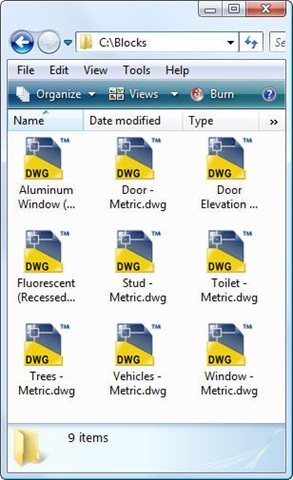
Exported blocks as separate DWG files

Running the CBL command, we see this output on the command-line:

Command: CBL

Enter the folder of source drawings: C:\Blocks

Imported from "C:\Blocks\Aluminum Window (Elevation) - Metric.dwg".

Imported from "C:\Blocks\Door - Metric.dwg".

Imported from "C:\Blocks\Door Elevation - Metric.dwg".

Imported from "C:\Blocks\Fluorescent (Recessed) - Metric.dwg".

Imported from "C:\Blocks\Stud - Metric.dwg".

Imported from "C:\Blocks\Toilet - Metric.dwg".

Imported from "C:\Blocks\Trees - Metric.dwg".

Imported from "C:\Blocks\Vehicles - Metric.dwg".

Imported from "C:\Blocks\Window - Metric.dwg".

Imported block definitions from 9 files in "C:\Blocks" into the current drawing.

If we then run the INSERT command, we see our blocks in the current drawing, along with any associated blocks upon which they rely:
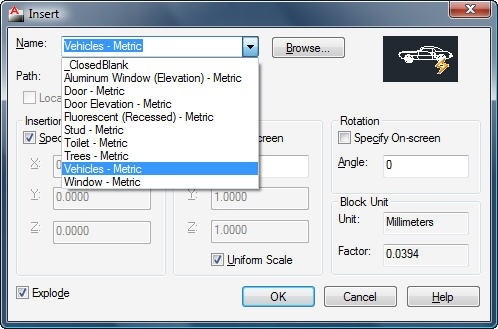
Our blocks recombined into a single library


Update

I've been reminded by comments that I've missed something obvious (using Database.Insert() to avoid some of the messiness).

I'll take another look at this after the weekend and post another update.

Thanks for keeping me honest! ๐Ÿ™‚

Update 2

As now mentioned at the top of this post, the next post contains a simpler, more complete implementation of this technique.

2 responses to “Combining AutoCAD blocks in separate files into a single DWG using .NET”

  1. Thanks Kean! This will be of great help.

  2. This is a stripped version of something similar I have been using. (I don't remember where I found this method)

    Using TempDB As New Database(False, True)
    Using dl As DocumentLock = Autodesk.AutoCAD.ApplicationServices.Application.DocumentManager.MdiActiveDocument.LockDocument()
    Using tr As Transaction = dwgdb.TransactionManager.StartTransaction

    Dim bt As BlockTable = tr.GetObject(dwgdb.BlockTableId, OpenMode.ForWrite, False)

    Dim id As ObjectId
    Dim BlockName As String = CadFileName.Replace("\", "").Replace(":", "").Replace(".", "")

    TempDB.ReadDwgFile(CadFileName, IO.FileShare.Read, True, Nothing)
    id = dwgdb.Insert(BlockName, TempDB, True)

    tr.Commit()

    End Using
    End Using
    End Using

  3. This will miss whether the source drawing defines an annotative block. Here's my try (I also use Database.Insert -- curious if there's a reason you've avoided it):

    bool srcIsAnnotative = false;
    string destBlockName = Path.GetFileNameWithoutExtension(fileName);
    using (Database db = new Database(false, true))
    {
    // Read the DWG into our side database
    db.ReadDwgFile(fileName, FileShare.Read, true, "");
    srcIsAnnotative = db.AnnotativeDwg;
    destDb.Insert(destBlockName, db, false);
    }

    if (srcIsAnnotative)
    {
    using (Transaction t = destDb.TransactionManager.StartTransaction())
    {
    BlockTable bt = t.GetObject(destDb.BlockTableId, OpenMode.ForRead) as BlockTable;
    if (bt.Has(destBlockName))
    {
    BlockTableRecord btr = t.GetObject(bt[destBlockName], OpenMode.ForWrite) as BlockTableRecord;
    btr.Annotative = AnnotativeStates.True;
    }
    t.Commit();
    }
    }
    imported++;

  4. I've just been using this...

    Dim tmpDB As New Database(False, True)
    tmpDB.ReadDwgFile(tmpPath, IO.FileShare.Read, False, "")
    acdocs.MdiActiveDocument.Database.Insert(BlockName, tmpDB, True)
    tmpDB.Dispose()

    It doesn't even require a transaction.

    That snippet appears inside a function I call every time I am going to control the creation of a block reference by code. The function first checks the blocktable, if not there, it checks a file in which I have stored a bunch of small blocks for my program to use, if still not found, it searches the local drive and the AutoCAD Search Path. If it finds a .dwg file matching the supplied blocname, it calls those four lines of code, then moves on to create the block reference. Of course, it is in a try/catch just in case the file can not be read.

  5. Hi Kean,
    Off topic, but I am trying to add your blog to my AutoCAD 2011 RSS Subscription. I can't find your url. Regards, Dale
    PS Nice to meet you at AU2010, I'll be doing my best to make 2011.

  6. Hi Dale,

    Yes - hopefully we'll meet again at AU 2011. ๐Ÿ™‚

    At the upper-right of my blog's page, you should find a Subscribe via RSS link.

    All the best for 2011,

    Kean

  7. In AutoCAD 2010 x64 the WblockCloneObjects() seems to fail with exception eOutOfRange on some drawings (but not all). The x86 version works all the time. C++ ObjectARX is stable as a rock (as expected). ๐Ÿ™‚

  8. That's strange. I suggest posting the problem to the ADN team or to the AutoCAD .NET Discussion Group.

    Kean

  9. Hi kean,

    Firstly, I want to say thank you for your post. It help me a lot.

    Secondly, I want to point out a little bug of this porgram. The line :

    btr.Name.StartsWith(BlockTableRecord.ModelSpace, stringComparison.InvariantCultureIgnoreCase)

    should use method :" EndsWith". Because the btr.Name here is "*ModelSpace".

    Please check whether I am right.

  10. Hi Justin,

    Thanks for your comment.

    As String.StartsWith() doesn't support wildcards (the asterisk is just checked literally), then I think the code in this post is correct.

    Do let me know if I've missed the point you're making.

    Regards,

    Kean

  11. It happens in AutoCAD 2012 x64 too!

  12. Hello Kean

    I have a question is possible to copy text from one dwg to another dwg.
    And if you have an example?

    Thanks for your time

  13. Hi Makaveli,

    I don't have a sample that shows exactly that.

    That said, the approach shown in this post should work on other kinds of object, too. With some modifications.

    Regards,

    Kean

  14. Jan Gunnar Ludvigsen Avatar
    Jan Gunnar Ludvigsen

    Super duper, thanks a million! Having some issues with importing dynamic blocks, think this will be of great help!

  15. how to run CBL command?

    1. You'll need to build it into a .NET DLL that can be NETLOADed into AutoCAD. If you need help with this, please ask on the AutoCAD .NET forum.

      Kean

Leave a Reply to Dale Bartlett Cancel reply

Your email address will not be published. Required fields are marked *