Generating preview images for all blocks in an AutoCAD drawing using .NET

This was a nice little solution I saw provided recently by Viru Aithal from DevTech India. It's a simple command to open a drawing and generate preview icons for each of the blocks it contains. It forces an icon to be generated – when it doesn't already exist – via Viru's old trick of using InvokeMember() to call IAcadDocument::SendCommand() via COM (which is synchronous, where Document.SendStringToExecute() is asynchronous and only executes once the command has completed).

Viru's trick allows him to call SendCommand() without creating a dependency on the AutoCAD Type Library (something developers often prefer to avoid, as it simplifies supporting multiple AutoCAD product versions). A similar effect can presumably be achieved using Type Embedding, but I like Viru's approach for just the odd function call.

Here's the C# code:

using Autodesk.AutoCAD.ApplicationServices;

using Autodesk.AutoCAD.DatabaseServices;

using Autodesk.AutoCAD.EditorInput;

using Autodesk.AutoCAD.Geometry;

using Autodesk.AutoCAD.Runtime;

using System.IO;


namespace BlockPreviews

{

  publicclassCommands

  {

    [CommandMethod("GBP", CommandFlags.Session)]

    staticpublicvoid GenerateBlockPreviews()

    {

      Editor ed =

        Application.DocumentManager.MdiActiveDocument.Editor;


      PromptFileNameResult res =

        ed.GetFileNameForOpen(

          "Select file for which to generate previews"

        );

      if (res.Status != PromptStatus.OK)

        return;


      Document doc = null;


      try

      {

        doc =

          Application.DocumentManager.Open(res.StringResult, false);

      }

      catch

      {

        ed.WriteMessage("\nUnable to read drawing.");

        return;

      }


      Database db = doc.Database;


      string path = Path.GetDirectoryName(res.StringResult),

             name = Path.GetFileName(res.StringResult),

             iconPath = path + "\\" + name + " icons";


      int numIcons = 0;


      Transaction tr =

        doc.TransactionManager.StartTransaction();

      using (tr)

      {

        BlockTable table =

          (BlockTable)tr.GetObject(

            db.BlockTableId, OpenMode.ForRead

          );


        foreach (ObjectId blkId in table)

        {

          BlockTableRecord blk =

            (BlockTableRecord)tr.GetObject(

              blkId, OpenMode.ForRead

            );


          // Ignore layouts and anonymous blocks


          if (blk.IsLayout || blk.IsAnonymous)

            continue;


          // Attempt to generate an icon, where one doesn't exist


          if (blk.PreviewIcon == null)

          {

            object ActiveDocument = doc.AcadDocument;

            object[] data = { "_.BLOCKICON " + blk.Name + "\n" };

            ActiveDocument.GetType().InvokeMember(

              "SendCommand",

              System.Reflection.BindingFlags.InvokeMethod,

              null, ActiveDocument, data

            );

          }


          // Hopefully we now have an icon


          if (blk.PreviewIcon != null)

          {

            // Create the output directory, if it isn't yet there


            if (!Directory.Exists(iconPath))

              Directory.CreateDirectory(iconPath);


            // Save the icon to our out directory


            blk.PreviewIcon.Save(

               iconPath + "\\" + blk.Name + ".bmp"

            );


            // Increment our icon counter


            numIcons++;

          }

        }

        tr.Commit();

      }

      doc.CloseAndDiscard();


      ed.WriteMessage(

        "\n{0} block icons saved to \"{1}\".", numIcons, iconPath

      );

    }

  }

}

When we run the GBP command use it to select a number of AutoCAD's sample files containing blocks, we see it generates a number of icons for each:

Command: GBP

13 block icons saved to "C:\Program Files\Autodesk\AutoCAD 2012 -

English\Sample\Dynamic Blocks\Annotation - Imperial.dwg icons".

Command: GBP

10 block icons saved to "C:\Program Files\Autodesk\AutoCAD 2012 -

English\Sample\Dynamic Blocks\Architectural - Imperial.dwg icons".

Command: GBP

6 block icons saved to "C:\Program Files\Autodesk\AutoCAD 2012 -

English\Sample\Dynamic Blocks\Electrical - Imperial.dwg icons".

Command: GBP

11 block icons saved to "C:\Program Files\Autodesk\AutoCAD 2012 -

English\Sample\Dynamic Blocks\Civil - Imperial.dwg icons".

While the code executes, you'll see the BLOCKICON command displaying a dialog for each block it processes, but once completed the drawing is closed (without being saved to disk).

Here's what we see in Windows Explorer:
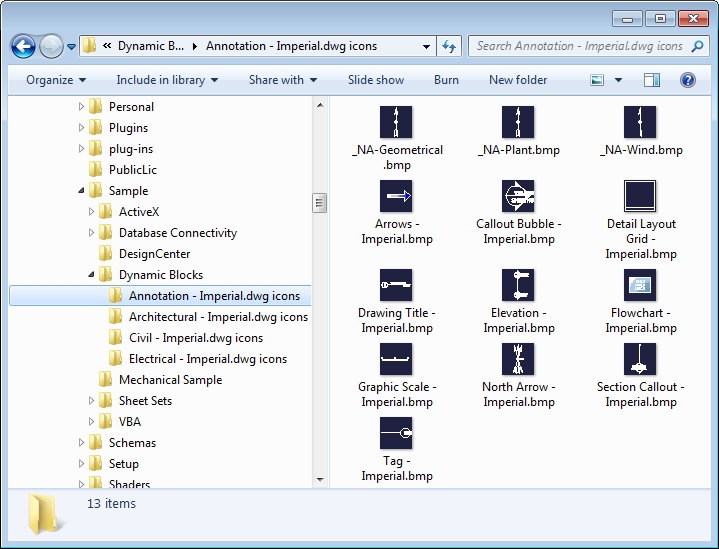
Block preview images saved to disk


Update:

See this post for an improved technique for achieving this.

19 responses to “Generating preview images for all blocks in an AutoCAD drawing using .NET”

  1. Hello Kean,
    I'm hoping to be able to do this in AutoCAD 2013 or 2014.
    I tried the code and had to change
    object ActiveDocument = doc.AcadDocument;
    to use the new extension method
    object ActiveDocument = doc.GetAcadDocument();
    but when I tried it with a number of blocks it either does not generate an icon or fails in the attempt.
    Is there an alternative way to do this now?
    Thanks
    Craig

  2. Hi Craig,

    I took a quick look: it does work on my system (although it takes some time to complete). It did result in a number of empty icons (some were OK), and until I called BLOCKICON * to see if that helped (it did).

    So it may be worth moving the BLOCKICON call outside of the loop and use the * argument, before saving the blocks individually. At least that's what I'd try first.

    Regards,

    Kean

  3. Hi Kean,
    Its possible to set icon size? Or we can generate only 32x32 sized thumbnails?

    Thanks

  4. Hi Egor,

    I don't believe so. This code is just taking whatever is generated by AutoCAD. I'm not sure whether that's controllable (I assume not).

    Regards,

    Kean

  5. Pardon my ignorance, I found this when searching for a way to export my blocks as images for palette or toolbars.

    How can I load this as an application or plugin. I am quite familiar with lisp but not C#?

  6. Kean Walmsley Avatar

    Hi Todd,

    This post should be of some use.

    Otherwise I recommend the resources on the AutoCAD Developer Center.

    Basically you need to copy the code, paste it into a (for instance) Visual C# Express Class Library project and add a few assembly references (AcDbMgd.dll and AcMgd.dll for AutoCAD 2012 and before, add AcCoreMgd.dll for AutoCAD 2013 onwards). The best is to use the AutoCAD .NET Wizard to generate the project skeleton, though.

    Regards,

    Kean

  7. Thanks very much, I will have a crack at it.

  8. Hello Kean, Hello all.
    So I tried to convert this snippet in VB.NET and encountered an issue at the line:
    object[] data = { "_.BLOCKICON " + blk.Name + "\n" };

    Converting in: Dim data() as Object = {"_.BLOCKICON " + blk.Name + "\n" } it doesn't work.

    After some few attempts this is the correct syntax:

    Dim data() As Object = {"_.BLOCKICON " + blk.Name + vbCr}

    Thankyou

    Regards

  9. Thanks, Luigi. It's always nice to see people posting such hints proactively.

    Kean

  10. thanks Kean and Luigi
    now works fine also for me
    andrea

  11. olivier.pavlin@gmail.com Avatar
    olivier.pavlin@gmail.com

    Hi,
    This is a very interesting feature, but I wonder if we can do the same with blocks that are not in the current drawing.
    My problem is that I would like to generate icons for blocks located in several external .dwg without opening them ...
    And for what I have seen the BLOCKICON command works only for blocks in the current database.

    Thank you for your help,
    Olivier

  12. Hi Oliver,

    You might want to look at the Core Console (available from AutoCAD 2013 onwards). This should allow you (I believe) to run the BLOCKICON command in non-current drawings.

    Regards,

    Kean

  13. Thanks I'm going to take a look at it. I'll let you know if I succeed to do it.

    Oliver.

  14. Hi Kean as Egor said, BLOCKICON works great but it's limited to 32*32 bitmap.

    My problem is to generate a block preview in a larger window to help the user to choose it correctly.
    It seems that the solution is to generate the block inside an empty database and use the Database.ThumbnailBitmap function which gets a nice 320*250 image.

    This works perfectly if you use the -WBLOCK command and then use db.ReadDwgFile and db.ThumbnailBitmap

    but if I want to execute something similar by code :

    using (Database tempDb = sourceDb.Wblock(bt[blocName]))
    { tempDb.SaveAs("C:\\temp\\temp.dwg", true, DwgVersion.Newest, tempDb.SecurityParameters);
    }

    I get a correct new drawing with the right block inside but WITH NO PREVIEW... (tempDb.ThumbnailBitmap = null)

    Look like a tricky one...I can't achieve the same result than -WBLOCK command in .net 🙁

    Thanks for your help,
    Olivier

  15. Hi Olivier,

    By coincidence this very question came up in an internal discussion. I'm putting some code together and will post something by the end of the week.

    Regards,

    Kean

  16. Hello Kean,
    I successfully implemented this code, but had to notice that it unfortunately creates the preview from the blockdefinition only.
    However, i have dynamic blocks and their appearance differs in the drawing depending on the set visibility and linear parameters as well as the set text attribute properties.

    Any chance to create a preview of each block how it is set and visible in the drawing?
    Thanks
    Harry

    1. Kean Walmsley Avatar

      Hello Harry,

      You could probably automate the insertion of blocks (and the setting of the variables) and then screen grab from the drawing itself, rather than using BLOCKICON... it'd take some work, though.

      Regards,

      Kean

Leave a Reply to Craig Cancel reply

Your email address will not be published. Required fields are marked *