Another piece of code culled from an email from Balaji Ramamoorthy, from DevTech India. I did a little refactoring and formatting, to fit the blog. Thanks, Balaji! 🙂
The below C# code demonstrates how to use Solid3d.ChamferEdges() with a user-selected edge and face. Balaji has also provided code to determine the edge and face programmatically – without the user needing to select anything – using the Brep API. I expect to show that approach in a subsequent post.
using Autodesk.AutoCAD.ApplicationServices;
using Autodesk.AutoCAD.DatabaseServices;
using Autodesk.AutoCAD.EditorInput;
using Autodesk.AutoCAD.Runtime;
using System;
namespace SolidEditing
{
public class Commands
{
[CommandMethod("EC")]
public void EdgeChamfer()
{
Document doc =
Application.DocumentManager.MdiActiveDocument;
Database db = doc.Database;
Editor ed = doc.Editor;
// Select an edge
PromptSelectionOptions pso =
new PromptSelectionOptions();
pso.MessageForAdding = "\nSelect edge to chamfer";
pso.SingleOnly = true;
pso.ForceSubSelections = true;
PromptSelectionResult psrEdge = ed.GetSelection(pso);
if (psrEdge.Status != PromptStatus.OK)
return;
// Select a face
pso.MessageForAdding =
"\nSelect the face to which the edge belongs";
pso.SinglePickInSpace = true;
PromptSelectionResult psrFace = ed.GetSelection(pso);
if (psrFace.Status != PromptStatus.OK)
return;
try
{
Transaction tr =
db.TransactionManager.StartTransaction();
using (tr)
{
ObjectId edgeSolId, faceSolId;
// Get the subentity Id for the edge and the face
SubentityId edgeId =
GetSubentity(
ed, tr, psrEdge.Value, SubentityType.Edge,
out edgeSolId
);
SubentityId faceId =
GetSubentity(
ed, tr, psrFace.Value, SubentityType.Face,
out faceSolId
);
// We also have the Ids of their containing solids,
// so we can check they belong to the same one
if (edgeSolId == faceSolId && edgeSolId != ObjectId.Null)
{
Solid3d solid =
tr.GetObject(edgeSolId, OpenMode.ForWrite)
as Solid3d;
if (solid != null)
{
// Here's where we actually chamfer the edge
// with hard-coded values
SubentityId[] edgeIds =
new SubentityId[] { edgeId };
solid.ChamferEdges(edgeIds, faceId, 0.5, 1.0);
}
tr.Commit();
}
}
}
catch (Autodesk.AutoCAD.Runtime.Exception ex)
{
ed.WriteMessage(ex.Message);
}
}
public static SubentityId GetSubentity(
Editor ed, Transaction tr, SelectionSet ss,
SubentityType type, out ObjectId solId
)
{
SubentityId retId = new SubentityId();
// Should have only one object in the array
SelectedObject so = ss[0];
// We set our out parameter to the owning solid's ObjectId
solId = so.ObjectId;
// Access the solid via the transaction passed in
Solid3d solid =
tr.GetObject(so.ObjectId, OpenMode.ForRead)
as Solid3d;
// Get its subentities
SelectedSubObject[] sso = so.GetSubentities();
// Get their first subentity's type
SubentityType subentityType =
sso[0].FullSubentityPath.SubentId.Type;
// See if it's of the type we want
if (subentityType == type)
{
retId = sso[0].FullSubentityPath.SubentId;
}
else
{
ed.WriteMessage(
"\nInvalid Subentity Type: {0}, " +
"Expecting a {1} to be selected.\n",
subentityType, type.ToString()
);
}
return retId;
}
}
}
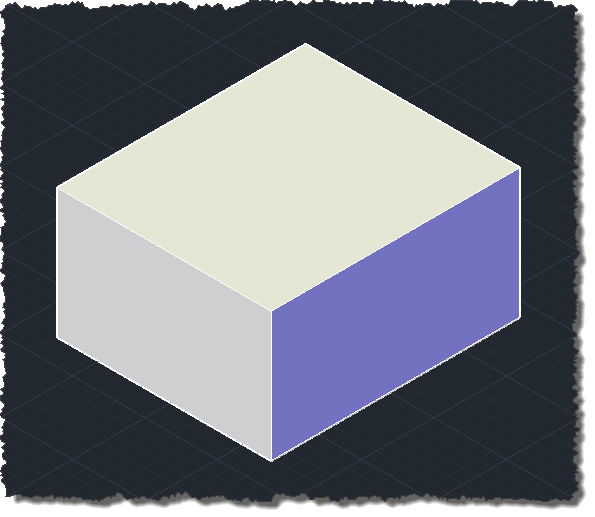
We'll use a simple box to test the code:
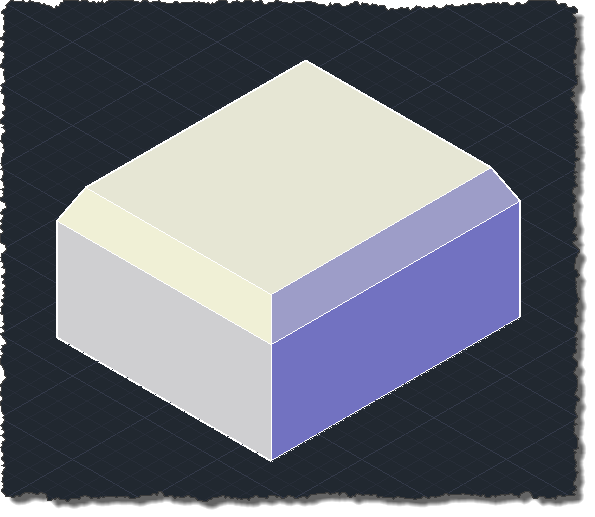
Here's what happens when we run the EC command to chamfer each of the top edges (selecting the top face, each time):


Leave a Reply to Kean Walmsley Cancel reply