A couple of recent posts have covered different ways of checking whether a point is on a curve. This post looks at a rudimentary way of profiling the relative performance of these various methods, in order to determine the best approach to use, in general.
There are various performance profiling technologies available on the market, but given the specificity of the cases we wanted to test and compare, I rolled my own very simple approach. Nothing at all earth-shattering, just a helper function that will call one of our methods (passed in as a delegate with a specific signature) a set number of times, and return the elapsed time (in seconds) for that set of operations.
For instance, we are typically calling our various functions 100K times, and in each set of calls using different combinations of object type, function and point (whether on or off the curve in question). The duration of each set of 100K operations gets returned to the calling function, which then saves the information for the various sets out to a CSV file for easy loading into Excel.
Each run of the POC command creates a new CSV file, so there is some manual work still involved to copy & paste into a central file to compare the results: this could also be automated, but the law of diminishing returns led me to draw the line here (it's really a one-off investigation, not a regularly-run performance benchmark). You may choose to drawn the line elsewhere in your own, regularly-run performance analyses, of course.
A few things to bear in mind: our ProfileMethod() function checks for the elapsed time between the beginning and the end of the set of calls. Lots of things can contribute to the operations taking time, so it's worth running the various tests multiple times and comparing the results. That's certainly what I did before settling on the results at the bottom of this post.
Here's the C# code:
using Autodesk.AutoCAD.ApplicationServices;
using Autodesk.AutoCAD.DatabaseServices;
using Autodesk.AutoCAD.EditorInput;
using Autodesk.AutoCAD.Geometry;
using Autodesk.AutoCAD.Runtime;
using System.IO;
using System;
namespace CurveTesting
{
public delegate bool IsPointOnCurveDelegate(Curve cv, Point3d pt);
public class Commands
{
[CommandMethod("POC")]
public void PointOnCurve()
{
Document doc =
Application.DocumentManager.MdiActiveDocument;
Database db = doc.Database;
Editor ed = doc.Editor;
PromptEntityOptions peo =
new PromptEntityOptions("\nSelect a curve");
peo.SetRejectMessage("Please select a curve");
peo.AddAllowedClass(typeof(Curve), false);
PromptEntityResult per = ed.GetEntity(peo);
if (per.Status != PromptStatus.OK)
return;
PromptPointResult ppr = ed.GetPoint("\nSelect a point");
if (ppr.Status != PromptStatus.OK)
return;
Transaction tr = db.TransactionManager.StartTransaction();
using (tr)
{
Curve cv =
tr.GetObject(per.ObjectId, OpenMode.ForRead) as Curve;
if (cv != null)
{
StreamWriter sw =
File.CreateText(GetFileName(cv));
sw.WriteLine(
"GCP (On),GCP (Off),GDAP (On),GDAP (Off),PL (On),PL (Off)"
);
// Let's repeat each method call 100K times
const int reps = 100000;
// We measure up to 6 sets of calls per object
// (6 for Polylines, 4 for other Curves)
// The calls with Point3d.Origin being passed as the
// point should result in the point being off the curve
// (unless the test data happens to have geometry
// going through the origin)
double d1, d2, d3, d4, d5, d6;
d1 =
ProfileMethod(
IsPointOnCurveGCP, cv, ppr.Value, reps
);
d2 =
ProfileMethod(
IsPointOnCurveGCP, cv, Point3d.Origin, reps
);
d3 =
ProfileMethod(
IsPointOnCurveGDAP, cv, ppr.Value, reps
);
d4 =
ProfileMethod(
IsPointOnCurveGDAP, cv, Point3d.Origin, reps
);
// For Polylines we have an additional method we can use
Polyline pl = cv as Polyline;
if (pl != null)
{
d5 =
ProfileMethod(
IsPointOnCurvePL, cv, ppr.Value, reps
);
d6 =
ProfileMethod(
IsPointOnCurvePL, cv, Point3d.Origin, reps
);
sw.WriteLine(
"{0},{1},{2},{3},{4},{5}", d1, d2, d3, d4, d5, d6
);
}
else
{
sw.WriteLine(
"{0},{1},{2},{3}", d1, d2, d3, d4
);
}
sw.Close();
}
tr.Commit();
}
}
// Return a unique filename in the root folder on C:\
private string GetFileName(Curve cv)
{
int i = 0;
string fname;
do
{
fname =
"c:\\results for " + cv.GetType().Name +
(i > 0 ? i.ToString() : "") + ".csv";
i++;
}
while (File.Exists(fname));
return fname;
}
// Run a specific function a certain number of times, returning
// the elapsed time in seconds
private double ProfileMethod(
IsPointOnCurveDelegate fn, Curve cv, Point3d pt, int reps
)
{
DateTime start = DateTime.Now;
for (int i = 0; i < reps; i++)
{
fn(cv, pt);
}
TimeSpan elapsed = DateTime.Now - start;
return elapsed.TotalSeconds;
}
// A generalised IsPointOnCurve function that works on all
// types of Curve (including Polylines), but catches an
// Exception on failure
private bool IsPointOnCurveGDAP(Curve cv, Point3d pt)
{
try
{
// Return true if operation succeeds
cv.GetDistAtPoint(pt);
return true;
}
catch { }
// Otherwise we return false
return false;
}
// A generalised IsPointOnCurve function that works on all
// types of Curve (including Polylines), and checks the position
// of the returned point rather than relying on catching an
// exception
private bool IsPointOnCurveGCP(Curve cv, Point3d pt)
{
try
{
// Return true if operation succeeds
Point3d p = cv.GetClosestPointTo(pt, false);
return (p - pt).Length <= Tolerance.Global.EqualPoint;
}
catch { }
// Otherwise we return false
return false;
}
// A manual approach that works specifically for polylines
private bool IsPointOnCurvePL(Curve cv, Point3d pt)
{
bool isOn = false;
Polyline pl = cv as Polyline;
if (pl != null)
{
for (int i = 0; i < pl.NumberOfVertices; i++)
{
Curve3d seg = null;
SegmentType segType = pl.GetSegmentType(i);
if (segType == SegmentType.Arc)
seg = pl.GetArcSegmentAt(i);
else if (segType == SegmentType.Line)
seg = pl.GetLineSegmentAt(i);
if (seg != null)
{
isOn = seg.IsOn(pt);
if (isOn)
break;
}
}
}
return isOn;
}
}
}
Here's a graph plotting the CSV file from various objects the POC command has been executed against:
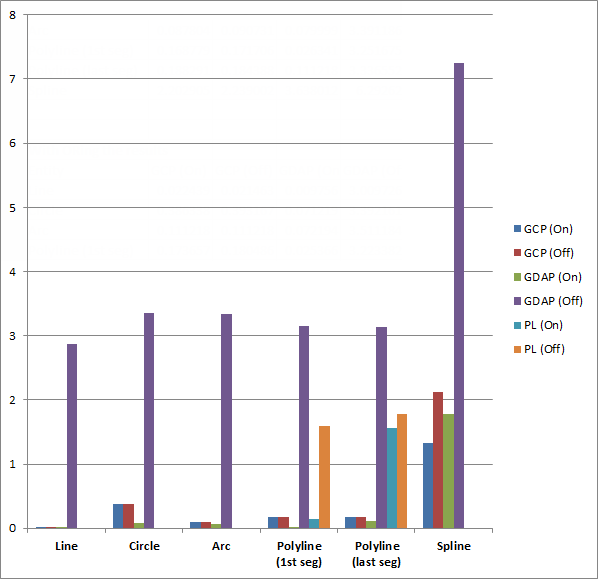
Some observations:
- As expected, the GCP (GetClosestPoint) approach is generally the most efficient, whether the point is on or off the curve.
- The GDAP (GetDistAtPoint) approach is comparable – and in some cases cheaper, such as for circles – when the point is on the curve, but much, much worse when the point is not.
- When the point is on the curve, the function returns and there's no need for further operations to be performed (whereas with GCP there is a modest amount of vector arithmetic to be done per call).
- When the point is off the curve, an exception is thrown and caught (relatively expensively, as the stack needs to be unwound and stored for a stack trace), which causes a spike in the time taken to complete the operations.
- The PL (Polyline-specific segment iteration & testing) approach is cheap when you pick a point on and early segment, but in all other cases is pretty expensive (and this will go up, the larger the size of the polyline).
- All these operations are relatively expensive when performed on Splines, presumably from the need to call through to ASM (the Autodesk Shape Modeler component).
Let's take a look at just the data for the GetClosestPoint implementation, the best overall approach to use for testing whether a point is on a curve:
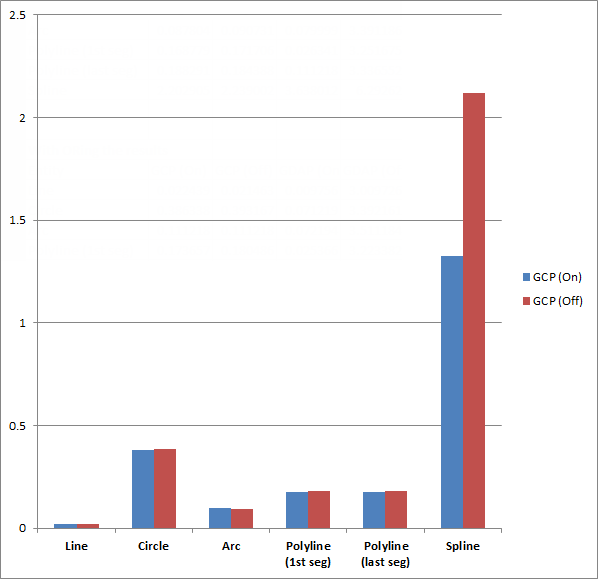
Interestingly circles have quite a high relative cost. That said, I assume the first three are fixed, while polylines and splines will presumably get more expensive as the number of segments/control points increase: the test data used a 10-segment polyline and a spline with 7 control points – both of a modest size.
If anyone has additional thoughts on this analysis – whether you've seen similar behaviour or there's something I've missed – please do post a comment.


Leave a Reply to Jimmy Bergmark - JTB World Cancel reply