Finding a point on an AutoCAD surface based on X,Y coordinates using .NET – Part 2

As predicted in the first post in this series, today's post looks at a slightly more robust and user-friendly approach for determining the point on a surface found by firing a ray normal to a selected X,Y point in the plane of the current UCS.

Here's the updated C# code that now includes an additional command called POXY (that's a shortened form of PointOnXY, but will hopefully bring a smile to the lips of British readers):

using Autodesk.AutoCAD.ApplicationServices;

using Autodesk.AutoCAD.DatabaseServices;

using Autodesk.AutoCAD.EditorInput;

using Autodesk.AutoCAD.Geometry;

using Autodesk.AutoCAD.Runtime;

using AcDb = Autodesk.AutoCAD.DatabaseServices;


namespace SurfaceIntersection

{

  public class Commands

  {

    [CommandMethod("SURFRAY")]

    public void SurfaceRay()

    {

      var doc = Application.DocumentManager.MdiActiveDocument;

      var db = doc.Database;

      var ed = doc.Editor;


      // Ask the user to pick a surface


      var peo = new PromptEntityOptions("\nSelect a surface");

      peo.SetRejectMessage("\nMust be a surface.");

      peo.AddAllowedClass(typeof(AcDb.Surface), false);


      var per = ed.GetEntity(peo);

      if (per.Status != PromptStatus.OK)

        return;


      var sf =

        new SelectionFilter(

          new TypedValue[] {

            new TypedValue((int)DxfCode.Start, "LINE")

          }

        );


      // Ask the user to select some lines


      var pso = new PromptSelectionOptions();

      pso.MessageForAdding = "Select lines";

      pso.MessageForRemoval = "Remove lines";


      var psr = ed.GetSelection(pso, sf);

      if (psr.Status == PromptStatus.OK && psr.Value.Count > 0)

      {

        using (var tr = db.TransactionManager.StartTransaction())

        {

          // We'll start by getting the block table and modelspace

          // (which are really only needed for results we'll add to

          // the database)


          var bt =

            (BlockTable)tr.GetObject(

              db.BlockTableId, OpenMode.ForRead

            );


          var btr =

            (BlockTableRecord)tr.GetObject(

              bt[BlockTableRecord.ModelSpace], OpenMode.ForWrite

            );


          // Next we'll get our surface object


          var obj = tr.GetObject(per.ObjectId, OpenMode.ForRead);

          var surf = obj as AcDb.Surface;

          if (surf == null)

          {

            // Should never happen, but anyway


            ed.WriteMessage("\nFirst object must be a surface.");

          }

          else

          {

            DoubleCollection heights;

            SubentityId[] ids;


            // Fire ray for each selected line


            foreach (var id in psr.Value.GetObjectIds())

            {

              var ln = tr.GetObject(id, OpenMode.ForRead) as Line;

              if (ln != null)

              {

                surf.RayTest(

                  ln.StartPoint,

                  ln.StartPoint.GetVectorTo(ln.EndPoint),

                  0.01,

                  out ids,

                  out heights

                );


                if (ids.Length == 0)

                {

                  ed.WriteMessage("\nNo intersections found.");

                }

                else

                {

                  // Highlight each subentity and add point

                  // at intersection


                  for (int i = 0; i < ids.Length; i++)

                  {

                    var subEntityPath =

                      new FullSubentityPath(

                        new ObjectId[] { per.ObjectId },

                        ids[i]

                      );


                    // Highlight the sub entity


                    surf.Highlight(subEntityPath, true);


                    // Create a point at the line-surface

                    // intersection


                    var pt =

                      new DBPoint(

                        new Point3d(

                          ln.StartPoint.X,

                          ln.StartPoint.Y,

                          heights[i]

                        )

                      );


                    // Add the new object to the block table

                    // record and the transaction


                    btr.AppendEntity(pt);

                    tr.AddNewlyCreatedDBObject(pt, true);

                  }

                }

              }

            }

          }

          tr.Commit();

        }

      }

    }


    [CommandMethod("POXY")]

    public void PointOnXY()

    {

      var doc = Application.DocumentManager.MdiActiveDocument;

      var db = doc.Database;

      var ed = doc.Editor;


      // Ask the user to pick a surface


      var peo = new PromptEntityOptions("\nSelect a surface");

      peo.SetRejectMessage("\nMust be a surface.");

      peo.AddAllowedClass(typeof(AcDb.Surface), false);


      var per = ed.GetEntity(peo);

      if (per.Status != PromptStatus.OK)

        return;


      using (var tr = db.TransactionManager.StartTransaction())

      {

        // We'll start by getting the block table and modelspace

        // (which are really only needed for results we'll add to

        // the database)


        var bt =

          (BlockTable)tr.GetObject(

            db.BlockTableId, OpenMode.ForRead

          );


        var btr =

          (BlockTableRecord)tr.GetObject(

            bt[BlockTableRecord.ModelSpace], OpenMode.ForWrite

          );


        var obj = tr.GetObject(per.ObjectId, OpenMode.ForRead);

        var surf = obj as AcDb.Surface;

        if (surf == null)

        {

          ed.WriteMessage("\nFirst object must be a surface.");

        }

        else

        {

          DoubleCollection heights;

          SubentityId[] ids;


          // Fire ray for each selected line


          var ucs = ed.CurrentUserCoordinateSystem;

          PromptPointResult ppr;

          do

          {

            ppr = ed.GetPoint("\nSelect point beneath surface");

            if (ppr.Status != PromptStatus.OK)

            {

              break;

            }


            // Our selected point needs to be transformed to WCS

            // from the current UCS


            var start = ppr.Value.TransformBy(ucs);


            // Fire a ray from the selected point in the direction

            // of the UCS' Z-axis


            surf.RayTest(

              start,

              ucs.CoordinateSystem3d.Zaxis,

              0.01,

              out ids,

              out heights

            );


            if (ids.Length == 0)

            {

              ed.WriteMessage("\nNo intersections found.");

            }

            else

            {

              // Add point at each intersection found


              for (int i = 0; i < ids.Length; i++)

              {

                // Create a point at the intersection


                var end =

                  start +

                  new Vector3d(0, 0, heights[i]).TransformBy(ucs);


                var pt = new DBPoint(end);

                var ln = new Line(start, end);


                // Add the new objects to the block table

                // record and the transaction


                btr.AppendEntity(pt);

                tr.AddNewlyCreatedDBObject(pt, true);

                btr.AppendEntity(ln);

                tr.AddNewlyCreatedDBObject(ln, true);

              }

            }

          }

          while (ppr.Status == PromptStatus.OK);

        }

        tr.Commit();

      }

    }

  }

}

Here's what happens when we run the POXY command, select a surface and start selecting points beneath it:
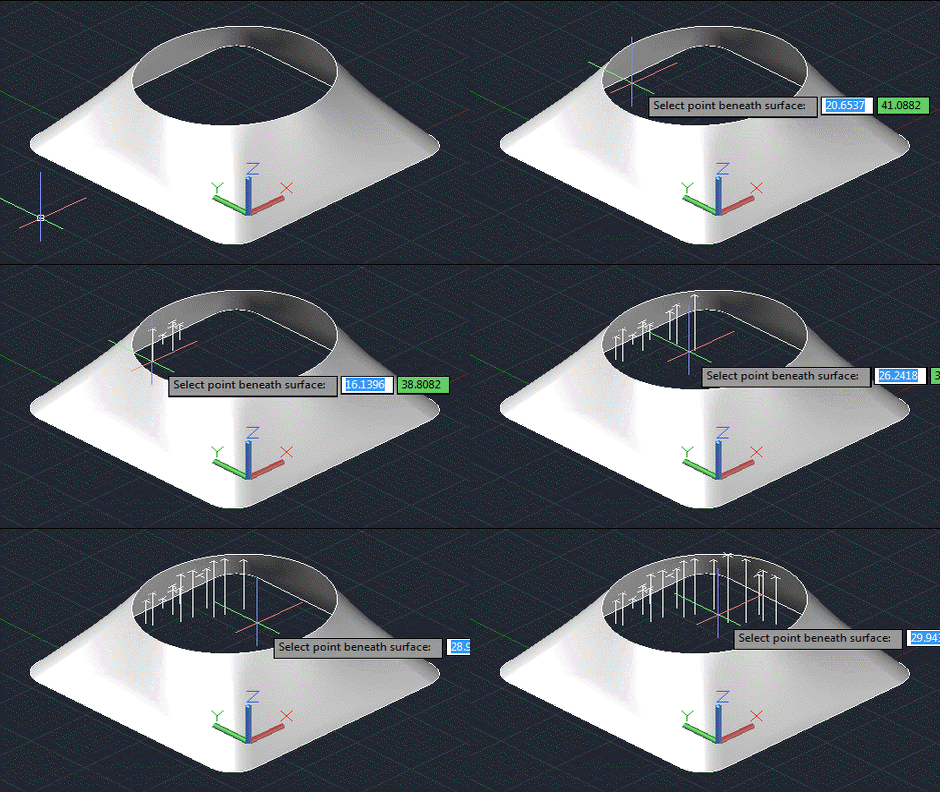
Below the surface

5 responses to “Finding a point on an AutoCAD surface based on X,Y coordinates using .NET – Part 2”

  1. Hi Kean,
    i have tested both SurfRay and POXY.
    Everything seems to be OK as long as the line normal to UCS intersects the selected surface ONLY ONCE (one intersection Point) but not in the case of >1 intersection Points !
    Unfortunately it is not possible to to include Screenshots here so i am going to describe briefly:

    Test1:
    Draw three profile curves (same center) say a circle R= 5.0, a circle above R=2.5 and a circle above R=5.0, then loft a surface through the 3 profiles. Now you have a region under the surface between the 2 cocentric circles (a band) whose every selected point (and firing Ray...) SHOULD HAVE 2 intersection points with the Surface !
    But the Routine finds only one !
    I have added in the loop a line of code
    ed.WriteMessage("\nIntersections found : " + ids.Length.ToString());
    to check the surf.RayTest() method which indeed finds only one intersection point instead of two which smells like a bug ?

    Test 2:
    create a PLANESURFACE (planesurf command)then make 2 copies in the Z+ direction with a distance of say 5.0 units. Now UNION the Surfaces and call POXY.
    Now you get correctly 3 intersection Points BUT the 1st point selected (among several points) does not produces any intersection points!

    To me seems like a bug of the surf.RayTest() method
    If you want I could mail you some screenshots with different surface tests using the last parameter of the surf.RayTest() method as a Parameter(as documented in ARX Docs MGD) of the selected linear curve (Line, Ray or Xline) in the SURFRAY command using following code

    switch (id.ObjectClass.DxfName)
    {
    case "LINE":
    {
    ptonc3d = len.GetPointAtParameter(heights[i]);
    break;
    }
    case "XLINE":
    {
    ptonc3d = xen.GetPointAtParameter(heights[i]);
    break;
    }
    case "RAY":
    {
    ptonc3d = ren.GetPointAtParameter(heights[i]);
    break;
    }
    }

    var pt = new DBPoint(new Point3d(ptonc3d.X, ptonc3d.Y, ptonc3d.Z));

    Then you can select a Line, Ray or Xline and you get depending on the Surface and the Position and Direction of the Linear entity ALL or some of the Intersection Points
    in ANY Direction and NOT only the normal UCS Z+ one

    Best Regards
    Konstantin

  2. Hi Konstantin,

    Thanks for the prompt and detailed feedback!

    Test 1:

    I can see the behaviour you're describing. It does seem anomalous that the second intersection isn't identified by the Surface.RayTest() method. I'll look into it a bit more. It'd be interesting to see whether originating a second ray from just above the first intersection results in other intersections being identified (this would be a possible workaround).

    Test 2:

    I don't see the issue related to the first selected point (unless you're counting the selection of the surface itself, which shouldn't result in any intersections being identified). It's good that RayTest() returns all three intersections in this scenario, of course.

    The SURFRAY command asks you to select a line but, as mentioned in the post, it only uses it to define the Ray: the returned parameter has no connection whatsoever with the selected curve. So be careful when applying this to some other object, as you seem to have done. Unless I've minsunderstood the point of the last part of your comment, of course (please correct me if that's the case).

    Best regards,

    Kean

  3. Hi Kean,

    Just a general Point to be considered from the ARX/MGD .NET documentation ....here cited:

    C# method
    public void RayTest(
    Point3d rayBasePoint,
    Vector3d rayDir,
    double rayRadius,
    out SubentityId\[\] subEntIds,
    out DoubleCollection parameters
    );

    This wraps the ObjectARX AcDbSurface::rayTest() method.

    ObjectARX-Parameters

    - const AcGePoint3d& rayBasePoint
    Input base point of the ray.
    - const AcGeVector3d& rayDir
    Input ray direction.
    - double rayRadius
    input tolerance during the intersection check.
    - AcArray<acdbsubentid>& subEntIds
    Returned array including faces, edges and vertices.
    - AcGeDoubleArray& parameters Returned array of doubles indicating the intersection parameter on the ray with the returned subentities. The smaller of the parameter, the closer to the base point.

    As i understand it in both the ARX and .NET class the 5th argument has to do with parameters and not coordinates of geometric points in 3D space,
    "AcGeDoubleArray& parameters = Returned array of doubles indicating the intersection parameter" and "out DoubleCollection = parameters" respectively. ?

    So that's how I came on the idea to use the returned value as parameter of the selected linear curve (Line, Xline or Ray) indepentently of the Ray direction Vector argument of the surf.RayTest method.
    If they are parameters, they have to be applied to something after all...?

    Test 2:
    I have just modified the SURFRAY routine and added Xlines and Rays to the selection filter...

    var sf = new SelectionFilter(new TypedValue[5] { new TypedValue((int)DxfCode.Operator, "<or"), new="" typedvalue(0="" ,="" "line"),="" new="" typedvalue(0="" ,="" "xline"),="" new="" typedvalue(0="" ,="" "ray"),="" new="" typedvalue((int)dxfcode.operator,="" "or="">")
    });

    then i check for the type of object in order to get the necessary arguments for the surf.RayTest() method and apply the returned parameters on the respective selected curve.

    And it succeds indeed to find the intersection Points but NOT ALL and as mentioned depending on the position + direction of the intersecting curve in relation to the same surface.
    I will email you asap a screenshot-test routine on that because it is very interesting to see it.

    Best Regards
    Konstantin

  4. I want to select two autocad 2d line and find their intersection point how can i do this using c#.net i am new here. Please help me.

  5. You need to call IntersectsWith(). This isn't a support forum, by the way: please contact ADN or post to the Discussion Groups with further questions.

    Kean

Leave a Reply to Kean Walmsley Cancel reply

Your email address will not be published. Required fields are marked *