Or otherwise named "Creating an AutoCAD jig to dynamically display a guilloché pattern using F#". But then why pass up the chance for a Jerry Maguire reference? 🙂
Anyway, to continue on from last week's post, Doug – who had presented the original challenge – went on to suggest that I give it the same treatment as Spiro. Basically to implement a jig to display the guilloche pattern dynamically as you input the various options.
I understand the difficulty in understanding the nature of the geometry being created in the previous version… the fact that I'd named the original variables R, r, p, Q, m and n (as per the equation in the post that inspired this app) probably didn't help with the understandability of the app, all things considered. It was certainly easier to name the various parameters in that way rather than work out more human-friendly labels.
This time around, though, I found additional help from this site, which includes a very cool Flash-based guilloché configurator. And as it also provided source code, I was able to connect some of the exposed UI elements with the underlying formula.
Which has given rise to this version of the app, with an additional GUIJIG command to complement GUILLOCHE. We're also now storing the previous selections – whether via the jig- or the prompt-based version – so there's an accompanying GUIDEF command to reset these default values should they become confused or confusing (and that's quite easy to do with this app).
So here's the updated F# code. Bear in mind this is still very much in the experimental stage, so expect quirks. If you have some ideas on how to improve it (such as an alternative name for the "Wiggle" parameter 🙂 then please let me know.
module Guillocher.Commands
open Autodesk.AutoCAD.ApplicationServices.Core
open Autodesk.AutoCAD.Runtime
open Autodesk.AutoCAD.DatabaseServices
open Autodesk.AutoCAD.EditorInput
open Autodesk.AutoCAD.Geometry
open System
// Save our various default values in mutable state
let mutable _R = 50.0
let mutable _r = -0.2
let mutable _p = 25.0
let mutable _Q = 3.0
let mutable _m = 1.0
let mutable _n = 6.0
let mutable _segs = 300
let mutable _perfSegs = 1000
// User prompting helper functions
let getIntegerWithDefault (ed : Editor) msg min max def =
let pio = new PromptIntegerOptions(msg)
pio.LowerLimit <- min
pio.UpperLimit <- max
pio.DefaultValue <- def
pio.UseDefaultValue <- true
let pir = ed.GetInteger(pio)
if pir.Status = PromptStatus.OK then
Some(pir.Value)
else
None
let getDoubleWithDefault (ed : Editor) msg neg zero def =
let pdo = new PromptDoubleOptions(msg)
pdo.AllowNegative <- neg
pdo.AllowZero <- zero
pdo.DefaultValue <- def
pdo.UseDefaultValue <- true
let pdr = ed.GetDouble(pdo)
if pdr.Status = PromptStatus.OK then
Some(pdr.Value)
else
None
// Get the various values we need from the user for this command
let getGuillocheInput ed =
let R = getDoubleWithDefault ed "\nR" true false _R
if R = None then
None
else
let r = getDoubleWithDefault ed "\nr" true false _r
if r = None then
None
else
let p = getDoubleWithDefault ed "\np" true false _p
if p = None then
None
else
let Q = getDoubleWithDefault ed "\nQ" true true _Q
if Q = None then
None
else
let m = getDoubleWithDefault ed "\nm" true false _m
if m = None then
None
else
let n = getDoubleWithDefault ed "\nn" true false _n
if n = None then
None
else
let segs =
getIntegerWithDefault
ed "\nNumber of control points" 500 32767 _segs
if segs = None then
None
else
let ppr = ed.GetPoint("\nSelect center point")
if ppr.Status = PromptStatus.OK then
// Set the selected values as our new defaults
// (stored in mutable global state)
_R <- R.Value
_r <- r.Value
_p <- p.Value
_Q <- Q.Value
_m <- m.Value
_n <- n.Value
_segs <- segs.Value
// Return these to the calling function for it to
// create the guilloche
Some(R, r, p, Q, m, n, segs, ppr.Value)
else
None
let pointsOnGuilloche (cen : Point3d) R r p Q m n segs =
[|
let period = Math.PI * 2.0;
for theta in 0.0..period/(float segs)..period do
let rr = R + r
let rp = r + p
let rror = rr / r
let mth = m * theta
let nth = n * theta
let k = rror * mth
let x =
rr * Math.Cos(mth) + rp * Math.Cos(k) + Q * Math.Cos(nth)
let y =
rr * Math.Sin(mth) - rp * Math.Sin(k) + Q * Math.Sin(nth)
yield cen + new Vector3d(x, y, 0.0)
|]
// Different modes of acquisition for our jig
type AcquireMode =
| RADIUS
| MAJOR
| MINOR
| MULTIPLIER
| WIGGLE
type GuillocheJig() as this = class
inherit DrawJig()
// Our mutable member state
let mutable (_sp : Spline) = new Spline()
let mutable _cen = Point3d.Origin
let mutable _norm = Vector3d.ZAxis
let mutable _locp = _p
let mutable _locR = _R
let mutable _locr = _r
let mutable _locQ = _Q
let mutable _locm = _m
let mutable _mode = RADIUS
// Calculate some ratios, so that we keep proportions
// as we jig the initial values
let _rOverP = _r / _p
let _ROverP = _R / _p
let _rOverR = _r / _R
member x.StartJig(ed : Editor, pt) =
// Set our center and start with the radius
_cen <- pt
_mode <- RADIUS
_norm <- ed.CurrentUserCoordinateSystem.CoordinateSystem3d.Zaxis
let stat = ed.Drag(this)
if stat.Status = PromptStatus.OK then
// Next we get the major ripple
_mode <- MAJOR
let stat = ed.Drag(this)
if stat.Status = PromptStatus.OK then
// Next the minor ripple
_mode <- MINOR
let stat = ed.Drag(this)
if stat.Status = PromptStatus.OK then
// Next the angle multiplier
_mode <- MULTIPLIER
let stat = ed.Drag(this)
if stat.Status = PromptStatus.OK then
// Next the wiggle
_mode <- WIGGLE
ed.Drag(this)
else
stat
else
stat
else
stat
else
stat
// Helper function to acquire a distance and return
// the appropriate status
member private x.GetDist (prompts : JigPrompts)
(opts : JigPromptDistanceOptions) oldVal =
opts.DefaultValue <- oldVal
let res = prompts.AcquireDistance(opts)
if res.Status <> PromptStatus.OK then
(SamplerStatus.Cancel, 0.0)
else
if oldVal = res.Value then
(SamplerStatus.NoChange, 0.0)
else
(SamplerStatus.OK, res.Value)
// Our Sampler function to acquire the various distances
override x.Sampler prompts =
// We're just acquiring distances
let jo = new JigPromptDistanceOptions()
jo.BasePoint <- _cen
jo.Cursor <- CursorType.RubberBand
jo.UseBasePoint <- true
jo.UserInputControls <-
UserInputControls.NoZeroResponseAccepted
// Then we have slightly different behavior depending
// on the info we're acquiring
match _mode with
// p...
| RADIUS ->
jo.Message <- "\nRadius"
let (stat, res) = x.GetDist prompts jo _locp
if stat = SamplerStatus.OK then
_locp <- res
stat
// R...
| MAJOR ->
jo.Message <- "\nMajor ripple"
let (stat, res) = x.GetDist prompts jo _locR
if stat = SamplerStatus.OK then
_locR <- res
stat
// r...
| MINOR ->
jo.Message <- "\nMinor ripple"
let (stat, res) = x.GetDist prompts jo _locr
if stat = SamplerStatus.OK then
_locr <- res
stat
// m...
| MULTIPLIER ->
jo.Message <- "\nAngle multiplier"
let (stat, res) = x.GetDist prompts jo _locm
if stat = SamplerStatus.OK then
_locm <- res
stat
// Q...
| WIGGLE ->
jo.Message <- "\nWiggle"
let (stat, res) = x.GetDist prompts jo _locQ
if stat = SamplerStatus.OK then
_locQ <- res
stat
// Our WorldDraw function to display the guilloche and
// the related temporary graphics
override x.WorldDraw
(draw : Autodesk.AutoCAD.GraphicsInterface.WorldDraw) =
// We'll actually only draw a green circle for our radius
if _mode = RADIUS then
let col = draw.SubEntityTraits.Color
draw.SubEntityTraits.Color <- (int16 3)
draw.Geometry.Circle(_cen, _locp, _norm) |> ignore
draw.SubEntityTraits.Color <- col
// Check the RegenAbort flag...
// If it's set then we drop out of the function
if not draw.RegenAbort then
// Generate the spline with low accuracy
// (fewer control points == quicker)
match _mode with
| RADIUS ->
// Make sure we don't have a p of 0
if _locp = 0.0 then _locp <- 0.001
x.Generate
(_locp * _ROverP, _locp * _rOverP, _locp,
_locQ, _locm, _n, _segs)
| MAJOR ->
x.Generate
(_locR, _locR * _rOverR, _locp, _locQ, _locm, _n, _segs)
| _ ->
x.Generate(_locR, _locr, _locp, _locQ, _locm, _n, _segs)
if not draw.RegenAbort then
draw.Geometry.Draw(_sp) |> ignore
true
// Set the global defaults based on the last set of successful
// input values
member x.SetDefaults() =
_R <- _locR
_p <- _locp
_r <- _locr
_Q <- _locQ
_m <- _locm
// Generate a more accurate spline
member x.Perfect() =
x.Generate(_R, _r, _p, _Q, _m, _n, _perfSegs)
// Generate a spline
member x.Generate(R, r, p, Q, m, n, num) =
// Generate control points based on the accuracy
let pts = pointsOnGuilloche _cen R r p Q m n num
if _sp <> null then
_sp.Dispose()
_sp <- new Spline(new Point3dCollection(pts), 1, 0.)
// Accessor for the entity
member x.GetEntity() = _sp
// Let the caller clean-up when cancelling
member x.CleanUp() = _sp.Dispose()
end
// Our jig-based command
[<CommandMethod("GUIJIG")>]
let guillochejig() =
// Let's get the usual helpful AutoCAD objects
let doc = Application.DocumentManager.MdiActiveDocument
let ed = doc.Editor
let db = doc.Database
// Prompt the user for the center of the spiro
let cenRes = ed.GetPoint("\nSelect center point: ")
if cenRes.Status = PromptStatus.OK then
let cen = cenRes.Value
// Create the spline and run the jig
let jig = new GuillocheJig()
let res = jig.StartJig(ed, cen)
if res.Status = PromptStatus.OK then
// Perfect the spline created, smoothing it up
jig.SetDefaults()
jig.Perfect()
use tr = db.TransactionManager.StartTransaction()
// Get appropriately-typed BlockTable and BTRs
let bt =
tr.GetObject(db.BlockTableId,OpenMode.ForRead)
:?> BlockTable
let ms =
tr.GetObject
(bt.[BlockTableRecord.ModelSpace], OpenMode.ForWrite)
:?> BlockTableRecord
// Add our spline to the modelspace
let sp = jig.GetEntity()
let id = ms.AppendEntity(sp)
tr.AddNewlyCreatedDBObject(sp, true)
tr.Commit()
else
jig.CleanUp()
// Set the values back to the program defaults
[<CommandMethod("GUIDEFS")>]
let resetGuillocheDefaults() =
_R <- 50.0
_r <- -0.2
_p <- 25.0
_Q <- 3.0
_m <- 1.0
_n <- 6.0
[<CommandMethod("GUILLOCHE")>]
let guilloche() =
// Let's get the usual helpful AutoCAD objects
let doc = Application.DocumentManager.MdiActiveDocument
let ed = doc.Editor
let db = doc.Database
// First we need some user input
match getGuillocheInput ed with
| None -> ()
| Some(R, r, p, Q, m, n, segs, cen) ->
// Next we get a sampling of points along the Guilloche geometry
let pts =
pointsOnGuilloche
Point3d.Origin
R.Value r.Value p.Value Q.Value m.Value n.Value segs.Value
// Use the points as control points on a spline
let sp = new Spline(new Point3dCollection(pts), 1, 0.)
// Move the geometry to the selected point
sp.TransformBy(Matrix3d.Displacement(cen.GetAsVector()))
// Use a transaction to add our spline to the model-space
use tr = db.TransactionManager.StartTransaction()
// Get appropriately-typed BlockTableRecord
let btr =
tr.GetObject(db.CurrentSpaceId, OpenMode.ForWrite)
:?> BlockTableRecord
// Add our curve to the model-space
let id = btr.AppendEntity(sp)
tr.AddNewlyCreatedDBObject(sp, true)
// Commit the transaction
tr.Commit()
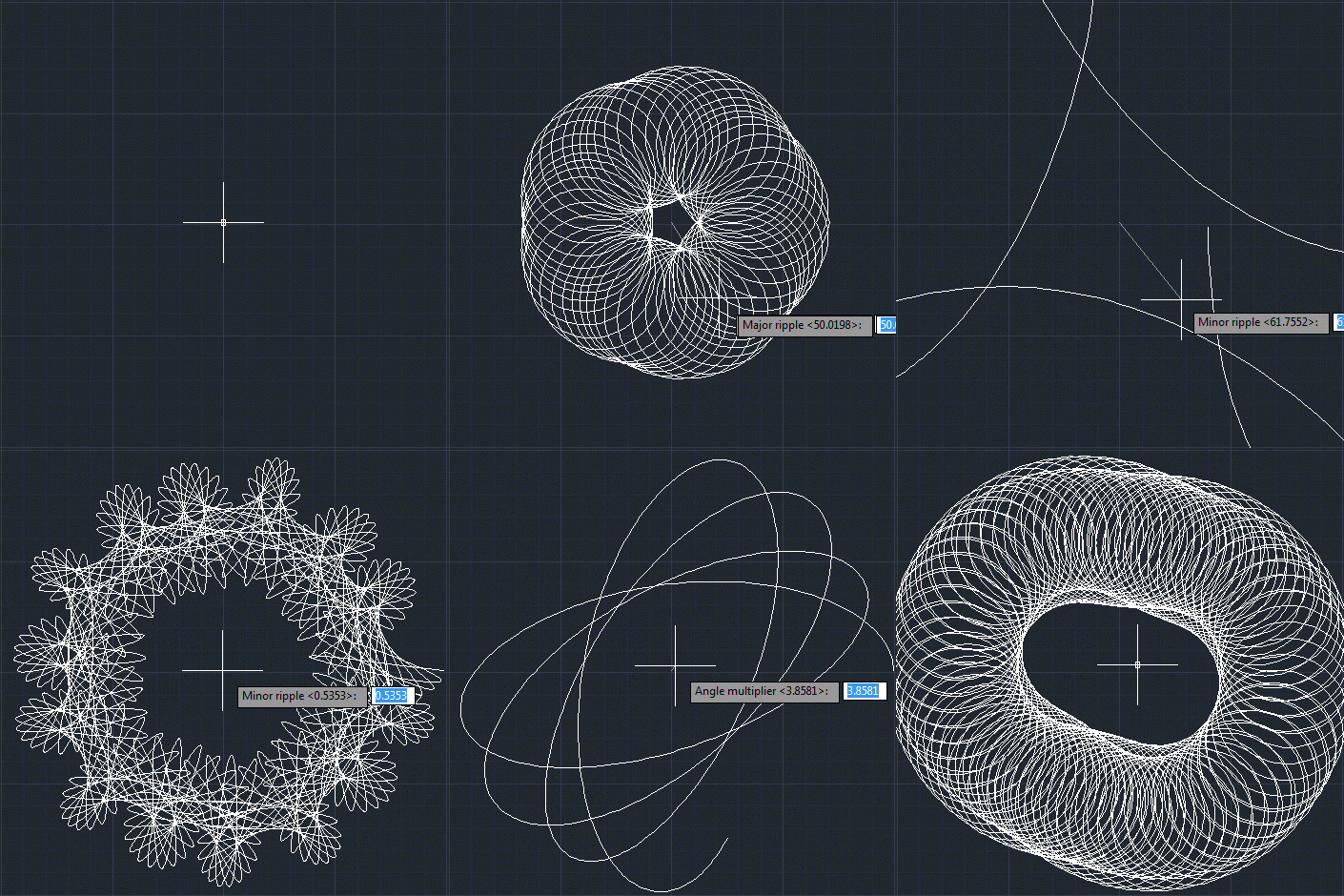
Here's an example guilloché pattern being created via GUIJIG. You're going to have a tough time creating a specific pattern that you're aiming for, but it's worth persevering – every so often you strike gold. 🙂
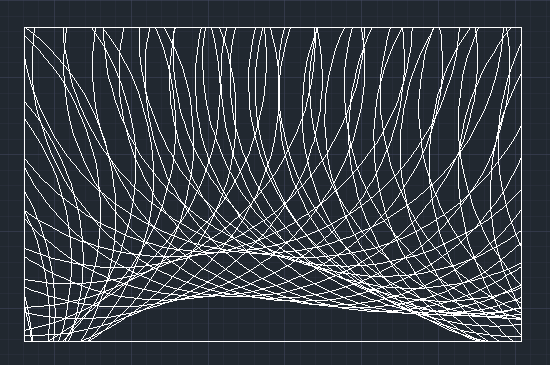
Doug also mentioned filling a certain area with a pattern. In this case, I just drew a rectangular polyline using RECTANG and then used TRIM to remove the parts of the spline outside of it. It took a few crossing window selections, but it got there eventually.
Leave a Reply