Here's a fun one that came up as a question during the recently "AutoCAD APIs: Meet the Experts" session at Autodesk University. I promised during the session that I'd address it in a blog post this week, so here we are. But I'm splitting the post into two parts, so the more complete solution will only be available next week.
The problem is as follows: we want to be able to disable osnap on specific AutoCAD objects by tagging them in some way. The solution proposed by the panel during the session (I forget by whom: it could have been me but it's more likely to have been Albert Szilvasy 🙂 was to tag the entities in question with a custom piece of XData (you might also use a heavier option – Extension Dictionaries also work but come with greater overhead) and use that to drive the use of a custom OsnapOverrule that doesn't super-message to the base class, effectively returning no object snap information for those objects.
Now this covers the majority of osnap modes – and is what we'll see covered in this post – but of course doesn't stop intersections between objects. For that we'll need a GeometryOverrule – and we'll go ahead and add one in Part 2.
Here's the C# code that implements the basic DISNAP and ENSNAP commands that disable and enable osnap on a per-object basis, respectively:
using Autodesk.AutoCAD.ApplicationServices;
using Autodesk.AutoCAD.DatabaseServices;
using Autodesk.AutoCAD.EditorInput;
using Autodesk.AutoCAD.Geometry;
using Autodesk.AutoCAD.Runtime;
using System;
namespace ObjectSnapping
{
public class Commands
{
const string regAppName = "TTIF_SNAP";
private static OSOverrule _osOverrule = null;
// Object Snap Overrule to prevent snapping to objects
// with certain XData attached
public class OSOverrule : OsnapOverrule
{
public OSOverrule()
{
// Tell AutoCAD to filter on our application name
// (this should mean our overrule only gets called
// on objects possessing XData with this name)
SetXDataFilter(regAppName);
}
public override void GetObjectSnapPoints(
Entity ent,
ObjectSnapModes mode,
IntPtr gsm,
Point3d pick,
Point3d last,
Matrix3d view,
Point3dCollection snap,
IntegerCollection geomIds
)
{
}
public override void GetObjectSnapPoints(
Entity ent,
ObjectSnapModes mode,
IntPtr gsm,
Point3d pick,
Point3d last,
Matrix3d view,
Point3dCollection snaps,
IntegerCollection geomIds,
Matrix3d insertion
)
{
}
public override bool IsContentSnappable(Entity entity)
{
return false;
}
}
private static void ToggleOverruling(bool on)
{
if (on)
{
if (_osOverrule == null)
{
_osOverrule = new OSOverrule();
ObjectOverrule.AddOverrule(
RXObject.GetClass(typeof(Entity)),
_osOverrule,
false
);
}
ObjectOverrule.Overruling = true;
}
else
{
if (_osOverrule != null)
{
ObjectOverrule.RemoveOverrule(
RXObject.GetClass(typeof(Entity)),
_osOverrule
);
_osOverrule.Dispose();
_osOverrule = null;
}
// I don't like doing this and so have commented it out:
// there's too much risk of stomping on other overrules...
// ObjectOverrule.Overruling = false;
}
}
[CommandMethod("DISNAP")]
public static void DisableSnapping()
{
var doc = Application.DocumentManager.MdiActiveDocument;
var db = doc.Database;
var ed = doc.Editor;
// Start by getting the entities to disable snapping for.
// If none selected, turn off the overrule
var psr = ed.GetSelection();
if (psr.Status != PromptStatus.OK)
return;
ToggleOverruling(true);
// Start a transaction to modify the entities' XData
using (var tr = doc.TransactionManager.StartTransaction())
{
// Make sure our RegAppID is in the table
var rat =
(RegAppTable)tr.GetObject(
db.RegAppTableId,
OpenMode.ForRead
);
if (!rat.Has(regAppName))
{
rat.UpgradeOpen();
var ratr = new RegAppTableRecord();
ratr.Name = regAppName;
rat.Add(ratr);
tr.AddNewlyCreatedDBObject(ratr, true);
// Create the XData and set it on the object
using (
var rb =
new ResultBuffer(
new TypedValue(
(int)DxfCode.ExtendedDataRegAppName, regAppName
),
new TypedValue(
(int)DxfCode.ExtendedDataInteger16, 1
)
)
)
{
foreach (SelectedObject so in psr.Value)
{
var ent =
tr.GetObject(so.ObjectId, OpenMode.ForWrite) as Entity;
if (ent != null)
{
ent.XData = rb;
}
}
};
tr.Commit();
}
}
[CommandMethod("ENSNAP")]
public static void EnableSnapping()
{
var doc = Application.DocumentManager.MdiActiveDocument;
var db = doc.Database;
var ed = doc.Editor;
// Start by getting the entities to enable snapping for
var pso = new PromptSelectionOptions();
pso.MessageForAdding =
"Select objects (none to remove overrule)";
var psr = ed.GetSelection(pso);
if (psr.Status == PromptStatus.Error)
{
ToggleOverruling(false);
ed.WriteMessage("\nOverruling turned off.");
return;
}
else if (psr.Status != PromptStatus.OK)
return;
// Start a transaction to modify the entities' XData
using (var tr = doc.TransactionManager.StartTransaction())
{
// Create a ResultBuffer and use it to remove the XData
// from the object
using (
var rb =
new ResultBuffer(
new TypedValue(
(int)DxfCode.ExtendedDataRegAppName, regAppName
)
)
)
{
foreach (SelectedObject so in psr.Value)
{
var ent =
tr.GetObject(so.ObjectId, OpenMode.ForWrite) as Entity;
if (ent != null)
{
ent.XData = rb;
}
}
};
tr.Commit();
}
}
}
}
In the ENSNAP command we're choosing to check for zero objects being selected as a special case (as opposed to the command being canceled), which will remove the overrules. We might also have a separate command for this, of course.
Here are the DISNAP and ENSNAP commands in action. [In case you're confused about where the video starts and ends, the idea is that we show the LINE command letting you snap to all the geometry – both rectangles, which are made of lines – before using the DISNAP command to turn snapping off for the inner rectangle (which we again check using the LINE command). We then use ENSNAP to re-enable snapping for the inner rectangle before checking once again using LINE. And then we repeat.]
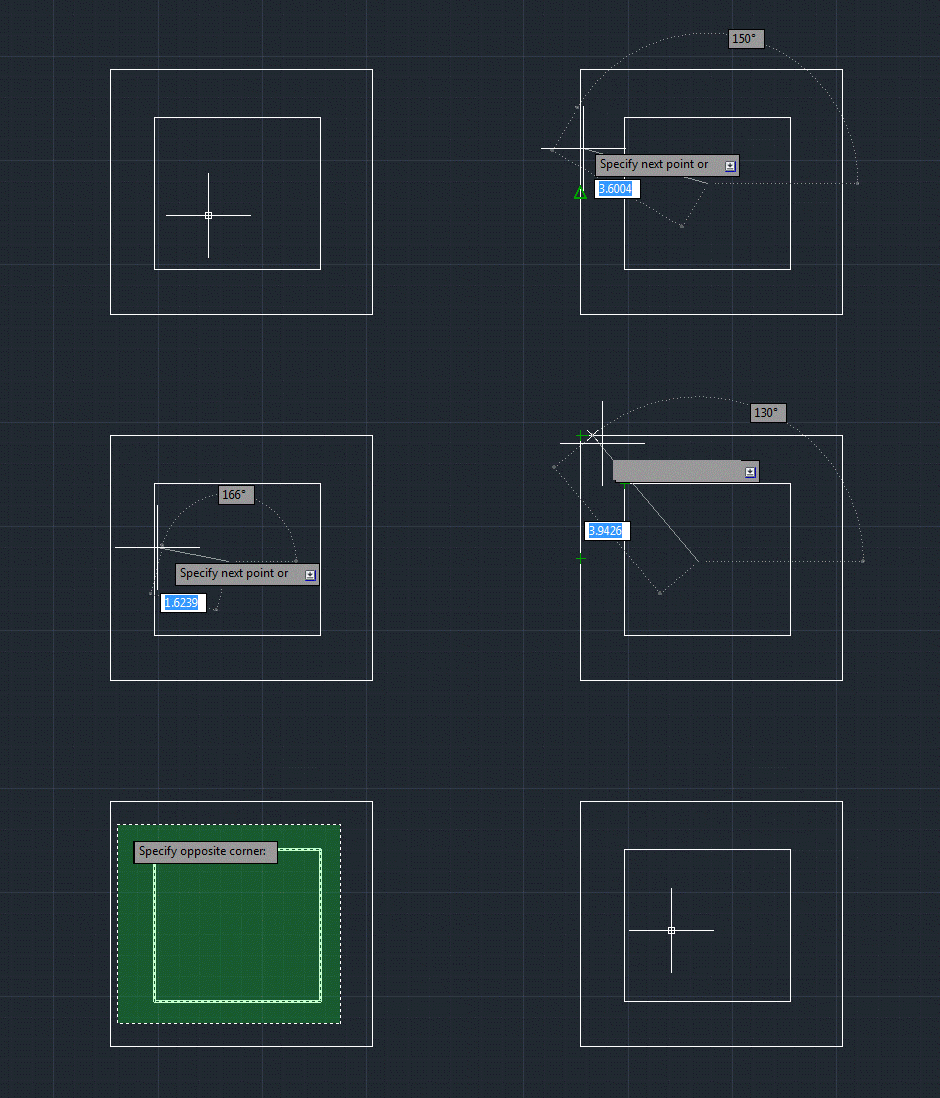
Note that the intersections are still visible in this sample, as expected. In the next post we'll add an additional overrule to our code to remove (most of) those, also.


Leave a Reply to Mark Douglas Cancel reply