I was planning to post about Autodesk University 2013 today, but things have just been too hectic. I have a 3-hour layover in Heathrow on the journey home – which starts this evening – so I'll try to use that to post a summary of this year's AU as experienced by yours truly.
In the last post we saw some code to move an entity – any entity, with text as the primary requirement – in a block.
Here's a version of the C# code that shows the entity as it's being jigged across the screen to its new position. The interesting part of this, in many ways, is the transformations that are needed pre- and post-jig to make sure the entity is under the cursor (the same transformation matrices calculated from the nested containers in the last post).
using Autodesk.AutoCAD.ApplicationServices;
using Autodesk.AutoCAD.DatabaseServices;
using Autodesk.AutoCAD.EditorInput;
using Autodesk.AutoCAD.Geometry;
using Autodesk.AutoCAD.Runtime;
namespace Textformations
{
public class DisplacementJig : EntityJig
{
private Point3d _pos;
private Point3d _loc;
public DisplacementJig(Entity ent, Point3d basePt)
: base(ent)
{
_loc = basePt;
}
protected override bool Update()
{
var disp = _pos - _loc;
_loc = _pos;
var mat = Matrix3d.Displacement(disp);
Entity.TransformBy(mat);
return true;
}
protected override SamplerStatus Sampler(JigPrompts prompts)
{
var opts =
new JigPromptPointOptions("\nSelect displacement");
opts.BasePoint = _pos;
opts.UserInputControls =
UserInputControls.NoZeroResponseAccepted;
var ppr = prompts.AcquirePoint(opts);
if (_pos == ppr.Value)
r
eturn SamplerStatus.NoChange;
_pos = ppr.Value;
return SamplerStatus.OK;
}
}
public class Commands2
{
[CommandMethod("MTIBJIG")]
public static void MoveTextInBlock()
{
var doc = Application.DocumentManager.MdiActiveDocument;
var db = doc.Database;
var ed = doc.Editor;
// Start by getting the text (or other) object in the block
var pneo =
new PromptNestedEntityOptions("\nSelect text inside block");
var pner = ed.GetNestedEntity(pneo);
if (pner.Status != PromptStatus.OK)
return;
var selId = pner.ObjectId;
// Start a transaction to access the object
var oc = selId.ObjectClass;
if (
!oc.IsDerivedFrom(
RXClass.GetClass(typeof(DBText))
) &&
!oc.IsDerivedFrom(
RXClass.GetClass(typeof(MText))
)
)
{
// Isn't a text object - ask whether we continue
ed.WriteMessage(
"\nObject is not text, it is a {0}.", oc.Name
);
var pko =
new PromptKeywordOptions(
"\nDo you want to continue? [Yes/No]", "Yes No"
);
pko.AppendKeywordsToMessage = true;
pko.AllowNone = true;
pko.Keywords.Default = "No";
var pr = ed.GetKeywords(pko);
if (
pr.Status != PromptStatus.OK || pr.StringResult == "No"
)
return;
}
// Start a transaction to modify the object
using (var tr = doc.TransactionManager.StartTransaction())
{
// Unless we get a block reference container, use the
// identity matrix as the block transform
var brMat = Matrix3d.Identity;
// Get the containers around the nested entity
var conts = pner.GetContainers();
foreach (var brId in conts)
{
var br =
tr.GetObject(brId, OpenMode.ForRead) as BlockReference;
if (br != null)
{
brMat = brMat.PreMultiplyBy(br.BlockTransform);
}
}
// Transform the entity
var ent = (Entity)tr.GetObject(selId, OpenMode.ForWrite);
// Before we run the jig, transform the object by the
// aggregate transform of the containers
ent.TransformBy(brMa
t);
// Run the jig to displace the object
var dj = new DisplacementJig(ent, pner.PickedPoint);
var pr = ed.Drag(dj);
if (pr.Status == PromptStatus.OK)
{
// We can transform the entity back, now (at least in
// terms of the containers: the displacement remains)
ent.TransformBy(brMat.Inverse());
// Open each of the containers and set a property so that
// they each get regenerated
foreach (var id in conts)
{
var ent2 = tr.GetObject(id, OpenMode.ForWrite) as Entity;
if (ent2 != null)
{
// We might also have called this method:
// ent2.RecordGraphicsModified(true);
// but setting a property works better with undo
ent2.Visible = ent2.Visible;
}
}
tr.Commit();
}
}
}
}
}
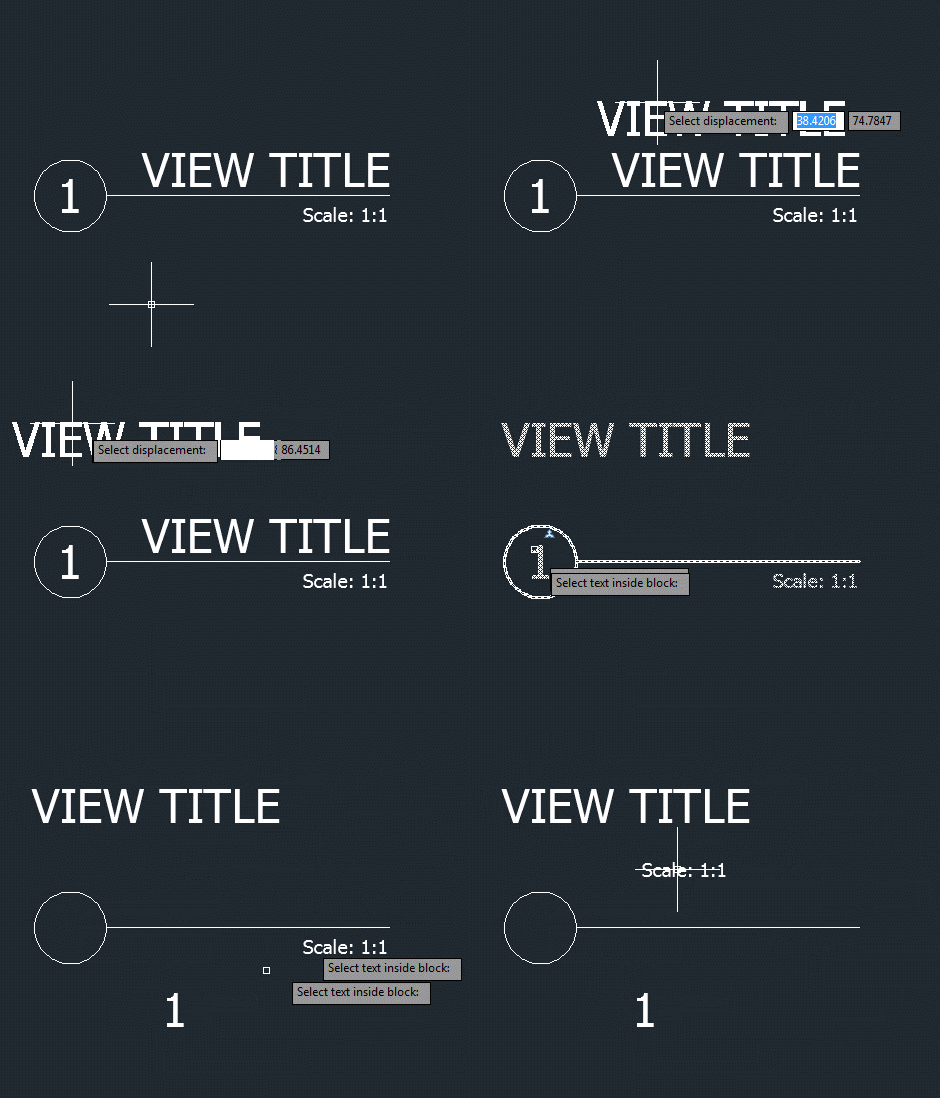
Here's the new MTIBJIG command in action:


Leave a Reply