Another interesting question came in by email, this week. Fredrik Skeppstedt, a long-time user of the TXTEXP Express Tool, wanted to perform a similar operation using C#: to explode text objects – as TXTEXP does – but then be able to manipulate the resulting geometry from .NET.
TXTEXP is an interesting command: in order to explode text objects, it actually exports them to a Windows Metafile (.WMF) using the WMFOUT command, and then reimports the file back in using WMFIN. This, in itself, is trickier than it sounds, as WMFOUT creates the graphics in the file relative to the top left of the drawing area, and it takes some work to generate the WCS location to pass into the WMFIN command for the geometry to be in the same location.
So why does TXTEXP use a format such as WMF to do this? Well, to reduce text into its base geometry, AutoCAD needs to us its plotting pipeline to generate the primitives with a high degree of fidelity. Generating the graphics isn't enough, as text is generally displayed directly (yes, I'm simplifying this somewhat, but anyway) rather than being decomposed into underlying vectors. WMF is as good a way as any to do this – at least it was back in the late 1990s when this was implemented, and frankly I'm not aware of a better way to capture the data, today (please to post a comment if I'm missing something obvious, of course). Even the approach shown earlier in the week won't work, as it just gets "text" callbacks for each of the objects.
I went down a few warm-looking rabbit-holes while researching a solution to this problem: I looked into manually reading the graphics primitives from a WMF file using .NET – which would take a lot of work and GDI/GDI+ knowledge, apparently – as well as scripting the WMFOUT and WMFIN commands. I ended up realizing that the TXTEXP command does some very useful heavy lifting of its own, and if we're calling commands to do the work then we may as well call this one.
Which reduced the problem to being able to call the TXTEXP command (which happens to be defined using LISP) and then capture the results in order to work with them. I'm generally not a fan of calling commands, but avoiding doing so – especially with complex commands doing a lot of legwork – can often lead to you reinventing the wheel. There are still things to watch out for – such as fiber-based re-entrancy issues – but these are gradually going away (in the coming weeks we'll talk more about the pros and cons of calling commands vs. using "low-level" APIs).
As the TXTEXP command erases the source text objects, I decided to add a feature to copy the objects prior to calling the command, which leaves the originals unerased. I had previously tried just unerasing the originals, but TXTEXP does some really funky things to the text objects it explodes – such as mirroring them a few times and setting the direction to be backwards – so I found the copying approach to be both simpler and less dependent on the internal workings of TXTEXP.
That's enough of the preliminaries… here's the C# command defining our EXPVECS command:
using System.Linq;
using Autodesk.AutoCAD.ApplicationServices;
using Autodesk.AutoCAD.DatabaseServices;
using Autodesk.AutoCAD.EditorInput;
using Autodesk.AutoCAD.Runtime;
//using System.Reflection;
namespace GetTextVectors
{
public class Commands
{
private ObjectIdCollection _entIds;
[CommandMethod("EXPVECS")]
public void ExplodeToVectors()
{
var doc = Application.DocumentManager.MdiActiveDocument;
var db = doc.Database;
var ed = doc.Editor;
_entIds = new ObjectIdCollection();
var pso = new PromptSelectionOptions();
pso.MessageForAdding = "Select text objects to explode";
var psr = ed.GetSelection(pso);
if (psr.Status != PromptStatus.OK)
return;
// Pass the objects to explode via the pickfirst selection
// set and save them to be unerased in the next command
var origIds = psr.Value.GetObjectIds();
var msId = SymbolUtilityServices.GetBlockModelSpaceId(db);
// We're going to copy the original text entities and then
// pass the copies into TXTEXP, which will then go and erase
// them, leaving the originals intact
// If you want the originals erased, just pass origIds into
// the call to SetImpliedSelection() and delete the lines
// of code prior to it
var map = new IdMapping();
db.DeepCloneObjects(
new ObjectIdCollection(origIds), msId, map, false
);
// Use a handy LINQ "map" to extract the ObjectId of the copy
// for each of the input IDs
var copiedIds =
(from id in origIds select map[id].Value).ToArray<ObjectId>();
ed.SetImpliedSelection(copiedIds);
// We'll use COM's SendCommand, but using InvokeMember()
// on the type rather than using the TypeLib
var odoc = doc.GetAcadDocument();
var docType = odoc.GetType();
// Check for objects added to the database
db.ObjectAppended += new ObjectEventHandler(ObjectAppended);
// Call SendCommand passing in both the Express Tools'
// TXTEXP command and then the custom TXTFIX command
// to fix the results
//var args = new object[] { "TXTEXP\nTXTFIX\n" };
//docType.InvokeMember(
// "SendCommand", BindingFlags.InvokeMethod, null, odoc, args
//);
// Actually, no. I've switched back to SendStringToExecute,
// as in any case the mode we're using is asynchronous
doc.SendStringToExecute(
"TXTEXP\nTXTFIX\n", false, false, false
);
}
[CommandMethod("TXTFIX", CommandFlags.NoHistory)]
public void FixText()
{
var doc = Application.DocumentManager.MdiActiveDocument;
var db = doc.Database;
var ed = doc.Editor;
// Remove the event handler
db.ObjectAppended -= new ObjectEventHandler(ObjectAppended);
if (_entIds.Count == 0)
{
ed.WriteMessage(
"\nCould not find any entities created by TXTEXP."
);
return;
}
// To show we can, let's change the colour of each of
// the entities generated by TXTEXP to red
using (var tr = doc.TransactionManager.StartTransaction())
{
foreach (ObjectId id in _entIds)
{
// TXTEXP erases quite a few temporary objects, so be
// sure to check their erased status first
if (!id.IsErased)
{
var ent = (Entity)tr.GetObject(id, OpenMode.ForWrite);
ent.ColorIndex = 1;
}
}
< span style="line-height: 140%"> tr.Commit();
}
}
void ObjectAppended(object sender, ObjectEventArgs e)
{
if (e.DBObject is Entity)
{
_entIds.Add(e.DBObject.ObjectId);
}
}
}
}
We use a "database reactor" (or the .NET equivalent, an event handler off the Database object) to capture the objects that get created while the command executes. We also use COM's SendCommand() to launch the TXTEXP command (and then the TXTFIX one – more on that in a tick) but we don't use the COM TypeLib to do so: we use a technique that Viru Aithal showed me when he wrote the sample that evolved into ScriptPro 2.0, calling InvokeMember() to essentially use reflection to bind to the method dynamically.
We use a separate command called TXTFIX to manipulate the results because SendCommand() – while synchronous – doesn't execute quite soon enough for our database reactor to pick them up. This two-command technique is interesting for current versions of AutoCAD but shouldn't be necessary once fibers finally go the way of the dodo.
Here's a quick view on some AutoCAD text before calling the EXPVECS command…
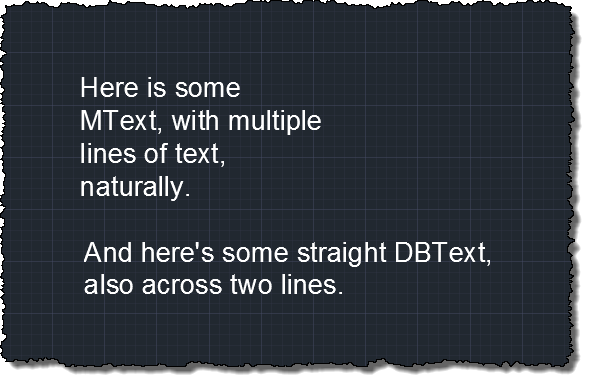
… and then after calling it:

TXTFIX adjusts the resultant geometry to be red, but it could do all sorts of other things instead, of course (that was just a "for instance"). And you could also apply this general mechanism to all kinds of other problems where you have commands generating database-resident data but that provide no direct .NET API to use.
Update:
After a quick discussion over the weekend with Tony Tanzillo, via this post's comments, I realised I'd been using SendCommand() when I'd otherwise not have: I'd previously been using it to call WMFOUT and WMFIN synchronously but when I'd come to the conclusion that was not going to work – and had introduced the TXTFIX command – I'd forgotten to switch across to use SendStringToExecute() when I went with a more asynchronous approach. I've updated the above code, commenting out the (still very interesting when appropriate) technique of calling SendCommand() via InvokeMember().


Leave a Reply