After our quick look at AutoCAD 2016 from a user perspective, let's now spend some time looking at the things important to developers in this latest release.

Compatibility

Off the bat it's worth stating that AutoCAD 2016 is a DWG compatible release: it's using the same file format as AutoCAD 2013, 2014 and 2015. It's also a binary application compatible release: ObjectARX apps written for AutoCAD 2015 should work in 2016 and it's likely that .NET apps built for AutoCAD 2014 will work, too. That said, some changes have been made to the security model for this release of AutoCAD, so you may want to make sure these changes haven't impacted your application…

Security

You'll see straight away when you try to load your application that there's a bit more going on in the 2016 version of this dialog.
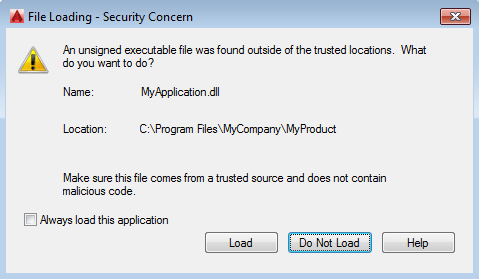
Security dialog in AutoCAD 2016

Firstly, the word "unsigned" indicates something very important: we're encouraging developers to sign their executables – and even their LISP files – to improve security. An increasing number of AutoCAD customers – often the larger ones, as you might expect – are requiring application modules to be signed. This is certainly a topic that's worth go into more deeply in a future post.

The other addition to the dialog is the "Always load this application" checkbox. This tells AutoCAD to continue loading this module from a non-trusted location, with the caveat that if the module changes the user will be prompted again.

A number of sysvars related to AutoCAD's security features can now be locked by CAD managers:

  • SECURELOAD
  • TRUSTEDPATHS
  • TRUSTEDDOMAINS (see update below)
  • LEGACYCODESEARCH
  • ACADLSPASDOC (see update below)

LEGACYCODESEARCH is important to note: AutoCAD's default "find file" behaviour has been changed neither to search the current working folder nor the folder of the active drawing. This will make it much harder for people to write viruses that travel around with AutoCAD drawings.

On the subject of sysvars, I do think the System Variable Monitor – which we mentioned last time – will be a useful diagnostic tool for developers. If you know you're using sysvars in your code – such as CMDECHO, CMDDIA, FILEDIA, etc. – try adding them to the monitor and see whether you get any notifications about your commands not setting them back properly. If you get any you can bet your users will, too.
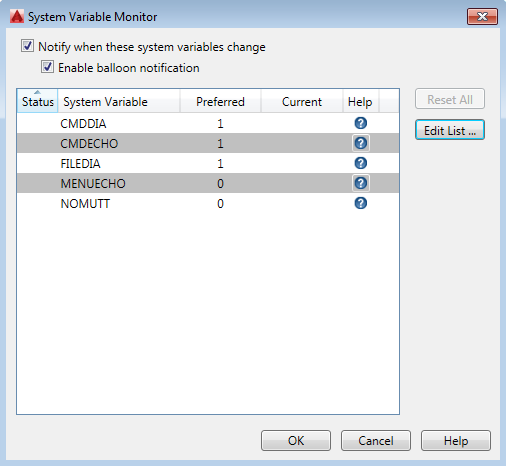
Sysvar monitor

Now let's take a look at the new .NET API features (equivalent – and in a few cases more – functionality is also available via ObjectARX).

Reality computing

A number of point cloud-related features have been added to the product and are also available via the API.

You can create point cloud extension definitions (PointCloudDefEx objects) by attaching .RCS/.RCP files. These are analogous to block definitions. You can also create point cloud extension entities (PointCloudEx objects) that "insert" these into the drawing. A whole slew of properties and methods are exposed from both these classes.

A number of capabilities have been added relating to extraction of features from point clouds. Firstly, the Section class now has a "slice" type, and can be used to slice through a point cloud. Correspondingly it's possible to use a PointCloudCrop object to crop a point cloud relative to a plane.

Even silly point clouds can be sectioned

The extraction itself can also be driven programmatically. I've put together a sample that performs an extraction and adds the extracted geometry to the drawing: we'll take a look at that in an upcoming post.

Rendering

A number of capabilities related to the newly introduced RapidRT rendering system have been added to the API in this release. You can add and control image-based lighting, for instance, as well as managing the various settings related to RapidRT.

As this is a binary application compatible release, when we change an API significantly we make sure we do so via a new class until we can safely break API compatibility in a future release. So there's a new Autodesk.AutoCAD.GraphicsSystem.Manager2 class which contains GetOffScreenDevice() and GetOffScreenView() methods making use of the RapidRT engine.

Miscellaneous

Here's a quick round-up of some of the more interesting miscellaneous API enhancements in this release…

The Spline.ToPolyline() method has a couple of new Boolean parameters allowing you to specify that you wish to create arc segments as well as requesting the generation of lightweight polylines.

The Dimension.TextDefinedSize property allows you to control the width associated with long dimension text.

The MText class has a couple of new properties: ContentsRTF allows you to extract a version of the contents in Rich Text Format, while ShowBorders allows you to query or control whether an MText object's borders are visible.

We mentioned the ability for CAD managers to lock certain system variables. There's a corresponding Variable.IsLocked property allowing you to test this programmatically.

And finally my personal favourite miscellaneous enhancement in this release… you can now request code to be executed within a command context from the application context using DocumentCollection.ExecuteInCommandContextAsync(). Now this may not sound like much, but this one method allows you to do some really interesting things, such as calling commands from AutoCAD event handlers or even OS-level events. This is definitely a method of which we're going to make a great deal of use, both in a few near-term posts and in the longer term.

Update:

It turns out that while the documentation for ACADLSPASDOC and TRUSTEDDOMAINS state they "may be locked by CAD managers", the CAD Manager Control Utility currently does not, in fact, allow you to lock these two sysvars. Thanks to Dieter and Karen for tracking this one down: we'll make sure the docs get fixed during the next update.

44 responses to “AutoCAD 2016 for developers”

  1. Alexander Rivilis Avatar
    Alexander Rivilis

    Hi Kean!
    Is there ObjectARX equivalent of DocumentCollection.ExecuteInCommandContextAsync ?

    1. Hi Alexander!

      The equivalent function in ObjectARX is AcApDocManager::beginExecuteInCommandContext().

      (The .NET method had the same name in AutoCAD 2015 but it unfortunately didn't work: when we fixed it in 2016 we renamed it to something more meaningful.)

      Regards,

      Kean

      1. Alexander Rivilis Avatar
        Alexander Rivilis

        Thanks!

  2. Kean, I noticed the security feature on loading "from start-in or current dwg folder"... Why were those combined?
    I would argue 95% of the security problems with acad are the fact that it looks for acad.lsp (and variants) in the current drawing folder BEFORE it uses the support paths. You switch that, and you solve every case I have ever run into. Sorry for the caps, just no way to emphasize otherwise. How do the sucurity features in 2016 help the person with a lisp that does bad things? If they choose to run it, the bad things happen. THe security features do not distinguish between good and bad code, and the impression Autodesk is giving is that they somehow do IMO.

    1. James,

      I think we're talking about the same thing: AutoCAD uses "find file" at startup to locate acad.lsp. If one is placed in the DWG folder, in AutoCAD 2015 it gets loaded - although the user hopefully gets prompted that it's trying to load acad.lsp from a writeable/non-trusted location - whereas in 2016 the default LEGACYCODESEARCH setting of OFF leads to AutoCAD not even looking in the folder. Which addresses the 95% (or so) of problems you've referred to.

      And as this sysvar can now be controlled by the CAD manager/administrator, things are even more secure.

      Does that make sense?

      Kean

      1. Hi Kean,
        Bravo! This is great news that this change has finally been implemented. It's also good that you have allowed for legacy people who are stuck in their ways.

        1. Thanks, Mike!

          I've passed on your feedback to the team who worked on this feature (they're the ones who deserve the credit).

          Kean

        2. but the startup lisps got lumped in with all lisps. Mike, if you are going to poke, be specific buddy.

          1. James... I don't think Mike was having a dig at you, personally.

            Anyway - I really need help understanding why this feature is causing you a problem. Are you expecting AutoCAD to perform code analysis on LISP apps, or perhaps to provide an app sandbox that doesn't allow OS access?

            Kean

            1. I don't even get his dig, there is no legacy behavior of people at hand. My problem is there are good reasons to put lisps in a drawings folder, and I don't want to be nagged when they are needed. I do want startup lisps to be rejected and nagged about though, as they are never supposed to be there. These acad.lsp files get dumped in from zip files from other companies on accident by unwary users. I am not sure how they get in the zip files, its not sabotage as the senders are generally clueless. The security feature should have been "only load startup lisps from folders in support paths" IMO. Maybe others could improve on that, but lumping all together is not one of them. thx for your replies on all this.

              1. You can still load a LISP file manually from the drawing folder, even if ill-advised (it's usually a writeable folder: a bad place to be storing executable code).

                Setting LEGACYCODESEARCH to OFF will mean startup LISP files only get loaded from the support path.

                Kean

                1. exactly my point, who ever said its ill-advised? Are you picturing companies as having all tools folders locked down? That is not reality as I have seen it in most real companies. Only parts are locked down, or let's say, controlled. Eiher way, the focus should be on options of handling the startup lisps/files, not any lisp/tools. Sorry to drag this out, I think our points are clear so thanks for your replies.

      2. it makes sense, but the start-in folder is entirely different than the cur dwg folder. That should not have been mixed. Also, the 95% number refers to the lisps named acad.lsp and so on, as they get loaded automatically. The other lisps are generally harmless, and I have yet to see a malicious non-startup lisp. I would like to understand why this distinction was discarded as it is central to the real life things that are happening.

        1. When you open a drawing from Explorer, the "start in" folder is the location of the drawing...

          Kean

          1. sure, but in this day of so many flavors of acad and multiple profiles, you must use an icon to start the right acad, then open a drawing. In that case, the start in folder is from the icon, and is typically userdatacache or the same folder as acad.exe. I am not clear on what that start-in folder should really be in the icon.

            1. Typically it's the UserDataCache. The other likely location is AutoCAD's Program Files folder. Neither should usually contain an acad.lsp.

              Kean

              1. if you use defaults. Some places change that for certain advantages. With so many seats on subscription, that is a lot of users.

  3. Hi kean, nice post as ever!
    Would you make a post about signed applications in a near future, or you have some useful links to share?

    1. Thanks, Gdiael!

      Yes, definitely (one or the other during the next week).

      Kean

  4. This is a strange one.

    My plugin references accoremgd.dll, acmgd.dll, acdbmgd.dll, and adwindows.dll

    If I reference the 2015 versions (20.0.0.0) I have no problems, but if I reference the 2016 versions (20.1.0.0) there are no imported namespaces, and the project can't build (can't reference any autocad types/namespaces in code)

    Here's the interesting part: When using AutoCad 2015 binaries I had my project set to compile under .NET 4.5.1 with no problems. The only way I can fix the 2016 problem is to set the .NET framework to 4.5

    What would have changed between builds that could cause this problem? Last I checked, without 4.5.1 it's not possible to use "Edit & Continue" when debugging 64bit applications.

    1. I've so far only targeted 4.5, in my own apps, and E&C works just fine.

      Beyond that I suggest posting to ADN or the discussion group for help with this...

      Kean

  5. Took me a while, but reconfiguring everything to compile under .NET 4.5 seems to work (I have 15 linked projects in my plugin)

    Previously to debug I had used the technique linked here:

    http://through-the-interfac...

    This approach didn't allow me to use E&C, but the alternate approach shown in the in the attached image did.

    I think everything is working OK for me now, and I'll follow up in the ADN with regards to .NET 4.5.1 assemblies working using R20.0 but not R20.1

    Thanks for the quick response.

  6. Just as a follow up: The problems I had look like they were directly related to Visual Studio.

    Overall the AutoCad R20.1 binaries work fine.

    Looking forward to the first article regarding ExecuteInCommandContextAsync()

    1. Cool!

      Yes, the first one will be posted tomorrow. 🙂

      Kean

  7. Hi Kean,

    I am receiving the trusted location message even though the DLL is located under C:/ProgramData/Autodesk/ApplicationPlugins. I know in AutoCAD 2015 and 2014 this location was inherently trusted, but it seems in AutoCAD 2016 it is not. Did this change?

    1. Kean Walmsley Avatar

      Hi Joe,

      I'm overdue writing a comprehensive post on how this all works in 2016. Hopefully next week...

      Kean

  8. Kadir Ersin Temizel Avatar
    Kadir Ersin Temizel

    hi, mine is not difficult, so please dont find it down- leveled. I coudnt find point format. how can we change point format style? in Autocad 2016

  9. Kadir Ersin Temizel Avatar
    Kadir Ersin Temizel

    Hi, How can we change format style for point in ACAD 2016? pls. help.

    1. Kean Walmsley Avatar

      Please don't use this blog as a support forum: Autodesk hosts discussion groups for just this type of question.

      (You may want to look at the PDMODE system variable.)

      Kean

  10. Naresh NIchani Avatar
    Naresh NIchani

    Hi,

    When I try to download a zip using .Net code from AutoCAD 2016 it does not work - it refuses to start.
    I am able to download dwg files the same way however.

    Are there any changes as to what is allowed to download?

    Regards,

    Naresh

    1. Kean Walmsley Avatar

      This is a support question (and this isn't a support forum). Please post it to the relevant discussion group.

      Regards,

      Kean

  11. Thomas Schmidt Avatar
    Thomas Schmidt

    Hi Kean,

    What happened to the ApplicationServices.Utility namespace? I use the CloningHelper class in my project and can no longer find it. Is there an alternative in the 2016 API?

    1. Kean Walmsley Avatar

      Hi Thomas,

      Is that part of AcMgd.dll? If so, for which AutoCAD version? I don't recall having used it myself.

      Regards,

      Kean

      1. Thomas Schmidt Avatar
        Thomas Schmidt

        It is part of the AecUiBaseMgd.dll in AutoCAD 2015.

        1. Kean Walmsley Avatar

          Hi Thomas,

          Which means in AutoCAD Architecture? I don't see that module in base AutoCAD. I suggest posting on the discussion group or contacting ADN - I don't know what has happened to this namespace.

          Regards,

          Kean

  12. Hi Kean,
    I want to know that, is there any option to change the multi line elements from one style to another. I have a mlstyle with two lines and wanted change the elements by another mlstyle containing 4 lines. Is that possible?

    1. Hi prem,

      Please post this question to the relevant discussion forum. Here's the one for AutoCAD .NET:

      forums.autodesk.com/

      Regards,

      Kean

  13. The URL above to "number of sysvars" is dead. The search returns nothing. I'm looking to find out more about the method(s) used to lock down these sysvars. Thanks.

  14. It looks like "acad.rx" does *not* get read when it's in the DWG folder, regardless of the value of LEGACYCODESEARCH. Can you verify this? Thanks.

    1. Kean Walmsley Avatar

      Unfortunately I'm currently tied up on other projects: I suggest either posting to the discussion groups or contacting ADN. Someone there should be able to help.

      Kean

  15. Hi Kean..
    I am trying to Crop the PointCloud data... for that I have attached the PointCloud file in AutoCAD 2016 dwg file using this command
    Dim pcd = PointCloudEx.AttachPointCloud(HostPath, New Point3d(-1000, -1000, 0), 100, 0, PCDCurrentDB)

    Now PointCloud (.rcs) file attached successfully...
    I need to Crop the particular part & save to crop state with new name & New layer
    I am Using VB.net ... Is there possible to crop the pointcloud data using VB.net ..
    if yes..please help me to start...
    thanks

    1. Hi talha,

      Sorry, this isn't a support forum. Please post your question to the AutoCAD .NET discussion group.

      Thanks,

      Kean

Leave a Reply to Mike Burke Cancel reply

Your email address will not be published. Required fields are marked *