NuGet packages now available for AutoCAD 2016

Some time ago we posted the NuGet packages for AutoCAD 2015's .NET API. The packages for AutoCAD 2016 are now live, too.

Here's the report from the NuGet console (accessible in Visual Studio via Tools –> NuGet Package Manager –> Package Manager Console).

PM> Get-Package -filter AutoCAD.NET -ListAvailable


Id                   Version    Description/Release Notes

--                   -------    -------------------------

AutoCAD.NET          20.1.0     AutoCAD 2016 API

AutoCAD.NET.Core     20.1.0     AutoCAD 2016 core object model API

AutoCAD.NET.Model    20.1.0     AutoCAD 2016 drawing object model API

To install the 2016 versions of the assemblies into your project, you can use the following command, once again in the NuGet Console.

PM> Install-Package AutoCAD.NET -Version 20.1

And the 2015 are still available too, of course:

PM> Install-Package AutoCAD.NET -Version 20.0

I actually just learned a nice trick: you can use tab to autocomplete the version number inside the NuGet console, as you can see below. Very handy!
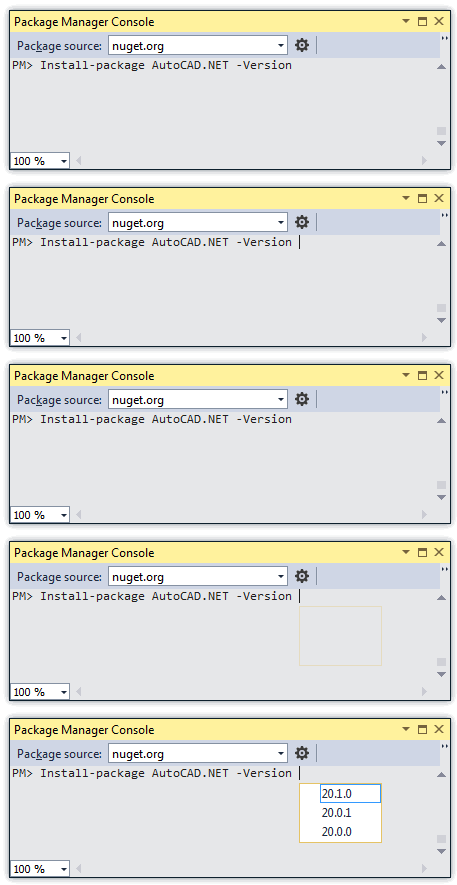
NuGet package manager console with autocomplete

I hadn't realised there was a 20.0.1 version posted – I'll check in on that and report its significance.

As promised last time, on Monday we'll look at another possible use of DocumentCollection.ExecuteInCommandAsync() in AutoCAD 2016.

Update:

It turns out 20.0.1 was a very minor bugfix. There were some versioning issues with 20.0.0 and we'd also omitted the Brep API's .NET assembly from that version.

10 responses to “NuGet packages now available for AutoCAD 2016”

  1. Jason Leinberger Avatar
    Jason Leinberger

    Are there any plans for creating NuGet packages for Civil 3D?

    1. Kean Walmsley Avatar

      Not that I'm aware of. You might try posting to their developer-oriented discussion group: that's a good way to get visibility on this need.

      Kean

    2. Andrey Bushman Avatar
      Andrey Bushman

      You can create such packages yourself. It is very simple.

  2. Andrey Bushman Avatar
    Andrey Bushman

    I have
    looked the newest AutoCAD.Net (Version 21.0.1). It doesn't set
    `CopyLocal` to `false` for each its assembly. It is bad. Also current
    naming creates the problem of forced updating. I.e. by default the
    package will update the assemblies to newer AutoCAD versions even if you
    don't want to use newer AutoCAD version for your project. Therefore
    user are to use `-Version` key and be very attentive. So, current naming
    of the package is bad too... Also, Autodesk didn't create the packages
    for older AutoCAD versions (2009-2014 are interesting for me too).

    Please, test your packages before you will publish them on NuGet feed.
    To solve the problems mentioned by me I created own packages for AutoCAD 2009-2017 here: nuget.org/profi...

    1. Kean Walmsley Avatar

      Hi Andrey,

      I'll pass this feedback on to the people creating the NuGet packages for AutoCAD.

      Regards,

      Kean

    2. Lee Ambrosius Avatar

      Thanks for bringing this to our attention, the CopyLocal property not being set to False is a problem in the NuGet package that is being looked into along with the description of the NuGet package itself to help clarify which product release it should be used with. We currently do not support older product releases with the latest NuGet package, and there are no current plans to add this support at this time.

      1. Andrey Bushman Avatar
        Andrey Bushman

        The `CopyLocal` problem is not a problem. The decission can be found through Google for couple of seconds ( stackoverflow.com/qu... ). I did it (and my packages change that property to `false`).

        I know that Autodesk will not support NuGet packages for previous versions. Therefore I haven't that hope and have mentioned about it only like the existing shortcoming. On my NuGet page you can see that packages for old AutoCAD versions are in the greatest demand by users.

        Your answer doesn't contain info about the problem of unwanted automatic updates to newest AuoCAD versions.

        1. Hi Andrey,

          Can you provide step by step instruction that allow me to reproduce the "unwanted automatic update" problem? I'm not sure when this happens. Nuget has a very flexible version reference syntax which should allow you to choose the exact version you need.https://docs.nuget.org/Create/Versi...

          Albert

          1. Andrey Bushman Avatar
            Andrey Bushman

            @Albert,

            We will assume, I want to use in my project the AutoCAD 2015 .NET API:
            `Install-Package AutoCAD.NET -Version 20.0.0`
            Later, if I will update my packages, AutoCAD API will be updated to newest (i.e. AutoCAD 2017):
            `Update-Package`
            But I don't want such migration (done by default, without the `-Version` option), because I want to use AutoCAD 2015 in my project. For newer AutoCAD version I will create new project.

          2. Andrey Bushman Avatar
            Andrey Bushman

            @Albert, you can read more detailed information here: bushman-andrey.blogs...

Leave a Reply to Lee Ambrosius Cancel reply

Your email address will not be published. Required fields are marked *