After the last post, where we saw how to get the centroid of a Region, today we're going to use that information to place some text inside a detected space.
To restate our process from last time:
- The user selects a point
- Call Editor.TraceBoundary() to determine the containing space
- Call Region.CreateFromCurves() with the resulting geometry
- Determine the centroid of the Region
- Check whether the centroid is actually inside the Region
- If it is, then generate some text to place (we could also have asked the user for this, of course)…
- … and then calculate the size of the text such that it fits entirely into the space
Here's an example of we're aiming for. We're placing the textual equivalent of consecutive integers in the space, for fun.
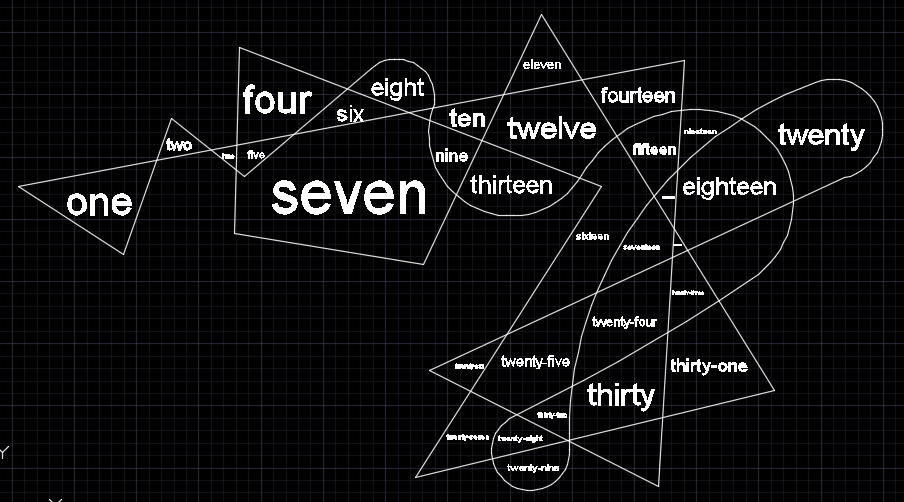
Here's the C# code that does this. The code defines a number of extension methods on various classes which I've left in a single static class contained in the same file as our command implementation.
using Autodesk.AutoCAD.ApplicationServices;
using Autodesk.AutoCAD.BoundaryRepresentation;
using Autodesk.AutoCAD.DatabaseServices;
using Autodesk.AutoCAD.EditorInput;
using Autodesk.AutoCAD.Geometry;
using Autodesk.AutoCAD.Runtime;
using System;
using System.Collections.Generic;
namespace TextPlacement
{
public static class Extensions
{
// Point3d extensions
///<summary>
/// Projects the provided Point3d onto the specified coordinate system.
///</summary>
///<param name="ucs">The coordinate system to project onto.</param>
///<returns>A Point2d projection on the plane of the
/// coordinate system.</returns>
public static Point2d ProjectToUcs(this Point3d pt, CoordinateSystem3d ucs)
{
var pl = new Plane(ucs.Origin, ucs.Zaxis);
return pl.ParameterOf(pt);
}
// DBText extensions
///<summary>
/// Gets the bounds of a DBText object.
///</summary>
///<param name="fac">Optional multiplier to increase/reduce buffer.</param>
///<returns>A collection of points defining the text's extents.</returns>
public static Point3dCollection ExtractBounds(
this DBText txt, double fac = 1.0
)
{
var pts = new Point3dCollection();
if (txt.Bounds.HasValue && txt.Visible)
{
// Create a straight version of the text object
// and copy across all the relevant properties
// (stopped copying AlignmentPoint, as it would
// sometimes cause an eNotApplicable error)
// We'll create the text at the WCS origin
// with no rotation, so it's easier to use its
// extents
var txt2 = new DBText();
txt2.Normal = Vector3d.ZAxis;
txt2.Position = Point3d.Origin;
// Other properties are copied from the original
txt2.TextString = txt.TextString;
txt2.TextStyleId = txt.TextStyleId;
txt2.LineWeight = txt.LineWeight;
txt2.Thickness = txt2.Thickness;
txt2.HorizontalMode = txt.HorizontalMode;
txt2.VerticalMode = txt.VerticalMode;
txt2.WidthFactor = txt.WidthFactor;
txt2.Height = txt.Height;
txt2.IsMirroredInX = txt2.IsMirroredInX;
txt2.IsMirroredInY = txt2.IsMirroredInY;
txt2.Oblique = txt.Oblique;
// Get its bounds if it has them defined
// (which it should, as the original did)
if (txt2.Bounds.HasValue)
{
var maxPt = txt2.Bounds.Value.MaxPoint;
// Only worry about this single case, for now
Matrix3d mat = Matrix3d.Identity;
if (txt.Justify == AttachmentPoint.MiddleCenter)
{
mat = Matrix3d.Displacement((Point3d.Origin - maxPt) * 0.5);
}
// Place all four corners of the bounding box
// in an array
double minX, minY, maxX, maxY;
if (txt.Justify == AttachmentPoint.MiddleCenter)
{
minX = -maxPt.X * 0.5 * fac;
maxX = maxPt.X * 0.5 * fac;
minY = -maxPt.Y * 0.5 * fac;
maxY = maxPt.Y * 0.5 * fac;
}
else
{
minX = 0;
minY = 0;
maxX = maxPt.X * fac;
maxY = maxPt.Y * fac;
}
var bounds =
new Point2d[] {
new Point2d(minX, minY),
new Point2d(minX, maxY),
new Point2d(maxX, maxY),
new Point2d(maxX, minY)
};
// We're going to get each point's WCS coordinates
// using the plane the text is on
var pl = new Plane(txt.Position, txt.Normal);
// Rotate each point and add its WCS location to the
// collection
foreach (Point2d pt in bounds)
{
pts.Add(
pl.EvaluatePoint(
pt.RotateBy(txt.Rotation, Point2d.Origin)
)
);
}
}
}
return pts;
}
// Region extensions
///<summary>
/// Returns whether a Region contains a Point3d.
///</summary>
///<param name="pt">A points to test against the Region.</param>
///<returns>A Boolean indicating whether the Region contains
/// the point.</returns>
public static bool ContainsPoint(this Region reg, Point3d pt)
{
using (var brep = new Brep(reg))
{
var pc = new PointContainment();
using (var brepEnt = brep.GetPointContainment(pt, out pc))
{
return pc != PointContainment.Outside;
}
}
}
///<summary>
/// Returns whether a Region contains a set of Point3ds.
///</summary>
///<param name="pts">An array of points to test against the Region.</param>
///<returns>A Boolean indicating whether the Region contains
/// all the points.</returns>
public static bool ContainsPoints(this Region reg, Point3dCollection ptc)
{
var pts = new Point3d[ptc.Count];
ptc.CopyTo(pts, 0);
return reg.ContainsPoints(pts);
}
///<summary>
/// Returns whether a Region contains a set of Point3ds.
///</summary>
///<param name="pts">An array of points to test against the Region.</param>
///<returns>A Boolean indicating whether the Region contains
/// all the points.</returns>
public static bool ContainsPoints(this Region reg, Point3d[] pts)
{
using (var brep = new Brep(reg))
{
foreach (var pt in pts)
{
var pc = new PointContainment();
using (var brepEnt = brep.GetPointContainment(pt, out pc))
{
if (pc == PointContainment.Outside)
return false;
}
}
}
return true;
}
///<summary>
/// Get the centroid of a Region.
///</summary>
///<param name="cur">An optional curve used to define the region.</param>
///<returns>A nullable Point3d containing the centroid of the Region.</returns>
public static Point3d? GetCentroid(this Region reg, Curve cur = null)
{
if (cur == null)
{
var idc = new DBObjectCollection();
reg.Explode(idc);
if (idc.Count == 0)
return null;
cur = idc[0] as Curve;
}
if (cur == null)
return null;
var cs = cur.GetPlane().GetCoordinateSystem();
var o = cs.Origin;
var x = cs.Xaxis;
var y = cs.Yaxis;
var a = reg.AreaProperties(ref o, ref x, ref y);
var pl = new Plane(o, x, y);
return pl.EvaluatePoint(a.Centroid);
}
// Database extensions
///<summary>
/// Create a piece of text of a specified size at a specified location.
///</summary>
///<param name="norm">The normal to the text object.</param>
///<param name="pt">The position for the text.</param>
///<param name="conts">The contents of the text.</param>
///<param name="size">The size of the text.</param>
public static void CreateText(
this Database db, Vector3d norm, Point3d pt, string conts, double size
)
{
using (var tr = db.TransactionManager.StartTransaction())
{
var ms =
tr.GetObject(
SymbolUtilityServices.GetBlockModelSpaceId(db),
OpenMode.ForWrite
) as BlockTableRecord;
if (ms != null)
{
var txt = new DBText();
txt.Normal = norm;
txt.Position = pt;
txt.Justify = AttachmentPoint.MiddleCenter;
txt.AlignmentPoint = pt;
txt.TextString = conts;
txt.Height = size;
var id = ms.AppendEntity(txt);
tr.AddNewlyCreatedDBObject(txt, true);
//tr.CreateBoundingBox(txt);
}
tr.Commit();
}
}
// Transaction extensions
///<summary>
/// Create a bounding rectangle around a piece of text (for debugging).
///</summary>
///<param name="txt">The text object around which to create a box.</param>
public static void CreateBoundingBox(this Transaction tr, DBText txt)
{
var ms =
tr.GetObject(
SymbolUtilityServices.GetBlockModelSpaceId(txt.Database),
OpenMode.ForWrite
) as BlockTableRecord;
if (ms != null)
{
var corners = txt.ExtractBounds();
if (corners.Count >= 4)
{
var doc = Application.DocumentManager.MdiActiveDocument;
if (doc == null) return;
var ed = doc.Editor;
var ucs = ed.CurrentUserCoordinateSystem;
var cs = ucs.CoordinateSystem3d;
var pl = new Polyline(4);
for (int i = 0; i < 4; i++)
{
pl.AddVertexAt(i, corners[i].ProjectToUcs(cs), 0, 0, 0);
}
pl.Closed = true;
pl.TransformBy(ucs);
ms.AppendEntity(pl);
tr.AddNewlyCreatedDBObject(pl, true);
}
}
}
// Int extensions
// Based on:
// http://stackoverflow.com/questions/2729752/converting-numbers-in-to-words-c-sharp
///<summary>
/// Return the description of an integer in string form.
///</summary>
///<returns>The words describing an integer
/// e.g. "one hundred and twenty-eight."</returns>
public static string ToWords(this int number)
{
if (number == 0)
return "zero";
if (number < 0)
return "minus " + ToWords(Math.Abs(number));
string words = "";
if ((number / 1000000) > 0)
{
words += ToWords(number / 1000000) + " million ";
number %= 1000000;
}
if ((number / 1000) > 0)
{
words += ToWords(number / 1000) + " thousand ";
number %= 1000;
}
if ((number / 100) > 0)
{
words += ToWords(number / 100) + " hundred ";
number %= 100;
}
if (number > 0)
{
if (words != "")
words += "and ";
var unitsMap =
new[] {
"zero", "one", "two", "three", "four", "five", "six", "seven",
"eight", "nine", "ten", "eleven", "twelve", "thirteen",
"fourteen", "fifteen", "sixteen", "seventeen", "eighteen",
"nineteen"
};
var tensMap =
new[] {
"zero", "ten", "twenty", "thirty", "forty", "fifty",
"sixty", "seventy", "eighty", "ninety"
};
if (number < 20)
words += unitsMap[number];
else
{
words += tensMap[number / 10];
if ((number % 10) > 0)
words += "-" + unitsMap[number % 10];
}
}
return words;
}
}
public class Commands
{
private int _number = 1;
[CommandMethod("LS")]
public void LabelSpace()
{
var doc = Application.DocumentManager.MdiActiveDocument;
if (doc == null) return;
var ed = doc.Editor;
// Loop, creating labels in the selected space, until cancelled
do
{
var ppr = ed.GetPoint("\nSelect point in boundary");
if (ppr.Status != PromptStatus.OK)
break;
try
{
LabelSpace(doc, ppr.Value, _number);
_number++;
}
catch (Autodesk.AutoCAD.Runtime.Exception)
{
ed.WriteMessage("\nUnable to label this space.");
}
}
while (true);
}
// Our main operation: adding a label to a space
private static void LabelSpace(Document doc, Point3d pt, int num)
{
var ed = doc.Editor;
var db = doc.Database;
// Start by tracing the boundary around the selected point
var objs = ed.TraceBoundary(pt, false);
if (objs == null || objs.Count == 0)
return;
// If we have some geometry, create a Region from it
var regs = Region.CreateFromCurves(objs);
if (regs == null || regs.Count == 0)
return;
// There should only be one Region, but you never know
foreach (Region reg in regs)
{
// Get the Region's centroid: we'll use this for the text placement
var cen = reg.GetCentroid(objs[0] as Curve);
// If the centroid is contained in the Region (not always the case)
// then we proceed
if (cen.HasValue && reg.ContainsPoint(cen.Value))
{
// Get our number in words
var txt = num.ToWords();
// Establish the closest fit height for our text
var size = FindTextSize(reg, cen.Value, txt);
// If we didn't fail, create our text of this size
if (size > 0)
db.CreateText(reg.Normal, cen.Value, txt, size);
}
else
{
ed.WriteMessage("\nCenter of space is outside - skipping.");
}
}
}
// Helper function to find the size of text that fits into a particular
// Region
private static double FindTextSize(Region reg, Point3d pt, string text)
{
// Returning < 0 mean failure
double lastGood = -1.0;
// This factor must be > 1: if it's close to 1, we will iterate more
// (but have a closer match)
const double factor = 1.05;
// We're using a temporary text object
using (var txt = new DBText())
{
txt.Normal = reg.Normal;
txt.Position = pt;
txt.Justify = AttachmentPoint.MiddleCenter;
txt.AlignmentPoint = pt;
txt.TextString = text;
txt.Height = 1.0;
// Growing means we're working our way outwards
// !Growing means we're working out way inwards
// We'll only know which one we're doing when we pass/fail
// the first time
bool first = true;
bool growing = true; // Setting a default to help the compiler
do
{
// Add 10% so we have a bit of a buffer around the text
if (reg.ContainsPoints(txt.ExtractBounds(1.1)))
{
// If we succeed first time, we grow the text
if (first)
{
growing = true;
first = false;
}
// When we're growing and we succeed, iterate by growing the text
if (growing)
{
lastGood = txt.Height;
txt.Height = txt.Height * factor;
}
else
{
// If we're not growing this will be the first time we succeed
return txt.Height;
}
}
else
{
// If we fail first time, we shrink the text
if (first)
{
growing = false;
first = false;
}
// When we're growing and we fail, return the previous good result
if (growing)
{
return lastGood;
}
else
{
// If we're not growing, iterate by shrinking the text
// (unless it gets too small, then we return failure)
txt.Height = txt.Height / factor;
if (txt.Height < Tolerance.Global.EqualPoint)
return -1.0;
}
}
}
while (true);
}
}
}
}
Here's the LS (LabelSpace) command in action:
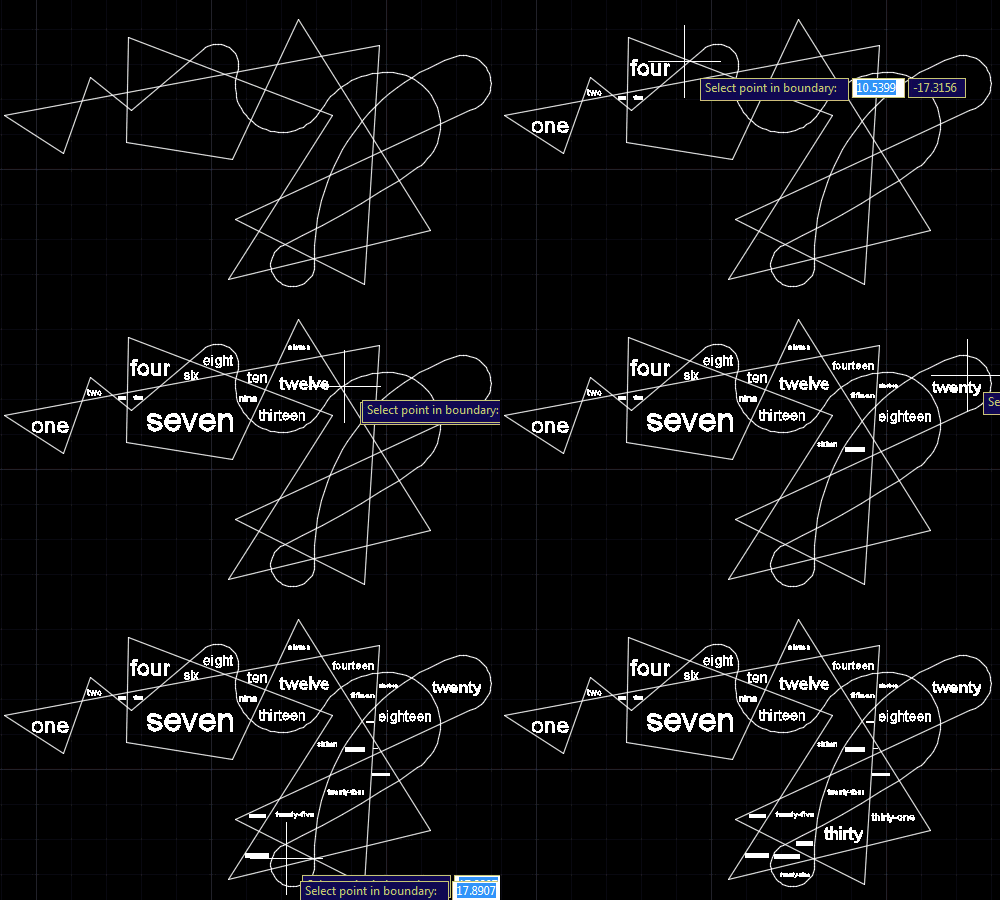
Again, I see lots of potential applications for this one… in the next (related) post, I plan to extend the implementation to adjust the text size of text and block attributes, as per the original request from Alex. We'll see where it goes from there!


Leave a Reply to Parthiv Cancel reply