It's been an interesting first week in Autodesk Research. I've had the opportunity to jump into a few projects that are really interesting. One involves the use of generative design tools to perform a number of different analyses on design alternatives for an architectural project, assessing criteria such as maximum team co-location and improving the circulation of people through corridors.
One the tools being used for the analysis is Dynamo: something I've been meaning to spend some time with for ages, but finally have good reason to. (Some of you may remember my involvement/interest in the DesignScript project… DesignScript is the language engine that drives Dynamo, so many of the concepts are very familiar. It's a bit like meeting an old friend after a long separation. 🙂
The hope is to use Dynamo to perform – among other things – spatial analysis using isovists, a term I was previously unfamiliar with. Isovists basically allow you to analyse the space enclosing a given point in the model: it's like tracking light outwards from a point light source and detecting the illuminated volume.
I couldn't find a direct way to generate isovists in Dynamo, but I did stumble across a (somewhat) recent Hackathon project called Acoustamo (which I've also seen referred to as Acustamo). This is a simple tool to perform acoustic analysis of a space: it uses rudimentary raytracing to analyse the reflection of sound, allowing you to analyse acoustic properties during conceptual design. I figured that isovist analysis is basically raytracing without the bounce (you limit the rays from being reflected at all: they simply get absorbed by the first obstacles they hit), so it seemed like an easy way to try it out.
I installed the "Acustamo" package inside Dynamo Studio and hacked around with the provided tutorial. Rather than taking geometry from Revit – as I'm not currently working inside Revit, but running standalone – I created a circular space and ran the analysis from a point located inside it. Nothing spectacular, but it appears to show that the principle works well enough. Here's my Dynamo file – you'll need to install the Acustamo package manually, as the .dyn format doesn't appear to contain package references, at least none that Dynamo Studio acts upon – in order to try it for yourself.
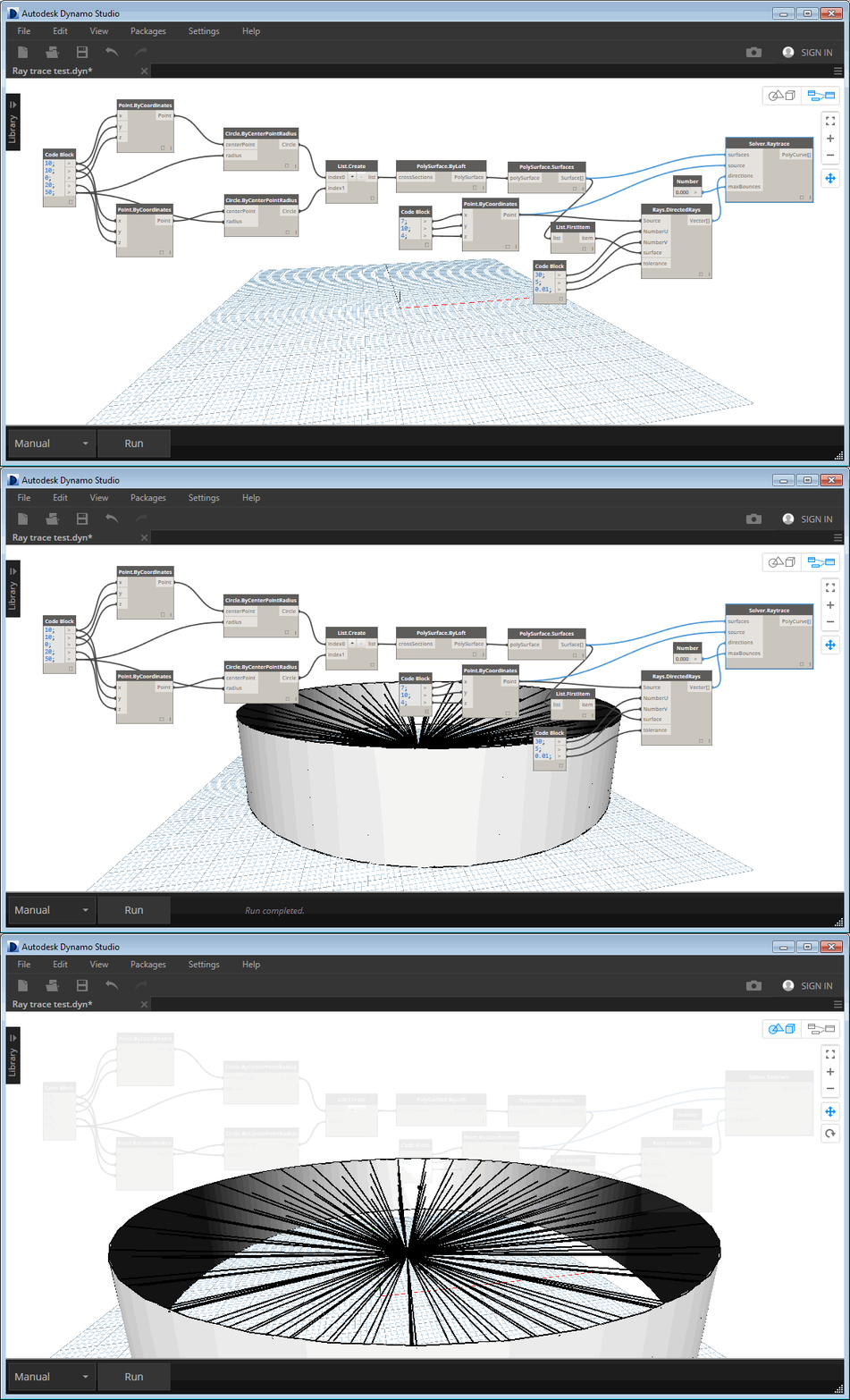
In many ways what we're doing is similar to the concept of partial application in functional programming: we're effectively "fixing" the maxBounces parameter of the Raytrace function to 0.
I'd like to see how I can compose this into a nicely packaged node… I know I can create a zero-touch .NET plugin – much in the same way as Acustamo was implemented – but I'm curious whether it's possible to build higher-level components based on existing ones. It seems to me that this kind of encapsulation would be necessary for a system like Dynamo – where you can quickly get huge graphs without it – so hopefully it's just a matter of learning how it all works.


Leave a Reply to Lester J. Grace Cancel reply