I received this interesting question by email from Henrik Ericson, last week.
Is it possible to sort the selected objects (only 3dFaces in my case) in a SelectionSet by their layers?
I want to process all the objects, one layer at a time.
In other words, first all objects on layer A, and then all objects on layer B and then C and so on. In my case it isn't necessary to process the layers alphabetically.
It's especially interesting as I'd just been thinking of approaches for sorting toolbars based on an index property, to get the code in this post to work properly. Henrik's question gave me a solid reason to think the problem through and create a solution.
We're going to take a look at the problem in three stages. In today's post we're going to look at a simple way to address this by using LINQ to sort on an object's layer and (for bonus points) on its object type. As you'll see the code for the two commands is very similar, so in the next post we're going to abstract the implementation away to create an extension method that can sort based on any string property.
In the last (planned) post, we're going to abstract things away even further, creating a static template class that will allow us (hopefully) to sort based on any object property, such as the color index of an object's layer. Which should be pretty cool. 🙂
To avoid a lot of hassle with transactions or manual open/close, we're going to make heavy use of dynamic .NET: we're going to declare ObjectId types as dynamic, so that we can simply access the object's properties directly. Or those of its layer, for that matter. We'll then add entries to a dictionary: the key will be the ObjectId and the value will be the property we want to sort on. Then we can just call LINQ's OrderBy() extension method, passing in a selector lambda from which we return the value to sort on (the value of the key-value pair, in our case).
We can then simply loop through the sorted results, printing the contents to the command-line.
So here's the basic implementation, showing how we can use LINQ to sort an ObjectId array and let us process the objects in sequence:
using Autodesk.AutoCAD.ApplicationServices;
using Autodesk.AutoCAD.DatabaseServices;
using Autodesk.AutoCAD.EditorInput;
using Autodesk.AutoCAD.Runtime;
using System.Collections.Generic;
using System.Linq;
namespace ProcessObjectsInOrder
{
public class Commands
{
[CommandMethod("OBL", CommandFlags.UsePickSet)]
public static void ObjectsByLayer()
{
var doc = Application.DocumentManager.MdiActiveDocument;
if (doc == null) return;
var ed = doc.Editor;
// Select the objects to sort
var psr = ed.GetSelection();
if (psr.Status != PromptStatus.OK)
return;
// We'll sort them based on a string value (the layer name)
var map = new Dictionary<ObjectId, string>();
foreach (dynamic id in psr.Value.GetObjectIds())
{
map.Add(id, id.Layer);
}
var sorted = map.OrderBy(kv => kv.Value);
// Print them in order to the command-line
foreach (var item in sorted)
{
ed.WriteMessage("\nObject {0} on layer {1}", item.Key, item.Value);
}
}
[CommandMethod("OBT", CommandFlags.UsePickSet)]
public static void ObjectsByType()
{
var doc = Application.DocumentManager.MdiActiveDocument;
if (doc == null) return;
var ed = doc.Editor;
// Select the objects to sort
var psr = ed.GetSelection();
if (psr.Status != PromptStatus.OK)
return;
// Sort them based on a string value (the class name)
var map = new Dictionary<ObjectId, string>();
foreach (dynamic id in psr.Value.GetObjectIds())
{
map.Add(id, id.ObjectClass.Name);
}
var sorted = map.OrderBy(kv => kv.Value);
// Print them in order to the command-line
foreach (var item in sorted)
{
ed.WriteMessage("\nObject {0} of type {1}", item.Key, item.Value);
}
}
}
}
The OBL and OBT commands sort based on layer and type, respectively. Here's how they work on a simple drawing:
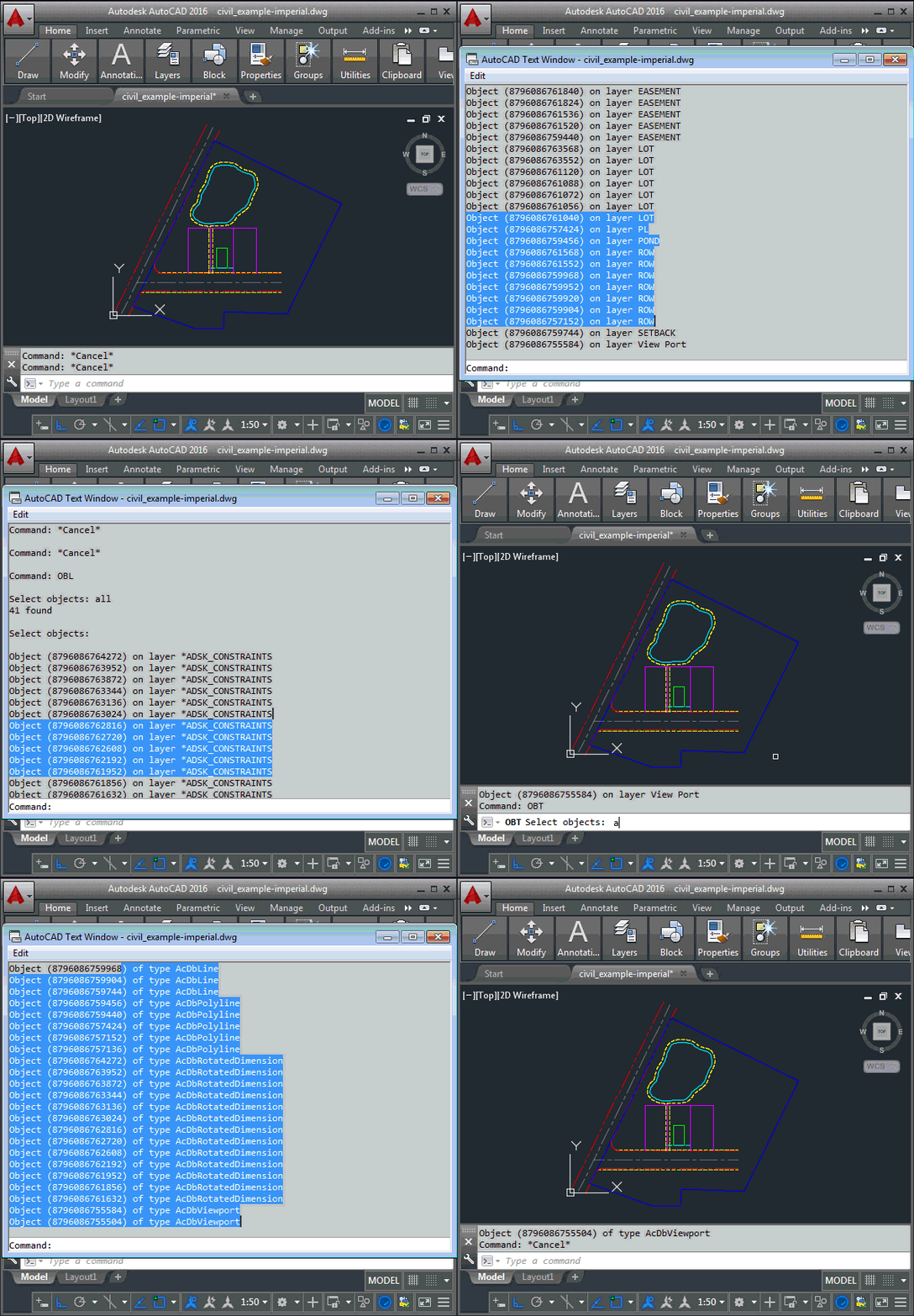
As mentioned already, there's a great deal of commonality between the two commands. We're going to take a shot at factoring that away, in the next post, creating an extension method to sort an array of ObjectIds.


Leave a Reply to James Maeding Cancel reply