After seeing a basic approach to sort arrays of ObjectIds using LINQ – and then refactoring that to be a shared extension method to be used on arrays of ObjectIds – today we're going to see that code refactored, once again, to work with types of data other than strings (up until now we could only sort objects based on string properties such as class and layer names).
One solid approach for creating operations that can deal with different types of object – while maintaining type safety – is to use template classes, which are known as generic classes in C#. I should probably have been calling these "generics" since the beginning of this series, but unfortunately my time with C++ has left the term "templates" somewhat ingrained. For the sake of this series of posts, please consider the terms template and generic to be interchangeable, even if it seems there are some differences between the two language implementations.
In case you're not already familiar with generics, you use them every time you create a generic collection – such as a List<> or a Dictionary<> – to manage objects of a particular type. In today's code we're going to define our own static template class with a static template method. Both class and method can be static as we don't need to store any per-instance data with instances of our generic class.
Which also means we don't even need to instanciate our class: we can just refer to the type and call the static method from that.
Here's the updated C# code:
using Autodesk.AutoCAD.ApplicationServices;
using Autodesk.AutoCAD.DatabaseServices;
using Autodesk.AutoCAD.EditorInput;
using Autodesk.AutoCAD.Runtime;
using System;
using System.Collections.Generic;
using System.Linq;
namespace ProcessObjectsInOrder
{
public static class Extensions
{
/// <summary>
/// Sorts an array of ObjectIds based on a string property and order.
/// </summary>
/// <param name="ids">The array of IDs to sort.</param>
/// <param name="propertySelector">A function selecting the string property.</param>
/// <param name="orderSelector">A function to specify the selection order.</param>
/// <returns>An ordered enumerable of key-value pairs.</returns>
public static List<KeyValuePair<ObjectId, string>>
Sort(
this ObjectId[] ids,
Func<dynamic, string> propertySelector,
Func<KeyValuePair<ObjectId, string>, string> orderSelector
)
{
var map = new Dictionary<ObjectId, string>();
foreach (dynamic id in ids)
{
map.Add(id, propertySelector(id));
}
return map.OrderBy(orderSelector).ToList();
}
}
public static class ObjectSorter<T>
{
public static List<KeyValuePair<ObjectId, T>>
Sort(
ObjectId[] ids,
Func<dynamic, T> propertySelector,
Func<KeyValuePair<ObjectId, T>, T> orderSelector
)
{
var map = new Dictionary<ObjectId, T>();
foreach (dynamic id in ids)
{
map.Add(id, propertySelector(id));
}
return map.OrderBy(orderSelector).ToList();
}
}
public class Commands
{
[CommandMethod("OBL", CommandFlags.UsePickSet)]
public static void ObjectsByLayer()
{
var doc = Application.DocumentManager.MdiActiveDocument;
if (doc == null) return;
var ed = doc.Editor;
// Select the objects to sort
var psr = ed.GetSelection();
if (psr.Status != PromptStatus.OK)
return;
// We'll sort them based on a string value (the layer name)
var map = new Dictionary<ObjectId, string>();
foreach (dynamic id in psr.Value.GetObjectIds())
{
map.Add(id, id.Layer);
}
var sorted = map.OrderBy(kv => kv.Value);
// Print them in order to the command-line
foreach (var item in sorted)
{
ed.WriteMessage("\nObject {0} on layer {1}", item.Key, item.Value);
}
}
[CommandMethod("OBT", CommandFlags.UsePickSet)]
public static void ObjectsByType()
{
var doc = Application.DocumentManager.MdiActiveDocument;
if (doc == null) return;
var ed = doc.Editor;
// Select the objects to sort
var psr = ed.GetSelection();
if (psr.Status != PromptStatus.OK)
return;
// Sort them based on a string value (the class name)
var map = new Dictionary<ObjectId, string>();
foreach (dynamic id in psr.Value.GetObjectIds())
{
map.Add(id, id.ObjectClass.Name);
}
var sorted = map.OrderBy(kv => kv.Value);
// Print them in order to the command-line
foreach (var item in sorted)
{
ed.WriteMessage("\nObject {0} of type {1}", item.Key, item.Value);
}
}
[CommandMethod("OBL2", CommandFlags.UsePickSet)]
public static void ObjectsByLayer2()
{
var doc = Application.DocumentManager.MdiActiveDocument;
if (doc == null) return;
var ed = doc.Editor;
// Select the objects to sort
var psr = ed.GetSelection();
if (psr.Status != PromptStatus.OK)
return;
// Sort them based on a string value (the layer name)
var sorted = psr.Value.GetObjectIds().Sort(id => id.Layer, kv => kv.Value);
// Print them in order to the command-line
foreach (var item in sorted)
{
ed.WriteMessage("\nObject {0} on layer {1}", item.Key, item.Value);
}
}
[CommandMethod("OBT2", CommandFlags.UsePickSet)]
public static void ObjectsByType2()
{
var doc = Application.DocumentManager.MdiActiveDocument;
if (doc == null) return;
var ed = doc.Editor;
// Select the objects to sort
var psr = ed.GetSelection();
if (psr.Status != PromptStatus.OK)
return;
// Sort them based on a string value (the class name)
var sorted =
psr.Value.GetObjectIds().Sort(id => id.ObjectClass.Name, kv => kv.Value);
// Print them in order to the command-line
foreach (var item in sorted)
{
ed.WriteMessage("\nObject {0} of type {1}", item.Key, item.Value);
}
}
[CommandMethod("OBL3", CommandFlags.UsePickSet)]
public static void ObjectsByLayer3()
{
var doc = Application.DocumentManager.MdiActiveDocument;
if (doc == null) return;
var ed = doc.Editor;
// Select the objects to sort
var psr = ed.GetSelection();
if (psr.Status != PromptStatus.OK)
return;
// Sort them based on a string value (the layer name)
var sorted =
ObjectSorter<string>.Sort(
psr.Value.GetObjectIds(),
id => id.Layer,
kv => kv.Value
);
// Print them in order to the command-line
foreach (var item in sorted)
{
ed.WriteMessage("\nObject {0} on layer {1}", item.Key, item.Value);
}
}
[CommandMethod("OBT3", CommandFlags.UsePickSet)]
public static void ObjectsByType3()
{
var doc = Application.DocumentManager.MdiActiveDocument;
if (doc == null) return;
var ed = doc.Editor;
// Select the objects to sort
var psr = ed.GetSelection();
if (psr.Status != PromptStatus.OK)
return;
// Sort them based on a string value (the class name)
var sorted =
ObjectSorter<string>.Sort(
psr.Value.GetObjectIds(),
id => id.ObjectClass.Name,
kv => kv.Value
);
// Print them in order to the command-line
foreach (var item in sorted)
{
ed.WriteMessage("\nObject {0} of type {1}", item.Key, item.Value);
}
}
[CommandMethod("OBC", CommandFlags.UsePickSet)]
public static void ObjectsByColor()
{
var doc = Application.DocumentManager.MdiActiveDocument;
if (doc == null) return;
var ed = doc.Editor;
// Select the objects to sort
var psr = ed.GetSelection();
if (psr.Status != PromptStatus.OK)
return;
// Sort them based on a short value (the layer's color index)
var sorted =
ObjectSorter<short>.Sort(
psr.Value.GetObjectIds(),
id => id.LayerId.Color.ColorIndex,
kv => kv.Value
);
// Print them in order to the command-line
foreach (var item in sorted)
{
ed.WriteMessage("\nObject {0} on layer of color {1}", item.Key, item.Value);
}
}
[CommandMethod("OBC2", CommandFlags.UsePickSet)]
public static void ObjectsByColor2()
{
var doc = Application.DocumentManager.MdiActiveDocument;
if (doc ==
null) return;
var ed = doc.Editor;
// Select the objects to sort
var psr = ed.GetSelection();
if (psr.Status != PromptStatus.OK)
return;
// Sort them based on an integer value (the layer's color index)
// Needs to be an integer as it's signed: we're going in reverse order
var sorted =
ObjectSorter<int>.Sort(
psr.Value.GetObjectIds(),
id => id.LayerId.Color.ColorIndex,
kv => -kv.Value
);
// Print them in order to the command-line
foreach (var item in sorted)
{
ed.WriteMessage("\nObject {0} on layer of color {1}", item.Key, item.Value);
}
}
}
}
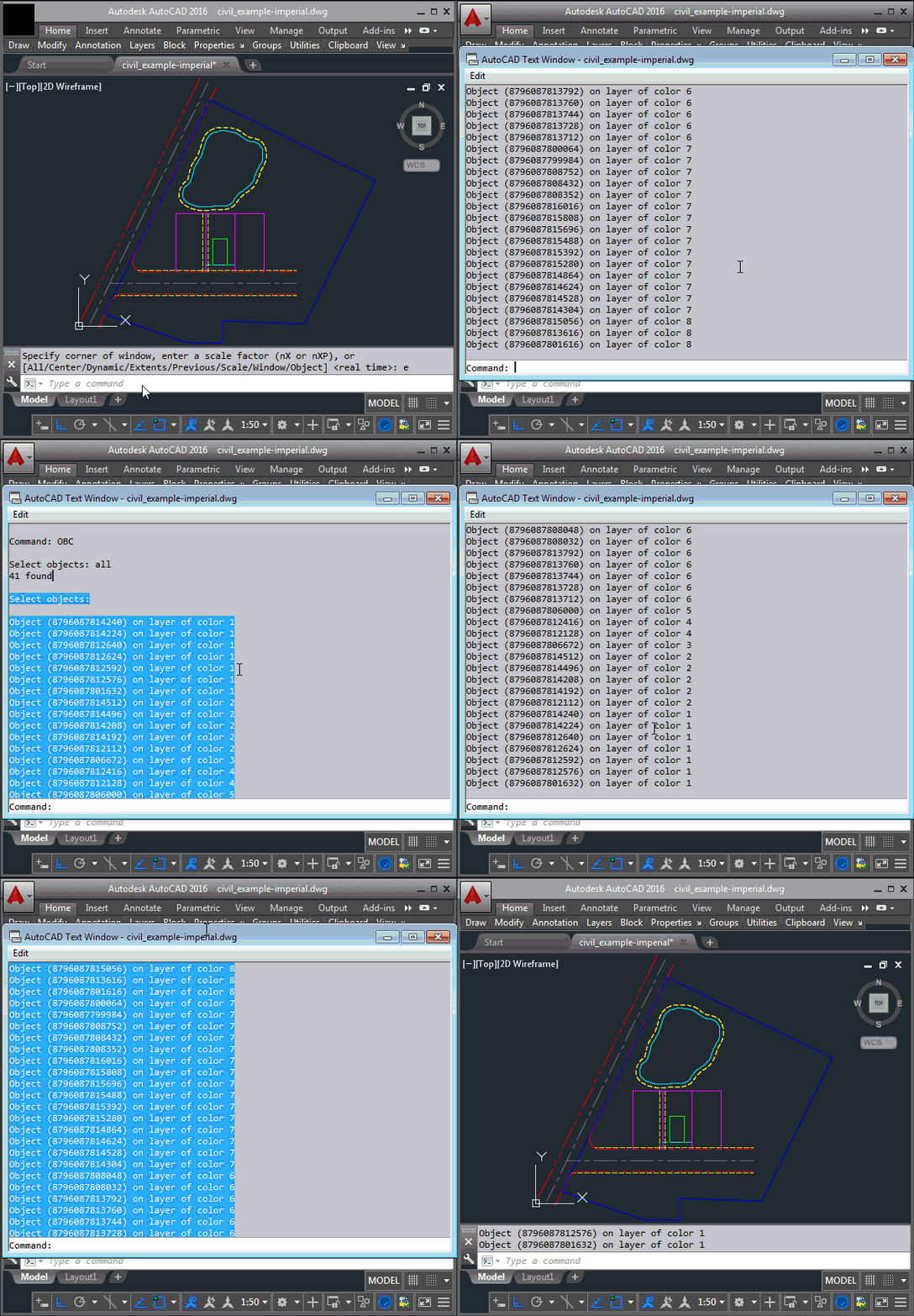
The main additions – other than new versions of the OBL and OBT commands called OBL3 and OBT3 – are a couple of commands to sort objects by their layer's color index. The first, OBC, uses the short data type to sort the list in ascending order. The second, OBC2, uses an integer instead – as this is a signed data type – so we can use our orderSelector argument to reverse the order and list them in descending order.
Here are the OBC and OBC2 commands in action:
That's it for this short series on sorting objects using LINQ and AutoCAD's dynamic .NET implementation. If you have suggestions on how to extend this implementation in interesting ways – or to create a separate series of posts – please do post a comment.


Leave a Reply to Ben Cancel reply