Implementing tooltips for individual points in a point cloud in the Forge viewer

In the last post we talked about a recent optimization to Dasher 360, where we implemented a point cloud rather than individual SVG-based markers for our various sensors. As mentioned, last time, this was pretty straightforward to get working, but did add some complexity: rather than having seperate DOM-resident markers – which can easily have separate tooltips assigned – we now have a single object and need to be able to display tooltips when individual points in the cloud are hovered over.
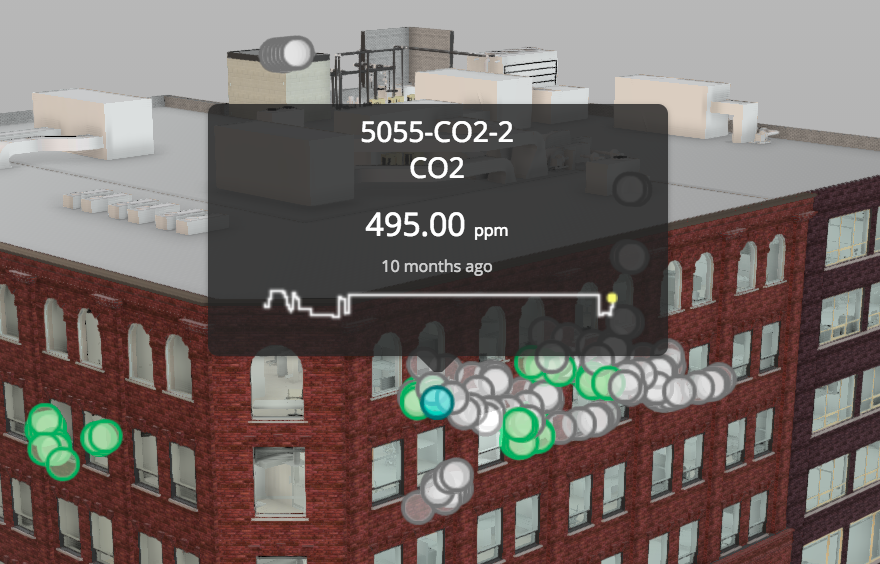
A tooltip on our sensor point cloud un Dasher 360

Here's the basic algorithm we used to determine when an individual sensor was being hovered over:

  1. Implement a 'mousemove' event listener on the viewer's container. The rest of this algorithm is executed on mouse move.
  2. Check whether the cursor is on a UI element (see below for more details on this).
  3. Fire a ray along the camera direction (there's code for this you can find in the Forge viewer .js file).
  4. Check for intersections with our point cloud.
  5. If there are hits, filter out any that aren't visible.
  6. Sort the remaining hits by distance from the camera.
  7. Get the closest point to the camera. Change its colour to your hover colour.
  8. Get the screen point of its world coordinates and then use this as the location for the tooltip.

We use tooltipster to display tooltips, but there are various other JavaScript tooltip libraries out there.

For the 2nd step: when I first looked at this, I realised I could iterate through the UI panels and check their various client coordinates. The below is in TypeScript, but that really only means the function signature – the rest is pure JavaScript.

cursorOnPanel(x: number, y: number): Boolean {


  let panels = this.viewer.dockingPanels;


  // Panels may not be present when dealing with an instance of Viewer3D.js

  // (as opposed to an instance of GuiViewer3D.js)

  if (!panels) {

    return false;

  }


  for (let i = 0; i < panels.length; ++i) {


    let panel = panels[i];

    let cont = panel.container;


    if (cont.clientWidth > 0 && cont.clientHeight > 0) {

      if (

        x >= cont.offsetLeft && x <= cont.offsetLeft + cont.offsetWidth &&

        y >= cont.offsetTop && y <= cont.offsetTop + cont.offsetHeight

      ) {

        return true;

      }

    }

  }

  return false;

}


When I first ran this code, it didn't include our custom dialogs. It was then that I realised we hadn't been calling viewer.addPanel() for these dialogs. This is well worth doing and not only for the above code to include them: if they've been added to the viewer then as the viewer gets resized the dialogs will get moved to stay inside the viewer's extents. Very handy.

In an internal discussion resident JavaScript guru, Philippe Leefsma, suggested an alternative approach. He mentioned document.elementFromPoint(), which allowed me to simplify the code somewhat. Now we only return false if the cursor isn't over the canvas.

cursorOnPanel(x: number, y: number): Boolean {


  let elem = document.elementFromPoint(x, y);

  if (elem && elem.localName === 'canvas') {

    return false;

  }

  return true;

}


I suppose this could even be reduced to this, albeit at the expense of readability.

cursorOnPanel(x: number, y: number): Boolean {


  let elem = document.elementFromPoint(x, y);

  return !(elem && elem.localName === 'canvas');

}


The code seems to work well. There are lots of situations where people will want to use THREE.js point clouds to display large numbers of markers, such as this, so at some point we'll try to package this into a more reusable extension for the Forge viewer.

7 responses to “Implementing tooltips for individual points in a point cloud in the Forge viewer”

  1. Hello Kean, just wanted to check if Forge viewer already has an extension of the above functionality. Or any leads for implementing sensor dots as mentioned in your previous post [1]

    [1] keanw.com/2017/01/optimizing-dasher-360-using-a-point-cloud-to-display-sensor-markers.html

  2. Kean Walmsley Avatar

    There isn't a published extension, as such, but you can follow the advice shown in this post to implement sensor dots via a point cloud: https://forge.autodesk.com/...

    1. Thank you for a quick response. Let me try and implement the same 🙂

  3. Hi Kean, after implementing pointcloud for marker positions, I used world2Screen to get their location for tooltip. Now I tried using elem = document.elementFromPoint but continuously only get canvas as the output instead of the clicked/hovered point.

    1. Kean Walmsley Avatar

      There is no DOM element: they're just points drawn on the canvas. That's why elementFromPoint returns the canvas.

      You'll need to find a way to display the tooltip at an arbitrary screen location (I think we use Tooltipster).

      Kean

  4. Hello Kean, I've implemented similar thing. I can make the sensor marker visible. Now trying to get the hovered item. Here's my code for hit-test -

    updateHitTest(event) {

    if (!this.overlayPointCloudMap || Object.keys(this.overlayPointCloudMap).length <= 0)
    return;

    const pointer = event.pointers ? event.pointers[0] : event;
    const pointerVector = new THREE.Vector3();
    const pointerDir = new THREE.Vector3();
    const ray = new THREE.Raycaster();
    ray.params.PointCloud.threshold = 20; // hit-test markup size. Change this if markup 'hover' doesn't work
    const camera = this.viewer.impl.camera;
    const rect = this.viewer.impl.canvas.getBoundingClientRect();
    const x = ((pointer.clientX - rect.left) / rect.width) * 2 - 1;
    const y = - ((pointer.clientY - rect.top) / rect.height) * 2 + 1;
    if (camera.isPerspective) {
    pointerVector.set(x, y, 0.5);
    pointerVector.unproject(camera);
    ray.set(camera.position, pointerVector.sub(camera.position).normalize());
    } else {
    pointerVector.set(x, y, -1);
    pointerVector.unproject(camera);
    pointerDir.set(0, 0, -1);
    ray.set(pointerVector, pointerDir.transformDirection(camera.matrixWorld));
    }

    let nodes = null;
    // Go through the point-cloud at each layer
    for (const overlay of this.overlayNames) {
    nodes = ray.intersectObject(this.overlayPointCloudMap[overlay]);
    if (nodes.length > 0) {
    break;
    }
    }

    console.log(nodes);

    if (nodes.length > 0) {
    if (this.lastClickedIndex != nodes[0].index) {
    this.lastClickedIndex = nodes[0].index;
    console.log(this.lastClickedIndex);
    }
    }
    }

    Could you please tell me the problem? It's not calculating the exact hovered item. Also empty sometime.

    1. Hi Shohag,

      I unfortunately don't have time to provide support. Please post your questions to the relevant forum (in this case I suggest StackOverflow as it relates to Forge).

      Best,

      Kean

Leave a Reply to shohag sarkar Cancel reply

Your email address will not be published. Required fields are marked *