Sweeping an AutoCAD surface using .NET

AutoCAD 2007 introduced more advanced solid & surface modeling tools. This post takes a look at how to generate one particular type of surface: a SweptSurface, which is created by sweeping a profile (which could be a region, a planar surface or a curve) through a particular path (which must be a curve).

The below C# code shows how to sweep an object along a curved path to create a surface. Our SAP (for SweepAlongPath) command doesn't provide all the options of the standard SWEEP command, as the point is to show how to do this programmatically, not to duplicate standard AutoCAD functionality.

We're creating a SweptSurface in our code: it's also possible to sweep a similar entity along a path to create a Solid3d, but at the time of writing this is only exposed through ObjectARX (AcDb3dSolid::createSweptSolid()). If you have a strong need to create swept solids in AutoCAD using .NET, please send me an email.

using Autodesk.AutoCAD.ApplicationServices;

using Autodesk.AutoCAD.DatabaseServices;

using Autodesk.AutoCAD.EditorInput;

using Autodesk.AutoCAD.Runtime;

using Autodesk.AutoCAD.Geometry;

namespace SolidCreation

{

  public class Commands

  {

    [CommandMethod("SAP")]

    public void SweepAlongPath()

    {

      Document doc =

        Application.DocumentManager.MdiActiveDocument;

      Database db = doc.Database;

      Editor ed = doc.Editor;

      // Ask the user to select a region to extrude

      PromptEntityOptions peo1 =

        new PromptEntityOptions(

          "\nSelect profile or curve to sweep: "

        );

      peo1.SetRejectMessage(

        "\nEntity must be a region, curve or planar surface."

      );

      peo1.AddAllowedClass(

        typeof(Region), false);

      peo1.AddAllowedClass(

        typeof(Curve), false);

      peo1.AddAllowedClass(

        typeof(PlaneSurface), false);

      PromptEntityResult per =

        ed.GetEntity(peo1);

      if (per.Status != PromptStatus.OK)

        return;

      ObjectId regId = per.ObjectId;

      // Ask the user to select an extrusion path

      PromptEntityOptions peo2 =

        new PromptEntityOptions(

          "\nSelect path along which to sweep: "

        );

      peo2.SetRejectMessage(

        "\nEntity must be a curve."

      );

      peo2.AddAllowedClass(

        typeof(Curve), false);

      per = ed.GetEntity(peo2);

      if (per.Status != PromptStatus.OK)

        return;

      ObjectId splId = per.ObjectId;

      // Now let's create our swept surface

      Transaction tr =

        db.TransactionManager.StartTransaction();

      using (tr)

      {

        try

        {

          Entity sweepEnt =

            tr.GetObject(regId, OpenMode.ForRead) as Entity;

          Curve pathEnt =

            tr.GetObject(splId, OpenMode.ForRead) as Curve;

          if (sweepEnt == null || pathEnt == null)

          {

            ed.WriteMessage(

              "\nProblem opening the selected entities."

            );

            return;

          }

          // We use a builder object to create

          // our SweepOptions

          SweepOptionsBuilder sob =

            new SweepOptionsBuilder();

          // Align the entity to sweep to the path

          sob.Align =

            SweepOptionsAlignOption.AlignSweepEntityToPath;

          // The base point is the start of the path

          sob.BasePoint = pathEnt.StartPoint;

          // The profile will rotate to follow the path

          sob.Bank = true;

          // Now generate the surface...

          SweptSurface ss =

            new SweptSurface();

          ss.CreateSweptSurface(

            sweepEnt,

            pathEnt,

            sob.ToSweepOptions()

          );

          // ... and add it to the modelspace

          BlockTable bt =

            (BlockTable)tr.GetObject(

              db.BlockTableId,

              OpenMode.ForRead

            );

          BlockTableRecord ms =

            (BlockTableRecord)tr.GetObject(

              bt[BlockTableRecord.ModelSpace],

              OpenMode.ForWrite

            );

          ms.AppendEntity(ss);

          tr.AddNewlyCreatedDBObject(ss, true);

          tr.Commit();

        }

        catch

        { }

      }

    }

  }

}

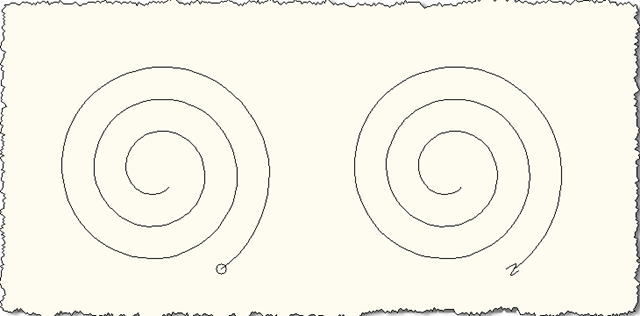
Here's an image of a very simple drawing I used to demonstrate the function. I started by creating a helix, and then copied it, essentially creating my two paths. I then drew a tiny circle at the end point of the first helix (not aligned to the path in any way - just flat in the World UCS - as the SweepOptions we choose will ask that the profile to be aligned automatically to the path), and drew a simple "S"-shaped spline at the end point of the second helix (I drew the spline elsewhere and moved it using the mid-point as a base point, selecting the end of the helix as the destination).

So we end up with two paths (both helixes) and their respective non-aligned profiles (one a circle, the other a spline):
Helix paths and profiles

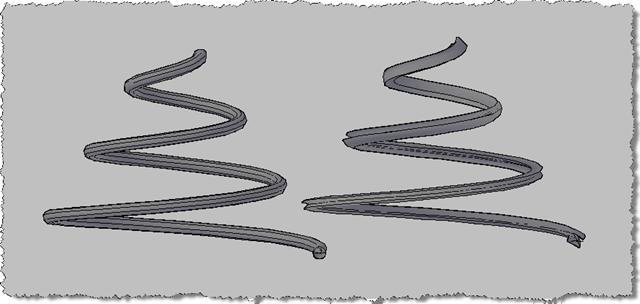
I then ran the SAP command twice, selecting one of the profiles and its respective path each time. Here's the 2D wireframe view of what was created:

Swept surfaces - plan

To see the geometry better, I then changed to use the conceptual visual style and orbitted around to get a better 3D view:
Swept surfaces - 3D conceptual

Update

As mentioned in this post, Solid3d.CreateSweptSolid has now been implemented in AutoCAD 2010.

Update 2

And you can see the how to use Solid3d.CreateSweptSolid in this post.

3 responses to “Sweeping an AutoCAD surface using .NET”

  1. Hi Mr. KEAN WALMSLEY:
    sorry for my english¡¡¡
    ok i need any routine in vba for applications for autocad 2009 to create some surface from excel list points x y z please i yo have someone macros i'm very apreciate.

    thanks a lot Mr. KEAN WALMSLEY

    Ronald

  2. Sorry, Ronald - I don't have a sample, and don't take custom development requests (unless something is of relevance to the general readership, which means I tend not to write VBA samples).

    Kean

  3. will this code run on autocad 2006?

  4. No, it won't.

    Kean

  5. Hi Kean,

    I really need to be able to programatically create 3dSolids by sweeping along mainly helixes and 3d splines. Could you help me with that?
    Maybe you could create a function that gets a region and a path entities as arguments and returns the newly created 3dSolid?

    Is that posible?

    If you can do it in VB.NET rather that C# it'll be even better for me because I'm an absolute beginner in C#.

    Thanks a lot for your great blog!

  6. Hi Alex,

    Today's post should help, and hopefully the resources provided here will help convert the code to VB.NET.

    While I haven't created a separate function to do this, I'd hope you'd be able to do that yourself (what you've described is quite similar to Solid3d.CreateSweptSolid() does, although rather than returning the result this sets the state of the Solid3d entity upon which is is called).

    Good luck!

    Kean

  7. Hi Kean,

    Is it possible to align an object to a path without executing the sweep command

    Thank you for this useful blog

  8. Hi Adi,

    So you want to align a profile without performing the sweep itself? When you say "the sweep command" do you mean the command or the operation?

    Regards,

    Kean

  9. Hi Kean,

    Yes, if possible I want to do the alignment without executing the sweep operation -sorry my mistakes in previous post-.

    For example in 3D coordinate system I have a line, and a circle. I want the circle to be rotated so that it perpendicularly aligned with the line

    Thank You

    Regards,

    Adi

  10. Hi Adi,

    That's a fairly straightforward example: you should be able to set the center of the circle to be the start-point of the line and its normal to be the unit vector going in the direction between the end-point and the start-point.

    Regards,

    Kean

  11. Hi Kean,

    Finally I successfully done it according to your advise. But, it doesn't work if the line that act as path change to arc, ellipse or spline.

    Well I can do it by doing the sweep operation, explode the object created until I get the 2D object.

    But I was wondering is it possible to do it faster, without doing the sweep operation.

    Regards
    Adi

  12. You just need to know the direction vector of the curve at its startpoint: you can get another point along the curve (at dist or at param) and use that for the circle's normal.

    Kean

  13. Nice Stuff! I am using a part of this for teching my class about vehicle swept paths. I'm also using some visuals from Sweptpath.com and i like to compare your article with a few others. Thank you!

  14. Very very interesting thx for post

  15. Hi Kean,
    I want to implement this functionality using objectARX how can I do it?

    1. Kean Walmsley Avatar

      Hi Frank,

      Please post requests for technical help such as this to the relevant AutoCAD forum.

      Many thanks,

      Kean

      1. ok ,thank you for your reply.

Leave a Reply to Vince Cancel reply

Your email address will not be published. Required fields are marked *