The code in this post is a direct port of the F# code in this previous post, which was entered by Qun Lu in the recent F# programming contest. Someone – very validly - commented on the fact the post involved both a new language and a new API, which was probably pushing things a little from a learning perspective. 🙂
Without repeating my various comments in the previous post, I will reiterate the fact that this API is extremely interesting for developers who wish to customize the appearance and behaviour of standard AutoCAD objects without going through the pain of implementing full custom objects.
Here's the equivalent C# code that works with AutoCAD 2010:
using Autodesk.AutoCAD.ApplicationServices;
using Autodesk.AutoCAD.Runtime;
using Autodesk.AutoCAD.DatabaseServices;
using Autodesk.AutoCAD.Geometry;
using Autodesk.AutoCAD.GraphicsInterface;
using Autodesk.AutoCAD.Colors;
namespace DrawOverrule
{
public class DrawOverrule : DrawableOverrule
{
static public DrawOverrule theOverrule =
new DrawOverrule();
static private double Radius = 0.5;
private SweepOptions sweepOpts = new SweepOptions();
public override bool WorldDraw (Drawable d, WorldDraw wd)
{
if (d is Line)
{
Line line = (Line)d;
// Draw the line as is, with overruled attributes
base.WorldDraw(line, wd);
if (!line.Id.IsNull && line.Length > 0.0)
{
// Draw a pipe around the line
EntityColor c =
wd.SubEntityTraits.TrueColor;
wd.SubEntityTraits.TrueColor =
new EntityColor(0x00AfAfff);
wd.SubEntityTraits.LineWeight =
LineWeight.LineWeight000;
Circle clr =
new Circle(
line.StartPoint,
line.EndPoint - line.StartPoint,
DrawOverrule.Radius
);
ExtrudedSurface pipe = new ExtrudedSurface();
try
{
pipe.CreateExtrudedSurface(
clr, line.EndPoint-line.StartPoint, sweepOpts
);
}
catch
{
Document doc =
Application.DocumentManager.MdiActiveDocument;
doc.Editor.WriteMessage(
"\nFailed with CreateExtrudedSurface."
);
}
clr.Dispose();
pipe.WorldDraw(wd);
pipe.Dispose();
wd.SubEntityTraits.TrueColor = c;
}
return true;
}
else if (d is Circle)
{
Circle circle = (Circle)d;
// Draw the circle as is, with overruled attributes
base.WorldDraw(circle, wd);
// Needed to avoid ill-formed swept surface
if (circle.Radius > DrawOverrule.Radius)
{
// Draw a pipe around the cirle
EntityColor c = wd.SubEntityTraits.TrueColor;
wd.SubEntityTraits.TrueColor =
new EntityColor(0x3fffe0e0);
wd.SubEntityTraits.LineWeight =
LineWeight.LineWeight000;
Vector3d normal =
(circle.Center-circle.StartPoint).
CrossProduct(circle.Normal);
Circle clr =
new Circle(
circle.StartPoint, normal, DrawOverrule.Radius
);
SweptSurface pipe = new SweptSurface();
pipe.CreateSweptSurface(clr, circle, sweepOpts);
clr.Dispose();
pipe.WorldDraw(wd);
pipe.Dispose();
wd.SubEntityTraits.TrueColor = c;
}
return true;
}
return base.WorldDraw(d, wd);
}
public override int SetAttributes (Drawable d, DrawableTraits t)
{
int b = base.SetAttributes(d, t);
if (d is Line)
{
// If d is LINE, set color to index 6
t.Color = 6;
// and lineweight to .40 mm
t.LineWeight = LineWeight.LineWeight040;
}
else if (d is Circle)
{
// If d is CIRCLE, set color to index 2
t.Color = 2;
// and lineweight to .60 mm
t.LineWeight = LineWeight.LineWeight060;
}
return b;
}
}
public class Commands
{
public void Overrule(bool enable)
{
// Regen to see the effect
// (turn on/off Overruling and LWDISPLAY)
DrawableOverrule.Overruling = enable;
if (enable)
Application.SetSystemVariable("LWDISPLAY", 1);
else
Application.SetSystemVariable("LWDISPLAY", 0);
Document doc =
Application.DocumentManager.MdiActiveDocument;
doc.SendStringToExecute("REGEN3\n", true, false, false);
doc.Editor.Regen();
}
[CommandMethod("OVERRULE1")]
public void OverruleStart()
{
ObjectOverrule.AddOverrule
(RXClass.GetClass(typeof(Drawable)),
DrawOverrule.theOverrule, true);
Overrule(true);
}
[CommandMethod("OVERRULE0")]
public void OverruleEnd()
{
Overrule(false);
}
}
}
[Repeating the results from the previous post…]
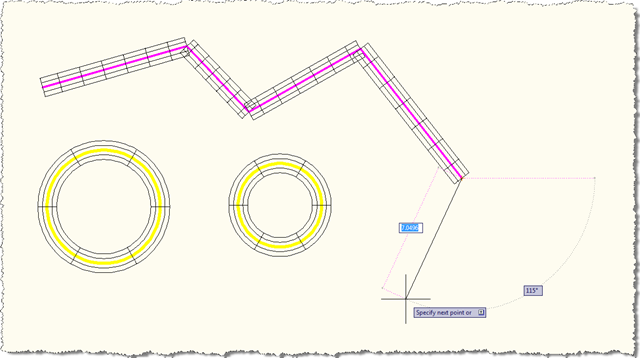
Here's what happens when we load the application, turn the overrule on using the OVERRULE1 command (OVERRULE0 is the command to turn the overrule off) and draw some lines and circles:
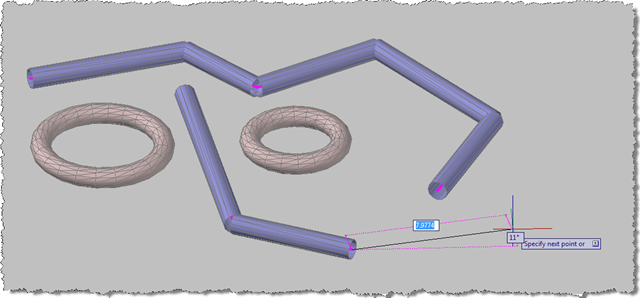
Even in a 3D view – this time with the realistic visual style applied – you get the piping effect when you draw simple geometry:
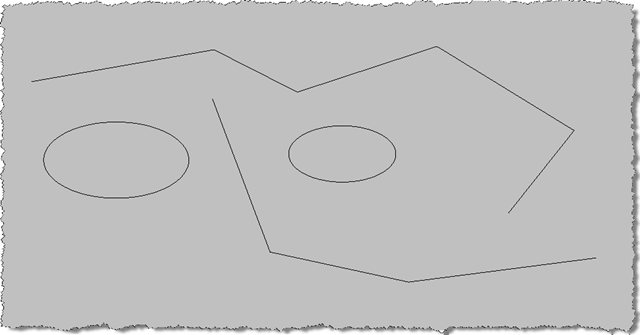
These are standard AutoCAD lines and circles. When you use the OVERRULE0 command to disable the overrule, they revert to their original form:


Leave a Reply to Layman Cancel reply