March’s Plugin of the Month live on Autodesk Labs: Batch Publish for AutoCAD

I'm very pleased to announce the availability of this really interesting Plugin of the Month over on Autodesk Labs: Batch Publish for AutoCAD. Here's an excerpt from the ReadMe (which I happen to have written, but anyway):

This plugin can be used with AutoCAD to simplify the process of publishing sets of drawings to DWF and/or PDF. It runs as a command within AutoCAD – as opposed to a separate executable – and uses a separate executable to monitor AutoCAD's health and restart it, as needed. The status of the batch publishing operation is stored to disk, allowing it to pick up from where it left off and also for any failed documents to be retried without starting from scratch. A setting is available to only publish drawings that have been modified since they were last published, making it easier to publish sets of documents on a regular basis.

Varadan Krishnan and Viru Aithal from our DevTech India team have been working hard on this tool for some time. Viru and Varadan have added some very interesting enhancements over the last few months, as the plugin has evolved, and I think it's going to prove a very useful tool for anyone needing to publish sets of drawings to DWF or PDF.

Typical batch publishing applications often take the form of standalone applications which call through to AutoCAD using COM to drive the publishing of drawings. This application takes a slightly different approach: it runs in-process to AutoCAD, as a standard .NET plugin defining a BATCHPUBLISH command, and this command will load and publish the various documents you care about, one after the other. So you have access to your publishing task right there in the AutoCAD application: no need to launch anything external. That said, as you're launching a batch processing operation – which may be trying to read problematic source drawings – it's highly recommended that you save and close any drawings you're working on. As we'll see below, AutoCAD may get restarted forcefully during the operation, so it's highly recommended to launch it from a fresh instance of AutoCAD (or at least one with no unsaved drawings open in the editor).

The application uses a couple of very interesting techniques which may be of interest to people looking at this from a development perspective. Firstly, it has a separate little "regulator" application which monitors the health of AutoCAD: if AutoCAD hangs on loading a corrupt drawing, or the publish operation is taking suspiciously long to complete (relative to a user-defined timeout value), the regulator kills the AutoCAD session and restarts it, making sure the batch publish operation starts back up just after the problematic drawing. Once the other drawings have completed, the user can then choose to retry publishing of any unpublished drawings, specifying a different timeout, as appropriate.

The other technique that I found interesting is the way the application calls through to AutoCAD via COM: it uses Document.SendCommand() to drive AutoCAD's PUBLISH command synchronously, but – rather than creating a dependency on AutoCAD's type library, which adds some complexity in terms of multiple version support – the code uses Type.InvokeMember() to dynamically call SendCommand() without needing the type library. The same effect can be achieved in VB quite easily using late binding and now in C# 4.0 we have the dynamic keyword or can embed specific types from a type library rather than needing the whole thing – but for older versions of C# this is a viable and interesting technique if you're only interested in a small portion of an application's COM object model.

The application makes heavy use of an XML file to persist information about the status of the batch publishing operation. This has a number of benefits, especially related to resuming the operation in case AutoCAD needs restarting, as well as restoring some temporarily-overridden system variables when everything's finished. The approach used to read and write the XML is probably slightly lower-level than might have been used – especially as .NET provides some very interesting object-level XML serialization capabilities – but the need to persist a variety of different pieces of data at various times during the batch publishing operation led to this approach being adopted, for better or worse. The current implement works well, but this is potentially one section of code that might be streamlined in a future release.

Now let's take a look at the BATCHPUBLISH command in action…

The first thing to do is to copy both the program files provided - ADNPlugin-BatchPublish.dll and its companion ADNPlugin-BatchPublishRegulator.exe – into the same folder on your local hard-drive (preferably AutoCAD's main Program Files folder).

Then we can NETLOAD the DLL into AutoCAD – which will create demand-loading entries for subsequent loads – and launch the BATCHPUBLISH command:
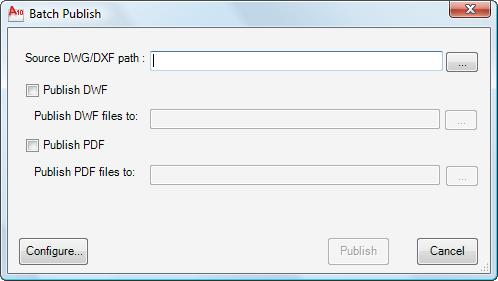
Batch Publish main dialog

Once we've filled out the information in this main dialog…
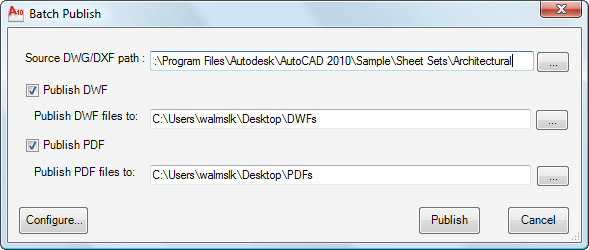
Filled out Batch Publish main dialog

… hitting configure will allow us to do additional fine-tuning of the application settings. We can choose whether to look for both DWG and DXF files in the source directory and we as having the option to exclude specific files or layouts. We can also change the timeout after which AutoCAD will be killed and restarted, as well as being able to choose whether to publish only the drawings that have been modified since the last time they were published (the alternative being to force a re-publish of everything).
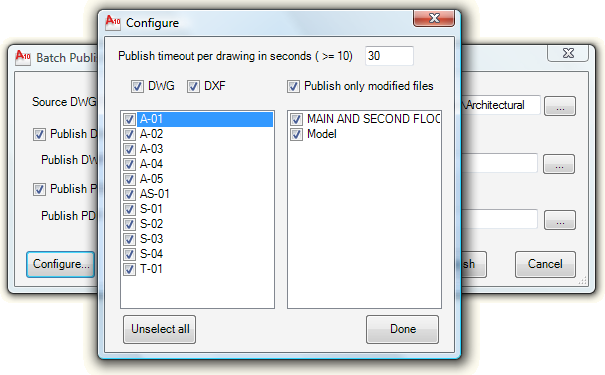
Batch Publish configuration dialog

Once we've finished, we can select "Done" and then launch the batch publish via the "Publish" button on the main form. You'll now see AutoCAD publishing the various drawings from the specified source folder, along with a small dialog displayed by the regulator application. This will count down from our timeout threshold and will restart AutoCAD when it gets to zero.Batch Publishing
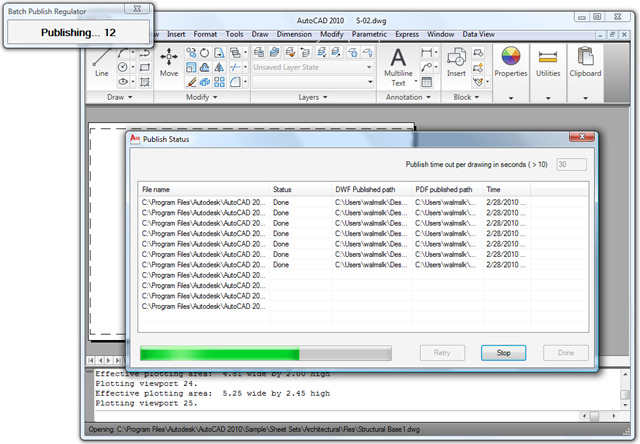
30 seconds isn't a very long time to publish both a DWF and PDF for complex drawings. If it's clear that the timeout isn't giving enough time for AutoCAD to complete both and the publish seems to be happening correctly, then you can either close the regulator (which will lead the rest of the batch publish to not be monitored, but will otherwise have no ill effects on the operation) or you can let AutoCAD be restarted and then try again later with a larger timeout value. In our case we're going to do that.

Once AutoCAD has been killed we'll see this message from the regulator:

Regulator waitiing to restart AutoCAD after killing itThe application waits for 10 seconds after killing AutoCAD before restarting it…
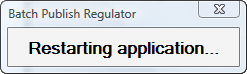
Restarting AutoCAD

… and the batch publish operation should continue until all drawings have either been published or have failed to do so:
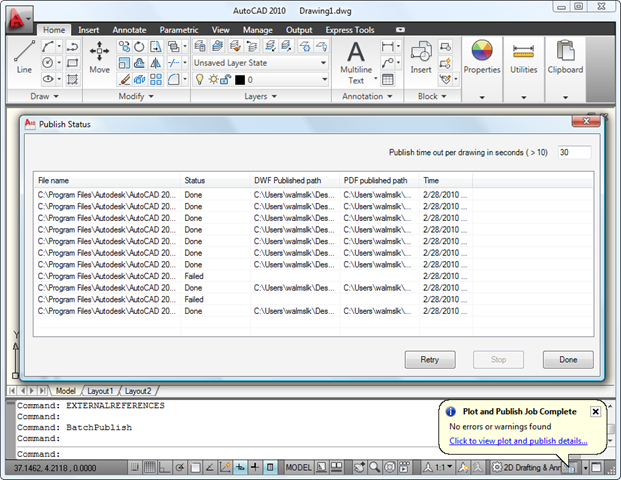
Failed a couple of drawings - time to retry

From here we can use "Retry" to attempt to publish any failed drawings again (possibly with a longer timeout specified in the top right of the dialog):
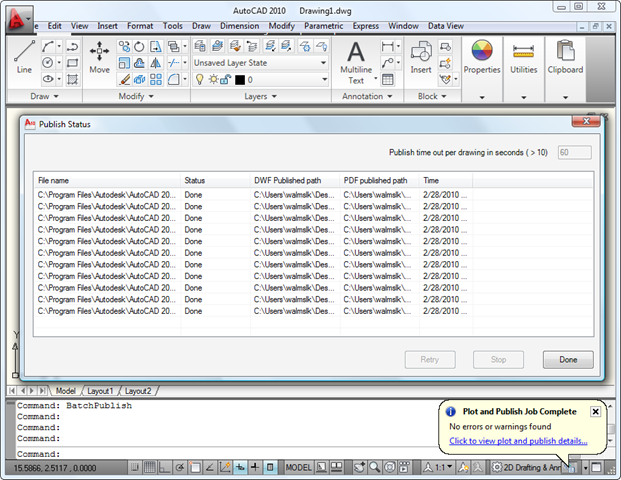
Publish complete

We should now find our output folders filled with DWFs…
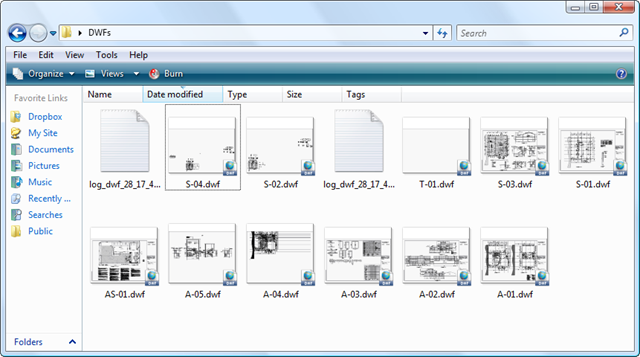
Our output DWF files

… and with PDFs:

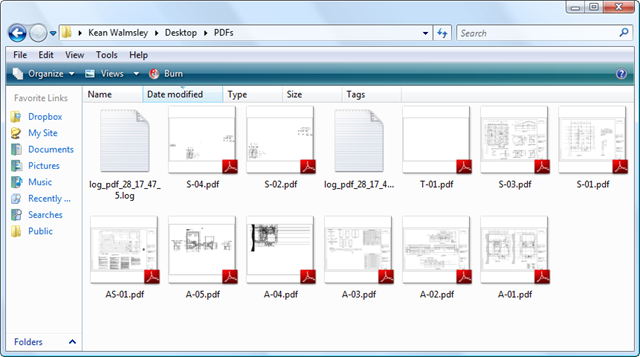
Our output PDF files

You'll see two log files in each folder, as it took us two batch publish attempts to get the whole set of drawings published.

Please give this tool a try and let us know if you have any feedback. Batch processing tools are often quite hard to get right, so please don't be discouraged if it doesn't work perfectly on some of your drawings: please let us know and we'll do what we can to fix the issue.

28 responses to “March’s Plugin of the Month live on Autodesk Labs: Batch Publish for AutoCAD”

  1. Constantin Gherasim Avatar
    Constantin Gherasim

    Hi Kean,

    This seems to be a nice tool. I have two questions:

    1) Is the application backwards compatible, or it works only for 2010 ?

    2) Is there any option which would allow to create a multi-pages PDF document, like let's say if a DWG has 3 layouts than maybe I would want to have a PDF with three pages ? Or even more than one DWG in the same PDF document, maybe for drawings related somehow ?

    Thanks for taking you time to answer this,

    Constantin

    PS - The Preview isn't really working

  2. Hi Constantin,

    1) The application should work from AutoCAD 2007 onwards. Be sure to let us know if you find any issues, of course.

    2) I'm guessing this is possible, although it would require some code changes (the good news being the code is all there for you to extend :-). I'll pass this on as a possible enhancement for the next release.

    Regards,

    Kean

    P.S. Sorry - which Preview do you mean?

  3. Mohamed Haris Avatar

    Hi Kean,
    The readme title is "Plugin of the Month, March 2009". You might want to set your clock a little forward ;-).

    Regards,
    Haris.

  4. Kean Walmsley Avatar

    Thanks, Haris.

    This will be fixed in the next point release.

    I'm just happy I don't have to write cheques, anymore - I'd still be signing 2009 in June. :-S 🙂

    Regards,

    Kean

  5. Constantin Gherasim Avatar
    Constantin Gherasim

    Hi Kean,

    Thanks for answering so fast.

    The Preview I was talking about is the one here, before posting the comments.

    But it seems that today it works 🙂

    Constantin

  6. Stephan Schevers Avatar
    Stephan Schevers

    Hi Kean,

    Some time ago I wrote my own batch plot routine. This one has some very nice features. I will definitely give it a spin.

    Probably I'll drop my own routine and switch to yours.

    Regards,

    Stephan

  7. Kean Walmsley Avatar

    Hi Stephan,

    Be sure to let us know if you find any functionality gaps (or bugs).

    Thanks,

    Kean

  8. Kélcyo Pereira Avatar
    Kélcyo Pereira

    Hello Kean,
    I should like to congratulate your team. A thrilling plugin for us that we work with many projects.
    I found a small detail that was not reported. The same does not process files with the special character "=". By chance we've detected that, because the labeling conventions of archives in company requires the same. Also I can say that there is an incompatibility with a version of AutoCAD. Processing all code, not finalizing the PDF file. Perhaps incompatibility in API for PDF. Grateful

  9. Kean Walmsley Avatar

    Hello Kélcyo,

    Thanks - I expect the '=' issue is related to an issue we've found with '&' - both valid characters in file paths and invalid in XML. We'll have to do some encoding to resolve it.

    [I've edited your comment to remove any reference to information under non-disclosure, by the way.]

    Regards,

    Kean

  10. Sorry by publication inconsistent. And thanks for the alert. Grateful

  11. It does not process files with the special character "~".
    Regards,
    Sabji

  12. Hi Kean,

    I would like to know how can I get a point of insert from block object in c#. Could you give me an example?

    I would like to know, too, how can I get the points (start/end) from line object?

    Regards,

    Marcos

  13. Kean Walmsley Avatar

    Hi Marcos,

    It sounds as though you'd benefit from working through the AutoCAD .NET Labs: you can get to this material from the AutoCAD Developer Center.

    Regards,

    Kean

  14. Tony Tanzillo Avatar

    Just curious if this approach to batch publish has advantages (or disadvantages) compared to using the Sheet Set Manager?

  15. Both mechanisms use DSD files to drive PUBLISH, from what I understand.

    This plugin provides a 1-to-1 mapping between a DWG (or DXF) and a DWF and/or PDF. It's relatively inflexible, in that sense, but if that's what you want then you can just point it at a folder and it cranks away.

    If you need more flexibility, such as combining sheets from multiple DWGs into a single output file, then you would probably see the benefit of investing time in setting up sheet sets for your drawings.

    I'm admittedly no sheet-set expert, so if anyone wants to chime in with more information, please do so.

    Kean

  16. Stephan Schevers Avatar
    Stephan Schevers

    Hi Kean,

    I did some quick testing and I have some suggestions:
    1) Loading of the configuration form taks some time (depending on how many drawing are in the directory and how many layouts there are in the drawing). Some feedback to the user would be nice. Like changing the cursor to the hourglass or a message in a label

    2) Possibility to reload a configuration. The PublishInfo.xml is reanamed to PublishInfo_old.xml. When the same direcotry is published again this file is deleted and the configuration must be done all over again. Would be nice if the old config is reloaded automatically or could be loaded mannualy.

    3) Add a option to ignor Modelspace. Saves time during configuration.

    Overall I like the tool.

    Regards,

    Stephan

  17. Hi Stephan,

    Thank you - we really appreciate the feedback.

    These are all interesting enhancements: I've passed them on to the developers of the tool and we'll look at addressing some or all of them in a future update.

    Regards,

    Kean

  18. Hello kean,
    Now that we have the new 2011 release can we have an update for this penning to the new version.That alias, I already tried to verify the new API which modicação should be made to this function.

  19. Hello Kean,
    This is very good article for exporting the DWG file in DWF.
    Can i know how can i publish the drawing in "3D DWF" Format with this plug in?

    Thanks,
    Sandeep

  20. Hi Sandeep,

    A couple of options...

    You could modify the code to support 3D DWF: of I recall correctly we just drive PUBLISH programmatically using a DSD file, so it should be easy enough to add that option.

    You might look at ScriptPro 2.0, to see whether it can be used to script the creation of 3D DWF files (although I believe the 3DDWF command is dialog-only, unfortunately).

    Regards,

    Kean

  21. Thanks Kean,
    I tried for options (dsd.3doptions) in DSD file but i didn't get i will go for second one. I will let you know about this if i found some good solution on it.

    Thanks
    Sandeep.

  22. Hi Kean,
    I got the solution finally. I have modified the text from DSD file like "Has3DDWF=0" to "Has3DDWF=1" only.
    And resulted in to 3d DWF.

    Thanks
    Sandeep.

  23. I have adopted parts of the code in my application. But I get the following error: AccessViolationException: Attempted to read or write protected memory. This is often an indication that other memory is corrupt.

    The execption occurs at PublishExecute in the following abbreviated code snippet:

    DsdData dsdd = newDsdData();
    dsdd.ReadDsd(dsdFile);
    Publisher publisher = Application.Publisher;
    PlotConfig pc = PlotConfigManager.SetCurrentConfig("DWG To PDF.pc3");
    publisher.PublishExecute(dsdd, pc);

    This error does NOT occur in my development environment - AutoCAD 2010, Window XP, 32-bit. It does occur on a customers machine - AutoCAD 2011, Win7, 64-bit. Although it isn't consistent. Sometimes it works but mostly it doesn't. Which obviously makes it even more frustrating. Any ideas on what I need to change to solve this problem? Any help would be greatly appreciated.

  24. Kean Walmsley Avatar

    Hi Chris,

    Unfortunately I don't have any suggestions, as there's a lot that I don't know about your application's architecture.

    I suggest creating a minimal, reproducible sample demonstrating the problem and submitting it to the ADN team.

    Regards,

    Kean

  25. This looks very good, what config file does it use i.e. PDF paper size, bleed quality etc. can you edit this config?

  26. Hi Dave,

    Although it's now 3 years later, the tool should still be available - with full source code provided - in Autodesk Labs' Plugin of the Month catalog.

    You should be able to configure various options, but more will be clear from taking a look at the app (and more from looking at the source).

    Regards,

    Kean

  27. Hello Kean

    I had a lot of trouble finding the plugin and the source code. But I did find the following:

    apps.autodesk.com/A...

    and note that it is being sold on the app store by JTB................and was a little perplexed: is that all kosher?

    besides, any ideas on where one can see the code and the app itself?

    rgds
    Ben

    1. Hello Ben,

      When we discontinued the "Plugin of the Month" program, a number of them were passed on to external developers to maintain and improve. JTB World took responsibility for this one.

      We have the archived POTM code, somewhere, which we can certainly provide: I suggest posting a request on the AutoCAD .NET forum - the ADN team should be able to help.

      Regards,

      Kean

Leave a Reply to Chris Vaught Cancel reply

Your email address will not be published. Required fields are marked *