Thanks to Stephen Preston for providing the prototype that I extended for this post. He put it together in response to a suggestion for a new Plugin of the Month from Shaan Hurley, who thought a "dimension finder" tool for locating overridden dimension text would be useful for people. This code may well develop into that tool, but for now it's being posted in its current, admittedly still somewhat rough, state.
The below code implements a couple of overrules using the mechanism introduced in AutoCAD 2010: one to highlight dimensions in a drawing which have had their text manually overridden – potentially a big problem if they no longer reflect the actual size of the object being dimensioned, of course – and one to highlight the DBText and MText objects in a drawing. I was hoping to work out how to specifically highlight the text of an overridden dimension – effectively applying the text highlighting overrule to the dimension highlighting on – but I'm not there yet: getting back to the Dimension from the contained MText will take some work, and the weekend has already started.
So here's the code "as is", with the expectation that the technique will most likely evolve, over time.
using Autodesk.AutoCAD.ApplicationServices;
using Autodesk.AutoCAD.DatabaseServices;
using Autodesk.AutoCAD.EditorInput;
using Autodesk.AutoCAD.Geometry;
using Autodesk.AutoCAD.GraphicsInterface;
using Autodesk.AutoCAD.Runtime;
using System;
namespace DimensionFinder
{
public class Commands
{
// Stores our global overrules instance
private static DimensionHighlightOverrule _dho = null;
private static TextHighlightOverrule _tho = null;
// Highlights the dimensions in the drawing
// with overridden text
[CommandMethod("SHOWDIMS")]
public static void ShowDimensions()
{
Document doc =
Application.DocumentManager.MdiActiveDocument;
if (_dho == null)
{
_dho = new DimensionHighlightOverrule(3);
_dho.SetCustomFilter();
}
short newCol =
UpdateHighlightOverrule(
doc, _dho, new< /span> Type[] {typeof(Dimension)}
);
if (newCol < 0)
{
_dho.Dispose();
_dho = null;
}
else
_dho.HighlightColor = newCol;
}
// Highlights the text objects in the drawing
[CommandMethod("SHOWTEXT")]
public static void ShowText()
{
Document doc =
Application.DocumentManager.MdiActiveDocument;
if (_tho == null)
_tho = new TextHighlightOverrule(1);
short newCol =
UpdateHighlightOverrule(
doc, _tho, new Type[] {typeof(DBText), typeof(MText)}
);
if (newCol < 0)
{
_tho.Dispose();
_tho = null;
}
else
_tho.HighlightColor = newCol;
}
// A shared function which applies our highlight overrule
// to different types, adjusting the color index used
private static short UpdateHighlightOverrule(
Document doc, HighlightOverrule ho, Type[] entTypes
&#
160; )
{
// Ask the user for the new color index to use
PromptIntegerOptions opts =
new PromptIntegerOptions("\nEnter highlight color index: ");
opts.LowerLimit = 0;
opts.UpperLimit = 127;
opts.Keywords.Add("Clear");
opts.DefaultValue = ho.HighlightColor;
PromptIntegerResult res = doc.Editor.GetInteger(opts);
if (res.Status == PromptStatus.Keyword)
{
// If the Clear keyword was entered, let's remove the
// overrule
if (res.StringResult == "Clear")
{
// Do so for each of our types
foreach (Type t in entTypes)
{
// Use try-catch, as Overrule.HasOverrule() needs an
// instance of an AutoCAD object, and we just have the
// type
try
{
Overrule.RemoveOverrule(RXObject.GetClass(t), ho);
}
catch
{ }
}
doc.Editor.Regen();
return -1;
}
}
else if (res.Status == PromptStatus.OK)
{
// Otherwise we attach the overrule for each type
&#
160; foreach (Type t in entTypes)
{
// Use try-catch, as Overrule.HasOverrule() needs an
// instance of an AutoCAD object, and we just have the
// type
try
{
Overrule.AddOverrule(RXObject.GetClass(t), ho, false);
}
catch
{ }
}
// If requested highlight color is a new color, then we
// want to change it
if (ho.HighlightColor != res.Value)
ho.HighlightColor = (short)res.Value;
// Make sure overruling is switched on
Overrule.Overruling = true;
doc.Editor.Regen();
}
return (short)res.Value;
}
}
// Custom base class with a highlight text property
public class HighlightOverrule : DrawableOverrule
{
public HighlightOverrule(short defCol)
{
_color = defCol;
}
// Color index used to highlight
private short _color;
// The color we highlight blocks with
public short HighlightColor
{
get { return _color; }
set
{
if ((value >= 0) && (value <= 127))
{
_color = value;
}
}
}
}
// Overrule to highlight dimensions
public class DimensionHighlightOverrule : HighlightOverrule
{
public DimensionHighlightOverrule(short defCol) : base(defCol)
{
}
public override bool WorldDraw(Drawable drawable, WorldDraw wd)
{
// We know this overrule is only registered for Dimensions,
// so could risk a cast without checking
Dimension dm = drawable as Dimension;
if (dm != null)
{
// Now we want to draw a box around the Dimension's extents
Extents3d? ext = dm.Bounds;
if (ext.HasValue)
{
Point3d maxPt = ext.Value.MaxPoint;
Point3d minPt = ext.Value.MinPoint;
// These are the vertices of the highlight box
Point3dCollection pts = new Point3dCollection();
pts.Add(new Point3d(minPt.X, minPt.Y, minPt.Z));
pts.Add(new Point3d(minPt.X, maxPt.Y, minPt.Z));
pts.Add(new Point3d(maxPt.X, maxPt.Y, minPt.Z));
pts.Add(new Point3d(maxPt.X, minPt.Y, minPt.Z));
// Store current filltype and set to FillAlways
FillType oldFillType = wd.SubEntityTraits.FillType;
wd.SubEntityTraits.FillType = FillType.FillAlways;
// Store old graphics color and set to the color we want
short oldColor = wd.SubEntityTraits.Color;
wd.SubEntityTraits.Color = this.HighlightColor;
// Draw the filled polygon
wd.Geometry.Polygon(pts);
// Restore old settings
wd.SubEntityTraits.FillType = oldFillType;
wd.SubEntityTraits.Color = oldColor;
}
}
// Let the overruled Drawable draw itself
return base.WorldDraw(drawable, wd);
}
// This function is called if we call SetCustomFilter
// on our custom overrule.
// We add our own code to return true if the Dimension passed
// in is one we want to highlight.
public override bool IsApplicable(RXObject overruledSubject)
{
// If it's a Dimension, we check if it has overridden text
Dimension dm = overruledSubject as Dimension;
if (dm != null)
{
// If it's overridden, we'll highlight it
if (dm.Dimension
Text != "")
return true;
}
// Only get to here if object isn't a Dimension and it
// didn't contain overridden text
return false;
}
}
// Overrule to highlight text (MText and DBText objects)
public class TextHighlightOverrule : HighlightOverrule
{
public TextHighlightOverrule(short defCol) : base(defCol)
{
}
public override bool WorldDraw(Drawable drawable, WorldDraw wd)
{
// Registered for MText and DBText, so proceed cautiously
Entity ent = drawable as Entity;
if (ent != null)
{
MText mt = ent as MText;
DBText dt = ent as DBText;
if (mt != null || dt != null)
{
Vector3d norm = (mt == null ? dt.Normal : mt.Normal);
// Now we want to draw a box around the extents
Extents3d? ext = ent.Bounds;
if (ext.HasValue)
{
Point3d maxPt =
ext.Value.MaxPoint;
Point3d minPt = ext.Value.MinPoint;
// These are the vertices of the highlight box
// (it also contains a cross, for fun)
Point3dCollection pts = new Point3dCollection();
pts.Add(new Point3d(minPt.X, minPt.Y, minPt.Z));
pts.Add(new Point3d(minPt.X, maxPt.Y, minPt.Z));
pts.Add(new Point3d(maxPt.X, minPt.Y, minPt.Z));
pts.Add(new Point3d(maxPt.X, maxPt.Y, minPt.Z));
pts.Add(new Point3d(minPt.X, minPt.Y, minPt.Z));
pts.Add(new Point3d(maxPt.X, minPt.Y, minPt.Z));
pts.Add(new Point3d(maxPt.X, maxPt.Y, minPt.Z));
pts.Add(new Point3d(minPt.X, maxPt.Y, minPt.Z));
// Store current filltype and set to FillNever
FillType oldFillType = wd.SubEntityTraits.FillType;
wd.SubEntityTraits.FillType = FillType.FillNever;
// Store old graphics color and set to the color we want
short oldColor = wd.SubEntityTraits.Color;
wd.SubEntityTraits.Color = this.HighlightColor;
// Draw the polyline
wd.Geometry.Polyline(pts, norm, IntPtr.Zero);
// Restore old settings
wd.SubEntityTraits.FillType = oldFillType;
wd.SubEntityTraits.Color = oldColor;
}
}
}
// Let the overruled Drawable draw itself.
return base.WorldDraw(drawable, wd);
}
}
}
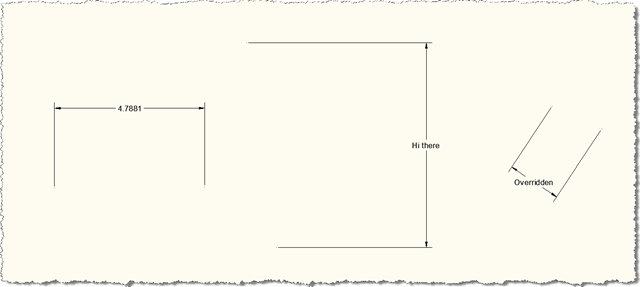
To see it in action, let's create some dimensions with overridden text (the two on the right, clearly :-):
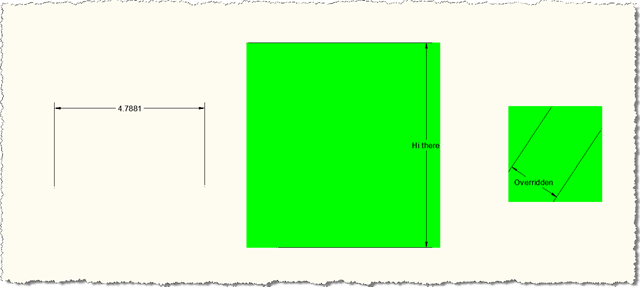
When we run the SHOWDIMS command, selecting the default colour index, we see them get highlighted:
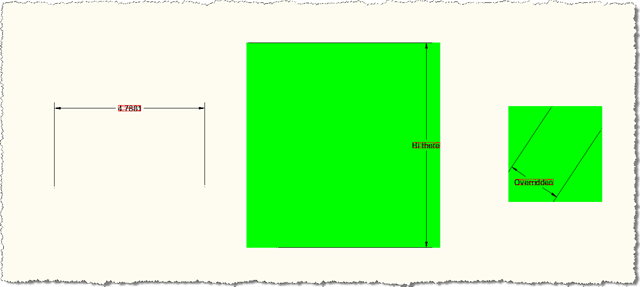
And if we run the SHOWTEXT command, doing the same, we see the text gets further highlighted:
Bear in mind there's still some work to be done to get the code working properly in MDI, etc. Even so, it seemed worth posting in its current state, as I'm sure the technique will prove useful to someone, and once again highlights how cool the new Overrule API is.
I'm now heading off on a two-week trip around Asia, so we'll see if I get the chance to take this further during that time.


Leave a Reply to Olivier Cancel reply