Changing the layer of an entity in an AutoCAD block using .NET

After seeing Shaan list the results of the latest AUGI wishlist, I started thinking about which of the items would be worth covering either on this blog or via a Plugin of the Month. The second item on the list, "Automatically Differentiate Manually Edited Dimensions", has (hopefully) been addressed by Dimension Patrol, this month's Plugin of the Month, so that's a good start, anyway.

The first item, "Change Objects in a Block to a new Layer", seemed as good a good place to start as anywhere.

Here's some C# code that builds upon a technique for selecting/highlighting nested entities shown in a previous post to actually modify their layers.

using Autodesk.AutoCAD.EditorInput;

using Autodesk.AutoCAD.ApplicationServices;

using Autodesk.AutoCAD.DatabaseServices;

using Autodesk.AutoCAD.Runtime;


namespace NestedObjectModification

{

  public class Commands

  {

    [CommandMethod("CNL")]

    static public void ChangeNestedLayer()

    {

      Document doc =

        Application.DocumentManager.MdiActiveDocument;

      Database db = doc.Database;

      Editor ed = doc.Editor;


      // Collection of our selected entities


      ObjectIdCollection ids = new ObjectIdCollection();


      // The results object for our nested selection

      // (will be reused)


      PromptNestedEntityResult rs;


      // Start a transaction... will initially be used

      // to highlight the selected entities and then to

      // modify their layer


      Transaction tr =

        doc.TransactionManager.StartTransaction();

      using (tr)

      {

        // Loop until cancelled or completed


        do

        {

          rs = ed.GetNestedEntity("\nSelect nested entity: ");


          if (rs.Status == PromptStatus.OK)

          {

            ids.Add(rs.ObjectId);


            HighlightSubEntity(doc, rs);

          }

        }

        while (rs.Status == PromptStatus.OK);


        if (ids.Count > 0)

        {

          // Get the name of our destination later


          PromptResult pr =

            ed.GetString("\nNew layer for these objects: ");

          if (pr.Status == PromptStatus.OK)

          {

            // Check that the layer exists


            string newLay = pr.StringResult;


            LayerTable lt =

              tr.GetObject(db.LayerTableId, OpenMode.ForRead)

                as LayerTable;


            if (lt.Has(newLay))

            {

              // If so, set the layer name to be the one chosen

              // on each of the selected entitires


              for (int i = 0; i < ids.Count; i++)

              {

                Entity ent =

                  tr.GetObject(ids[i], OpenMode.ForWrite) as Entity;

                if (ent != null)

                {

                  ent.Layer = newLay;

                }

              }

            }

            else

            {

              ed.WriteMessage(

                "\nLayer not found in current drawing."

  
;            );

            }

          }

        }

        tr.Commit();


        // Regen clears highlighting and reflects the new layer


        ed.Regen();

      }

    }


    private static void HighlightSubEntity(

      Document doc, PromptNestedEntityResult rs

    )

    {

      // Extract relevant information from the prompt object


      ObjectId selId = rs.ObjectId;

      ObjectId[] objIds = rs.GetContainers();

      int len = objIds.Length;


      // Reverse the "containers" list


      ObjectId[] revIds = new ObjectId[len + 1];

      for (int i = 0; i < len; i++)

      {

        ObjectId id =

          (ObjectId)objIds.GetValue(len - i - 1);

        revIds.SetValue(id, i);

      }


      // Now add the selected entity to the end


      revIds.SetValue(selId, len);


      // Retrieve the sub-entity path for this entity


      SubentityId subEnt =

        new SubentityId(SubentityType.Null, 0);

      FullSubentityPath path = new FullSubentityPath(revIds, subEnt);


      // Open the outermost container, relying on the open

      // transaction...


      ObjectId id2 = (ObjectId)revIds.GetValue(0);

      Entity ent = id2.GetObject(OpenMode.ForRead) as Entity;


      // ... and highlight the nested entity


      if (ent != null)

        ent.Highlight(path, false);

    }

  }

}

I'd really categorise this as a first attempt, as there are some minor quirks that I'm not fully happy with. For instance, when you cancel the initial selection loop using the escape key, the application still proceeds to ask the user for the destination layer. Also, the current implementation doesn't limit modification of objects inside Xrefs, which clearly won't result in an actual drawing change, as the nested entity is not being modified via a long transaction.

But as it stands the application should be complete enough to prove useful and should certainly allow people to provide feedback on whether this should be developed further into a future Plugin of the Month.

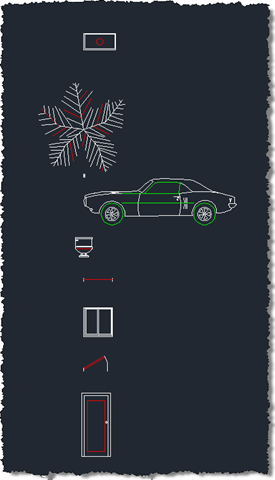
After building and NETLOADing the application, you can use the CNL command to change the layer of the nested entities you select. Here are some sample blocks that ship with AutoCAD, followed by the highlighting during the selection and finally the updated contents:

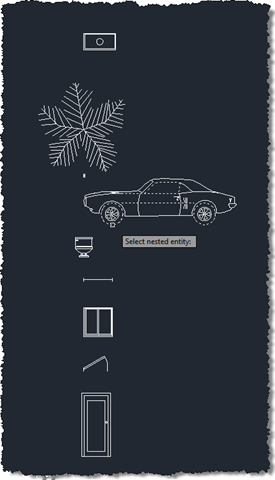
Some standard blocks Selected block contents Modified block contents

  1. Tony Tanzillo Avatar

    You might want to have a look at Array.Reverse(), List.Reverse(), and System.Linq.Enumerable.Reverse()

  2. Kean Walmsley Avatar

    Thanks, Tony.

    Glenn Ryan also dropped me a quick email about the Linq option. I'll be making the next version more elegant from this one respect, at least. ๐Ÿ™‚

    Kean

  3. I am massively keen to be able to select objects nested in AutoCAD blocks, and change the layer.

    I am struggling to apply the code detailed above in AutoCAD, as I am a total newb to .NET add ons (I'm using AutoCAD 2010)

    Here is what I've done - hoping someone could point out where I've gone wrong:

    1) Installed Visual Basic Express Edition
    2) Created a class library and referenced "acdbmgd.dll" & "acmgd.dll"
    3) Copied and pasted the code above and saved it under my project as "Class1.vb"
    4) Used Kean's advice for debugging with Express Editions (which is here: keanw.com/2006/07/debugging_using.html) i.e. I've replaced "select_nested.vbproj.user" with Kean's code & updated the filepath to suit my system.
    5) I've set the Command Line Argument for my Project to "C:Program FilesAutoCAD 2010acad.exe" and the working directory to "C:Program FilesAutoCAD 2010"
    6) Pressed F5 to debug.
    7) AutoCAD 2010 opens and I type "NETLOAD" and select the .dll file in the project folder.
    8) I type "CNL" on the command line and it says "Unknown command "CNL".

    What am I doing wrong?

    Knowing almost nothing about coding, am I just meant to copy and paste the above code?

    Does it need to be situated within other code, or modified to run properly?

    The error list for the project is 102 items long, and says "Statement cannot appear outside of a Method Body".

    Would totally appreciate some pointers or advice.

    Thanks,
    Adam the .NET fledgling.

  4. Hi Adam,

    Have you made sure the project references to acdbmgd.dll and acmgd.dll are set as "Copy Local = false"?

    Regards,

    Kean

  5. Yes I have, for both - as per this guide:

    augiru.augi.com/content/lib...

    I notice that if I do Stephen Preston's simple "HelloWorld" exercise, it creates HelloWorld.dll, HelloWorld.pbd
    and Helloword.xml here:

    ..ProjectsHelloWorldHelloWorldinDebug

    When I create a project using the Change Nested Layer
    script above, and save the project, and then debug, the only .dll file in the project folder system is here:

    ..ProjectsChange_NestedChange_NestedobjDebugTempPE

    and it's called "My Project.Resources.Designer.vb.dll"

    I would expect to find a Change_Nested.dll somewhere - but can't see it.

    In short, there is no .dll, .pbd or .xml file here:

    ..ProjectsChange_NestedChange_NestedinDebug

    I have a sinking feeling that the correct .dll files are not being created or generated, due to some problem with the code.

    It gives me a "there are build errors" dialog as soon as I try to debug.

    I tried following the all the same steps using your "Import Blocks" script, which I'm also very interested in, but have the same issue.

    I recognize this blog is intended for discussion of the finer points of the .NET scripts on display, however I am that hopeful of getting this working that I've had to swallow my pride and hassle you with implementation issues - I totally appreciate your help.

    Adam

  6. Out of curiosity, as a by the by, does this Change Nested Layer script allow the user to shift-select nested entities, and apply changes across the selection?

    I am living for the day when Quick Select has a check box to "Include Nested Objects". Just imagine being able to sort out the innards of all your blocks as though they were all exploded already, without exploding them. As far as I understand, selection sets derived through Quick Select do not excompass entities within blocks. For instance, if you select text of a certain style with Quick Select, you do not pick up text of that style existing within blocks.

    Just imagine if this Select Nested capability could be integrated into the Quick Select tool. That would be oober useful. I want to be there at the opening ceremony of this functionality, cheering and popping champagne bottles with wild exhaltation.

  7. Kean Walmsley Avatar

    Hi Adam,

    It does indeed sound as though the project isn't building properly. Does the Visual Studio output window provide any information as to what's failing?

    Regards,

    Kean

  8. Kean Walmsley Avatar

    This command uses ed.GetNestedEntity() in a loop to allow the user to select a set of single entities: you could probably support fancier selection approaches, but it would take some work (and was beyond the scope of the initial sample).

    I can imagine nested selection from Quick Select being very useful, but I can also see it would be quite a minefield to implement properly (there are deeper implications about allowing more general nested selection/modification that would need to be addressed to prevent user confusion). I do suggest submitting it for the AUGI wishlist.

    Kean

  9. I downloaded and installed Visual Studio 2008.

    If I create a Visual C# Class Library, and paste the above code, I get no syntax error messages or highlighted code. The code seems happy. However, with this project type, I can't reference "acmgd.dll" and "acdbmgd.dll" under the Project's references tab; the set up is different. If I try debugging, with acad.exe as the startup object, and then netload, again, I can find no .dll assemblies.

    If I create a Visual Basic Class Library, I can indeed reference "acmgd.dll" and "acdbmgd.dll", under the References panel, however the code, once I paste it in, is highlighted all over as though there are syntax errors. For example, in C#, you use "using" and with a .vb you use "Imports". The .vb class doesn't seem to like "using", and a whole lot of other aspects of the code.

    The error list consists of multiple instances of the following error types, totalling 102 in all:

    "Statement cannot appear outside of a method body..."
    "Syntax error..."
    "Bracketed identifier is missing closing ']'..."
    "End of statement expected."
    "Declaration expected..."

    Are there a set of instructions somewhere on this blog, or elsewhere, for novices, which illustrate how to apply the various codes featured on Through the Interface to AutoCAD? Right now I'm pretty confused and definitely need some enlightening pointers.

    I'm sure I deserve a "least competent blog-user of the month" nomination for being this confused.

  10. Kean Walmsley Avatar

    Hi Adam,

    The code posted is very much in C#: you would need to convert it to VB if you wanted to build it into a VB project (see this post for information).

    But it sounds as though you need to check the Visual C# Express documentation on adding project references: when I use Visual Studio I add project references by right clicking in the Solution Explorer window rather than from the project's properties page.

    Regards,

    Kean

  11. Thanks very much. I appreciate this advice. Will try the right click approach that you employ, and look at converting the C# to VB.net

  12. Got it going, adding the C# references like you do. Yeah, you can totally shift-select nested object. LOVING the power!!! ๐Ÿ™‚

Leave a Reply to Adam Cancel reply

Your email address will not be published. Required fields are marked *