Some of you may have seen the point cloud tool for 3ds Max and 3ds Max Design posted on Autodesk Labs. This plugin currently works with points defined in an ASCII format, although I expect in time it will support similar formats to those supported by AutoCAD.
In case you're interested in bringing point cloud files that intended for – or generated/edited by – this tool into AutoCAD, I thought I'd share a quick tip. You can use the TXT2LAS tool – which I've used extensively in my efforts to bring point clouds into AutoCAD from Photosynth and Photofly – to convert the PTS file into a LAS, and then index/attach the file there.
PTS files are simply space-delimited text files, with the first line containing the number of points. The txt2las tool doesn't need this number, so you can ignore the warning it'll generate (or delete the first line from the file – your choice).
Each subsequent line is comprised of the XYZ values of the point, followed by an unknown (to me, anyway) decimal (which was the same for each point in the file I tested with, so I've just ignored it) and then finally the RGB values of that point:
755047
55.74190000 77.90000000 4.15650000 0.1 246 246 246
55.74190000 77.90000000 4.15610000 0.1 246 246 246
55.74190000 77.90000000 4.15570000 0.1 246 246 246
55.74190000 77.90000000 4.15580000 0.1 245 245 245
55.74190000 77.90000000 4.15580000 0.1 246 246 246
55.74190000 77.90000000 4.15590000 0.1 246 246 246
55.74190000 77.90000000 4.15550000 0.1 245 245 245
55.74190000 77.89990000 4.15580000 0.1 245 245 245
55.74190000 77.89990000 4.15590000 0.1 245 245 245
...
With all this in mind, here's a working usage example for creating a LAS from a PTS using the txt2las utility:
txt2las -parse xyzsRGB -i test.pts -o test.las
Trying this with the Lobby_Scan_Ascii.pts sample file linked to from the Labs page…
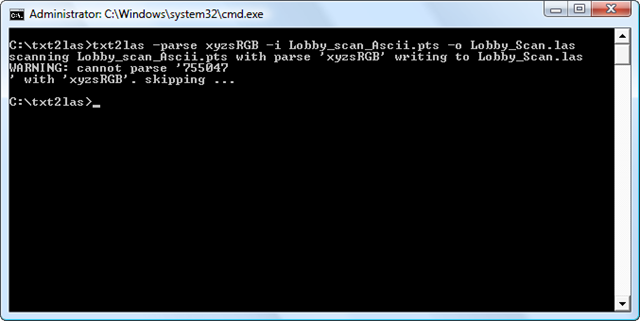 … we end up with a LAS file that can be indexed in AutoCAD using POINTCLOUDINDEX and attached using POINTCLOUDATTACH:


Leave a Reply to martin isenburg Cancel reply