Displaying an AutoCAD ribbon tab contextually using .NET

This very interesting feature came to my attention via an internal discussion. Thanks, once again, to George Varghese for providing the base sample used for this post.

At various times inside AutoCAD – such as when a block is selected, for instance – a specific ribbon tab is displayed "contextually". As an example, when you select a Hatch object inside the AutoCAD editor, you should see a hatch-related contextual tab displayed:
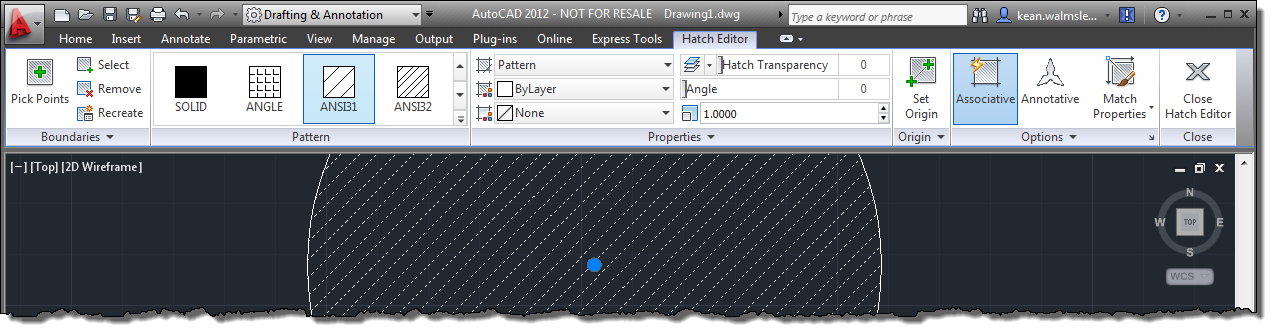
Hatch editor contextual tab

It's possible to implement your own, comparable behaviour inside the AutoCAD editor using a combination of a simple .NET module, a XAML file and some CUI editing (or a partial CUI file).

Let's start with the .NET module. Here's some code that implements a sample rule that can be hooked into AutoCAD to tell it when a certain condition has been satisfied. In our case, the condition we want is that exactly two circles are selected in the drawing editor.

Here's the C# code:

using Autodesk.AutoCAD.ApplicationServices;

using Autodesk.AutoCAD.DatabaseServices;

using Autodesk.AutoCAD.EditorInput;

using Autodesk.AutoCAD.Runtime;

using System;


namespace Rules

{

  public class SampleRule

  {

    // The flag stating whether the contextual tab is enabled


    bool _enableCtxtTab = false;


    // A static reference to the rule itself


    static SampleRule _rule = null;


    // A public property referenced from the XAML, getting

    // whether the contextual tab should be enabled


    public bool TwoCirclesSelected

    {

      get { return _enableCtxtTab; }

    }


    // A public static property providing access to the rule

    // (also referenced from the XAML)


    public static SampleRule TheRule

    {

      get

      {

        if (_rule == null)

          _rule = new SampleRule();


        return _rule;

      }

    }


    // Constructor for the rule, where we attach various

    // even handlers


    SampleRule()

    {

      DocumentCollection dm =

        Autodesk.AutoCAD.ApplicationServices.Application.

        DocumentManager;


      dm.DocumentCreated +=

        new DocumentCollectionEventHandler(

          OnDocumentCreated

        );

      dm.DocumentToBeDestroyed +=

        new DocumentCollectionEventHandler(

          OnDocumentToBeDestroyed

        );

      dm.MdiActiveDocument.ImpliedSelectionChanged +=

        new EventHandler(

          OnImpliedSelectionChanged

        );

    }


    // When the pickfirst selection is changed, check

    // the selection to see whether to enable the

    // contextual tab (if exactly two circles are selected)


    void OnImpliedSelectionChanged(object sender, EventArgs e)

    {

      Editor ed =

        Application.DocumentManager.MdiActiveDocument.Editor;

      PromptSelectionResult res = ed.SelectImplied();

      if (res == null)

        return;


      EnableContextualTab(res.Value);

    }


    // When a document is created, add our handler to it


    void OnDocumentCreated(

      object sender, DocumentCollectionEventArgs e

    )

    {

      e.Document.ImpliedSelectionChanged +=

        new EventHandler(OnImpliedSelectionChanged);

    }


    // When a document is destroyed, remove our handler from it


    void OnDocumentToBeDestroyed(

      object sender, DocumentCollectionEventArgs e

    )

    {

      e.Document.ImpliedSelectionChanged -=

        new EventHandler(OnImpliedSelectionChanged);

    }


    // Check whether we should enable the contextual tab,

    // based on the selection passed in


    void EnableContextualTab(SelectionSet ss)

    {

      // The default assumption is "no"


      _enableCtxtTab = false;


      // We need to have exactly two objects selected


      if (ss == null)

        return;


      if (ss.Count == 2)

      {

        ObjectId[] ids = ss.GetObjectIds();

        if (ids != null)

        {

          Database db =

            HostApplicationServices.WorkingDatabase;

          Transaction tr =

            db.TransactionManager.StartTransaction();

          using (tr)

          {

            // Check whether both objects are Circles


            DBObject obj =

              tr.GetObject(ids[0], OpenMode.ForRead);

            DBObject obj2 =

              tr.GetObject(ids[1], OpenMode.ForRead);


            _enableCtxtTab = (obj is Circle && obj2 is Circle);


            // Commit, as it's quicker than aborting


            tr.Commit();

          }

        }

      }

    }

  }

}

The above code is reasonably simple – it detects changes to the pickfirst selection set and checks whether it contains exactly two objects, both of which are circles. If so, it sets a Boolean property that can be checked by AutoCAD.

To tell AutoCAD what to do with the module, we need to include a small XAML file which AutoCAD will parse on startup:

<?xml version="1.0" encoding="utf-8"?>

<TabSelectorRules

  xmlns="clr-namespace:Autodesk.AutoCAD.Ribbon;assembly=AcWindows"

  Ordering="0">

  <TabSelectorRules.References>

    <AssemblyReference

      Namespace="Rules"

      Assembly="ADNPlugin-SampleRule"/>

  </TabSelectorRules.References>

  <Rule

    Uid="ADNPluginSampleRuleId"

    DisplayName="Sample: Two circles selected rule"

    Theme="Green"

    Trigger="Selection">

    <![CDATA[

      SampleRule.TheRule.TwoCirclesSelected

    ]]>

  </Rule>

</TabSelectorRules>

The DLL and XAML files are to be placed in the AutoCAD executable folder (on my system this is "C:\Program Files\Autodesk\AutoCAD 2012 - English"), which means it's imperative you prefix both with your Registered Developer Symbol (RDS), obtainable from http://autodesk.com/symbolreg.

In my case – as I have the ADNP symbol registered – I've named the files ADNPlugin-SampleRule.dll and  ADNPlugin-SampleContextualTabSelectorRules.xaml. You can find them here, along with the source project.

Now on to actually using the rule inside AutoCAD.

Launch AutoCAD: if all is well you should see nothing out of the ordinary, otherwise you'll see lots of additional (and often very helpful) text describing the problem with your rule implementation (or its XAML description).

Run the CUI command. From here you should see a new node named "Sample: Two circles selected rule" under Ribbon –> Contextual Tab States.
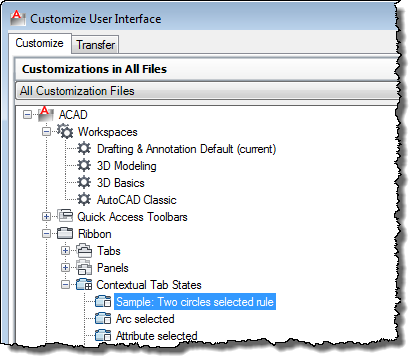
Our new Contextual Tab State in the CUI dialog

To have a custom tab displayed when this condition is true, simply drag and drop the tab from the Ribbon –> Tabs list to our new node. You'll see a number of tabs named "… Contextual Tab", for just this purpose. Just for fun – and because we can – let's show the "Solid Modeling" tab when two circles are selected in the editor.
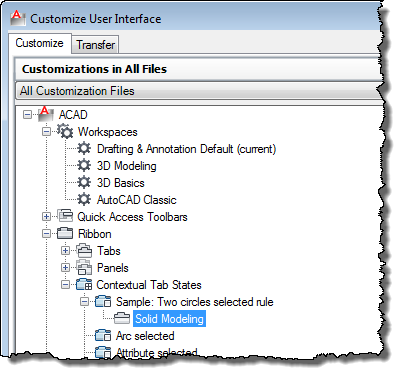
Let's show the solid modelling tab when two circles are selected

Sure enough, when we close the CUI dialog, saving changes, and select two circles in the AutoCAD editor, we see the Solid Modeling tab gets displayed and highlighted with our chosen theme (a green tint to it):
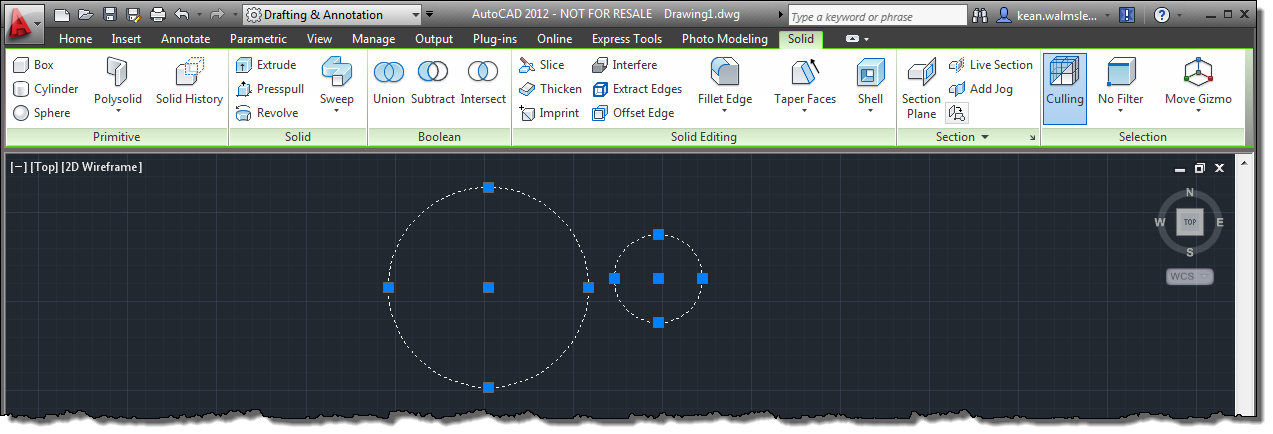
The Solid Modeling tab displayed contextually when two circles are selected

Now of course it's unlikely you'll want to do something quite like this, but this sample does show how you might implement your own contextual tabs, and not just for objects of a certain – you can perform quite deep analysis of the selection set, should you so wish (keeping an eye on interactive performance, of course).

19 responses to “Displaying an AutoCAD ribbon tab contextually using .NET”

  1. I was thinking about this within the last couple of weeks, so your timing is perfect!
    I'm assuming/hoping I'll be able to create a contextual state based on the value of an environment variable.

  2. Absolutely - just get the variable from your code and return the Boolean value as appropriate.

    Kean

  3. Hi!
    I did as described above. But i don't see a new node named “Sample: Two circles selected rule” under Ribbon –> Contextual Tab States.
    Where is the error?

  4. Sorry - there's no way for me to know. Did you follow the instructions (which do work) to the letter, such as the placement of the XAML file?

    Kean

  5. In the AutoCAD executable folder exist XAML file - AcContextualTabSelectorRules.xaml. If to copy a TabSelectorRules and Rule in it, that works! Through a separate XAML file doesn't work. So should be?
    P.S. Sorry for my english 🙂

  6. You shouldn't need a separate file. You may want to see if naming it the same as the DLL (just with the XAML extension) makes a difference, although that's just a shot in the dark (as it's been some time since I looked at this... I don't know why I'm suggesting something that contradicts what I've written in this post, come to think of it).

    Kean

  7. First of all, thanks for this great blog series.
    There are two things that crossed my mind:
    1. Besides Ribbon tabs, is it also possible to display groups, buttons or other Ribbon elements contextually? I guess not.
    2. The way to edit the general TabSelectorRules.xaml and placing the assembly next to it isn't much comfortable. I recently watched the ADN DevCast Episode you posted about the AppAutoLoader and I'm excited about it. Wouldn't it be great to have all customization files (assemblies, rule definitions, .cuix files and other resources) bundled together and provided via the apploader?

  8. 1. As far as I'm aware this is only at the tab level.
    2. I agree - it would certainly be preferable to have these loadable from Autoloader bundles.

    If you're an ADN member you should be sure to submit this feedback there, too.

    Kean

  9. Hi Kean,

    should we use
    if (res == null)
    or
    if (res.value == null)

    Since the first one will not be executed if the user hit Esc key

  10. Hi Mostafa,

    That check really just guards to make sure we don't de-reference a null pointer (or try to access a property on a null object - that sounds a bit more .NETy :-). We might also check the Status flag to only call the other function on OK, but ultimately that's taken care of when we check the SelectionSet - if it's null or doesn't contain exactly two objects, we don't go any further.

    Regards,

    Kean

  11. Hi Kean,

    Hate to ping you at AU2012 but I'm trying to enable a palette and ribbon tab based on whether a selected entity has named XDATA with a specific value and this looks like a good starting point. I'm hoping I can do this all from code. Can't we somehow package the XAML into a resource?

    Unfortunately, when I tried to grab the zip, this page came up...

    The page you've been trying to access was blocked.

    Reason: Active content was blocked due to digital signature violation. The violation is Missing Digital Signature.
    Transaction ID is 50B7885C37621305CBFB.

    ... any ideas? Thanks,
    Brad

  12. Hi Brad,

    I'm now in San Rafael after AU, so no problem. 🙂

    I've emailed the ZIP to you separately - let me know if you received it.

    I don't know of a way to avoid the XAML requirement, unfortunately. I know it's a pain to have to deploy in the Program Files foler, too, but that's the requirement as it stands.

    Regards,

    Kean

  13. Hello Kean,

    I've been testing this. After removing my XAML and dll from the program directory, the contextualtab state remains in the main CUI (with no action - naturally). The CUI-editor doesn't allow to manipulate the states.
    Is this standard behavior and is there any way to remove this entry from the CUI (reg, .mnr, or some)?

    Thanks in advance,
    Daniel

  14. Hello Daniel,

    Have you tried right-clicking and selecting Remove from within the CUI editor?

    Regards,

    Kean

  15. Greetings!

    How can I make a module that detects wether the text editing tab is open or not?

    Kind regards,
    Ivan

  16. Hi Ivan,

    I don't know, off the top of my head. I suggest posting your question to the AutoCAD .NET Discussion Group: someone there should be able to help.

    Regards,

    Kean

  17. Thank you, Kean!

    Best regards,
    Ivan

  18. Hi!

    I want create a new contextual ribbon, but I can not write or edit the Xaml file in the autocad folder because I do not necessarily have administrator rights.
    Is-it possible to create with Xaml in other folder ?
    Thanks

    1. Kean Walmsley Avatar

      Hi there,

      Please post your question to the AutoCAD .NET forum: someone there should be able to help.

      Best,

      Kean

Leave a Reply to Daniel Cancel reply

Your email address will not be published. Required fields are marked *