Face tracking inside AutoCAD using Kinect

After discovering, earlier in the week, that version 1.5 of the Kinect SDK provides the capability to get a 3D mesh of a tracked face, I couldn't resist seeing how to bring that into AutoCAD (both inside a jig and as database-resident geometry).

I started by checking out the pretty-cool FaceTracking3D sample, which gives you a feel for how Kinect tracks faces, super-imposing an exaggerated, textured mesh on top of your usual face in a WPF dialog:

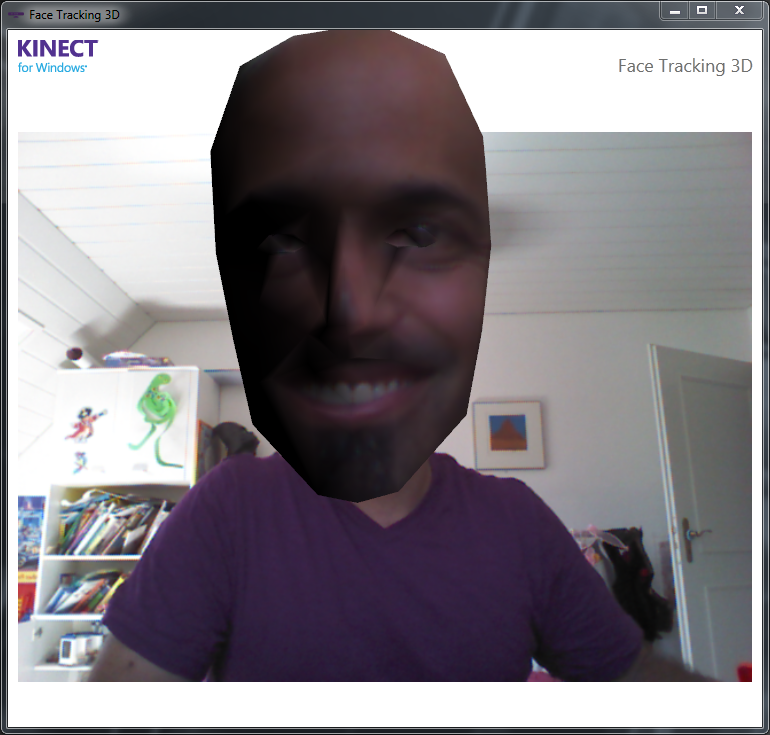
Before face-tracking kicks in

After face-tracking kicks in

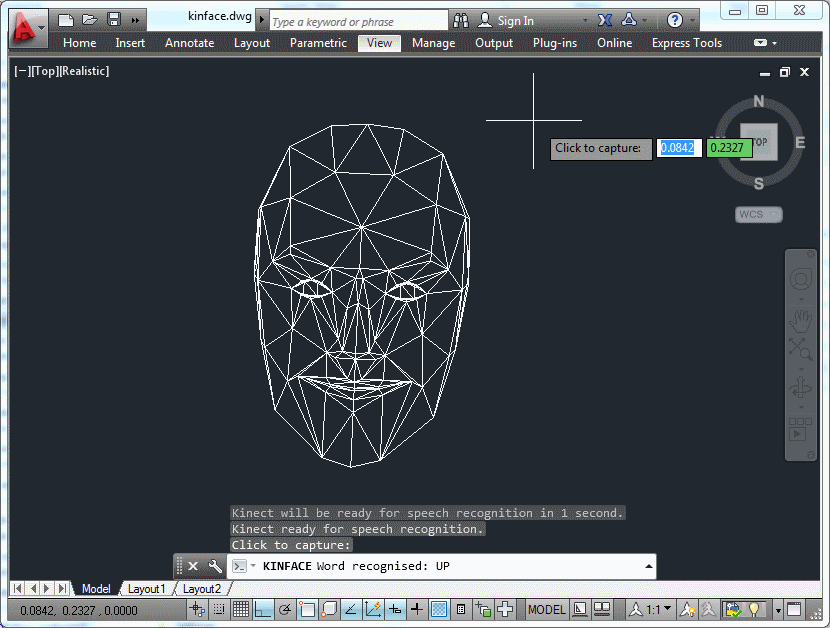
I decided to go for a more minimalist (which also happens to mean it's simpler and with less scary results ๐Ÿ™‚ approach for the AutoCAD integration: just to generate a wireframe view during a jig by drawing a series of polygonsโ€ฆ

Face tracking inside AutoCAD

โ€ฆ and then create some database-resident 3D faces once we're done:
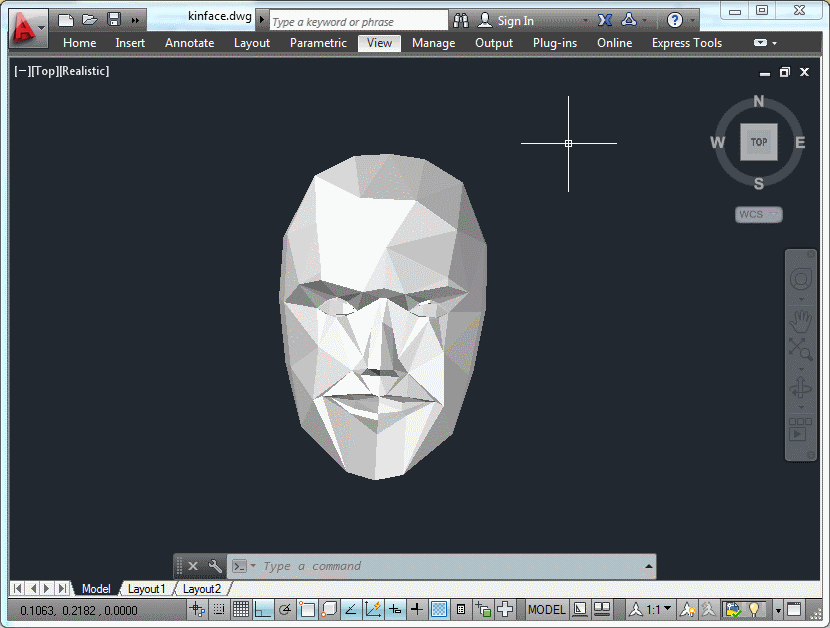
The captured output, a 3D face of 3D faces!

Here's the main C# code that does all this (although a few minor changes were needed in the base KinectJig class, to make certain members accessible โ€“ you can get the complete source here):

using Autodesk.AutoCAD.ApplicationServices;

using Autodesk.AutoCAD.EditorInput;

using Autodesk.AutoCAD.Geometry;

using Autodesk.AutoCAD.Runtime;

using Autodesk.AutoCAD.GraphicsInterface;

using Autodesk.AutoCAD.DatabaseServices;

using Microsoft.Kinect;

using Microsoft.Kinect.Toolkit.FaceTracking;

using System.Collections.Generic;

using System.Linq;


#pragma warning disable 1591


namespace KinectSamples

{

  // A simple, lightweight face definition class to be used

  // inside (and passed outside) the jig


  public class FaceDef

  {

    public FaceDef(Point3d first, Point3d second, Point3d third)

    {

      First = first;

      Second = second;

      Third = third;

    }


    public Point3d First { get; set; }

    public Point3d Second { get; set; }

    public Point3d Third { get; set; }

  }


  public class KinectFaceMeshJig : KinectJig

  {

    private FaceTracker _faceTracker;

    private bool _displayFaceMesh;

    private int _trackingId = -1;


    private FaceTriangle[] _triangleIndices;

    private Point3dCollection _points;


    private List<FaceDef> _faces;

    public List<FaceDef> Faces { get { return _faces; } }


    public KinectFaceMeshJig()

    {

      _displayFaceMesh = false;

    }


    public void UpdateMesh(FaceTrackFrame frame)

    {

      EnumIndexableCollection<FeaturePoint, Vector3DF> pts =

        frame.Get3DShape();


      if (_triangleIndices == null)

      {

        // The triangles definitions don't change from

        // frame to frame


        _triangleIndices = frame.GetTriangles();


        // We'll also create a dummy set of points

        // (as this also has a fixed size)


        _points = new Point3dCollection();


        for (int idx = 0; idx < pts.Count; idx++)

        {

          _points.Add(new Point3d());

        }

      }


      // Create or clear the list of face definitions


      if (_faces == null)

      {

        _faces = new List<FaceDef>();

      }

      else

      {

        _faces.Clear();

      }


      // Update the 3D model's vertices


      for (int idx = 0; idx < pts.Count; idx++)

      {

        Vector3DF point = pts[idx];

        _points[idx] = new Point3d(point.X, point.Y, -point.Z);

      }


      // Create a face definition for each triangle


      foreach (FaceTriangle triangle in _triangleIndices)

      {

        FaceDef face =

          new FaceDef(

            _points[triangle.First],

            _points[triangle.Second],

            _points[triangle.Third]

          );

        _faces.Add(face);

      }

    }


    protected override SamplerStatus SamplerData()

    {

      try

      {

        if (_faceTracker == null)

        {

          try

          {

            _faceTracker = new FaceTracker(_kinect);

          }

          catch (System.InvalidOperationException)

          {

            // During some shutdown scenarios the FaceTracker

            // is unable to be instantiated. Catch that exception

            // and don't track a face

            _faceTracker = null;

          }

        }


        if (

          _faceTracker != null &&

          _colorPixels != null &&

          _depthPixels != null &&

          _skeletons != null

        )

        {

          // Find a skeleton to track. First see if our old one

          // is good. When a skeleton is in PositionOnly tracking

          // state, don't pick a new one as it may become fully

          // tracked again


          Skeleton skeletonOfInterest =

            _skeletons.FirstOrDefault(

              skeleton =>

                skeleton.TrackingId == _trackingId &&

                skeleton.TrackingState !=

                  SkeletonTrackingState.NotTracked

            );


          if (skeletonOfInterest == null)

          {

            // The old one wasn't around. Find any skeleton that

            // is being tracked and use it


            skeletonOfInterest =

              _skeletons.FirstOrDefault(

                skeleton =>

                  skeleton.TrackingState ==

                    SkeletonTrackingState.Tracked

              );

          }


          // Call a different version of the function if we have

          // a tracked skeleton. We're also lazily hard-coding the

          // depth and image formats, for now (sorry!)


          FaceTrackFrame faceTrackFrame =

            (skeletonOfInterest == null ?

              _faceTracker.Track(

                ColorImageFormat.RgbResolution640x480Fps30,

                _colorPixels,

                DepthImageFormat.Resolution640x480Fps30,

                _depthPixels

              )

              :

              _faceTracker.Track(

                ColorImageFormat.RgbResolution640x480Fps30,

                _colorPixels,

                DepthImageFormat.Resolution640x480Fps30,

                _depthPixels,

                skeletonOfInterest

              )

            );


          if (faceTrackFrame.TrackSuccessful)

          {

            this.UpdateMesh(faceTrackFrame);


            // Only display face mesh if there was a successful track


            _displayFaceMesh = true;

          }

        }

      }

      catch (System.Exception ex)

      {

        Autodesk.AutoCAD.ApplicationServices.Application.

          DocumentManager.MdiActiveDocument.Editor.WriteMessage(

            "\nException: {0}", ex

          );

      }


      ForceMessage();


      return SamplerStatus.OK;

    }


    protected override bool WorldDrawData(WorldDraw draw)

    {

      if (_displayFaceMesh)

      {

        Point3dCollection pts = new Point3dCollection();

        pts.Add(new Point3d());

        pts.Add(new Point3d());

        pts.Add(new Point3d());


        foreach (FaceDef face in _faces)

        {

          pts[0] = face.First;

          pts[1] = face.Second;

          pts[2] = face.Third;

          draw.Geometry.Polygon(pts);

        }

      }


      return true;

    }

  }


  public class KinectFaceCommands

  {

    [CommandMethod("ADNPLUGINS", "KINFACE", CommandFlags.Modal)]

    public void ImportFaceFromKinect()

    {

      Document doc =

        Autodesk.AutoCAD.ApplicationServices.

          Application.DocumentManager.MdiActiveDocument;

      Editor ed = doc.Editor;


      KinectFaceMeshJig kj = new KinectFaceMeshJig();


      kj.InitializeSpeech();


      if (!kj.StartSensor())

      {

        ed.WriteMessage(

          "\nUnable to start Kinect sensor - " +

          "are you sure it's plugged in?"

        );

        return;

      }


      PromptResult pr = ed.Drag(kj);


      if (pr.Status != PromptStatus.OK && !kj.Finished)

      {

        kj.StopSensor();

        return;

      }


      kj.StopSensor();


      if (kj.Faces != null && kj.Faces.Count > 0)

      {

        Transaction tr =

          doc.TransactionManager.StartTransaction();

        using (tr)

        {

          var bt =

            (BlockTable)tr.GetObject(

              doc.Database.BlockTableId, OpenMode.ForRead

            );

          var btr =

            (BlockTableRecord)tr.GetObject(

              bt[BlockTableRecord.ModelSpace], OpenMode.ForWritea

            );


          // Create a 3D face for each definition


          foreach (var fd in kj.Faces)

          {

            Face face =

              new Face(

                fd.First, fd.Second, fd.Third,

                false, false, false, false

              );

            btr.AppendEntity(face);

            tr.AddNewlyCreatedDBObject(face, true);

          }

          tr.Commit();

        }

      }

    }

  }

}

And here's a quick video to give you a feel for how the tracking works (although it's smoother when not recording, I've found):

Unable to display content. Adobe Flash is required.

8 responses to “Face tracking inside AutoCAD using Kinect”

  1. Toby.Rosenberg@CreativeCADSolu Avatar
    Toby.Rosenberg@CreativeCADSolu

    Hi Kean

    I've been a great fan of your blog but right now I start wondering if you may have lost contact to reality.

    IOW: do you think that your post above covers any of the real world challenges that are out there in the market?

    I may be short-sighted or incompetent with regards to what the market is after, but for me all or your recent posts seem to be directed towards introducing some new features within AutoCAD which are even less usefull than what's being implemented in AutoCAD 2013 now.

    Totally understand Autodesks need to introduce features which will help selling the product but nevertheless, I am concerned about the acutual users being left alone to fight with a half-baked hardly funtional product because the marketing devision has decided to push for AutoCAD WD, AutoCAD 360, etc.

    As customization of AutoCAD is key to the game of making a difference to the competition, your blog (and the newly created DEV BLOG) have always been greatly appreciated for the content being delivered.

    Nevertheless: could you please come up with some clarfication about what this blog is intended to provide in the future?

    Cheers

  2. Kean Walmsley Avatar

    Hi Toby,

    I appreciate the frank feedback.

    You should firstly be aware that I'm not blogging about future features inside AutoCAD. As I work for a publicly traded company, I'm not allowed to talk about those until officially announced.

    Historically I've split my time between day-to-day AutoCAD programming issues and more future-oriented material. Now that the DevBlog is available - and members of the ADN team are generating huge amounts of "day-to-day" content - I'm spending more of my blogging time focused on new features (such as the AutoCAD Core Console) and directions in which I see the industry to be heading.

    Such areas include cloud computing (or distributed, scalable computing - whatever you'd prefer to call it), natural user interfaces (NUIs), 3D printing and reality capture. These are all industry trends I see impacting the design software industry significantly, over time.

    And the point is not to generate new AutoCAD product features, rather to provide some manner of inspiration to our development community - along with concrete code samples showing exactly how certain things are done.

    So no, I don't expect anyone to say "wow - I can actually track my face inside AutoCAD, how useful!", but even if a few people decided to take some of the code I've provided - or the techniques Iโ€™ve demonstrated - and do something useful for their customers - even if it has nothing to do with this particular capability or even with Autodesk software - then I'll have achieved something.

    Now it could very well be that I'm misjudging the topics that interest people. I hope/believe that some people are interested in what I'm putting out there. That said, while this blog is for all of you out there reading it, it is also very much for me: I've followed some very interesting coding journeys over the time I've been writing it - in directions that I wouldn't have followed without being inspired by discussion with readers.

    At this stage it would be nice to hear whether readers agree with this approach or would prefer me to focus more on day-to-day nuts & bolts - which I will continue to do, anyway, when I come across important topics that have neither been addressed here or on the DevBlog(s).

    I hope this helps clarify some of my intentions and personal motivations.

    Kean

  3. Toby: I totally disagree because reality capture is a "real world challenge"! Over the last few years big game changers have entered the field: affordable laserscanners (like FARO Focus 3D), mobile mapping systems, photogrammetry in the cloud (Project Photofly) to name just a few. And I believe the Kinect (or similiar systems) will be game changers, too. And having some fun along the way cannot be a fault ๐Ÿ™‚

    Please, Kean, keep going!

  4. Yea, I agree with Kean, especially since we got dev blogs now that are growing by the minute in content.

    Its definitely inspiring, a few years ago at AU they were demoing how you can rotate 3d models by holding some abstract object in front of 2 cameras with different angles. This is essentially the same thing with just kinect.

  5. Toby.Rosenberg@CreativeCADSolu Avatar
    Toby.Rosenberg@CreativeCADSolu

    Hi Kean
    Thank you very much for your reply which clarifies a lot.

  6. Hey! I was wondering if you can help me out here! ๐Ÿ™‚ I'm a undergrad student at NTU, Singapore. I have a research project in which I've to create a 3D face of a "real" person & then get that 3D face to speak whatever I want. I found your posts very interesting! You are doing a brilliant job with Kinect! You mentioned the "FaceTracking3D sample"? Where can I find this? Also, you said that initially you superimposed the 3D mesh over the image. Can you make that code available for me?

    As the 1st phase of my project, I was thinking of generating a 3D face of Person A as the "avatar" & then perhaps another Person B could stand in front of the Kinect sensor & speak out words. Using face tracking, I'll know the lip movements of Person B & can then get Person A's 3D avatar to say it...

    I am a total newbie to Kinect :p And I'm just trying to learn to program it. Don't know how feasible my plan is. Would really appreciate your help! ๐Ÿ™‚

    Thank you!

  7. Kean Walmsley Avatar

    Start by clicking the link in the post to get to the Kinect 1.5 SDK, and from there click on the "Step 2" link to download the developer toolkit.

    Once you've installed that, you should find a browser app that take you through the various SDK/toolkit samples - there's a really nice C++ sample that animates a custom avatar, that may help you (assuming you know C++).

    Regards,

    Kean

  8. Thanks a lot Kean! Yes I do know C++ & some C# too! Will definitely see the samples.
    Thanks again!
    Regards
    Prerna

Leave a Reply to Kean Walmsley Cancel reply

Your email address will not be published. Required fields are marked *