After having some fun writing our first jig inside AutoCAD, last week, and calling it either from an HTML page or an AutoCAD command defined in a .js file, in today's post we're going to see how we can use AutoCAD's .NET API to extend its new JavaScript layer.
We're going to take a concrete problem we had in last week's implementation: it turns out that when you draw a transient circle beneath the cursor using JavaScript – as we do during our jig – it absorbs mouse clicks. This is something we've logged as an issue, but it seems an interesting problem to work around using the extensibility framework we've built into AutoCAD's JavaScript API. It's always nice to have a concrete problem to get your teeth into. 🙂
For some background to both the extensibility mechanism and AutoCAD's JavaScript implementation, I recommend taking a look at Philippe Leefsma's DevTV recording over on the AutoCAD DevBlog. The provided downloadable archive includes demos that show how to complement the JavaScript API using either ObjectARX or .NET.
So what do we want to do to work around our problem? Well, rather than drawing the transient graphics directly in JavaScript, we're going to define a couple of methods in .NET that will get called from our JavaScript code via some functions that implement the required data marshaling.
Firstly, we need a drawCircle() function that draws a circle with the provided center and radius. The first time it's called, this function will create a Circle and keep it in memory for subsequent calls. We also need a clearCircle() function both to remove the transient graphics and to dispose of the Circle object (otherwise there'll be a crash when the object is disposed of by the .NET finalizer, which works on a background thread).
Let's start with the C# implementation code. This code needs to be compiled into a DLL and then NETLOADed into AutoCAD for all this to work, of course:
using Autodesk.AutoCAD.ApplicationServices;
using Autodesk.AutoCAD.DatabaseServices;
using Autodesk.AutoCAD.Geometry;
using Autodesk.AutoCAD.GraphicsInterface;
using Autodesk.AutoCAD.Runtime;
using Newtonsoft.Json.Linq;
namespace JavaScriptExtender
{
public class Functions
{
private static Circle _cir = null;
[JavaScriptCallback("NetDrawCircle")]
public string DrawCircle(string jsonArgs)
{
// Unpack our JSON-encoded parameters using Json.NET
var o = JObject.Parse(jsonArgs);
var x = (double)o["functionParams"]["center"]["x"];
var y = (double)o["functionParams"]["center"]["y"];
var z = (double)o["functionParams"]["center"]["z"];
var center = new Point3d< /span>(x, y, z);
var radius = (double)o["functionParams"]["radius"];
// Draw our transient circle
var ic = new IntegerCollection();
var tm = TransientManager.CurrentTransientManager;
if (_cir == null)
{
// If the first time, create our circle
var ed =
Application.DocumentManager.MdiActiveDocument.Editor;
var norm =
ed.CurrentUserCoordinateSystem.CoordinateSystem3d.Zaxis;
_cir = new Circle(center, norm, radius);
// And then draw it
tm.AddTransient(_cir, TransientDrawingMode.Main, 0, ic);
}
else
{
// If not the first time, update our circle and
// the transient graphics representation of it
_cir.Center = center;
_cir.Radius = radius;
tm.UpdateTransient(_cir, ic);
}
return "{\"retCode\":0, \"result\":\"OK\"}";
}
[JavaScriptCallback("NetClearCircle")]
public string ClearCircle(string jsonArgs)
{
if (_cir != null)
{
// Clear the transient graphics we've added
var ic = new IntegerCollection();
var tm = TransientManager.CurrentTransientManager;
tm.EraseTransient(_cir, ic);
// Very importantly dispose of our Circle
_cir.Dispose();
_cir = null;
}
return "{\"retCode\":0, \"result\":\"OK\"}";
}
}
}
You'll notice that the two methods we want to call from JavaScript – DrawCircle() and ClearCircle() – are tagged with the custom JavaScriptCallback attribute.
Something else to note is that the arguments passed into these methods are packaged as JSON (although this will be null for ClearCircle() as it doesn't take logical arguments – we'll see that later) that we'll therefore need to unpack. In the first function, we do this using Newtonsoft's excellent Json.NET library.
The simple way to add Json.NET to your project is via NuGet. In the Visual Studio interface select Tools –> Library Package Manager –> Manage NuGet Packages for Solution…
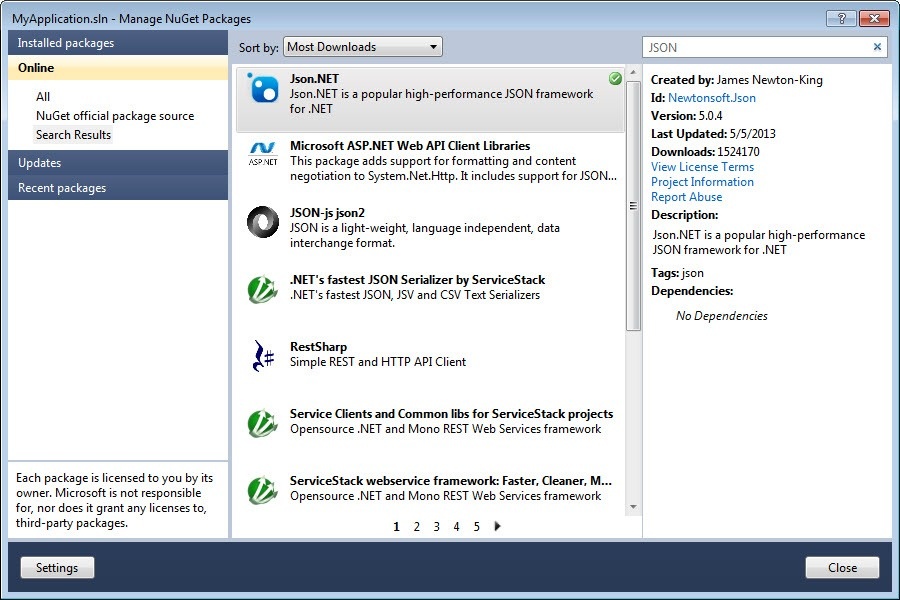
Check the beginning of the DrawCircle() method to see how Json.NET helps us unpack the JSON that's passed into the function.
That's the .NET side of things: now let's take a look at what we need to add to our JavaScript code to essentially extend the JavaScript Shaping Layer.
Here's the updated JavaScript code – the standalone version we saw at the end of last week. We could also update the HTML palette, but that would take more work to marshal across the data set by its various UI elements.
var doc = Acad.Application.activedocument;
var center = new Acad.Point3d(0, 0, 0);
var radius = 0;
//var trId;
function pointToString(pt) {
var ret =
pt.x.toString() + "," +
pt.y.toString() + "," +
pt.z.toString();
return ret;
}
function createCircle(cen, rad, first) {
// Build an XML string containing data to create
// an AcGiTransient that represents the circle
var cursor = '';
var drawable =
'<?xml version="1.0" encoding="utf-8"?>' +
'<drawable ' +
'xmlns="http://www.autodesk.com/AutoCAD/drawstream.xsd" ' +
'xmlns:t="http://www.autodesk.com/AutoCAD/transient.xsd" '+
't:onmouseover="onmouseover"' + cursor + '>' +
'<graphics id="id1"><circle center ="' + pointToString(cen) +
'" radius ="' + rad.toString() + '"/>' +
'</graphics></drawable>';
return drawable;
}
function circleJig() {
function onJigUpdate(args) {
var res = JSON.parse(args);
if (res) {
// The value being updated is the distance
radius = res.distance;
// Use it to create the XML for a transient
// circle and ask for it to be displayed
//var x = createCircle(center, radius);
//doc.transientManager.updateTransient(trId, x);
drawCircle(center, radius);
}
return true;
}
function onJigComplete(args) {
// When the jig is over, remove the transient
//doc.transientManager.eraseTransient(trId);
clearCircle();
var res = JSON.parse(args);
if (res && res.dragStatus == Acad.DragStatus.kNormal) {
Acad.Editor.executeCommandAsync(
'_.CIRCLE ' + pointToString(center) + ' ' + radius
);
}
}
function onJigError(args) {
write('\nUnable to create circle: ' + args);
}
function onPointSelected(args) {
var res = JSON.parse(args);
if (res) {
center =
new Acad.Point3d(
res.value.x,
res.value.y,
res.value.z
);
// Now we can create our transient
//var tran = new Acad.Transient();
//trId = tran.getId();
// And ask for it to be drawn
//var x = createCircle(center, 0, true);
//doc.transientManager.addTransient(tran, x);
drawCircle(center, 0);
// Set up our jig options
var opts =
new Acad.JigPromptDistanceOptions('Point on radius');
opts.basePoint = center;
opts.useBasePoint = true;
// Run the jig to select the distance
var jig = new Acad.DrawJig(onJigUpdate, opts);
Acad.Editor.drag(jig).then(onJigComplete, onJigError);
}
}
function onPointError(args) {
write('\nUnable to select point: ' + args);
}
// Ask the user to select the center point before we
// start the jig
var opts = new Acad.PromptPointOptions('Select center');
Acad.Editor.getPoint(opts).then(
onPointSelected, onPointError
);
}
// Our extensions to the AutoCAD Shaping Layer
function drawCircle(cen, rad) {
execAsync(
JSON.stringify({
functionName: 'NetDrawCircle',
invokeAsCommand: false,
functionParams: {
center: cen,
radius: rad
}
}),
onInvokeSuccess,
onInvokeError
);
}
function clearCircle() {
execAsync(
JSON.stringify({
functionName: 'NetClearCircle',
invokeAsCommand: false,
functionParams: undefined
}),
onInvokeSuccess,
onInvokeError
);
}
function onInvokeSuccess(result) {
write("\n");
}
function
onInvokeError(result) {
write("\nOnInvokeError: " + result);
}
Acad.Editor.addCommand(
"JIG_CMDS",
"CJ",
"CJ",
Acad.CommandFlag.MODAL,
circleJig
);
I've commented out the various uses of transient graphics (although I've left in the now-unused createCircle() function) so you can contrast the calls with the new ones to drawCircle() and clearCircle().
It should be fairly obvious how we've implemented our drawCircle() and clearCircle() functions to simply call through to .NET using execAsync() (I suppose exec() might also have been called, but I tend to prefer to use asynchronous calls unless it's absolutely required to use synchronous ones).
If you'd like to give this version a try – and it seems to work very well for me, at least – copy & paste the following into the command-line of AutoCAD 2014:
(command "_.WEBLOAD" "/wp-content/uploads/files/CircleJigNet.js")
As mentioned earlier, you'll need to have built the post's C# code into a DLL that you NETLOAD into AutoCAD before the JavaScript code will function correctly. This will clearly impact the portability of your JavaScript code – unless you add the same capability across the other (future) platforms – but hopefully you can see how it's possible to extend our JavaScript API implementation when you really need to.


Leave a Reply to Dale Bartlett Cancel reply