While developing the prototype ShapeShifter-AutoCAD integration, last week, it became clear that the user really needed something to look at as geometry was being marshalled across between the JavaScript hosting process and AutoCAD's address space. We might have used a standard progress bar, of course, but decided to do something a bit different: implement a mechanism to take the vertices of a mesh as they are being streamed/decoded and display them inside the drawing.
For us this proved to be a 2-stage process: the vertices were brought in and displayed as red, and these same vertices – as referenced by the various faces that were brought in during the second stage – were then displayed in yellow. Once all the data was there to generate the SubDMesh, we went ahead and did so.
This should give you an idea of what the results were like:
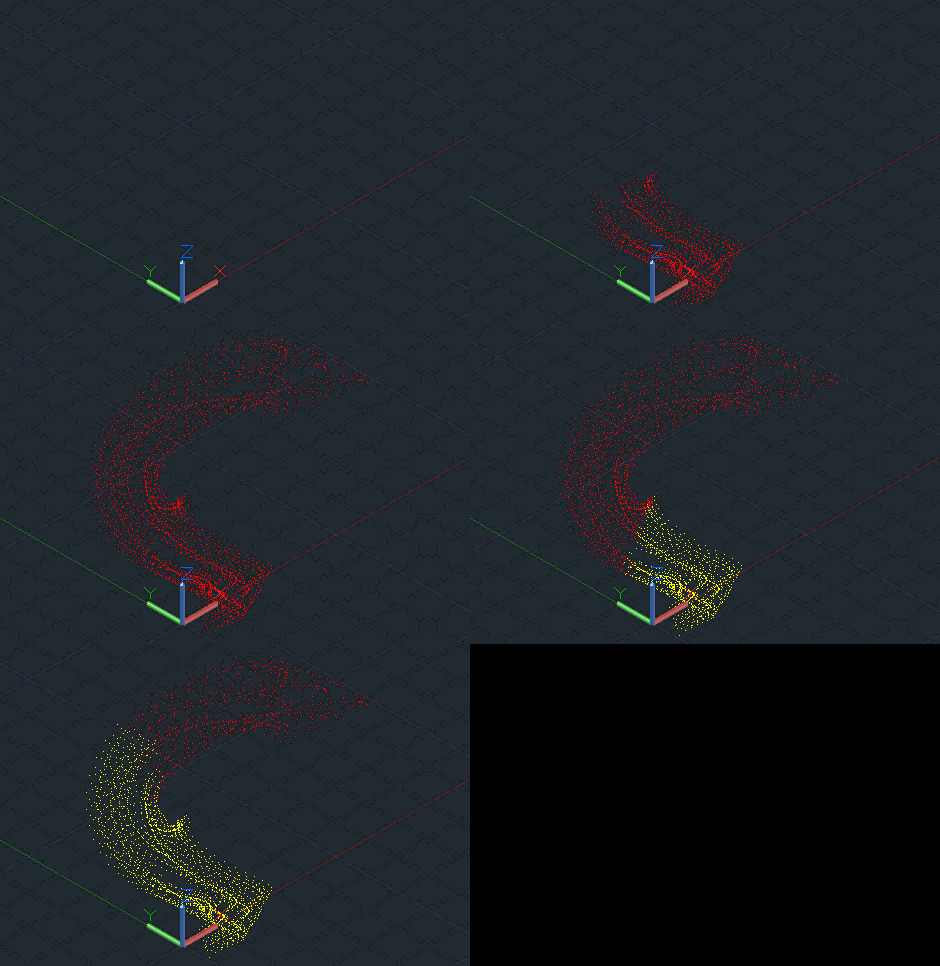
The primary technique was to derive a Transient object that could display the two sets of points in its SubWorldDraw() method:
public struct TransFace
{
public int a, b, c, d;
}
public class PointDisplay : Transient
{
Point3dCollection _vertices, _facepts;
public PointDisplay()
{
_vertices = new Point3dCollection();
_facepts = new Point3dCollection();
}
public void AddPoint(Point3d pt)
{
_vertices.Add(pt);
}
public void AddFace(TransFace face)
{
var pt1 = _vertices[face.a];
var pt2 = _vertices[face.b];
var pt3 = _vertices[face.c];
_facepts.Add(pt1);
_facepts.Add(pt2);
_facepts.Add(pt3);
if (face.c != face.d)
_facepts.Add(_vertices[face.d]);
}
protected override int SubSetAttributes(DrawableTraits traits)
{
return (int)DrawableAttributes.None;
}
protected override void SubViewportDraw(ViewportDraw vd)
{
}
protected override bool SubWorldDraw(WorldDraw wd)
{
short oc = wd.SubEntityTraits.Color;
wd.SubEntityTraits.Color = 1;
wd.Geometry.Polypoint(_vertices, null, null);
wd.SubEntityTraits.Color = 2;
wd.Geometry.Polypoint(_facepts, null, null);
wd.SubEntityTraits.Color = oc;
return true;
}
}
Then, during the course of our command, we needed to instantiate the PointDisplay() class (I chose to store mine in a member variable called _pd, as I'm going to populate it from another method) and then display it via the Transient Graphics Manager:
_pd = new PointDisplay();
TransientManager.CurrentTransientManager.AddTransient(
_pd, TransientDrawingMode.DirectShortTerm,
128, new IntegerCollection()
);
As we streamed in/generated the data, we added points and or TransFaces (a struct I created as a convenience: you can create your own depending on the data you're streaming/displaying) and then, at an appropriate interval, updated the transient:
TransientManager.CurrentTransientManager.UpdateTransient(
_pd, new IntegerCollection()
);
(You may need to throw in a call to DoEvents(), while you're at it.)
When it's all finished, we erased the transient and called Dispose() on it, of course:
TransientManager.CurrentTransientManager.EraseTransient(
_pd, new IntegerCollection()
);
_pd.Dispose();
That's about it. I'm not sharing the complete source for this project, as it's an internal prototype that includes a fair amount of other code, but this should give you enough information to get it working on your side.
I can see this technique being of interest for applications dealing with time-consuming model creation operations. Please let me know if you have your own thoughts on how it might be used or extended.


Leave a Reply to James Maeding Cancel reply