Our old friend Roland Feletic emailed me last week. He'd been having some trouble with this previous post when jigging blocks with multiline attributes. Roland had also identified some code in this post on another blog which worked properly for him.
I spent some time looking into what was wrong with the original post. It certainly didn't deal with the appropriate placement of multiline text, and didn't take proper care of annotation scaling and UCS. Time for a do-over. 🙂
The following C# code is a combination of the code from the previous post and the approach spiderinnet1 took in their own implementation. I didn't adopt everything they'd done on their side, however: this jig is about simple placement – I didn't extend it to worry about rotation and scaling – and I chose not to implement certain performance optimizations – their code keeps attribute references and their definitions open inside a hash table during the jigs operation, while I preferred to incur the modest overhead of opening them from ObjectIds, when needed.
So there are still a few differences in the two implementations – be sure to head over and check spiderinnet1's if you're interested in their implementation.
Here's the C# code:
using Autodesk.AutoCAD.ApplicationServices;
using Autodesk.AutoCAD.DatabaseServices;
using Autodesk.AutoCAD.EditorInput;
using Autodesk.AutoCAD.Geometry;
using Autodesk.AutoCAD.Runtime;
using System.Collections.Generic;
namespace BlockJigApplication
{
class BlockJig : EntityJig
{
// Member variables
private Matrix3d _ucs;
private Point3d _pos;
private Dictionary<ObjectId, ObjectId> _atts;
private Transaction _tr;
// Constructor
public BlockJig(
Matrix3d ucs,
Transaction tr,
BlockReference br,
Dictionary<ObjectId, ObjectId> atts
) : base(br)
{
_ucs = ucs;
_pos = br.Position;
_atts = atts;
_tr = tr;
}
protected override bool Update()
{
var br = (BlockReference)Entity;
// Transform to the current UCS
br.Position = _pos.TransformBy(_ucs);
if (br.AttributeCollection.Count > 0)
{
foreach (ObjectId id in br.AttributeCollection)
{
var obj = _tr.GetObject(id, OpenMode.ForRead);
var ar = obj as AttributeReference;
if (ar != null)
{
ar.UpgradeOpen();
// Open the associated attribute definition
var defId = _atts[ar.ObjectId];
var obj2 = _tr.GetObject(defId, OpenMode.ForRead);
var ad = (AttributeDefinition)obj2;
// Use it to set positional information on the
// reference
ar.SetAttributeFromBlock(ad, br.BlockTransform);
ar.AdjustAlignment(br.Database);
}
}
}
return true;
}
protected override SamplerStatus Sampler(JigPrompts prompts)
{
var opts =
new JigPromptPointOptions("\nSelect insertion point:");
opts.BasePoint = Point3d.Origin;
opts.UserInputControls =
UserInputControls.NoZeroResponseAccepted;
var ppr = prompts.AcquirePoint(opts);
var ucsPt = ppr.Value.TransformBy(_ucs.Inverse());
if (_pos == ucsPt)
return SamplerStatus.NoChange;
_pos = ucsPt;
return SamplerStatus.OK;
}
public PromptStatus Run()
{
var doc = Application.DocumentManager.MdiActiveDocument;
if (doc == null)
return PromptStatus.Error;
return doc.Editor.Drag(this).Status;
}
}
public class Commands
{
const string annoScalesDict = "ACDB_ANNOTATIONSCALES";
[CommandMethod("BJ")]
static public void BlockJigCmd()
{
var doc = Application.DocumentManager.MdiActiveDocument;
var db = doc.Database;
var ed = doc.Editor;
var pso = new PromptStringOptions("\nEnter block name: ");
var pr = ed.GetString(pso);
if (pr.Status != PromptStatus.OK)
return;
using (var tr = doc.TransactionManager.StartTransaction())
{
var bt =
(BlockTable)tr.GetObject(
db.BlockTableId,
OpenMode.ForRead
);
if (!bt.Has(pr.StringResult))
{
ed.WriteMessage(
"\nBlock \"" + pr.StringResult + "\" not found.");
return;
}
var ms =
(BlockTableRecord)tr.GetObject(
db.CurrentSpaceId,
OpenMode.ForWrite
);
var btr =
&
#160; (BlockTableRecord)tr.GetObject(
bt[pr.StringResult],
OpenMode.ForRead
);
// Block needs to be inserted to current space before
// being able to append attribute to it
var br = new BlockReference(new Point3d(), btr.ObjectId);
br.TransformBy(ed.CurrentUserCoordinateSystem);
ms.AppendEntity(br);
tr.AddNewlyCreatedDBObject(br, true);
if (btr.Annotative == AnnotativeStates.True)
{
var ocm = db.ObjectContextManager;
var occ = ocm.GetContextCollection(annoScalesDict);
br.AddContext(occ.CurrentContext);
}
else
{
br.ScaleFactors = new Scale3d(br.UnitFactor);
}
// Instantiate our map between attribute references
// and their definitions
var atts = new Dictionary<ObjectId,ObjectId>();
if (btr.HasAttributeDefinitions)
{
foreach (ObjectId id in btr)
{
var obj = tr.GetObject(id, OpenMode.ForRead);
var ad = obj as AttributeDefinition;
if (ad != null && !ad.Constant)
{
var ar = new AttributeReference();
// Set the initial positional information
ar.SetAttributeFromBlock(ad, br.BlockTransform);
ar.TextString = ad.TextString;
// Add the attribute to the block reference
// and transaction
var arId = br.AttributeCollection.AppendAttribute(ar);
tr.AddNewlyCreatedDBObject(ar, true);
// Initialize our dictionary with the ObjectIds of
// the attribute reference & definition
atts.Add(arId, ad.ObjectId);
}
}
}
// Run the jig
var jig =
new BlockJig(
ed.CurrentUserCoordinateSystem, tr, br, atts
);
if (jig.Run() != PromptStatus.OK)
return;
// Commit changes if user accepted, otherwise discard
tr.Commit();
}
}
}
}
As far as I can tell, this updated version works well with various kinds of blocks with attributes, as well as taking care of UCS and annotation scaling considerations.
A big thank you to Roland for suggesting the topic and providing his own code for comparison, to Philippe Leefsma for the original code and to spiderinnet1 for their improved implementation.
Update:
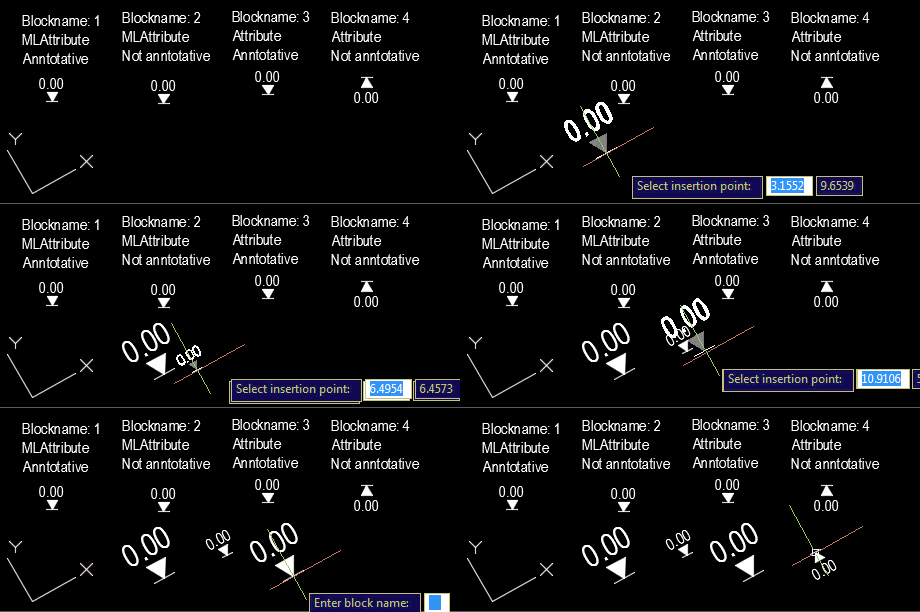
As requested, here's a quick demo of the updated BJ command in action, using an example file kindly provided by Roland:


Leave a Reply to Kean Walmsley Cancel reply