This is a follow-up to the post where we modified the size of selected text in a drawing, to make it fit its container. I received this comment last week:
instead of selecting the nested entities one by one, is it possible to make a "selectall" selection ?
It turns out that the question was related to a completely different post, but by the time I realised I'd already completed most of the work. It seems a very valid question for this topic, so that's fine. 🙂
Looping through all the text – some of which may be nested inside blocks – in a selection set, adjusting its size, is actually trickier than it looks. The approach we took before to perform nested selection of an individual object does quite a lot of heavy lifting for us.
We know we're going to have to iterate the selection set, of course, and then process the top-level text entities, as before. We need a "pick point", which we generate by taking the centre of the extents. The thing is, with long text this might not be inside the container, so if we find the centre is outside the container we then try each of the four corners until we find one that works. To make this work I ended up adjusting the processing function to return a Boolean. We also need our lambda to do the same, so what was previously an Action is now a Func (the latter allows us to return a value).
We have to deal with block references and their definitions recursively, of course, dealing with normal text – ignoring attribute definitions, as they don't have valid extents – and attribute references. We pass a transformation matrix into our various processing functions, to allow us to ultimately set the text's alignment point relative to the aggregate transform of the various nested blocks containing it.
One optimisation I decided to add was to pass a set of "already processed" block definitions through to the various functions (this could also be stored as state, if you prefer that approach). That way we don't try to edit text that has already been made to fit.
Here's the updated C# code with our new ATM (AdjustTextMultiple) command:
using Autodesk.AutoCAD.ApplicationServices;
using Autodesk.AutoCAD.BoundaryRepresentation;
using Autodesk.AutoCAD.DatabaseServices;
using Autodesk.AutoCAD.EditorInput;
using Autodesk.AutoCAD.Geometry;
using Autodesk.AutoCAD.Runtime;
using System;
namespace TextPlacement
{
public static class Extensions
{
// Point3d extensions
///<summary>
/// Projects the provided Point3d onto the specified coordinate system.
///</summary>
///<param name="ucs">The coordinate system to project onto.</param>
///<returns>A Point2d projection on the plane of the
/// coordinate system.</returns>
public static Point2d ProjectToUcs(this Point3d pt, CoordinateSystem3d ucs)
{
var pl = new Plane(ucs.Origin, ucs.Zaxis);
return pl.ParameterOf(pt);
}
// DBText extensions
///<summary>
/// Gets the bounds of a DBText object.
///</summary>
///<param name="fac">Optional multiplier to increase/reduce buffer.</param>
///<returns>A collection of points defining the text's extents.</returns>
public static Point3dCollection ExtractBounds(
this DBText txt, double fac = 1.0
)
{
var pts = new Point3dCollection();
if (txt.Bounds.HasValue && txt.Visible)
{
// Create a straight version of the text object
// and copy across all the relevant properties
// (stopped copying AlignmentPoint, as it would
// sometimes cause an eNotApplicable error)
// We'll create the text at the WCS origin
// with no rotation, so it's easier to use its
// extents
var txt2 = new DBText();
txt2.Normal = Vector3d.ZAxis;
txt2.Position = Point3d.Origin;
// Other properties are copied from the original
txt2.TextString = txt.TextString;
txt2.TextStyleId = txt.TextStyleId;
txt2.LineWeight = txt.LineWeight;
txt2.Thickness = txt2.Thickness;
txt2.HorizontalMode = txt.HorizontalMode;
txt2.VerticalMode = txt.VerticalMode;
txt2.WidthFactor = txt.WidthFactor;
txt2.Height = txt.Height;
txt2.IsMirroredInX = txt2.IsMirroredInX;
txt2.IsMirroredInY = txt2.IsMirroredInY;
txt2.Oblique = txt.Oblique;
// Get its bounds if it has them defined
// (which it should, as the original did)
if (txt2.Bounds.HasValue)
{
var maxPt = txt2.Bounds.Value.MaxPoint;
// Only worry about this single case, for now
Matrix3d mat = Matrix3d.Identity;
if (txt.Justify == AttachmentPoint.MiddleCenter)
{
mat = Matrix3d.Displacement((Point3d.Origin - maxPt) * 0.5);
}
// Place all four corners of the bounding box
// in an array
double minX, minY, maxX, maxY;
if (txt.Justify == AttachmentPoint.MiddleCenter)
{
minX = -maxPt.X * 0.5 * fac;
maxX = maxPt.X * 0.5 * fac;
minY = -maxPt.Y * 0.5 * fac;
maxY = maxPt.Y * 0.5 * fac;
}
else
{
minX = 0;
minY = 0;
maxX = maxPt.X * fac;
maxY = maxPt.Y * fac;
}
var bounds =
new Point2d[] {
new Point2d(minX, minY),
new Point2d(minX, maxY),
new Point2d(maxX, maxY),
new Point2d(maxX, minY)
};
// We're going to get each point's WCS coordinates
// using the plane the text is on
var pl = new Plane(txt.Position, txt.Normal);
// Rotate each point and add its WCS location to the
// collection
foreach (Point2d pt in bounds)
{
pts.Add(
pl.EvaluatePoint(
pt.RotateBy(txt.Rotation, Point2d.Origin)
)
);
}
}
}
return pts;
}
// Extents3d extensions
///<summary>
/// Returns the mid-point of the Extents3d.
///</summary>
///<returns>A Point3d containing the center of the extents object.</returns>
public static Point3d Center(this Extents3d ext)
{
return ext.MinPoint + (ext.MaxPoint - ext.MinPoint).DivideBy(2);
}
// Region extensions
///<summary>
/// Returns whether a Region contains a Point3d.
///</summary>
///<param name="pt">A points to test against the Region.</param>
///<returns>A Boolean indicating whether the Region contains
/// the point.</returns>
public static bool ContainsPoint(this Region reg, Point3d pt)
{
using (var brep = new Brep(reg))
{
var pc = new PointContainment();
using (var brepEnt = brep.GetPointContainment(pt, out pc))
{
return pc != PointContainment.Outside;
}
}
}
///<summary>
/// Returns whether a Region contains a set of Point3ds.
///</summary>
///<param name="pts">An array of points to test against the Region.</param>
///<returns>A Boolean indicating whether the Region contains
/// all the points.</returns>
public static bool ContainsPoints(this Region reg, Point3dCollection ptc)
{
var pts = new Point3d[ptc.Count];
ptc.CopyTo(pts, 0);
return reg.ContainsPoints(pts);
}
///<summary>
/// Returns whether a Region contains a set of Point3ds.
///</summary>
///<param name="pts">An array of points to test against the Region.</param>
///<returns>A Boolean indicating whether the Region contains
/// all the points.</returns>
public static bool ContainsPoints(this Region reg, Point3d[] pts)
{
using (var brep = new Brep(reg))
{
foreach (var pt in pts)
{
var pc = new PointContainment();
using (var brepEnt = brep.GetPointContainment(pt, out pc))
{
if (pc == PointContainment.Outside)
return false;
}
}
}
return true;
}
///<summary>
/// Get the centroid of a Region.
///</summary>
///<param name="cur">An optional curve used to define the region.</param>
///<returns>A nullable Point3d containing the centroid of the Region.</returns>
public static Point3d? GetCentroid(this Region reg, Curve cur = null)
{
if (cur == null)
{
var idc = new DBObjectCollection();
reg.Explode(idc);
if (idc.Count == 0)
return null;
cur = idc[0] as Curve;
}
if (cur == null)
return null;
var cs = cur.GetPlane().GetCoordinateSystem();
var o = cs.Origin;
var x = cs.Xaxis;
var y = cs.Yaxis;
var a = reg.AreaProperties(ref o, ref x, ref y);
var pl = new Plane(o, x, y);
return pl.EvaluatePoint(a.Centroid);
}
// Database extensions
///<summary>
/// Create a piece of text of a specified size at a specified location.
///</summary>
///<param name="norm">The normal to the text object.</param>
///<param name="pt">The position for the text.</param>
///<param name="conts">The contents of the text.</param>
///<param name="size">The size of the text.</param>
public static void CreateText(
this Database db, Vector3d norm, Point3d pt, string conts, double size
)
{
using (var tr = db.TransactionManager.StartTransaction())
{
var ms =
tr.GetObject(
SymbolUtilityServices.GetBlockModelSpaceId(db),
OpenMode.ForWrite
) as BlockTableRecord;
if (ms != null)
{
var txt = new DBText();
txt.Normal = norm;
txt.Position = pt;
txt.Justify = AttachmentPoint.MiddleCenter;
txt.AlignmentPoint = pt;
txt.TextString = conts;
txt.Height = size;
var id = ms.AppendEntity(txt);
tr.AddNewlyCreatedDBObject(txt, true);
//tr.CreateBoundingBox(txt);
}
tr.Commit();
}
}
// Transaction extensions
///<summary>
/// Create a bounding rectangle around a piece of text (for debugging).
///</summary>
///<param name="txt">The text object around which to create a box.</param>
public static void CreateBoundingBox(this Transaction tr, DBText txt)
{
var ms =
tr.GetObject(
SymbolUtilityServices.GetBlockModelSpaceId(txt.Database),
OpenMode.ForWrite
) as BlockTableRecord;
if (ms != null)
{
var corners = txt.ExtractBounds();
if (corners.Count >= 4)
{
var doc = Application.DocumentManager.MdiActiveDocument;
if (doc == null) return;
var ed = doc.Editor;
var ucs = ed.CurrentUserCoordinateSystem;
var cs = ucs.CoordinateSystem3d;
var pl = new Polyline(4);
for (int i = 0; i < 4; i++)
{
pl.AddVertexAt(i, corners[i].ProjectToUcs(cs), 0, 0, 0);
}
pl.Closed = true;
pl.TransformBy(ucs);
ms.AppendEntity(pl);
tr.AddNewlyCreatedDBObject(pl, true);
}
}
}
// Int extensions
// Based on:
// http://stackoverflow.com/questions/2729752/converting-numbers-in-to-words-c-sharp
///<summary>
/// Return the description of an integer in string form.
///</summary>
///<returns>The words describing an integer
/// e.g. "one hundred and twenty-eight."</returns>
public static string ToWords(this int number)
{
if (number == 0)
return "zero";
if (number < 0)
return "minus " + ToWords(Math.Abs(number));
string words = "";
if ((number / 1000000) > 0)
{
words += ToWords(number / 1000000) + " million ";
number %= 1000000;
}
if ((number / 1000) > 0)
{
words += ToWords(number / 1000) + " thousand ";
number %= 1000;
}
if ((number / 100) > 0)
{
words += ToWords(number / 100) + " hundred ";
number %= 100;
}
if (number > 0)
{
if (words != "")
words += "and ";
var unitsMap =
new[] {
"zero", "one", "two", "three", "four", "five", "six", "seven",
"eight", "nine", "ten", "eleven", "twelve", "thirteen",
"fourteen", "fifteen", "sixteen", "seventeen", "eighteen",
"nineteen"
};
var tensMap =
new[] {
"zero", "ten", "twenty", "thirty", "forty", "fifty",
"sixty", "seventy", "eighty", "ninety"
};
if (number < 20)
words += unitsMap[number];
else
{
words += tensMap[number / 10];
if ((number % 10) > 0)
words += "-" + unitsMap[number % 10];
}
}
return words;
}
}
public class Commands
{
private int _number = 1;
[CommandMethod("LS")]
public void LabelSpace()
{
var doc = Application.DocumentManager.MdiActiveDocument;
if (doc == null) return;
var ed = doc.Editor;
// Loop, creating labels in the selected space, until cancelled
do
{
var ppr = ed.GetPoint("\nSelect point in boundary");
if (ppr.Status != PromptStatus.OK)
break;
try
{
var txt = _number.ToWords();
if (
!FindAndProcessSpace(
doc, ppr.Value, txt,
(reg, pt, size) =>
{
// If the centroid is contained in the Region
// (not always the case) then we proceed
if (reg.ContainsPoint(pt))
{
doc.Database.CreateText(reg.Normal, pt, txt, size);
return true;
}
else
{
return false;
}
}
)
)
{
ed.WriteMessage("\nCenter of space is outside - skipping.");
}
_number++;
}
catch (Autodesk.AutoCAD.Runtime.Exception)
{
ed.WriteMessage("\nUnable to label this space.");
}
}
while (true);
}
[CommandMethod("AT")]
public void AdjustText()
{
var doc = Application.DocumentManager.MdiActiveDocument;
if (doc == null) return;
var ed = doc.Editor;
// Loop, creating labels in the selected space, until cancelled
do
{
var pneo = new PromptNestedEntityOptions("\nSelect text or attribute");
var pner = ed.GetNestedEntity(pneo);
if (pner.Status != PromptStatus.OK)
break;
// Create a transaction per iteration... the easiest way to get
// the modified text to display properly during execution
using (var tr = doc.TransactionManager.StartTransaction())
{
var text = tr.GetObject(pner.ObjectId, OpenMode.ForRead) as DBText;
if (text != null)
{
ResizeText(doc, text, pner.PickedPoint, pner.Transform.Inverse());
}
else
{
ed.WriteMessage("\nMust be single-line text or an attribute.");
}
tr.Commit();
}
}
while (true);
}
[CommandMethod("ATM", CommandFlags.UsePickSet)]
public void AdjustTextMultiple()
{
var doc = Application.DocumentManager.MdiActiveDocument;
if (doc == null) return;
var ed = doc.Editor;
// Loop, creating labels in the selected space, until cancelled
var psr = ed.GetSelection();
if (psr.Status != PromptStatus.OK)
return;
using (var tr = doc.TransactionManager.StartTransaction())
{
foreach (SelectedObject so in psr.Value)
{
ResizeTextOrBlock(
doc, tr, tr.GetObject(so.ObjectId, OpenMode.ForRead),
Matrix3d.Identity, new ObjectIdCollection()
);
}
tr.Commit();
}
ed.Regen();
}
private void ResizeTextOrBlock(
Document doc, Transaction tr, DBObject obj, Matrix3d mat,
ObjectIdCollection processedBlocks
)
{
if (obj is DBText)
{
var text = (DBText)obj;
if (text.Bounds.HasValue) // This filters out AttributeDefinitions
{
// We'll try the center then each of the corners
var pts = text.ExtractBounds();
pts.Insert(0, text.Bounds.Value.Center());
foreach (Point3d pt in pts)
{
if (ResizeText(doc, text, pt.TransformBy(mat), mat))
break;
}
}
}
else if (obj is BlockReference)
{
ResizeBlockText(tr, doc, (BlockReference)obj, mat, processedBlocks);
}
}
private void ResizeBlockText(
Transaction tr, Document doc, BlockReference br, Matrix3d mat,
ObjectIdCollection processedBlocks
)
{
// Only process the block if we haven't done so, already
if (processedBlocks.Contains(br.BlockTableRecord))
return;
// Open the block for read
var btr =
(BlockTableRecord)tr.GetObject(br.BlockTableRecord, OpenMode.ForRead);
// Work through the contents of the block: this will catch normal text
// contained within it, as well as any AttributeDefinitions
// (although these won't be adjusted)
foreach (var id in btr)
{
ResizeTextOrBlock(
doc, tr, tr.GetObject(id, OpenMode.ForRead),
mat.PostMultiplyBy(br.BlockTransform), processedBlocks
);
}
// Next let's work through the AttributeReferences. These will get
// resized properly
foreach (ObjectId id in br.AttributeCollection)
{
ResizeTextOrBlock(
doc, tr, tr.GetObject(id, OpenMode.ForRead), mat, processedBlocks
);
}
processedBlocks.Add(br.BlockTableRecord);
}
private static bool ResizeText(
Document doc, DBText text, Point3d cen, Matrix3d mat
)
{
try
{
return FindAndProcessSpace(
doc, cen, text.TextString,
(reg, pt, size) =>
{
text.UpgradeOpen();
text.Height = size;
if (text.Justify == AttachmentPoint.MiddleCenter)
{
text.AlignmentPoint = pt.TransformBy(mat.Inverse());
}
return true;
}
);
}
catch (Autodesk.AutoCAD.Runtime.Exception)
{
doc.Editor.WriteMessage("\nUnable to adjust the size of this text.");
return false;
}
}
// Process the space enclosing the provided point, find the optimal
// text size to "fill" it, fire the provided action on success
private static bool FindAndProcessSpace(
Document doc, Point3d pt, string txt,
Func<Region, Point3d, double, bool> lambda
)
{
var ed = doc.Editor;
var db = doc.Database;
// Start by tracing the boundary around the selected point
var objs = ed.TraceBoundary(pt, false);
if (objs == null || objs.Count == 0)
return false;
// If we have some geometry, create a Region from it
var regs = Region.CreateFromCurves(objs);
if (regs == null || regs.Count == 0)
return false;
// There should only be one Region, but you never know
foreach (Region reg in regs)
{
// Get the Region's centroid: we'll use this for the text placement
var cen = reg.GetCentroid(objs[0] as Curve);
if (cen.HasValue)
{
var size = FindTextSize(reg, cen.Value, txt);
// If we didn't fail, call our processing action
if (size > 0)
return lambda(reg, cen.Value, size);
}
}
return false;
}
// Helper function to find the size of text that fits into a particular
// Region
private static double FindTextSize(Region reg, Point3d pt, string text)
{
// Returning < 0 mean failure
double lastGood = -1.0;
// This factor must be > 1: if it's close to 1, we will iterate more
// (but have a closer match)
const double factor = 1.05;
// We're using a temporary text object
using (var txt = new DBText())
{
txt.Normal = reg.Normal;
txt.Position = pt;
txt.Justify = AttachmentPoint.MiddleCenter;
txt.AlignmentPoint = pt;
txt.TextString = text;
txt.Height = 1.0;
// Growing means we're working our way outwards
// !Growing means we're working out way inwards
// We'll only know which one we're doing when we pass/fail
// the first time
bool first = true;
bool growing = true; // Setting a default to help the compiler
do
{
// Add 10% so we have a bit of a buffer around the text
if (reg.ContainsPoints(txt.ExtractBounds(1.1)))
{
// If we succeed first time, we grow the text
if (first)
{
growing = true;
first = false;
}
// When we're growing and we succeed, iterate by growing the text
if (growing)
{
lastGood = txt.Height;
txt.Height = txt.Height * factor;
}
else
{
// If we're not growing this will be the first time we succeed
return txt.Height;
}
}
else
{
// If we fail first time, we shrink the text
if (first)
{
growing = false;
first = false;
}
// When we're growing and we fail, return the previous good result
if (growing)
{
return lastGood;
}
else
{
// If we're not growing, iterate by shrinking the text
// (unless it gets too small, then we return failure)
txt.Height = txt.Height / factor;
if (txt.Height < Tolerance.Global.EqualPoint)
return -1.0;
}
}
}
while (true);
}
}
}
}
Here's the new command in action with various types of text object and block attributes:
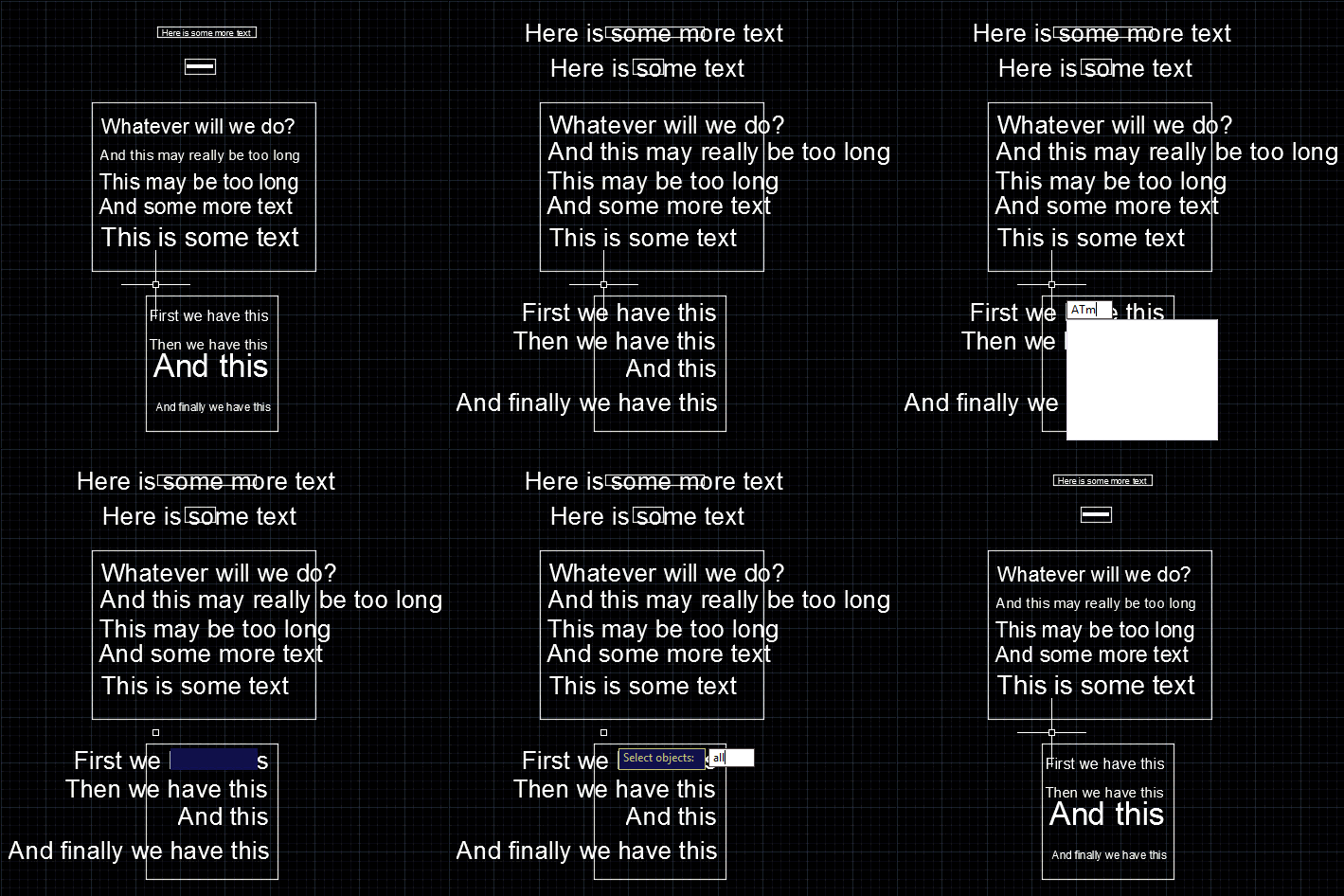
I'm sure there are cases that won't work (in the extreme there's MText, of course, but also other types of justification/alignment, etc.), but I believe the basic infrastructure to be sound. Let me know if there are scenarios that don't work for you, and we'll see what's possible.


Leave a Reply to Pushpak Phule Cancel reply