After seeing how we can use Cylon.js to control Sphero's Ollie and BB-8 robots from a browser, and then using the same mechanism from inside a custom AutoCAD command, today we're going to drive these cute little bots based on AutoCAD geometry.
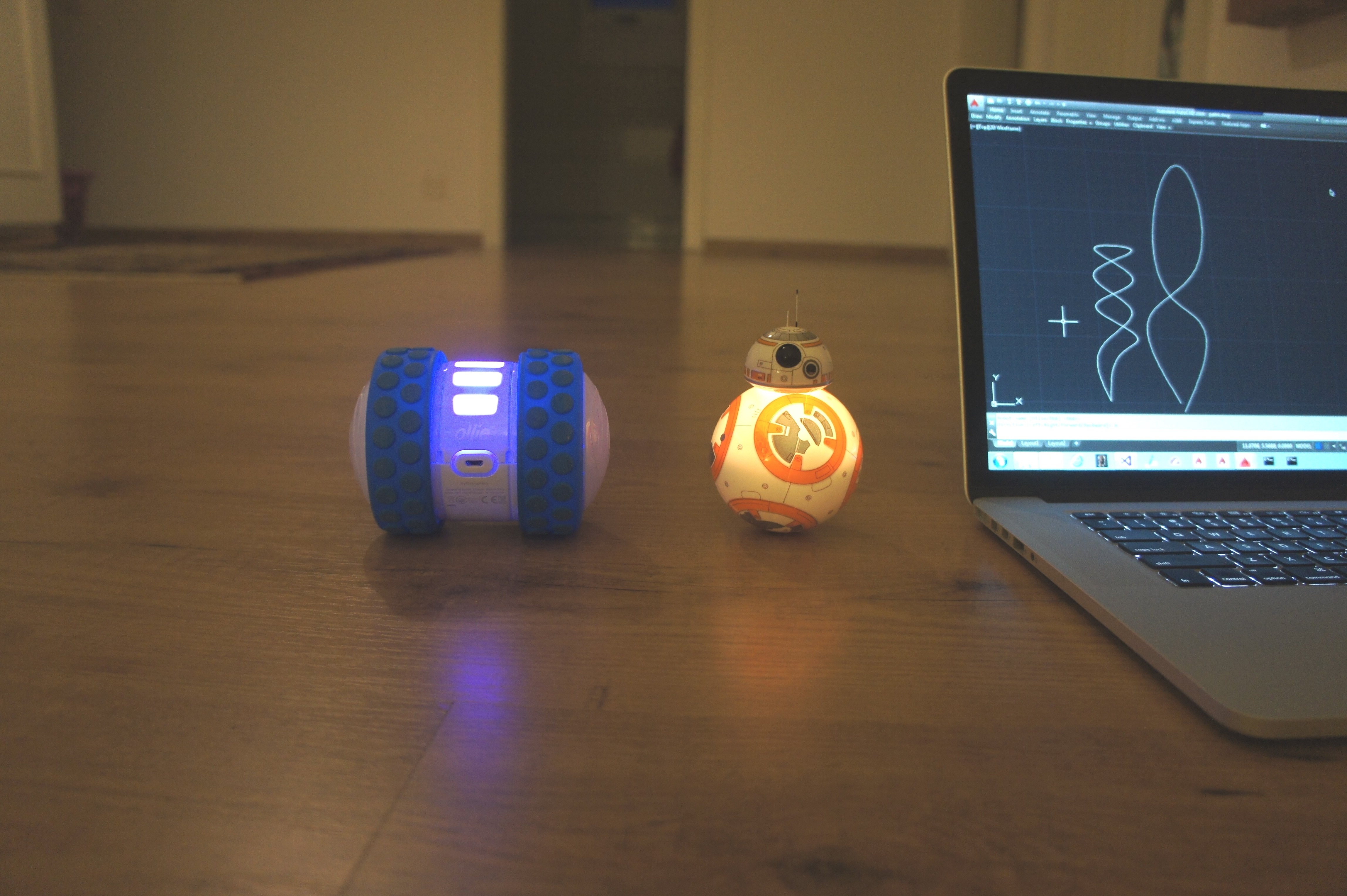 The idea is that we'll decompose regular curves – whether lines, arcs, polylines or splines – and use the "segments" as movement instructions for our robots. The approach is simple enough: we'll iterate along the length of each selected curve and generate a set of instructions – really just a set of angles – for the associated bot. When we come to executing the instructions, rather than iterating through each, bot by bot, we're going to interleave them. So the bots will effectively be driven in parallel, with the bot with the longer path getting instructions longer than the other(s).
I was hoping not to have to change the server-side code for this post, but then I realised I really needed to have speed set per robot: BB-8 is quite a bit slower than Ollie, so I needed to give it a wee boost. Either that or add some unwanted complexity by varying the amount of time we wait between instructions (I really don't want to vary this per robot, if I can avoid it).
Here's the updated, server-side, robot controller JavaScript code.
On the client side I went ahead and created a class to encapsulate the various calls to the REST API. This certainly makes things a lot cleaner. I also switched to using async calls, so we don't block the UI thread.
using Autodesk.AutoCAD.ApplicationServices;
using Autodesk.AutoCAD.DatabaseServices;
using Autodesk.AutoCAD.EditorInput;
using Autodesk.AutoCAD.Geometry;
using Autodesk.AutoCAD.Runtime;
using System;
using System.Collections.Generic;
using System.Collections.Specialized;
using System.Globalization;
using System.Linq;
using System.Net;
using System.Threading.Tasks;
using System.Web.Script.Serialization;
namespace DriveRobots
{
public static class Extensions
{
// We use this to capitalicise keywords, although this could fail for
// various cases (common first letters, etc)
public static string ToTitleCase(this string str)
{
return CultureInfo.CurrentCulture.TextInfo.ToTitleCase(str.ToLower());
}
// Simplistic curve length method (should add code to check for Rays)
public static double Length(this Curve cur)
{
double start = cur.GetDistanceAtParameter(cur.StartParam);
double end = cur.GetDistanceAtParameter(cur.EndParam);
return Math.Abs(end - start);
}
}
// Encapsulate calls to our robots behind a controller
public class RobotController : IDisposable
{
const string host = "http://localhost:8080";
const string root = host + "/api/robots";
private WebClient _wc;
private bool disposed = false;
public RobotController()
{
_wc = new WebClient();
}
// Public implementation of Dispose pattern callable by consumers
public void Dispose()
{
Dispose(true);
GC.SuppressFinalize(this);
}
// Protected implementation of Dispose pattern
protected virtual void Dispose(bool disposing)
{
if (disposed)
return;
if (disposing && _wc != null)
{
_wc.Dispose();
_wc = null;
}
disposed = true;
}
~RobotController()
{
Dispose(false);
}
// Return the connected robots
public async Task<string[]> GetRobots()
{
var json = await _wc.DownloadStringTaskAsync(root);
return new JavaScriptSerializer().Deserialize<string[]>(json);
}
// Return the names directions they can move in
public string[] GetDirections()
{
return new string[] { "Left", "Right", "Forward", "Backward" };
}
// Wake the specified robot
public async Task WakeRobot(string robot)
{
await _wc.DownloadStringTaskAsync(root + "/" + robot.ToLower());
}
// Move the specified robot in a particular direction
public async Task MoveRobot(string robot, string direction)
{
await _wc.DownloadStringTaskAsync(
root + "/" + robot.ToLower() + "/" + direction.ToLower()
);
await Task.Delay(500);
}
}
public class Commands
{
private static string _lastBot = "";
//private BlockTableRecord _ms = null; // For debugging
[CommandMethod("DR")]
public async void DriveRobot()
{
var doc = Application.DocumentManager.MdiActiveDocument;
if (doc == null)
return;
var ed = doc.Editor;
var db = doc.Database;
using (var rc = new RobotController())
{
string[] names = null;
try
{
names = await rc.GetRobots();
}
catch (System.Exception ex)
{
ed.WriteMessage("\nCan't access robot web-service: {0}.", ex.Message);
return;
}
// Ask the user for the robot to control
var pko = new PromptKeywordOptions("\nRobot name");
foreach (var name in names)
{
pko.Keywords.Add(name.ToTitleCase());
}
// If a bot was selected previously, set it as the default
if (!string.IsNullOrEmpty(_lastBot))
{
pko.Keywords.Default = _lastBot;
}
var pkr = ed.GetKeywords(pko);
if (pkr.Status != PromptStatus.OK)
return;
_lastBot = pkr.StringResult;
// Start by getting the bot - this should wake it, if needed
try
{
rc.WakeRobot(_lastBot);
}
catch (System.Exception ex)
{
ed.WriteMessage("\nCan't connect to {0}: {1}.", _lastBot, ex.Message);
return;
}
// The direction can be one of the four main directions or a number
var pio = new PromptIntegerOptions("\nDirection");
var directions = rc.GetDirections();
foreach (var direction in directions)
{
pio.Keywords.Add(direction);
}
pio.AppendKeywordsToMessage = true;
// Set the direction depending on which was chosen
var pir = ed.GetInteger(pio);
var dir = "";
if (pir.Status == PromptStatus.Keyword)
{
dir = pir.StringResult;
}
else if (pir.Status == PromptStatus.OK)
{
dir = pir.Value.ToString();
}
else return;
// Our move command
try
{
rc.MoveRobot(_lastBot, dir);
}
catch (System.Exception ex)
{
ed.WriteMessage("\nCan't move {0}: {1}.", _lastBot, ex.Message);
}
}
}
[CommandMethod("DRC", CommandFlags.UsePickSet)]
public async void DriveRobotAlongCurve()
{
var doc = Application.DocumentManager.MdiActiveDocument;
if (doc == null)
return;
var ed = doc.Editor;
var db = doc.Database;
var psr = ed.GetSelection();
if (psr.Status != PromptStatus.OK)
return;
// Filter the ObjectIds belonging to Curves
var curveIds =
psr.Value.GetObjectIds().Where(
id => id.ObjectClass.IsDerivedFrom(RXObject.GetClass(typeof(Curve)))
).ToArray<ObjectId>();
ed.WriteMessage("\n{0} curves selected.", curveIds.Length);
if (curveIds.Length == 0)
return;
// Ask the user for the step size to move along each path
var pdo = new PromptDoubleOptions("\nStep size for paths");
pdo.AllowNegative = false;
pdo.AllowZero = false;
pdo.DefaultValue = 1.0;
pdo.UseDefaultValue = true;
var pdr = ed.GetDouble(pdo);
if (pdr.Status != PromptStatus.OK)
return;
var inc = pdr.Value;
using (var rc = new RobotController())
{
// Store our robot names in a StringCollection to make it easier to
// remove them as they get selected by the user for association with
// a path
var names = new StringCollection();
var robots2paths = new Dictionary<string, ObjectId>();
try
{
names.AddRange(await rc.GetRobots());
}
catch (System.Exception ex)
{
ed.WriteMessage("\nCan't access robot web-service: {0}.", ex.Message);
return;
}
using (var tr = doc.TransactionManager.StartTransaction())
{
// For debugging...
// _ms =
// tr.GetObject(db.CurrentSpaceId, OpenMode.ForWrite)
// as BlockTableRecord;
// Loop through the selected curves and assign a robot to each
foreach (var id in curveIds)
{
// Highlight the curve
var ent = (Entity)tr.GetObject(id, OpenMode.ForRead);
ent.Highlight();
// Ask the user for the robot to associate with this path
var pko = new PromptKeywordOptions("\nRobot to drive along path");
foreach (var name in names)
{
pko.Keywords.Add(name.ToTitleCase());
}
var pkr = ed.GetKeywords(pko);
if (pkr.Status != PromptStatus.OK)
{
ent.Unhighlight();
return;
}
// Remove the selected robot from our list and map it to the path
var robot = pkr.StringResult.ToLower();
names.Remove(robot);
robots2paths.Add(robot, id);
// Unhighlight the curve
ent.Unhighlight();
// Wake the robot associated with this path
try
{
rc.WakeRobot(robot);
}
catch (System.Exception ex)
{
ed.WriteMessage("\nCan't connect to {0}: {1}.", robot, ex.Message);
return;
}
}
// Now the fun starts...
// Get the list of moves for each robot
var robots2moves = new Dictionary<string, StringCollection>();
foreach(var kv in robots2paths)
{
robots2moves.Add(kv.Key, DecomposeCurve(tr, kv.Value, inc));
}
// Find out which is the largest sequence of moves - use that
// for our loop
var max = robots2moves.Max(kv => kv.Value.Count);
// Do a breadth-first traversal of our various moves lists,
// so the moves get executed quasi-simultaneously
for (int i=0; i < max; i++)
{
foreach(var kv in robots2moves)
{
if (kv.Value.Count > i)
{
await rc.MoveRobot(kv.Key, kv.Value[i]);
}
}
}
// Always commit
tr.Commit();
}
}
}
private StringCollection DecomposeCurve(
Transaction tr, ObjectId id, double inc = 1.0
)
{
double dist = 0.0;
var moves = new StringCollection();
var curve = tr.GetObject(id, OpenMode.ForRead) as Curve;
if (curve == null)
return null;
var curLen = curve.Length();
while (dist < curLen)
{
// Make sure we go to the end of the curve, even if the last step
// is shorter than the specified distance
var endDist = dist + inc > curLen ? curLen : dist + inc;
var start = curve.GetPointAtDist(dist);
var end = curve.GetPointAtDist(endDist);
/*
* Geometry debugging...
var ln = new Line(start, end);
_ms.AppendEntity(ln);
tr.AddNewlyCreatedDBObject(ln, true);
*/
moves.Add(GetDirectionString(start, end));
dist += inc;
}
return moves;
}
private string GetDirectionString(Point3d start, Point3d end)
{
// Get an integer direction (0-359) as a string
// (these will be instructions for our robots)
var vec = end - start;
var ang = vec.GetAngleTo(Vector3d.YAxis, Vector3d.ZAxis);
var deg = (ang * 180.0) / Math.PI;
return Math.Round(deg).ToString();
}
}
}
Here's the code in action:


Leave a Reply to Kean Walmsley Cancel reply