I'm sure some of you will be relieved to see I can still (more or less) manage to write code for AutoCAD… the last few days I've been feeling quite under-the-weather, so today's post is a little bit of "comfort code": sometimes while you're brain is struggling to handle the unfamiliar, it's very happy to tackle the familiar.
At least that was the plan, and the reason I decided to tackle this recent question from Thomas Heitz:
I would like to write an code to change automatically the structure label style while dragging the label. So I created two labels styles: left and right. The label style would be set according to the structure position: left style at left structure side and right style at right structure side.
The first thing to bear in mind is that Thomas is talking about Civil 3D, which I don't use. So the code I'm showing today will do something approximating what Thomas is looking for, but using an MLeader object (a standard Leader doesn't have associated text, although the LEADER command does create it). Hopefully it'll still be of some use to Thomas.
So why didn't this go exactly as I'd planned? I thought it would be a simple enough one to crank out, but for one reason or another – whether my weakened mental state, my fading AutoCAD skills or the unexpected gnarliness of the problem – I ended up spending my entire evening on it. Oh well.
Here's what I managed to come up with:
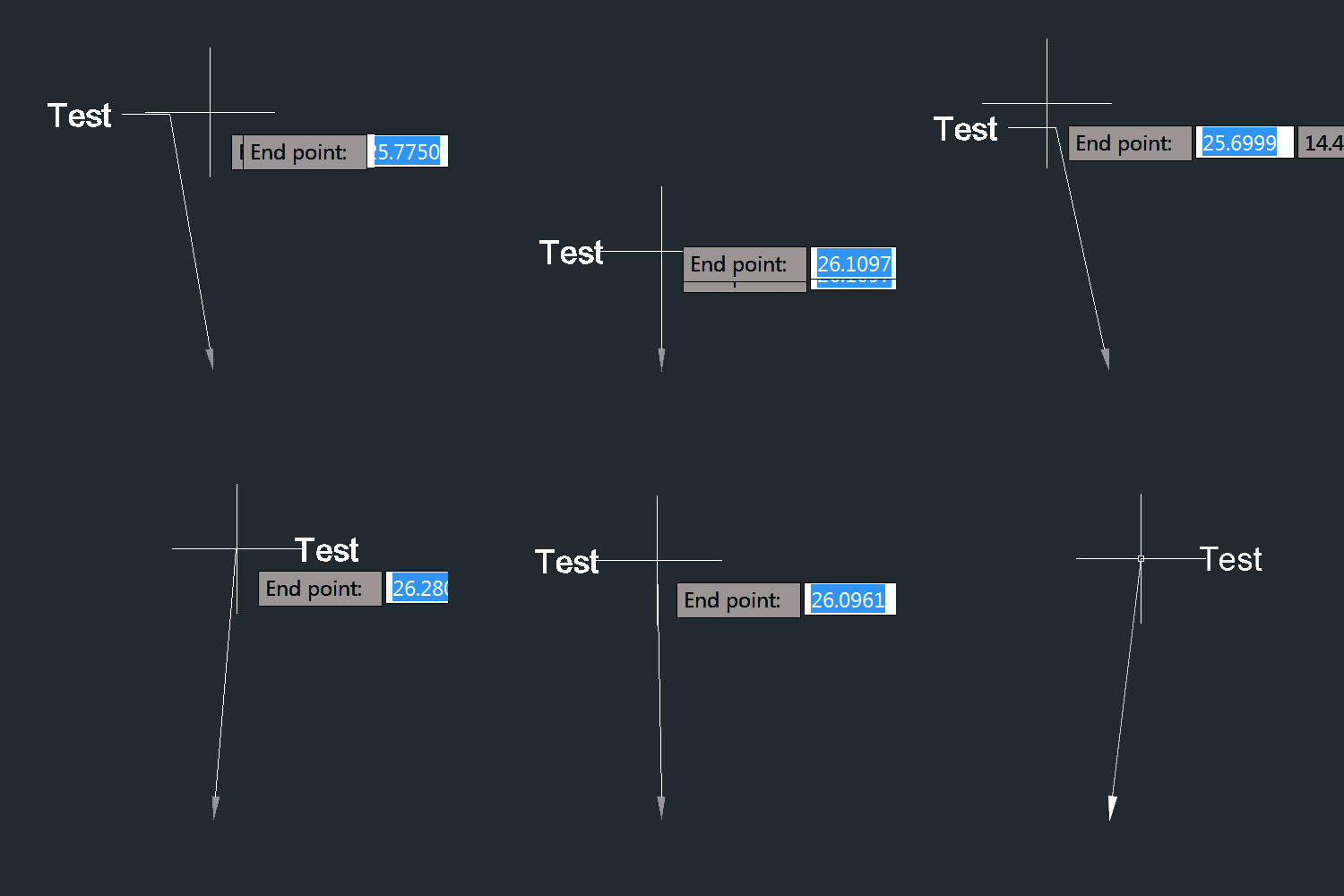
Much of the trickiness related to using MLeader from an EntityJig: firstly we need the MLeader to be database-resident to be jigged at all – a technique that's pretty common when jigging solids or blocks with attributes – but then there were some very subtle issues relating to geometry display. The MText would appear at the start of the leader, and then the leader would display from the origin until we moved the mouse to start the Sampler/Update cycle in the jig.
So there's some slightly quirky C# code below – such as making the MLeader invisible and only initializing it when really needed – but it works well enough for my purposes.
using Autodesk.AutoCAD.ApplicationServices;
using Autodesk.AutoCAD.DatabaseServices;
using Autodesk.AutoCAD.EditorInput;
using Autodesk.AutoCAD.Geometry;
using Autodesk.AutoCAD.Runtime;
namespace LeaderPlacement
{
public class LeaderCmds
{
class DirectionalLeaderJig : EntityJig
{
private Point3d _start, _end;
private string _contents;
private int _index;
private int _lineIndex;
private bool _started;
public DirectionalLeaderJig(string txt, Point3d start, MLeader ld) : base(ld)
{
// Store info that's passed in, but don't init the MLeader
_contents = txt;
_start = start;
_end = start;
_started = false;
}
// A fairly standard Sampler function
protected override SamplerStatus Sampler(JigPrompts prompts)
{
var po = new JigPromptPointOptions();
po.UserInputControls =
(UserInputControls.Accept3dCoordinates |
UserInputControls.NoNegativeResponseAccepted);
po.Message = "\nEnd point";
var res = prompts.AcquirePoint(po);
if (_end == res.Value)
{
return SamplerStatus.NoChange;
}
else if (res.Status == PromptStatus.OK)
{
_end = res.Value;
return SamplerStatus.OK;
}
return SamplerStatus.Cancel;
}
protected override bool Update()
{
var ml = (MLeader)Entity;
if (!_started)
{
if (_start.DistanceTo(_end) > Tolerance.Global.EqualPoint)
{
// When the jig actually starts - and we have mouse movement -
// we create the MText and init the MLeader
ml.ContentType = ContentType.MTextContent;
var mt = new MText();
mt.Contents = _contents;
ml.MText = mt;
// Create the MLeader cluster and add a line to it
_index = ml.AddLeader();
_lineIndex = ml.AddLeaderLine(_index);
// Set the vertices on the line
ml.AddFirstVertex(_lineIndex, _start);
ml.AddLastVertex(_lineIndex, _end);
// Make sure we don't do this again
_started = true;
}
}
else
{
// We only make the MLeader visible on the second time through
// (this also helps avoid some strange geometry flicker)
ml.Visible = true;
// We already have a line, so just set its last vertex
ml.SetLastVertex(_lineIndex, _end);
}
if (_started)
{
// Set the direction of the text to depend on the X of the end-point
// (i.e. is if to the left or right of the start-point?)
var dl = new Vector3d((_end.X >= _start.X ? 1 : -1), 0, 0);
ml.SetDogleg(_index, dl);
}
return true;
}
}
[CommandMethod("DL")]
public void DirectionalLeader()
{
var doc = Application.DocumentManager.MdiActiveDocument;
var ed = doc.Editor;
var db = doc.Database;
// Ask the user for the string and the start point of the leader
var pso = new PromptStringOptions("\nEnter text");
pso.AllowSpaces = true;
var pr = ed.GetString(pso);
if (pr.Status != PromptStatus.OK)
return;
var ppr = ed.GetPoint("\nStart point of leader");
if (ppr.Status != PromptStatus.OK)
return;
// Start a transaction, as we'll be jigging a db-resident object
using (var tr = db.TransactionManager.StartTransaction())
{
var bt =
(BlockTable)tr.GetObject(db.BlockTableId, OpenMode.ForRead, false);
var btr =
(BlockTableRecord)tr.GetObject(db.CurrentSpaceId, OpenMode.ForWrite, false);
// Create and pass in an invisible MLeader
// This helps avoid flickering when we start the jig
var ml = new MLeader();
ml.Visible = false;
// Create jig
var jig = new DirectionalLeaderJig(pr.StringResult, ppr.Value, ml);
// Add the MLeader to the drawing: this allows it to be displayed
btr.AppendEntity(ml);
tr.AddNewlyCreatedDBObject(ml, true);
// Set end point in the jig
var res = ed.Drag(jig);
// If all is well, commit
if (res.Status == PromptStatus.OK)
{
tr.Commit();
}
}
}
}
}
As you can see from the recording, above, the approach isn't quite right (although that depends on your requirements, I suppose): the text justification still causes the direction to jump a bit when you move across the threshhold. But it should be a good starting point for anyone who cares deeply enough about getting it working perfectly.


Leave a Reply to Mark Johnston Cancel reply