Runtime
-
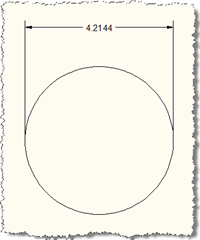
I'm still a little frazzled after transcribing the 18,000 word interview with John Walker (and largely with two fingers - at such times the fact that I've never learned to touch-type is a significant cause of frustration, as you might imagine). I'm also attending meetings all this coming week, so I've gone for the cheap option, once again, of dipping into my magic folder of code generated and provided by my team. The technique for this one came from a response sent out by Philippe Leefsma, from DevTech EMEA, but he did mention a colleague helped him by suggesting the…
-
This is an interesting one that came up recently during an internal discussion: During my module's Initialize() function, I want to decide that the module should not actually be loaded. How can I accomplish that? The answer is surprisingly simple: if you throw an exception during the function, AutoCAD's NETLOAD mechanism will stop loading the application. For an example, see this C# code: using Autodesk.AutoCAD.ApplicationServices; using Autodesk.AutoCAD.EditorInput; using Autodesk.AutoCAD.Runtime; namespace PreventLoad { public class Commands : IExtensionApplication { public void Initialize() { // This will prevent the application from loading …
-
A question came up recently in an internal discussion and I thought I'd share it as it proved so illuminating. If I have an object of a type which implements IDisposable, is it good practice to explicitly dispose it (whether via the using statement or calling Dispose() explicitly)? The quick(ish) answer is: Yes it is, but sometimes you might choose not to as the increase in code simplicity outweighs the benefits derived from manually disposing of the objects. So, naturally, the devil is in the detail. Let's take a look at the three scenarios where you're likely to be working…
-
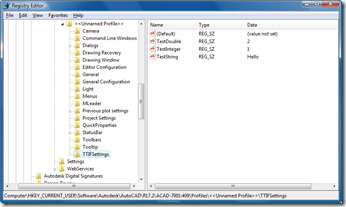
Thanks to Sreekar Devatha, Gopinath Taget & Jeremy Tammik (from DevTech India, Americas and Europe, respectively) for contributing to my knowledge in this area over the last few months (whether they knew they were doing so, or not :-). This post shows how to make use of a handy interface inside AutoCAD to place custom settings in the Registry and how to then read them back. The code is very simple: you simply open up the current profile and then access/modify your hierarchy of setting beneath it. I've used a Registered Developer Symbol (RDS) to prefix the section of the…
-
Here's an interesting question that came in from Kerry Brown: Is there a way to determine the names of Commands loaded into Acad from assemblies ... either a global list or a list associated with a specific assembly ... or both 🙂 I managed to put some code together to do this (although I needed to look into how AutoCAD does it to get some of the finer points). I chose to implement two types of command - one that gets the commands for all the loaded assemblies, and one that works for just the currently-executing assembly. The first one…
-
A quick pre-Thanksgiving tip that came from an internal discussion today: how to find the location of a .NET module (meaning the currently executing assembly). Two techniques were identified: Identify the current assembly by asking where one of its types is defined Use the Assembly.GetExecutingAssembly() to get the assembly from where the current code is executing Here's the C# code showing the two techniques: using System; using System.Reflection; using Autodesk.AutoCAD.ApplicationServices; using Autodesk.AutoCAD.EditorInput; using Autodesk.AutoCAD.Runtime; namespace AssemblyLocationTest { public class AssemblyCmds { [CommandMethod("LOC")] public void GetModuleLocation() { Editor ed = …
-
Thanks to Viru Aithal from the DevTech team in India team for this idea (he reminded me of this technique in a recent ADN support request he handled). A quick disclaimer: the technique shown in this entry could really confuse your users, if implemented with inadequate care. Please use it for good, not evil. I talked at some length in previous posts about MDI in AutoCAD, and how various commands lock documents when they need to work on them. When commands try to lock (or unlock) a document, an event gets fired. You can respond to this event in your…
-
Clearly it's far from ideal to ask your users to load your application modules manually into AutoCAD whenever they need them, so over the years a variety of mechanisms have been put in place to enable automatic loading of applications – acad.lsp, acad.ads, acad.rx, the Startup Suite, to name but a few. The most elegant way to auto-load both ObjectARX and .NET applications is the demand-loading mechanism. This mechanism is based on information stored in the Registry describing the conditions under which modules should be loaded and how to load them. Demand loading is fairly straightforward and well documented in…
-
In my previous post I described how you could use the Autodesk.AutoCAD.Runtime.IExtensionApplication interface to implement initialization code in your .NET module. Building on this, we're now going to look at how use of the Autodesk.AutoCAD.Runtime.IExtensionApplication interface can also allow you - with very little effort - to optimize the architecture of your managed modules for faster loading into AutoCAD. First some information from the "Using .NET for AutoCAD documentation" (which is available in the ObjectARX Developer's Guide on the ObjectARX SDK): When AutoCAD loads a managed application, it queries the application's assembly for an ExtensionApplication custom attribute. If this attribute…
-
It's very common to need to execute some code as your application modules are loaded, and then to clean-up as they get unloaded or as AutoCAD terminates. Managed AutoCAD applications can do this by implementing the Autodesk.AutoCAD.Runtime.IExtensionApplication interface, which require Initialize() and Terminate() methods. During the Initialize() method, you will typically want to set system variables and perhaps call commands which execute some pre-existing initialization code for your application. Here's some code showing how to implement this interface using VB.NET: Imports Autodesk.AutoCAD.Runtime Imports Autodesk.AutoCAD.ApplicationServices Imports Autodesk.AutoCAD.EditorInput Imports System Public Class InitializationTest Implements Autodesk.AutoCAD.Runtime.IExtensionApplication Public Sub Initialize() Implements _…