Runtime
-
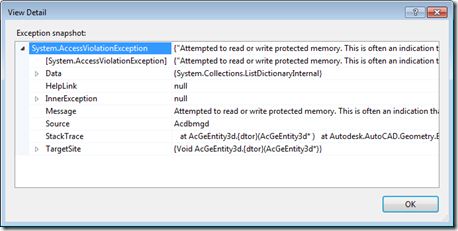
To accompany the last post – which raised some questions around when and where to call Dispose() on objects created or accessed via AutoCAD's .NET API – today we're going to look at a few concrete examples. Thanks to Danny P for not only requesting some examples but also presenting some concrete areas he wasn't fully clear on. Let's start by looking at those (and feel free to compare the responses I've put below with the ones I made in direct response to Danny's original comment): Within a transaction where something is added to the database, some new objects (Xrecords,…
-
This is a follow-on to this previous post, prompted by a thread over on The Swamp discussing a recent blog post by Fenton Webb on the AutoCAD DevBlog. Fenton's assertion is that you really need to call Dispose() on all AutoCAD objects that you create yourself, unless they are managed by AutoCAD's transaction system (i.e. you've passed responsibility across to AutoCAD by calling Transaction.AddNewlyCreatedDBObject()). Which means that while you don't need to call Dispose() on objects such as the AutoCAD Editor or the active Document (and you really shouldn't), you really should call Dispose() on various objects you've been used…
-
Some time ago, I posted code that used the Autodesk.AutoCAD.Windows.Data namespace to list the hatch patterns in the current drawing. Fenton Webb posted a follow-up on the AutoCAD DevBlog that took this further, extracting additional data from AutoCAD and using it to populate an Excel spreadsheet. Within that post, Fenton showed the technique required to access and iterate across other data collections – something I hadn't managed to do when creating my original post. Rather than repeat exactly what Fenton has put together – which is really nice, do take a look at it – I'm just taking a small…
-
Following on from our look at the Core Console, Dynamic .NET and .NET migration for AutoCAD 2013, today we're going to look briefly at the remaining API features in the AutoCAD 2013 release. Model Documentation The model documentation feature was introduced in AutoCAD 2012 – simplifying creation of 2D sections and details of 3D drawing content – and this initial API provides (primarily read-only) access to this information. It comprises the following classes SectionSymbol SectionViewstyle ViewBorder ViewRepBlockReference DetailViewStyle DetailSymbol The writeable aspects of the API are mostly related to the "style" objects – these can be created and edited programmatically,…
-
In the 2010 release, we introduced 2D geometric constraints to AutoCAD. The feature was implemented using AutoCAD's low-level – and very powerful – Associative Framework, which has subsequently been used to implement features such as parametric surfaces in AutoCAD 2011 (more information on that here). Our initial API implementation for creating and accessing geometric constraints (which you can find out more about via the DevTV session linked to from this previous post) in many ways reflects the low-level nature of the underlying framework: it was unfortunately just a bit too complicated for most mortals to get to grips with. Philippe…
-

In the last post, we looked at how to stop entities from being highlighted during selection. This post looks at how to stop entities from being selected at all. Thanks again to Balaji Ramamoorthy for providing the underlying technique shown in today's code. The basic scenario we're using is similar to the last post – we maintain a list of DXF names for the classes we want to stop from being selected – but it could easily be adapted to using different criteria for removing objects from the selection: an example being the use of a similar (although admittedly not…
-

Thanks to Balaji Ramamoorthy, from DevTech India, for the basis of this post (some code he provided in a recent reply to an ADN member). The original question came from someone who wanted to stop text objects from being highlighted when selected. I've extended the mechanism to make it a little more flexible: it now maintains a list of object types (their DXF names) of objects that should not be highlighted, when selected. Balaji implemented a HighlightOverrule to control the highlighting. This doesn't stop the objects from actually being selected, however: in the next post I'll add some additional code…
-
I'm now back from a nice, long weekend celebrating the Swiss National Day (August 1st) and our 10th wedding anniversary (which isn't until November, but who wants to hold a party then? ;-). So, getting back into the saddle, here's a question that came in recently by email: I'm using P/Invoke to call a function which is different on x86 and x64. How to code such entry point addresses dynamically, so one does not have to compile two separate versions, one for x86, and one for x64? While the answer can be found a previous post, it seemed worth calling…
-

Another Friday, another installment of Wayne Brill's AutoCAD .NET training DevTV series (to complement those sessions from previous weeks). Today's session is focused user-interface elements such as the .NET attributes for exposing commands and optimizing loading, adding your own tab to the options dialog and implementing drag & drop. This series of DevTV sessions is a companion for the new AutoCAD .NET training material available from the AutoCAD .NET Developer Center. Enjoy! 🙂
-

As a follow-up to their session on the Autoloader, AutoCAD 2012's simplified deployment mechanism, Stephen and Fenton have recorded another DevCast focused on creating an installer to deploy apps via the Autoloader. These two DevCasts are likely to be of relevance to anyone wishing to deploy their plugin via the "Apps" tab in Autodesk Exchange. There's also a new Developer Center focused on this very task, providing the guidelines and requirements for publishing apps along with a couple of helpful DevTV sessions to get you started.