This post has come out of an interesting discussion I had with Jim Cameron at the ADN party at AU 2008. He mentioned an idea, which he kindly later reminded me of by email, which was to develop an AutoCAD equivalent for Inventor's LookAt functionality. I didn't know about LookAt before this discussion, but it seems it allows you to look at a particular face: you pick a face and it rotates the view and zooms in to centre it on the screen.
Rather than try to attack the whole problem at once, this post tackles selecting a face (which is slightly more complicated than perhaps it might be) and in a future post I'll hopefully manage to post some code to perform the view change.
Here's the C# code:
using System.Collections.Generic;
using Autodesk.AutoCAD.ApplicationServices;
using Autodesk.AutoCAD.DatabaseServices;
using Autodesk.AutoCAD.EditorInput;
using Autodesk.AutoCAD.Runtime;
using Autodesk.AutoCAD.Geometry;
using Autodesk.AutoCAD.GraphicsInterface;
using Autodesk.AutoCAD.BoundaryRepresentation;
using BrFace =
Autodesk.AutoCAD.BoundaryRepresentation.Face;
using BrException =
Autodesk.AutoCAD.BoundaryRepresentation.Exception;
namespace LookAtFace
{
public class Commands
{
// Keep a list of trhe things we've drawn
// so we can undraw them
List<Drawable> _drawn = new List<Drawable>();
[CommandMethod("PICKFACE")]
public void PickFace()
{
Document doc =
Application.DocumentManager.MdiActiveDocument;
Database db = doc.Database;
Editor ed = doc.Editor;
ClearDrawnGraphics();
PromptEntityOptions peo =
new PromptEntityOptions(
"\nSelect face of solid:"
);
peo.SetRejectMessage("\nMust be a 3D solid.");
peo.AddAllowedClass(typeof(Solid3d), false);
PromptEntityResult per =
ed.GetEntity(peo);
if (per.Status != PromptStatus.OK)
return;
Transaction tr =
db.TransactionManager.StartTransaction();
using (tr)
{
Solid3d sol =
tr.GetObject(per.ObjectId, OpenMode.ForRead)
as Solid3d;
if (sol != null)
{
Brep brp = new Brep(sol);
using (brp)
{
// We're going to check interference between our
// solid and a line we're creating between the
// picked point and the user (we use the view
// direction to decide in which direction to
// draw the line)
Point3d dir =
(Point3d)Application.GetSystemVariable("VIEWDIR");
Point3d picked = per.PickedPoint,
nearerUser =
per.PickedPoint - (dir - Point3d.Origin);
// Two hits should be enough (in and out)
const int numHits = 2;
// Create out line
Line3d ln = new Line3d(picked, nearerUser);
Hit[] hits = brp.GetLineContainment(ln, numHits);
ln.Dispose();
if (hits == null || hits.Length < numHits)
return;
// Set the shortest distance to something large
// and the index to the first item in the list
double shortest = (picked - nearerUser).Length;
int found = 0;
// Loop through and check the distance to the
// user (the depth of field).
for (int idx = 0; idx < numHits; idx++)
{
Hit hit = hits[idx];
double dist = (hit.Point - nearerUser).Length;
if (dist < shortest)
{
shortest = dist;
found = idx;
}
}
// Once we have the nearest point to the screen,
// use that one to get the containing curves
List<Curve3d> curves = new List<Curve3d>();
if (CheckContainment(
ed,
brp,
hits[found].Point,
ref curves
)
)
{
// If we get some back, get drawables for them and
// pass them through to the transient graphics API
TransientManager tm =
TransientManager.CurrentTransientManager;
IntegerCollection ic = new IntegerCollection();
foreach (Curve3d curve in curves)
{
Drawable d = GetDrawable(curve);
tm.AddTransient(
d,
TransientDrawingMode.DirectTopmost,
0,
ic
);
_drawn.Add(d);
}
}
}
}
tr.Commit();
}
}
private void ClearDrawnGraphics()
{
// Clear any graphics we've drawn with the transient
// graphics API, then clear the list
TransientManager tm =
TransientManager.CurrentTransientManager;
IntegerCollection ic = new IntegerCollection();
foreach (Drawable d in _drawn)
{
tm.EraseTransient(d, ic);
}
_drawn.Clear();
}
private Drawable GetDrawable(Curve3d curve)
{
// We could support multiple curve types here, but for
// now let's just return a line approximating it
Line ln = new Line(curve.StartPoint, curve.EndPoint);
ln.ColorIndex = 1;
return ln;
}
private static bool CheckContainment(
Editor ed,
Brep brp,
Point3d pt,
ref List<Curve3d> curves
)
{
bool res = false;
// Use the BRep API to get the lowest level
// container for the point
PointContainment pc;
BrepEntity be =
brp.GetPointContainment(pt, out pc);
using (be)
{
// Only if the point is on a boundary...
if (pc == PointContainment.OnBoundary)
{
// And only if the boundary is a face...
BrFace face = be as BrFace;
if (face != null)
{
// ... do we attempt to do something
try
{
foreach (BoundaryLoop bl in face.Loops)
{
// We'll return a curve for each edge in
// the containing loop
foreach (Edge edge in bl.Edges)
{
curves.Add(edge.Curve);
}
}
res = true;
}
catch (BrException)
{
res = false;
}
}
}
}
return res;
}
}
}
A few comments on the implementation:
- We use the standard Editor.GetEntity() selection method - it gives us the ObjectId of the selected Solid3d but also the point that was picked.
- Using this point and the view direction, we can then draw a line (which we make as big as the diagonal of the solid's bounding box, which should be large enough) from that point in the direction of the user.
- The Boundary Representation (BRep) API allows us to determine how this line intersects the solid: we select the intersection nearest the screen, as presumably that's the one the user was intending to pick.
- We will then use the BRep API to test the solid to see whether the point is contained by (or - and this is more likely - on) the solid, and it very helpfully provides us with the lowest-level topological entity that contains the point (which we hope to be a face).
- The BRep API will throw an exception when traversing (typically during calls to GetEnumerator() for various collections) for a couple of unbounded solid-types (spheres, etc.) as we traverse: in this case we simply abort the containment checking operation.
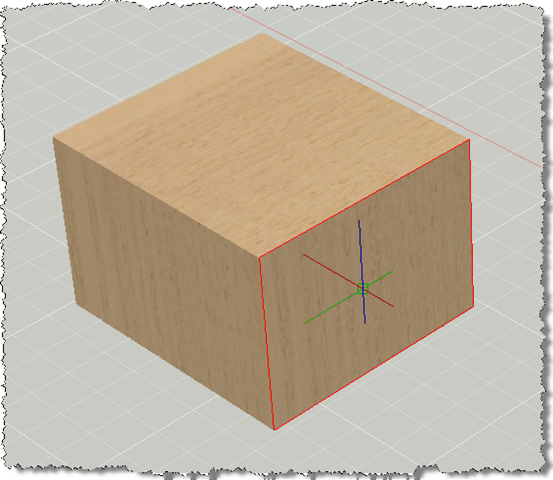
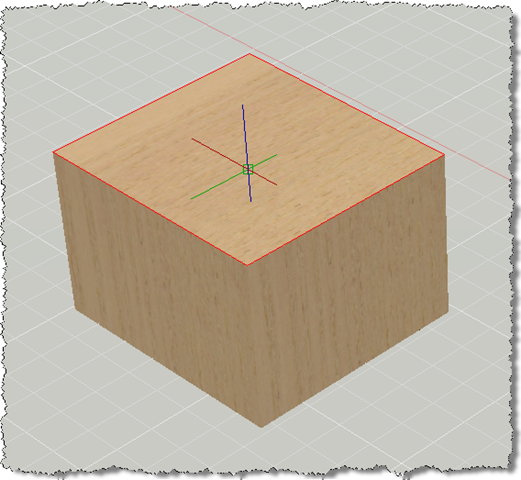
- We use the Transient Graphics API to display the edges of the selected face. Right now we just draw lines for each curve - which will be wrong for anything with arcs or circles, for instance - but at this stage we don't care a great deal about the graphics we're drawing - this is really just to make sure we're approximately accurate, and later we'll do something more intelligent with the edges we get back for the selected face.
Here's what happens when we use the PICKFACE command to select first one face and then another of a simple box:


Leave a Reply