In the last post we looked at some C# code to customize the display of all Lines and Circles within AutoCAD, adding a thickness (or a diameter) to make them look more like pipes. This was, in turn, based on this F# post.
The previous code implemented an overrule that allowed us to insert our own graphics for every instance of the types of object we cared about.
[A quick note on the previous implementation: we actually register the overrule to be called for all "drawable" objects: the inheritance tree for the Circle class is: Drawable –> DBObject –> Entity –> Curve –> Circle. Drawable belongs to the Autodesk.AutoCAD.GraphicsInterface namespace while all the others are db-resident and therefore belong to Autodesk.AutoCAD.DatabaseServices. Within our "drawable overrule" we check the type of the object before proceeding: right now we only care about Lines and Circles, but this could clearly be extended to handle other types of object, also.]
In this post we take this a step further. Rather than apply a single, arbitrary radius to every Line and Circle in the drawing, we're going to attach the radius as extended entity data (XData) to the individual objects we care about and then during the WorldDraw() of our overrule we will attempt to retrieve that data and – if it exists – use it to apply an object—specific radius. Because XData is part of an object's persistent data, this will also work across drawing sessions (assuming our application is re-loaded and the overrule is turned on).
Here's the C# code:
using Autodesk.AutoCAD.ApplicationServices;
using Autodesk.AutoCAD.Runtime;
using Autodesk.AutoCAD.DatabaseServices;
using Autodesk.AutoCAD.EditorInput;
using Autodesk.AutoCAD.Geometry;
using Autodesk.AutoCAD.GraphicsInterface;
using Autodesk.AutoCAD.Colors;
namespace DrawOverrule
{
public class XDataHelpers
{
const string regAppName = "TTIF_PIPE";
// Get the XData for a particular object
// and return the "pipe radius" if it exists
public static double PipeRadiusForObject(DBObject obj)
{
double res = 0.0;
ResultBuffer rb = obj.XData;
if (rb != null)
{
bool foundStart = false;
foreach (TypedValue tv in rb)
{
if (tv.TypeCode == (int)DxfCode.ExtendedDataRegAppName &&
tv.Value.ToString() == regAppName)
foundStart = true;
else
{
if (foundStart == true)
{
if (tv.TypeCode == (int)DxfCode.ExtendedDataReal)
{
res = (double)tv.Value;
break;
}
}
}
}
rb.Dispose();
}
return res;
}
// Set the "pipe radius" in the XData of a particular object
public static void SetPipeRadiusOnObject(
Transaction tr, DBObject obj, double radius
)
{
Database db = obj.Database;
// Make sure the application is registered
// (we could separate this out to be called
// only once for a set of operations)
RegAppTable rat =
(RegAppTable)tr.GetObject(
db.RegAppTableId,
OpenMode.ForRead
);
if (!rat.Has(regAppName))
{
rat.UpgradeOpen();
RegAppTableRecord ratr = new RegAppTableRecord();
ratr.Name = regAppName;
rat.Add(ratr);
tr.AddNewlyCreatedDBObject(ratr, true);
}
// Create the XData and set it on the object
ResultBuffer rb =
new ResultBuffer(
new TypedValue(
(int)DxfCode.ExtendedDataRegAppName, regAppName
),
new TypedValue(
(int)DxfCode.ExtendedDataReal, radius
)
);
obj.XData = rb;
rb.Dispose();
}
}
public class DrawOverrule : DrawableOverrule
{
static public DrawOverrule theOverrule =
new DrawOverrule();
private SweepOptions sweepOpts = new SweepOptions();
public override bool WorldDraw (Drawable d, WorldDraw wd)
{
double radius = 0.0;
if (d is DBObject)
radius = XDataHelpers.PipeRadiusForObject((DBObject)d);
if (radius > 0.0)
{
if (d is Line)
{
Line line = (Line)d;
// Draw the line as is, with overruled attributes
base.WorldDraw(line, wd);
if (!line.Id.IsNull && line.Length > 0.0)
{
// Draw a pipe around the line
EntityColor c =
wd.SubEntityTraits.TrueColor;
wd.SubEntityTraits.TrueColor =
new EntityColor(0x00AfAfff);
wd.SubEntityTraits.LineWeight =
LineWeight.LineWeight000;
Circle clr =
new Circle(
line.StartPoint,
line.EndPoint - line.StartPoint,
radius
);
ExtrudedSurface pipe = new ExtrudedSurface();
try
{
pipe.CreateExtrudedSurface(
clr, line.EndPoint - line.StartPoint, sweepOpts
);
}
catch
{
Document doc =
Application.DocumentManager.MdiActiveDocument;
doc.Editor.WriteMessage(
"\nFailed with CreateExtrudedSurface."
);
}
clr.Dispose();
pipe.WorldDraw(wd);
pipe.Dispose();
wd.SubEntityTraits.TrueColor = c;
}
return true;
}
else if (d is Circle)
{
Circle circle = (Circle)d;
// Draw the circle as is, with overruled attributes
base.WorldDraw(circle, wd);
// Needed to avoid ill-formed swept surface
if (circle.Radius > radius)
{
// Draw a pipe around the cirle
EntityColor c = wd.SubEntityTraits.TrueColor;
wd.SubEntityTraits.TrueColor =
new EntityColor(0x3fffe0e0);
wd.SubEntityTraits.LineWeight =
LineWeight.LineWeight000;
Vector3d normal =
(circle.Center - circle.StartPoint).
CrossProduct(circle.Normal);
Circle clr =
new Circle(
circle.StartPoint, normal, radius
);
SweptSurface pipe = new SweptSurface();
pipe.CreateSweptSurface(clr, circle, sweepOpts);
clr.Dispose();
; pipe.WorldDraw(wd);
pipe.Dispose();
wd.SubEntityTraits.TrueColor = c;
}
return true;
}
}
return base.WorldDraw(d, wd);
}
public override int SetAttributes(Drawable d, DrawableTraits t)
{
int b = base.SetAttributes(d, t);
double radius = 0.0;
if (d is DBObject)
radius = XDataHelpers.PipeRadiusForObject((DBObject)d);
if (radius > 0.0)
{
if (d is Line)
{
// If d is LINE, set color to index 6
t.Color = 6;
// and lineweight to .40 mm
t.LineWeight = LineWeight.LineWeight040;
}
else if (d is Circle)
{
// If d is CIRCLE, set color to index 2
t.Color = 2;
// and lineweight to .60 mm
t.LineWeight = LineWeight.LineWeight060;
}
}
return b;
}
}
public class Commands
{
private double _radius = 0.0;
public void Overrule(bool enable)
{
// Regen to see the effect
// (turn on/off Overruling and LWDISPLAY)
DrawableOverrule.Overruling = enable;
if (enable)
Application.SetSystemVariable("LWDISPLAY", 1);
else
Application.SetSystemVariable("LWDISPLAY", 0);
Document doc =
Application.DocumentManager.MdiActiveDocument;
doc.SendStringToExecute("REGEN3\n", true, false, false);
doc.Editor.Regen();
}
[CommandMethod("OVERRULE1")]
public void OverruleStart()
{
ObjectOverrule.AddOverrule(
RXClass.GetClass(typeof(Drawable)),
DrawOverrule.theOverrule,
true
);
Overrule(true);
}
[CommandMethod("OVERRULE0")]
public void OverruleEnd()
{
ObjectOverrule.RemoveOverrule(
RXClass.GetClass(typeof(Drawable)),
DrawOverrule.theOverrule
);
Overrule(false);
}
[CommandMethod("MP", CommandFlags.UsePickSet)]
public void MakePipe()
{
Document doc =
Application.DocumentManager.MdiActiveDocument;
Database db = doc.Database;
Editor ed = doc.Editor;
// Ask the user to select the entities to make into pipes
PromptSelectionOptions pso =
new PromptSelectionOptions();
pso.AllowDuplicates = false;
pso.MessageForAdding =
"\nSelect objects to turn into pipes: ";
PromptSelectionResult selRes =
doc.Editor.GetSelection(pso);
// If the user didn't make valid selection, we return
if (selRes.Status != PromptStatus.OK)
return;
SelectionSet ss = selRes.Value;
// Ask the user for the pipe radius to set
PromptDoubleOptions pdo =
new PromptDoubleOptions(
"\nSpecify pipe radius:"
);
// Use the previous value, if if already called
if (_radius > 0.0)
{
pdo.DefaultValue = _radius;
pdo.UseDefaultValue = true;
}
pdo.AllowNegative = false;
pdo.AllowZero = false;
PromptDoubleResult pdr =
ed.GetDouble(pdo);
// Return if something went wrong
if (pdr.Status != PromptStatus.OK)
return;
// Set the "last radius" value for when
// the command is called next
_radius = pdr.Value;
// Use a transaction to edit our various objects
Transaction tr =
db.TransactionManager.StartTransaction();
using (tr)
{
// Lop through the selected objects
foreach (SelectedObject o in ss)
{
// We could choose only to add XData to the objects
// we know will use it (Lines and Circles, for now)
DBObject obj =
tr.GetObject(o.ObjectId, OpenMode.ForWrite);
XDataHelpers.SetPipeRadiusOnObject(tr, obj, _radius);
}
tr.Commit();
}
}
}
}
The core overrule has changed very little – we've just added calls to our helper functions to retrieve XData that has been added through the use of the new MP command – but the OverruleEnd() function (the implementation of the OVERRULE0 command) has been modified to properly remove the overrule when called. This allows the overrule to be re-added without a "duplicate key" error.
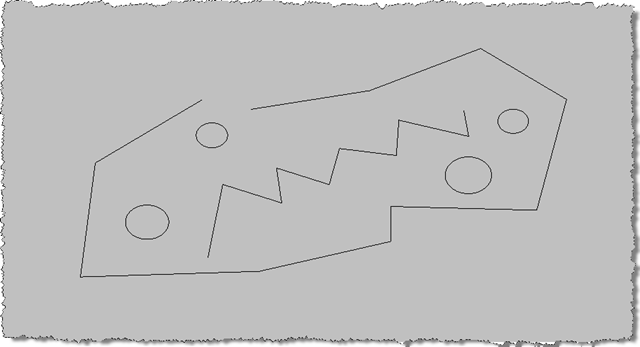
Here's some simple geometry for which we're going to overrule the display:
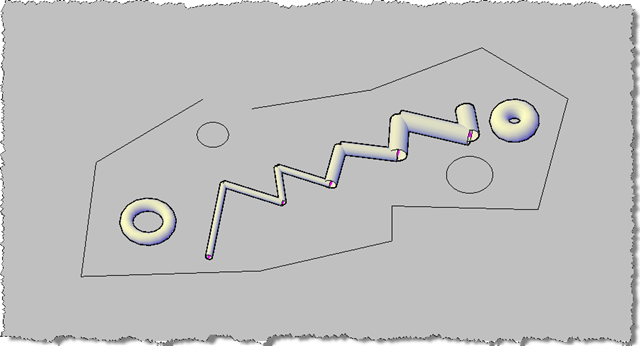
When we run the OVERRULE1 command to add our overrule and then use the MP command to add XData to the entities we want to turn into pipes (we can do this in the reverse order, also), we can see that we can selectively a
pply radii to individual objects in the AutoCAD drawing (displayed here using the conceptual visual style):
A comment came in on a previous post about accessing object-specific data through AutoCAD's Properties Palette: what I'll probably do in one of the coming posts is to show how to connect a dynamic property in the Properties Palette with our "pipe radius" XData, to show how this is possible.
Update:
A more efficient version of the code provided in this post can be found here.


Leave a Reply to kuanghf Cancel reply