In the last post we looked at some code that attaches additional data to individual entities, allowing them to be drawn independently with different visual properties via the new Overrule API in AutoCAD 2010.
A couple of comments – one from Qun, who provided the original F# sample, and one from Tony Tanzillo – have prompted me to optimize the code somewhat. Tony pointed out, very validly, that as the previous code registers its overrule against Drawable objects it will get called for every entity (and various objects besides) which could clearly impact performance. Qun pointed me to some interesting framework capabilities that allow you to let AutoCAD decide whether to call your overrule based on the existence of certain XData or some other criterion (such as the existence of a particular entry in the object's extension dictionary).
So here's what I've done…
I decided to define separate overrule classes for each object type we want to handle and have these classes derive from a common abstract base class. This allows us to encapsulate all the common XData-related stuff inside the base class, and leave the child classes to worry about the type-specific display. We will then register our overrules for the specific classes they care about, which will lead them to only being called for objects of those types.
A nice feature is the ability to let AutoCAD filter on the existence of specific XData prior to invoking our overrule: check out the constructor of the PipeOverrule class – it calls SetXDataFilter() on the base DrawableOverrule class, telling AutoCAD the registered application name for which to look. An interesting test: draw some lines and/or circles, and use the MP command in the below sample to attach radii to some of them. If you set a breakpoint in your WorldDraw() functions and run the code as it stands, you'll see that they only get called for the circles/lines that have been modified by the MP command. If you comment that one line, you should see WorldDraw() being called for all circles and lines, irrespective of whether they've been given a radius or not.
Before we get into the code, here's the protocol for the DrawableOverrule class, as provided by Visual Studio:
namespace Autodesk.AutoCAD.GraphicsInterface
{
[Wrapper("AcGiDrawableOverrule")]
public abstract class DrawableOverrule : Overrule
{
protected internal DrawableOverrule();
public virtual int SetAttributes(
Drawable drawable, DrawableTraits traits);
public override sealed void SetCustomFilter();
public override sealed void SetExtensionDictionaryEntryFilter(
string entryName);
public override sealed void SetIdFilter(ObjectId[] ids);
public override sealed void SetNoFilter();
public override sealed void SetXDataFilter(
string registeredApplicationName);
public virtual void ViewportDraw(
Drawable drawable, ViewportDraw vd);
public virtual int ViewportDrawLogicalFlags(
Drawable drawable, ViewportDraw vd);
public virtual bool WorldDraw(Drawable drawable, WorldDraw wd);
}
}
Aside from filtering on XData, we can see that we can also filter on specific ObjectIds (good for overruling objects very specifically), extension dictionary entries (good if you're working with lots of data per object and XData is no longer viable) or something more custom.
Here's the protocol for the Overrule class, the base class for DrawableOverrule:
namespace Autodesk.AutoCAD.Runtime
{
[Wrapper("AcRxOverrule")]
public abstract class Overrule : RXObject
{
public static bool Overruling { get; set; }
public static void AddOverrule(
RXClass targetClass, Overrule overrule, bool bAtLast);
public static bool HasOverrule(
RXObject overruledSubject, RXClass targetClass);
public virtual bool IsApplicable(RXObject overruledSubject);
public static void RemoveOverrule(
RXClass targetClass, Overrule overrule);
public abstract void SetCustomFilter();
public abstract void SetExtensionDictionaryEntryFilter(
string entryName);
public abstract void SetIdFilter(ObjectId[] ids);
public abstract void SetNoFilter();
public abstract void SetXDataFilter(
string registeredApplicationName);
; }
}
The protocol in which we're interested has been declared as abstract (== pure virtual) at this level, so we need to use DrawableOverrule as a base class unless we want to implement the protocol ourselves. One additional function to be overridden at this level is IsApplicable(), which is the fundamental way the overrule tells AutoCAD whether it can work with a specific object, or not. This is the function we would override to implement a custom filter, and is the only part of the filter protocol available from ObjectARX: more work has been done on the .NET side of things, which thankfully makes our lives much simpler. 🙂
One open question in my mind: while asking AutoCAD to filter on XData is simpler and means our code is called less often, it does mean that both AutoCAD and our code will be checking for XData (when we retrieve the radius information). Presumably AutoCAD is going to check very efficiently, which means the code should be quicker in the cases where we have lots of objects that are not overruled, but in the cases where we are overruling a lot of objects there does appear to be some potential for this making the application run marginally slower. Ultimately – as mentioned earlier - there's just a single line of code to comment out if you want to see the difference (and presumably profile the performance in some way). Just something to watch for, in case – I doubt this is something that's going to have a significant – or even measurable – performance impact, but anyway.
Here's the modified C# code:
using Autodesk.AutoCAD.ApplicationServices;
using Autodesk.AutoCAD.Runtime;
using Autodesk.AutoCAD.DatabaseServices;
using Autodesk.AutoCAD.EditorInput;
using Autodesk.AutoCAD.Geometry;
using Autodesk.AutoCAD.GraphicsInterface;
using Autodesk.AutoCAD.Colors;
namespace DrawOverrule
{
public abstract class PipeOverrule : DrawableOverrule
{
const string regAppName = "TTIF_PIPE";
public PipeOverrule()
{
// Tell AutoCAD to filter on our application name
// (this means our overrule will only be called
// on objects possessing XData with this name)
SetXDataFilter(regAppName);
}
// Get the XData for a particular object
// and return the "pipe radius" if it exists
public static double PipeRadiusForObject(DBObject obj)
{
double res = 0.0;
ResultBuffer rb = obj.XData;
if (rb != null)
{
bool foundStart = false;
foreach (TypedValue tv in rb)
{
if (tv.TypeCode == (int)DxfCode.ExtendedDataRegAppName &&
tv.Value.ToString() == regAppName)
foundStart = true;
else
{
if (foundStart == true)
{
if (tv.TypeCode == (int)DxfCode.ExtendedDataReal)
{
res = (double)tv.Value;
break;
}
}
}
}
rb.Dispose();
}
return res;
}
// Set the "pipe radius" in the XData of a particular object
public static void SetPipeRadiusOnObject(
Transaction tr, DBObject obj, double radius
)
{
Database db = obj.Database;
// Make sure the application is registered
// (we could separate this out to be called
// only once for a set of operations)
RegAppTable rat =
(RegAppTable)tr.GetObject(
db.RegAppTableId,
OpenMode.ForRead
);
if (!rat.Has(regAppName))
{
rat.UpgradeOpen();
RegAppTableRecord ratr = new RegAppTableRecord();
ratr.Name = regAppName;
rat.Add(ratr);
tr.AddNewlyCreatedDBObject(ratr, true);
}
// Create the XData and set it on the object
ResultBuffer rb =
new ResultBuffer(
new TypedValue(
(int)DxfCode.ExtendedDataRegAppName, regAppName
),
new TypedValue(
(int)DxfCode.ExtendedDataReal, radius
)
);
obj.XData = rb;
rb.Dispose();
}
}
// An overrule to make a pipe out of line
public class LinePipeOverrule : PipeOverrule
{
static public LinePipeOverrule theOverrule =
new LinePipeOverrule();
private SweepOptions sweepOpts = new SweepOptions();
public override bool WorldDraw(Drawable d, WorldDraw wd)
{
double radius = 0.0;
if (d is DBObject)
radius = PipeRadiusForObject((DBObject)d);
if (radius > 0.0)
{
Line line = d as Line;
if (line != null)
{
// Draw the line as is, with overruled attributes
base.WorldDraw(line, wd);
if (!line.Id.IsNull && line.Length > 0.0)
{
// Draw a pipe around the line
EntityColor c =
wd.SubEntityTraits.TrueColor;
wd.SubEntityTraits.TrueColor =
new EntityColor(0x00AfAfff);
wd.SubEntityTraits.LineWeight =
LineWeight.LineWeight000;
Circle clr =
new Circle(
line.StartPoint,
line.EndPoint - line.StartPoint,
radius
);
ExtrudedSurface pipe = new ExtrudedSurface();
try
{
pipe.CreateExtrudedSurface(
clr, line.EndPoint - line.StartPoint, sweepOpts
);
}
catch
{
Document doc =
Application.DocumentManager.MdiActiveDocument;
doc.Editor.WriteMessage(
"\nFailed with CreateExtrudedSurface."
);
}
clr.Dispose();
pipe.WorldDraw(wd);
pipe.Dispose();
wd.SubEntityTraits.TrueColor = c;
}
return true;
}
}
return base.WorldDraw(d, wd);
}
public override int SetAttributes(Drawable d, DrawableTraits t)
{
int b = base.SetAttributes(d, t);
double radius = 0.0;
if (d is DBObject)
radius = PipeRadiusForObject((DBObject)d);
if (radius > 0.0)
{
// Set color to index 6
t.Color = 6;
// and lineweight to .40 mm
t.LineWeight = LineWeight.LineWeight040;
}
return b;
}
}
// An overrule to make a pipe out of circle
public class CirclePipeOverrule : PipeOverrule
{
static public CirclePipeOverrule theOverrule =
new CirclePipeOverrule();
private SweepOptions sweepOpts = new SweepOptions();
public override bool WorldDraw(Drawable d, WorldDraw wd)
{
double radius = 0.0;
if (d is DBObject)
radius = PipeRadiusForObject((DBObject)d);
if (radius > 0.0)
{
Circle circle = d as Circle;
if (circle != null)
{
// Draw the circle as is, with overruled attributes
base.WorldDraw(circle, wd);
// Needed to avoid ill-formed swept surface
if (circle.Radius > radius)
{
// Draw a pipe around the cirle
EntityColor c = wd.SubEntityTraits.TrueColor;
wd.SubEntityTraits.TrueColor =
new EntityColor(0x3fffe0e0);
wd.SubEntityTraits.LineWeight =
LineWeight.LineWeight000;
Vector3d normal =
(circle.Center - circle.StartPoint).
CrossProduct(circle.Normal);
Circle clr =
new Circle(
circle.StartPoint, normal, radius
);
SweptSurface pipe = new SweptSurface();
pipe.CreateSweptSurface(clr, circle, sweepOpts);
clr.Dispose();
pipe.WorldDraw(wd);
pipe.Dispose();
wd.SubEntityTraits.TrueColor = c;
}
return true;
}
}
return base.WorldDraw(d, wd);
}
public override int SetAttributes(Drawable d, DrawableTraits t)
{
int b = base.SetAttributes(d, t);
double radius = 0.0;
if (d is DBObject)
radius = PipeRadiusForObject((DBObject)d);
if (radius > 0.0)
{
// Set color to index 2
t.Color = 2;
// and lineweight to .60 mm
t.LineWeight = LineWeight.LineWeight060;
}
return b;
}
}
< p style="margin: 0px; font-size: 8pt">
public class Commands
{
private double _radius = 0.0;
public void Overrule(bool enable)
{
// Regen to see the effect
// (turn on/off Overruling and LWDISPLAY)
DrawableOverrule.Overruling = enable;
if (enable)
Application.SetSystemVariable("LWDISPLAY", 1);
else
Application.SetSystemVariable("LWDISPLAY", 0);
Document doc =
Application.DocumentManager.MdiActiveDocument;
doc.SendStringToExecute("REGEN3\n", true, false, false);
doc.Editor.Regen();
}
[CommandMethod("OVERRULE1")]
public void OverruleStart()
{
ObjectOverrule.AddOverrule(
RXClass.GetClass(typeof(Line)),
LinePipeOverrule.theOverrule,
true
);
ObjectOverrule.AddOverrule(
RXClass.GetClass(typeof(Circle)),
CirclePipeOverrule.theOverrule,
true
);
Overrule(true);
[CommandMethod("OVERRULE0")]
public void OverruleEnd()
{
ObjectOverrule.RemoveOverrule(
RXClass.GetClass(typeof(Line)),
LinePipeOverrule.theOverrule
);
ObjectOverrule.RemoveOverrule(
RXClass.GetClass(typeof(Circle)),
CirclePipeOverrule.theOverrule
);
Overrule(false);
}
[CommandMethod("MP", CommandFlags.UsePickSet)]
public void MakePipe()
{
Document doc =
Application.DocumentManager.MdiActiveDocument;
Database db = doc.Database;
Editor ed = doc.Editor;
// Ask the user to select the entities to make into pipes
PromptSelectionOptions pso =
new PromptSelectionOptions();
pso.AllowDuplicates = false;
pso.MessageForAdding =
"\nSelect objects to turn into pipes: ";
PromptSelectionResult selRes =
doc.Editor.GetSelection(pso);
// If the user didn't make valid selection, we return
if (selRes.Status != PromptStatus.OK)
return;
SelectionSet ss = selRes.Value;
// Ask the user for the pipe radius to set
PromptDoubleOptions pdo =
new PromptDoubleOptions(
"\nSpecify pipe radius:"
);
// Use the previous value, if if already called
if (_radius > 0.0)
{
pdo.DefaultValue = _radius;
pdo.UseDefaultValue = true;
}
pdo.AllowNegative = false;
pdo.AllowZero = false;
PromptDoubleResult pdr =
ed.GetDouble(pdo);
// Return if something went wrong
if (pdr.Status != PromptStatus.OK)
return;
// Set the "last radius" value for when
// the command is called next
_radius = pdr.Value;
// Use a transaction to edit our various objects
Transaction tr =
db.TransactionManager.StartTransaction();
using (tr)
{
// Lop through the selected objects
foreach (SelectedObject o in ss)
{
// We could choose only to add XData to the objects
// we know will use it (Lines and Circles, for now)
DBObject obj =
tr.GetObject(o.ObjectId, OpenMode.ForWrite);
PipeOverrule.SetPipeRadiusOnObject(tr, obj, _radius);
}
tr.Commit();
}
}
}
}
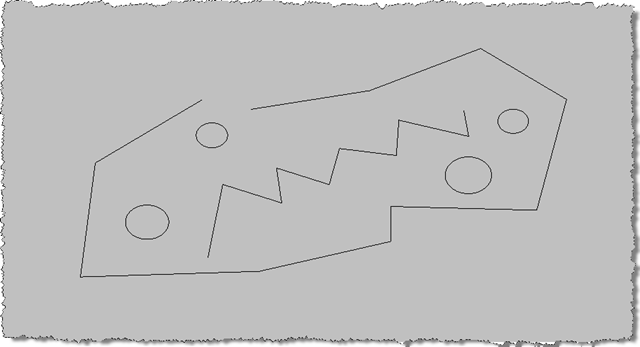
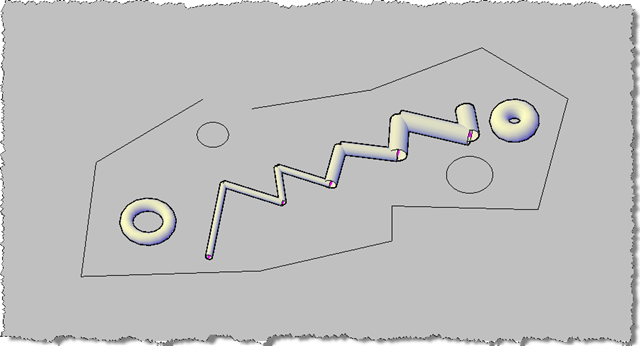
In terms of what happens when we run the code, here are the results from the previous post (as it should function identically).
First some simple geometry for which we're going to overrule the display:
And here's some geometry for which we've attached radii using the MP command, once we've turned our overrules on via the OVERRULE1 command:


Leave a Reply to Danny Cancel reply