No source available when debugging an AutoCAD plug-in

Given the fact AU 2011 is quickly approaching, I decided it was time to dust off my Kinect-related code and getting it working with the Beta SDK from Microsoft Research. Part of the reason I haven't been able to do this sooner is that my primary work machine is currently a MacBook Pro running Windows 7 via Parallels, and the Microsoft Kinect driver currently does not support working inside a Virtual Machine.

I did start to try to get my previous implementation using OpenNI + NITE to work on this system, but as it uses the nKinect component that is currently (and will probably remain) dependent on the 32-bit versions of the OpenNI/NITE SDKs, I couldn't easily get that working with my 64-bit AutoCAD 2012 installation. Ho hum.

Anyway, thankfully our IT department came to the rescue and loaned me an old system, re-built with 32-bit Windows 7, so that I should now be in a position to demonstrate integrations using both the OpenNI and Microsoft SDKs inside AutoCAD during my Kinect-related session at AU. Which also means I'll be carrying two machines with me to Las Vegas, but so it goes.

I now have a basic implementation using the Microsoft Kinect SDK working inside AutoCAD, but it's not generating the point cloud as I'd expect it to. Which means I need to debug it. Unfortunately, the breakpoints I've set in my jig – while they appear to get hit while executing my command inside AutoCAD – do not lead to source code being displayed inside VS 2010:
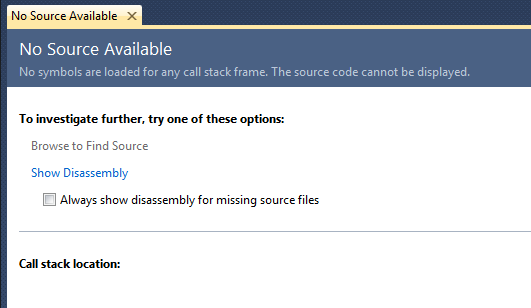
No source available

[To help people find this post via a search engine, here the text in the dialog: "No Source Available. No symbols are loaded for any call stack frame. The source code cannot be displayed."]

It took me some time to work out how to resolve this. I searched on the web and found a number of suggestions that I hoped would help:

  • Enable "Just My Code" in the Debugging options
  • Disable "Require source files to exactly match the original version", too
  • Set "Automatically load symbols for all modules"
  • Clear the symbol cache
  • Launched the debug session with my left hand, while crossing fingers on my right hand and whistling the Imperial March from Star Wars

[In case you're wondering, the last approach didn't seem to have any less effect than any of the others: the source was still not found. 🙁 🙂 ]

Then, feeling somewhat foolish, I remembered the most likely source of the problem.

AutoCAD still uses fibers, which can cause a problem when debugging. I've known about this issue for some time, but had worked around the problem on my main system, and so no longer his the debugging issue.

The workaround is to set the NEXTFIBERWORLD system variable to 0, and then restart AutoCAD. You can check the current value of FIBERWORLD, to see what it is prior to doing so, of course:

Command: FIBERWORLD

FIBERWORLD = 1 (read only)

Command: NEXTFIBERWORLD

Enter new value for NEXTFIBERWORLD <1>: 0

Command: QUIT

You have to restart for FIBERWORLD to be updated, as switching fiberless operation on or off is not something that can be done on-the-fly.

Now this approach is really something that you should enable and use sparingly: while we expect to make AutoCAD work perfectly without fibers, at some point, this is currently an unsupported mode of operation and can cause problems with WPF, in particular. In fact, one major issue I had on my system (one I only just realised was related to this) was that my ribbon would simply not work: while I could switch ribbon tabs and even successfully use ribbon customizations such as TransTips and the expanding textbox control, the actual commands selected from the ribbon were not getting executed. A problem which went away when setting NEXTFIBERWORLD back to 1 and restarting.

For ADN members interested in a bit more background on this topic, see this DevNote and an article in this newsletter edition.

Right – now that I can at least see what's happening in my code, I'd better go fix it and get it ready for posting. 🙂

22 responses to “No source available when debugging an AutoCAD plug-in”

  1. Hi,
    The problem with FIBERWORLD=0 is that you end up with a "limited" version of AutoCAD, so the testing in the AutoCAD side (create some geometry, attributes, etc) while debuging is limited to very simple actions, and you can expect "unexpected" results. Also, you can't test at all a ribbon customization, just for say some of the problems with this "workaround". I think this problem deserve a patch or service pack.

  2. There are definitely issues (as mentioned briefly in this post) with our fiberless implementation: we really need people to test in this mode, however, and submit issues through to us to address (ideally via ADN).

    This is not a trivial undertaking, it's an architectural change. We're doing our best to get to the point where FIBERWORLD==0 is the default (i.e. only) mode of operation, but it'll unfortunately take time.

    Kean

  3. Hi Kean,

    I'm not in ADN, but if you want, i can submit you all the issues i had found so far, may be opening a thread in .net forum so every one can post their findings. I understand that it's an architectural change, and honestly i'm hopeless about the availability of a patch in this release.

  4. Hi Gaston,

    Please do start a thread. I'll let people know internally to track it for fiber-related issues.

    Thanks,

    Kean

  5. Jürgen A. Becker Avatar
    Jürgen A. Becker

    Great tip. This error drove me crazy.
    You are really great.

    Regards Jürgen

  6. Thanks! This was very helpful!

    We could not debug form events on a modal dialog nor an entity jig but this resolved the problem. Had really painful moments when porting an application into Autocad 2012. Luckily our client was very understanding and suggested the high number of sunspots and the full moon as the reason for the delay due to the debugging problem.

    We can live with setting the fiberworld back and forth, but I certainly hope this will be resolved or improved somehow in the future.

  7. Darrin Maidlow Avatar

    Thanks for yet another time saving post Kean. I had been happily debugging away in Vanilla 2012 x64 forever. Just today I started having this problem all of a sudden. I suspect that installing 2013 x64 last night is to blame for the sudden change. Next time you're in Edmonton, drinks are on me 🙂

  8. I'll second Darrin, never had this problem until installing 2013 (x64 as well). Thanks Kean!

  9. thanks a lot for your blog. saved my tons of time.

  10. Win7 x64 ACAD 2012 VS 2010 C# .Net 4.0
    yup, I too have hit this issue, thanks for the post I still have a few strands of grey hair left 😉

  11. Wow! I knew about the session and document contexts in AutoCAD, but never heard of NEXTFIBERWORLD. Thanks, Kean. I've got about 2 days of troubleshooting in this one and this was the only thing that got me around the "No source available" problem.

  12. Did anyone test it with VS2012?

  13. Not specifically, but I have no doubt that switching off fibers would have the same effect with VS2012.

    Kean

  14. What I meant is, if it's possible to debug with VS2012 with fibers turned ON. It works with VS2008.

  15. I don't think Microsoft has reversed its position on supporting fibers (it's a long deprecated technology from their perspective), but then I haven't specifically tested it, as yet.

    Kean

  16. Confirmed!

    (BTW, thanks for the time saving tip)

  17. Michael Carrico Avatar
    Michael Carrico

    Kean,
    Not to unnecessarily rehash and old post, but I started running into this when trying to debug programs during our migration to ACAD 2014. I was initially debugging fine and, all of a sudden, I started receiving this error (no configuration changes to the solution). Anyways, when I change the fiberworld variable, AutoCAD freezes simply when opening some drawings. Have you run into this issue or do you have any insight as to what may be causing this? Thanks as always for all of the information.

  18. Kean Walmsley Avatar
    Kean Walmsley

    Hi Michael,

    With fibers off (FIBERWORLD == 0) the OPEN command can often hose user input (I think it may have something to do with WPF and/or the ribbon). So if debugging a particular drawing with fibers off, I launch AutoCAD with the drawing as a command-line parameter (to the executable... typically from the debugger). That's what has worked for me, at least.

    I hope this helps,

    Kean

  19. Michael Carrico Avatar
    Michael Carrico

    Thanks Kean. Another behavior I noticed. I only seem to run into this error when I set a breakpoint in subroutines called by the form load. Once the form is loaded and I hit a breakpoint (for example in an event for a control), the breakpoint hits without issue. Not sure if this has something to do with the fact that the winform is now loaded and the primary application so the presence of fibers is a non-issue or what but just something I thought I would add.

  20. Kean Walmsley Avatar

    Thanks, Michael. It's possibly not a fiber issue at all, in your case. I haven't seen this behaviour myself, as far as I can recall, so I don't have any additional advice to give.

    Kean

  21. Hi Michael,

    I can reproduce the behaviour you describe. If I call a subroutine from a form I loaded with ShowModalDialog(frmName) I get the "no source available" error. If I call the same subroutine after returning from showing the dialog box, I can debug the code without problems.

    The solution of changing the value of the fibreworld variable also doesn't worked for me. After I had changed the fibreworld variable, autocad hanged on startup and I have to change back the value in registry.

    Regards,
    Peter

  22. Ahh! Thanks a bunch, I was getting frustrated with this. Finally solved

Leave a Reply to Alex Crook Cancel reply

Your email address will not be published. Required fields are marked *