As promised in the last post, today we're going to see the adjusted point cloud import workflow applied to the previously posted Kinect integration samples. This was also an opportunity to look at the improvements in version 1.5 of the Kinect for Windows SDK.
When the SDK was announced, my initial reaction was "OK, but what we really need is finger-tracking", especially as it was right around the time Leap Motion made their big announcement. But there have nonetheless been some really interesting capabilities added to the Kinect SDK with version 1.5:
- Seated mode skeletal tracking
- You can choose to receive just the upper body joints in your skeleton tracking data when in "near mode"
- Better skeletal tracking
- Face tracking capabilities
- You can apparently map a 3D mesh onto a user's face – I'll be digging into this in a future post
- Developer toolkit & Kinect Studio
- A separated SDK and tools download containing an interesting new environment for working with and analysing Kinect data directly
- Speech recognition options
- Lots more languages supported, including British English! 🙂
There were apparently also a number of performance features related to colour mapping – both in terms of the speed but also in terms of the quality of the colours in low-light conditions and the mapping between RGB and depth frames. It may just be an impression, but I did find the results to be better with this SDK version:
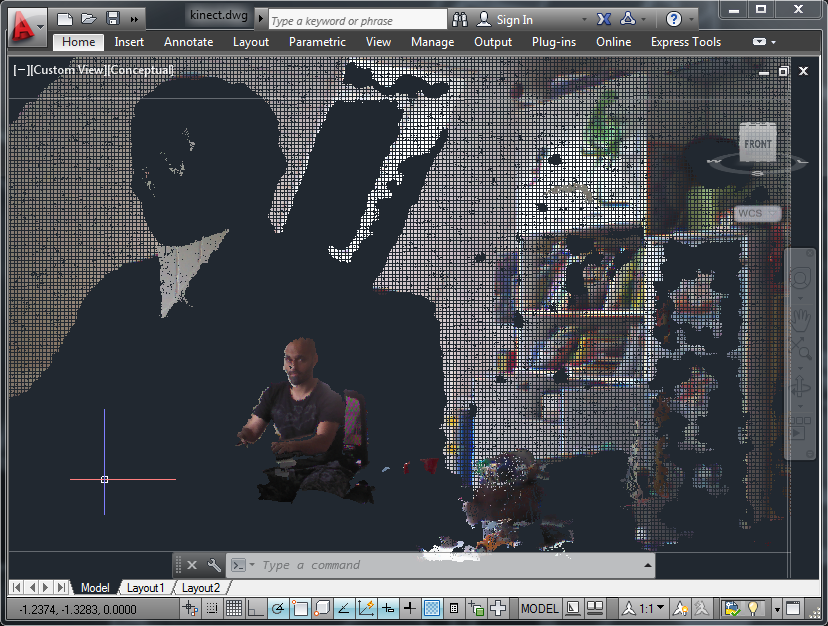
Here's the updated set of samples for AutoCAD 2013 and the Microsoft Kinect SDK v1.5.
The main changes were related to the updated point cloud import workflow, but I also updated the code to allow the user to choose to enter "near mode" (by setting the KINNEAR system variable to 1), and to make sure the reduced set of 10 joints get displayed properly when jigging using either the KINSKEL or KINBOTH commands.
I also tested the British English language pack, and sure enough it did a a much better job of understanding my commands. I've left the samples defaulting to US English – just search for and replace "en-US" with "en-GB" (having installed the language pack, of course) to give it a try.
As I ended up changing several files in relatively small ways, I won't copy and paste the code into this post, but do download the ZIP and take a look! 🙂


Leave a Reply to Donnie King Cancel reply