Adding a web-page as a document tab in AutoCAD 2015 using .NET

This was a fun one. It was really only a single line of code but I decided to embellish it a bit to make it a bit more useful.

The "task" I set myself was to open a web-page โ€“ this blog, in fact โ€“ inside AutoCAD as an MDI child. AutoCAD can now host web-pages directly inside its MDI frame โ€“ the New Tab Page is a great example of that โ€“ and this mechanism can be used for external applications, too. You can also load non-HTML documents into the frame, but it's quick and easy to use HTML.

The "embellishments" consisted of a couple of things, reallyโ€ฆ

Firstly, I wanted to check whether the chosen URL was actually loadable (not just valid, but loadable) before having AutoCAD load it. If we don't do that then we risk a rather inelegant 404 in AutoCAD's main frame. We check this both by validating the URL and by issuing a "HEAD" request โ€“ rather than a full "GET" โ€“ as this is significantly cheaper.

Secondly, I wanted to do all this asynchronously, so AutoCAD wouldn't risk blocking while doing it. As AutoCAD 2015 is using .NET 4.5, it's safe to assume that async/await is available to applications using the new APIs, so we used that to keep things nice and clean.

Here's the C# code that loads this blog into AutoCAD:

using Autodesk.AutoCAD.ApplicationServices;

using Autodesk.AutoCAD.Runtime;

using System;

using System.Net;

using System.Threading.Tasks;


namespace NewDocumentWindow

{

  // To check whether a page exists, we can use a HEAD request

  // rather than a full GET. Derive a custom client to do that


  class HeadClient : WebClient

  {

    protected override WebRequest GetWebRequest(Uri address)

    {

      var req = base.GetWebRequest(address);

      if (req.Method == "GET")

        req.Method = "HEAD";

      return req;

    }

  }


  public class Commands

  {

    // Asynchronous helper that checks whether a URL exists

    // (i.e. that the URL is valid and can be loaded)


    private async static Task<bool> PageExists(string url)

    {

      // First check whether the URL is valid


      Uri uriResult;

      if (

        !Uri.TryCreate(url, UriKind.Absolute, out uriResult) ||

        uriResult.Scheme != Uri.UriSchemeHttp

      )

        return false;


      // Then we try to peform a HEAD request on the page

      // (a WebException will be fired if it doesn't exist)


      try

      {

        using(var client = new HeadClient())

        {

          await client.DownloadStringTaskAsync(url);

        }

        return true;

      }

      catch (WebException)

      {

        return false;

      }

    }


    [CommandMethod("BLOG")]

    public async static void OpenBlog()

    {

      const string url =

        "http://blogs.autodesk.com/through-the-interface";


      // As we're calling an async function, we need to await

      // (and mark the command itself as async)


      if (await PageExists(url))

      {

        // Now that we've validated the URL, we can call the

        // new API in AutoCAD 2015 to load our page


        Application.DocumentWindowCollection.AddDocumentWindow(

          "Kean's blog", new System.Uri(url)

        );

      }

      else

      {

        // Print a helpful message if the URL wasn't loadable


        var doc = Application.DocumentManager.MdiActiveDocument;

        var ed = doc.Editor;


        ed.WriteMessage(

          "\nCould not load url: \"{0}\".", url

        );

      }

    }

  }

}

When we run the BLOG command, here's what we see:
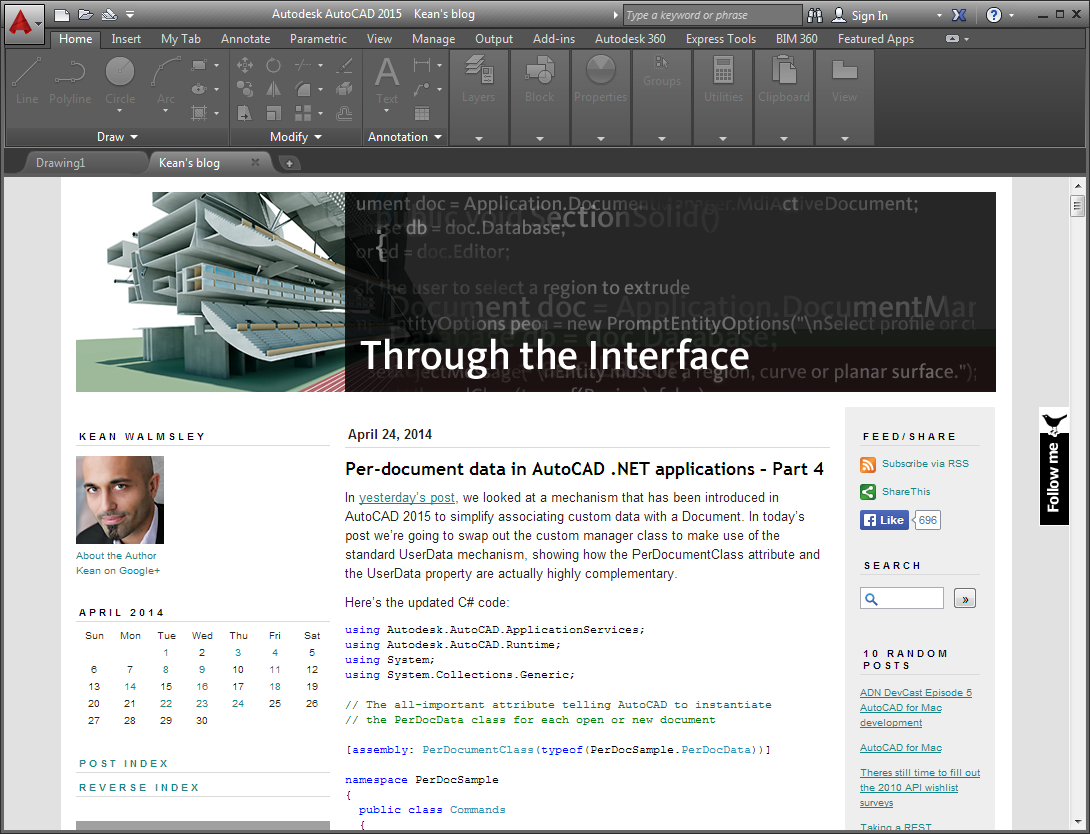
AutoCAD 2015 hosting this blog

To make this application more interesting, we could use AutoCAD's JavaScript API to execute commands etc. inside AutoCAD directly from the hosted web-page (just as the New Tab Page does). This opens a host of interesting possibilities from an application development perspective!

16 responses to “Adding a web-page as a document tab in AutoCAD 2015 using .NET”

  1. I can see using this functionality as a way to make an inter-office website available to everyone that opens autocad every morning.

    1. I can see that too, although I'm a bit wary of suggesting it to people (it's the kind of feature that risks being disliked by users, in my experience).

      Kean

  2. This looks like a very nice feature. What limitations are there on content? Are you forced to load webpages, or can something else like WPF elements be hosted in a new tab window? Can the URI point to assembly resources?

    Looking at intellisense, I see an overload to AddDocumentWindow() that takes a DocumentWindow object as a parameter. Perhaps this is where we get more control over what's in the document tab?

    1. You can certainly load local web-pages (the New Tab Page is one such example - you can find it under the C:\Program Files\AutoCAD 2015\Support folder), but I haven't tried local resources. You could always extract them at runtime, in case it didn't work.

      You're absolutely right in that it doesn't have to be a web-page: I'll be looking at how else to define these document pages in a future post.

      Kean

      1. Is the rendering of html run by IE or default web program, or does acad do it itself?
        I'm thinking things like text files can be useful to open, especially when the user is expected to edit something, then close.
        I would guess this ability was targeted to help with cloud integration. Autodesk needs to treat companies like companies first though. Give us accounts based on how a cad manager wants to split things up, not user based. Its not your problem but you should know when the admin side of things is choking the technical side.

        1. We use the Chromium Embedded Framework to do the rendering, I believe.

          The mechanism certainly won't hinder cloud integration but the main, current use is for a local feature (the New Tab Page).

          Kean

  3. Hi Kean,

    I have checked the AddDocumentWindow() method at AutoCAD2015 online Help( help.autodesk.com/vi... ), but didn't get any information about it.

    I found it is an interesting feature, I want to get more information about it.
    TKS.

    1. Hi Frank,

      You'll find a little (not much, for now) more information in the offline AutoCAD developer documentation that's in the ObjectARX SDK's doc folder. Check arxmgd.chm.

      I'll do my best to cover the other version of the method during the coming days/weeks.

      Regards,

      Kean

      1. I get it.
        Tks for your kindness.
        ๐Ÿ™‚

      2. Hi Kean,

        I have another question, Does it support the window.external object to do interactive operation?

        Such as WebBrowser.ObjectForScripting property. Using this method it can make windows form and HTML page talk with each other, then we can do lots of amazing jobs via it.

        TKS.

        1. Hi Frank,

          I don't know yet - I haven't looked into version taking a DocumentWindow, and don't know anything about WebBrowser.ObjectForScripting.

          Regards,

          Kean

          1. Please refer to this web page:
            msdn.microsoft.com/e...

            ๐Ÿ™‚

  4. Michal Zeman Avatar

    Hi Keen,

    Very nice idea indeed. Thank you for the sample code!

    I would suggest to amend your code little to support proxy settings:

    using (var client = new HeadClient())
    {

    client.Proxy = WebRequest.GetSystemWebProxy();

    client.Proxy.Credentials = CredentialCache.DefaultNetworkCredentials;

    await client.DownloadStringTaskAsync(url);

    }
    Best regards,
    Michal

    1. Kean Walmsley Avatar

      Hi Michal,

      Thanks - I don't usually worry about manually setting the proxy in my WebClient calls: out of curiosity, is this a requirement for your or your users' network?

      It seems GetSystemWebProxy() has been tagged as obsolete, so it's probably safer to use DefaultWebProxy (or even to get the proxy based on the URL).

      Anyway - dealing with such issues is beyond the scope of this particular post (the key thing is the AutoCAD API, of course), but it's good you've pointed people in one possible direction, should they hit issues.

      Regards,

      Kean

  5. I do not have 2015 to test but 2016 it will add 2 new document tabs and closing one of them causes AutoCAD to crash. Is anyone else seeing this behavior.

    1. I see it (after using FILETAB to show the file tabs). Something has apparently been broken in 2016. I'll pass this on.

      Kean

Leave a Reply to JeffH Cancel reply

Your email address will not be published. Required fields are marked *