As promised, way back when we started this series of posts looking at various Windows Holographic platform capabilities to build an app that displays an animated ABB industrial robot inside HoloLens, here's the part where we make it dance. 🙂
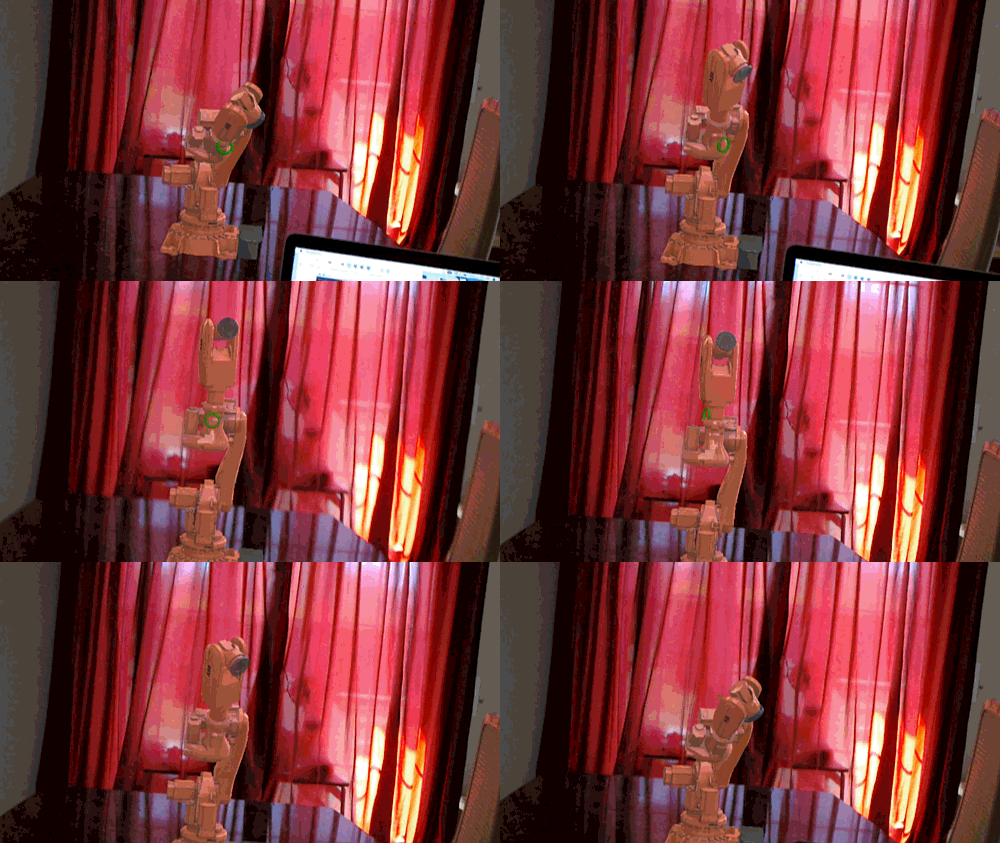
Dancing robot

During Autodesk Switzerland's 25th anniversary party in late October, people will be able to give the app a try and hopefully see the robot dancing along to whatever tunes the DJ plays. Let's talk a bit about how the system works…

Quite early on I decided against doing the additional audio processing directly on the HoloLens device itself. So I wanted to set the HoloLens up as a TCP server that a client could connect to and send messages to whenever it detected a beat.

Let's take a look at what was needed on the HoloLens for this…

The big challenge here is that Unity's C# implementation is based on Mono, which doesn't yet have async/await implemented. And as Universal Windows Apps (UWPs) live in a sandbox, it's not always easy to get things working.

What I really wanted was a System.Net.Sockets.TcpListener, which is apparently available in a new version of the System.Net.Sockets component, but I couldn't work out how to make use of this from inside a Unity app.

My next attempt was influenced heavily by a StackOverflow thread. I'd hoped to use a SocketStreamListener, but due to the lack of async/await support I was out of luck, once again.

It was time to go *way* back to basics… it was time to crack open some VS 2008 (perhaps even older) code on MSDN.

I took the Server implementation from example code for System.Net.Sockets.SocketAsyncEventArgs. I took the BufferManager implementation from the example code for its SetBuffer method. I took the SocketAsyncEventArgsPool implementation from the example code for its constructor. And finally, I added the missing AsyncUserToken implementation, as per StackOverflow.

With these pieces in my Unity project, it was trivial to start a TCP server from my MonoBehaviour:

using UnityEngine;

using System.Net;


public class Dance : MonoBehaviour

{


  private bool toggle = false;


  private int port = 4444;

  private TcpServer s;


  void Start()

  {

    s = new TcpServer(10, 100);

    s.Init(ReceiveCompleted);

    s.Start(new IPEndPoint(IPAddress.Any, port));

  }


  internal void ReceiveCompleted()

  {

    toggle = true;

  }


  void Update()

  {

    if (toggle)

    {

      this.BroadcastMessage("OnReverse");

      toggle = false;

    }

  }

}


Whenever a TCP message is received, we simply go and reverse the direction of the robot: i.e. all the moving parts of the robot change their rotation direction. We could make it more sophisticated, but for now it at least clearly responds to messages it receives.

So how do we detect beats in the music?

I found some Processing code on the web that performs beat detection on an audio stream and displays the results in a graphical window on my Mac (it uses Soundflower, an OS X system extension). As Processing has some limited support for HTTP & TCP, I went ahead and added a few lines of code to send a message via a TCP connection to the HoloLens device. The client code is really trivial: I just create a Processing.Net.Client object – pointing to the IP address and port of the HoloLens's TCP server – and use the write() method to send a single character (a "b", but it could be anything).

Here it is in action:


It doesn't dance very well, but then I can say that it dances significantly better than I do. So perhaps I'm not in a position to criticise. 😉

17 responses to “Making our HoloLens robot dance!”

  1. Just the idea of you saying "smaller" and shrinking an ar robot, moving it from your floor to your table with a hand gesture..

    hats off to Microsoft for this tech!

  2. Kean, this is really cool! Not only have you put all the pieces together to make your Unity app listening to sockets, the robot actually starts dancing. I guess we are all looking forward to proper dotnet core support in Unity.

    1. It was certainly more work than it should have been. But I was happy with the results. 🙂

      Kean

  3. Subir Kumar Dutta Avatar
    Subir Kumar Dutta

    Kean I am unable to do into the details of your posts and I try to follow the head line. I see your current work is on Robotics domain with Unity 3D and Holo Lens API. Just once question, what is the possibility to port this application to AutoCAD ?

    1. You could generate content in AutoCAD and then import it into Unity. But there's a lot of work needed to make sure the content looks good: the person who did this used a combination of products to get the robot looking like it does.

      Kean

      1. Subir Kumar Dutta Avatar
        Subir Kumar Dutta

        Kean I am working on Robotics Simulation but not on any CAD platform. I am into developing a Simulation software from scratch using OpenCascade kernel. And its working good so far where we import Robot Models as Step files generated using SolidWorks and then giving the required kinematics to those imported models. As you know I did some Robotics Simulation earlier on AutoCAD but those were with low Degree of Freedom. Now with my enhanced knowledge of Robot Kinematics I am thinking to give another shot to do Robotics Simulation within AutoCAD for higher degrees of Freedom. Once its done, do you think that Holo Lens API can be integrated at that stage ?

        1. I don't see why not. Given enough effort, anything's possible.

          Kean

  4. Thank you for sharing your effort. Here is my question: how to edit the init() in TCPServer because s.Init(ReceiveCompleted); causes errors.

    Thank you so much.

    1. Are you trying to duplicate what I've done, or is this in a different context? I just copied the samples from MSDN - I don't know why you'd be getting errors with that code.

      Kean

      1. Thank you for your reply soon.
        In the example in terms of Server you shared, the init() has no parameter following as: public void Init()
        {
        // Allocates one large byte buffer which all I/O operations use a piece of. This gaurds
        // against memory fragmentation
        m_bufferManager.InitBuffer();

        // preallocate pool of SocketAsyncEventArgs objects
        SocketAsyncEventArgs readWriteEventArg;

        for (int i = 0; i < m_numConnections; i++)
        {
        //Pre-allocate a set of reusable SocketAsyncEventArgs
        readWriteEventArg = new SocketAsyncEventArgs();
        readWriteEventArg.Completed += new EventHandler<socketasynceventargs>(IO_Completed);
        readWriteEventArg.UserToken = new AsyncUserToken();

        // assign a byte buffer from the buffer pool to the SocketAsyncEventArg object
        m_bufferManager.SetBuffer(readWriteEventArg);

        // add SocketAsyncEventArg to the pool
        m_readWritePool.Push(readWriteEventArg);
        }

        }

        Thank you.

        1. You're absolutely right - I'd completely forgotten about that change.

          Here's the updated version of the code:

          github.com/KeanW/Da...

          Kean

          1. Thank you so much,
            Best regards,
            Woon

  5. Hi Kean, the whole series was very helpful for us. We were already cracking on a similar thing (maintenance assistance in general, with a robotic arm as example) when I stumbled upon your posts. Please take a look here here: youtube.com/wat... . We used your rotation and scaler scripts, many thanks for those. Next steps is that we will integrate Vuforia Studio to augment directly the real object instead of projecting beside it a hologram.

  6. Panagiotis Psimatikas Avatar
    Panagiotis Psimatikas

    Hello Kean,

    Amazing article.
    We are trying to use the same thing but we are facing some issues with the port.
    Did you have to configure the hololens to open some ports?

    The exact message we are getting is :

    System.Net.Sockets.SocketException: No connection could be made because the target machine actively refused it <ip>:4444

    Thanks,
    Panos

    1. Panagiotis Psimatikas Avatar
      Panagiotis Psimatikas

      I have found the answer myself.

      In order for your application to have access to open sockets and use the internet of the device you have to enable the Internet "Capabilities" on your project.

      In Visual Studio double click the file : "Package.appxmanifest"
      Go to "Capabilities" tab and enable the "Internet" capabilities.

  7. Thanks for this! It was very helpful.

  8. An alternative to async/await in Unity3D is to use Reactive Extensions with the UniRx package: github.com/neuecc/U...

Leave a Reply to Kris Riemslagh Cancel reply

Your email address will not be published. Required fields are marked *