AutoCAD .NET
-
As promised in the last post, here's some old LISP code I used to demo the original circle linking application. I've changed it slightly to not only move the snake in 2D, now the Z-value of the lead object is set to be a fraction of the object's Y-value. This won't actually change what's seen in a standard overhead view... if you want to revert to 2D-only movement of the snake, simply remove "zval" from the two calls to the MOVE command. I should also add that while the snake will move through 3D by default, I didn't change the…
-
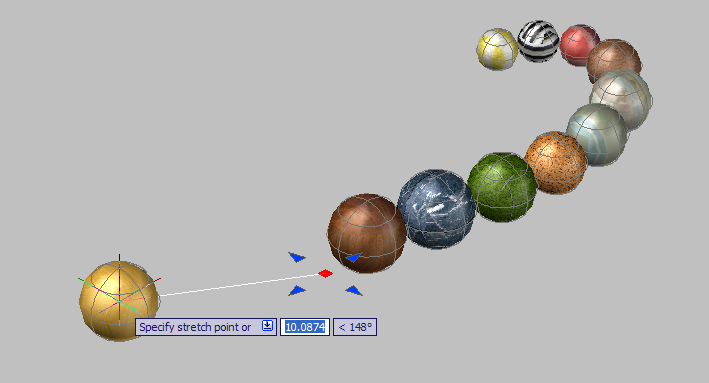
In the last three posts, we've looked at how to link circles using .NET events, how to store the link data in the drawing database, and how to create links automatically as objects are created. In this post we'll extend the code to support 3D. Yes, that's right, we're going to add support for creating chains of spheres, and with surprisingly little additional effort. Here's the source code for this post as a download. Notes on the changes: Lines 522, 526 and 536 are simply changes to prompts to refer to spheres as well as circles. To actually support the…
-
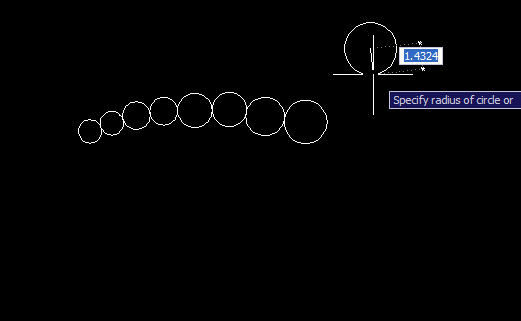
In the previous posts we looked at some code to link AutoCAD entities via .NET events, and how to persist the link data in the drawing file. This post extends the previous code to automatically link circles into the head of the chain, as circles are drawn by the user. The changes to the project are relatively modest compared to last time. Once again, the source is both available for download and listed below with changed line-numbers in red. Some notes on the changes: First we declare some new variables in our command class: a boolean (m_autolink - line 463)…
-
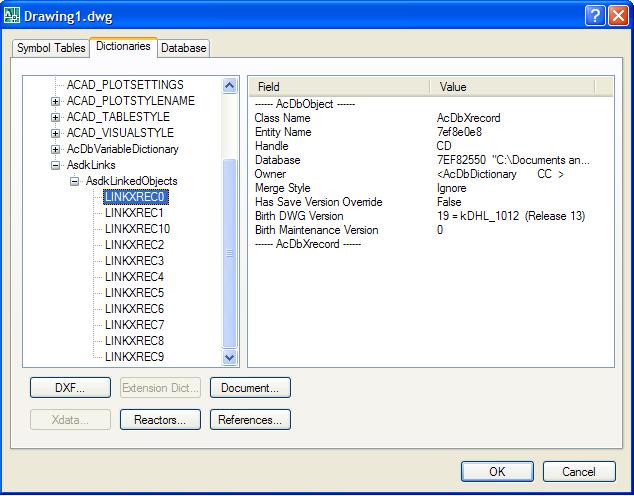
In the previous post we looked at some code that created chains of circles, linking them together using .NET events (a technique that can be used to maintain other types of geometric relationship, of course). In this post, we're going to extend our sample to support persistence of the link data in the AutoCAD database. Firstly, here's the updated source file. Below I've posted the code, once again with line numbers - but this time the lines that have changed or been added since the previous post are marked in red. This should highlight the modified sections of the code.…
-

I received this question some time ago from Paul Richardson from CAD System Engineering: I have never been sure when to update objects programmatically. An example would be a user edits an entity that I'm tracking and I need to edit another entity in reaction to that change. Is there a standard used to cache the handle, and make the change. Doesn't seem editing of entities should be done in the event that is watching for the change. When/how does one do it? Doesn't seem to be any info on a standard for this. This is such an excellent question…
-
A quick pre-Thanksgiving tip that came from an internal discussion today: how to find the location of a .NET module (meaning the currently executing assembly). Two techniques were identified: Identify the current assembly by asking where one of its types is defined Use the Assembly.GetExecutingAssembly() to get the assembly from where the current code is executing Here's the C# code showing the two techniques: using System; using System.Reflection; using Autodesk.AutoCAD.ApplicationServices; using Autodesk.AutoCAD.EditorInput; using Autodesk.AutoCAD.Runtime; namespace AssemblyLocationTest { public class AssemblyCmds { [CommandMethod("LOC")] public void GetModuleLocation() { Editor ed = …
-
This entry was contributed by an old friend who recently rejoined the ADN team, Jeremy Tammik. Jeremy has been in and around the Autodesk family for many years - he actually delivered the first ever ARX training in San Rafael, back when it was still called ARX - and I'm very pleased he chose to rejoin our team earlier this year. It also happens to be Jeremy's birthday this coming weekend (on Sunday 26th November), for anyone who's interested. 🙂 The question came in from an ADN member and revolved around the need to select objects at a particular location…
-
This post extends the polyline-creation jig shown in the previous entry to support the use of keywords both for arc segments and for undo. A few notes: I removed the use of a separate vertex list, as it proved to be less necessary than needed This implementation supports Undo, and the toggling between Line segment and Arc segment entry Arc segments have a fixed bulge of 1.0, which is actually quite useful if drawing a cloud, but not really useful for much else. Generally the bulge should be adjusted according to the position of the cursor relative to the previous…
-
During the first two parts of this series we looked at different techniques for creating polylines programmatically in AutoCAD (while allowing the user to select the various vertices). In this post look at the most advanced technique yet, the use of a "Jig". A Jig is a special construct in AutoCAD that hosts an object - in our case a polyline - and feeds user input information into this object, which then determines what graphics gets displayed. This is especially useful when dealing with complex objects, such as polylines with arc segments. We're going to start with a fairly basic…
-
During the first part of this series, we looked at ways to drive the PLINE command while retaining (or regaining) the thread of execution in your application. During this and the next post (yes, I've decided to spread the series a little thinner 🙂 we're going to look at how to completely replace the user-interface to the polyline command, a very useful technique in certain situations. This post focuses on the simple use of GetPoint() to request vertex information from the user; the next post will look at a more advanced technique, the Jig. Even the "simple" user-interface implemented in…