AutoCAD .NET
-
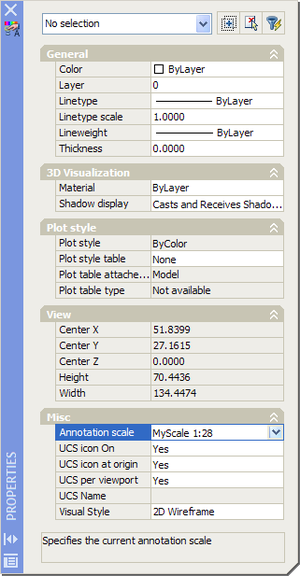
Thanks to Nikolay Poleshchuk and Roland Feletic for suggesting this topic, and to Wayne Brill, from DevTech Americas, for providing the code. In this post we're going to look at some functionality that's specific to AutoCAD 2008 - adding a new annotative scale to a drawing. The next post (assuming I can work out how to do it 🙂 will cover how you can attach a scale programmatically to make an entity annotative. Firstly, I should cover what the annotation scaling feature is all about... Here's a quick overview from the AutoCAD 2008 online help: Objects that are commonly used…
-
This question has come in from a number of developers... How can I tell when my application is running inside a 64-bit version of AutoCAD? As mentioned in this previous post, AutoCAD 2008 installs as native 64-bit binaries on a supported 64-bit OS, just as 32-bit binaries get installed on a supported 32-bit OS. A minor complication is that certain of our AutoCAD-based products do not yet have native 64-bit versions. Our Engineering teams are working on this, but in the meantime, your application might well be working inside a 32-bit Autodesk product on a 64-bit OS. So how do…
-
In this previous post, we looked at some code to do a programmatic snapshot of AutoCAD's modelspace, saving the results to an image file. From the discussion that followed, I realised that the code had an undesired (and unnecessary) side-effect of creating a new 3D GS View and leaving the modelspace with that view active. GS Views in AutoCAD 2007 have grey backgrounds by default, and so this change can be quite disturbing for users. The only reason we created the GS View in the first place (if one didn't already exist), was to use it to query the view…
-
I was inspired by some code sent out by Viru Aithal to write a command that iterates through the vertices of the various types of AutoCAD polyline: Optimized (or "lightweight") 2D polylines, which store an array of 2D vertices Old-format (or "heavyweight") 2D polylines, which contain a sequence of 2D vertex objects 3D polylines, which contain a sequence of 3D vertex objects Polylines that contain vertex objects are containers for the object IDs for the various vertices - you can use foreach to loop through the vertex objects, opening them one-by-one. For optimized polylines we need to loop using a…
-

This topic is a follow-up to the previous post dealing with offscreen rendering, and was suggested (and is based on code provided) by Fenton Webb, a member of DevTech Americas who has just moved across to San Rafael. Fenton was until recently part of DevTech EMEA, working from the UK. The basic technique is similar to the one used in the previous post: we use the graphics system to create an "offscreen device", which we then set up and request to create a snapshot of our model. This can work on graphical objects stored in any AutoCAD database, but in…
-
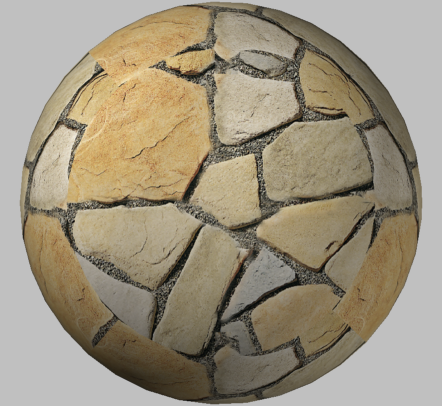
This question came up in an internal discussion, and I thought I'd share the code provided by our Engineering team with you (with a few minor additions from my side, of course). The idea is to render a 3D scene off-screen (i.e. save to file the rendered image not visible in the editor). In the below code, we do zoom to the extents of the 3D model that gets created, just to show it's there, but the rendering activity itself is not performed by the 3D view that is used to generate the graphics for AutoCAD's editor window. A 3D…
-
A follow-up question came in related to the last post, around how to add XData to entities using .NET. Extended Entity Data (XData) is a legacy mechanism to attach additional information to AutoCAD entities. I say "legacy" as there are limits inherent to using XData, which make other mechanisms more appropriate when storing significant amounts of data. The global XData limit is 16 KBytes per object, and this potentially needs to be shared between multiple applications. With AutoCAD 2007 came the complete switch to Unicode for string representation, which increases the storage requirements for strings in XData. Internally, the limit…
-
This question came in from Limin as a comment in this previous post: Is there .Net interface for autocad command "DrawOrder"? For example: after solid-hatch a polyline, need to reorder polyline and hatch, how to make it happen using .NET? I've put together some C# code to demonstrate how to do this: using Autodesk.AutoCAD.ApplicationServices; using Autodesk.AutoCAD.DatabaseServices; using Autodesk.AutoCAD.EditorInput; using Autodesk.AutoCAD.Runtime; namespace HatchDrawOrder { public class Commands { [CommandMethod("HDO")] static public void HatchDrawOrder() { Document doc = Application.DocumentManager.MdiActiveDocument; Editor ed = doc.Editor; // Ask…
-
One question that comes up from time to time is how to "gracefully" close all open documents inside AutoCAD. I use the term "gracefully" in quotes, as this does mean different things to different people. Let me first define what it means to me: Changes get saved to modified drawings Even if the drawing in question has never been saved before Which means you should expect to get some DWGs with names such as "Drawing1.dwg" saved to the working directory Active commands get cancelled, where possible Firstly, we need to define our command in the "session context", which means it…
-
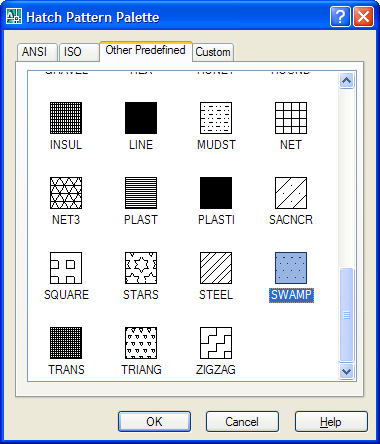
This question was posted by csharpbird: How to get the Hatch dialog using .NET? It seems that there is no such class in the .NET API? It's true there is no public class - or even a published function - to show the hatch dialog inside AutoCAD. It is, however, possible to P/Invoke an unpublished (and therefore unsupported and liable to change without warning) function exported from acad.exe. Here's some C# code that shows how. The code works for AutoCAD 2007, but will be different for AutoCAD 2006: the function takes and outputs strings, so the change to Unicode in…