Drawing structure
-
Firstly I should apologise to those readers using RSS to access this site: I've been playing around with the configuration, to integrate FeedBurner but also to switch from publishing entire articles via RSS to publishing introductions - my posts are just too long, which seems to cause a problem for some RSS readers. So you may have received multiple versions of the same articles for the last few weeks - sorry about that. For those of you who have not yet subscribed via RSS - please see the new options in the side-bar on the left: it should now be…
-
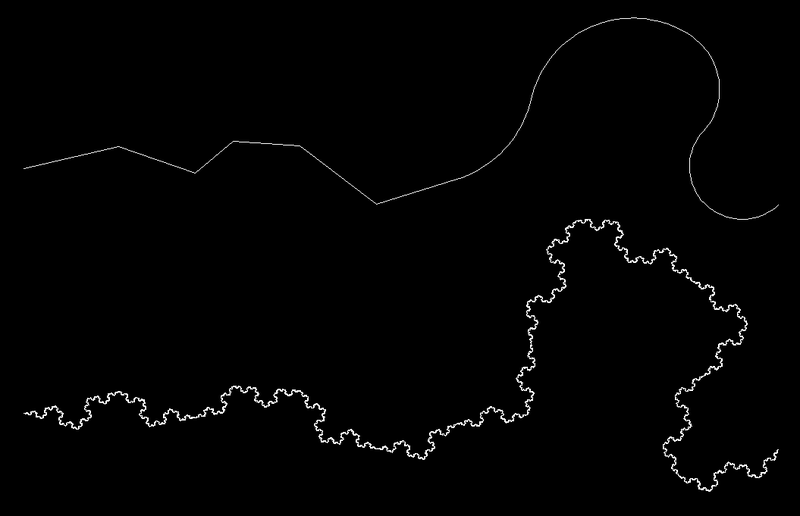
This post continues on from the last one, which introduced some code that creates "Koch curves" inside AutoCAD. Not in itself something you'll want to do to your drawings, but the techniques shown may well prove helpful for your applications. Last time we implemented support for Lines and Arcs - in this post we extend that to Polylines. These are a different animal, as rather than replacing the original entities with 4 times as many for each "level", in this case we add 3 new segments to each original segment. So we don't then mark the entities for erasure, either.…
-

I'm currently waiting to get my RealDWG license through, so I'll interrupt the previous series on side databases to focus on something a little different. I'll get back to it, in due course, I promise. 🙂 A long time ago, back during my first few years at Autodesk (which logically must have been some time in the mid- to late-90s, but I forget now), I developed an ObjectARX application to create fractals from linear geometry. I first got interested in the subject when I stumbled across something called the Koch curve: a very basic fractal - in fact one of…
-
I was inspired by some code sent out by Viru Aithal to write a command that iterates through the vertices of the various types of AutoCAD polyline: Optimized (or "lightweight") 2D polylines, which store an array of 2D vertices Old-format (or "heavyweight") 2D polylines, which contain a sequence of 2D vertex objects 3D polylines, which contain a sequence of 3D vertex objects Polylines that contain vertex objects are containers for the object IDs for the various vertices - you can use foreach to loop through the vertex objects, opening them one-by-one. For optimized polylines we need to loop using a…
-
A follow-up question came in related to the last post, around how to add XData to entities using .NET. Extended Entity Data (XData) is a legacy mechanism to attach additional information to AutoCAD entities. I say "legacy" as there are limits inherent to using XData, which make other mechanisms more appropriate when storing significant amounts of data. The global XData limit is 16 KBytes per object, and this potentially needs to be shared between multiple applications. With AutoCAD 2007 came the complete switch to Unicode for string representation, which increases the storage requirements for strings in XData. Internally, the limit…
-
This comment came in overnight from Brian: I was hoping to work out how to get the Entity from the handle and then erase it, from your posts, I've learned a lot but not found the answer to this one yet, I still have a mountain to climb. (I'm using VB.NET, I've done it in VB6 +COM, even in Lisp but .NET ....) As it's such a good question, I'm making a post out of it... The trick is to go from a hexadecimal string to a 64-bit integer (using System.Convert.ToInt64(str,16); which specifies the string as being "base-16" or hexadecimal).…
-
Someone asked me earlier today how to iteratively change the color of entities inside blocks. The following code uses a recursive helper function to iterate down through the contents of a block, changing the various entities (other than block references, for which we simply recurse) to a specified colour. Here's the C# code: using Autodesk.AutoCAD.ApplicationServices; using Autodesk.AutoCAD.DatabaseServices; using Autodesk.AutoCAD.EditorInput; using Autodesk.AutoCAD.Runtime; using Autodesk.AutoCAD.Colors; namespace BlockTest { public class BlockCmds { [CommandMethod("CC")] public void ChangeColor() { Document doc = Application.DocumentManager.MdiActiveDocument; Database db = doc.Database; …
-
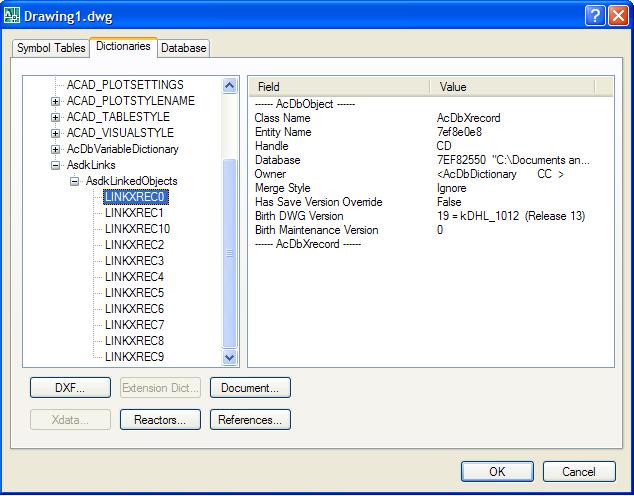
In the previous post we looked at some code that created chains of circles, linking them together using .NET events (a technique that can be used to maintain other types of geometric relationship, of course). In this post, we're going to extend our sample to support persistence of the link data in the AutoCAD database. Firstly, here's the updated source file. Below I've posted the code, once again with line numbers - but this time the lines that have changed or been added since the previous post are marked in red. This should highlight the modified sections of the code.…