Drawing structure
-

A big thanks to Philippe Leefsma, from the DevTech team in Europe, for providing this handy piece of code in a response to an ADN member. In the last post we saw some code that made use of DBObject.HandOverTo() to maintain identity between an old line and a new one with which we wanted to replace it. This code makes use of this method's counterpart, DBObject.SwapIdWith(), which works on two database-resident objects (rather than the replacement being in-memory, as is the case with HandOverTo()). Here's C# code implementing two commands, to swap the identity (and therefore the order) of two…
-

Brent Burgess commented on this previous post showing how to extend lines in AutoCAD: Is there a different process for shortening lines, or is it similar syntax? A very valid question… unfortunately the Curve.Extend() method only works with points or parameters that are outside the current definition of the curve, so we need to find another way (if you try, you'll get an eInvalidInput, at least that's what I found :-). I chose the approach of using Curve.GetSplitCurves() on each line, passing in an array of parameters at which to split the curve. I calculate the start parameter as 25%…
-
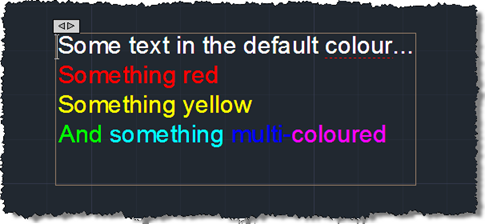
First we saw some simple code to create a pretty multi-line text object, then we saw some code to place it using a "drag jig", now we're going to launch AutoCAD's In-Place Editor (IPE) for MText once the object has been placed. To do this we're going to make use of the InplaceTextEditor object added to the Autodesk.AutoCAD.ApplicationServices namespace in AutoCAD 2011. There's very little work needed to do this – I had concerns about whether it could work safely with a newly-created, transaction-resident object, but it seems to work very well, as far as I can tell. Here's the…
-
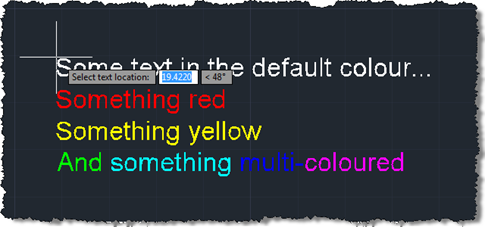
In the last post we created a simple MText object containing sections of text with different colours. The object was located at a hard-coded location, so now we want to use a simple technique to allow placement of our MText (or any object, for that matter) in the current user coordinate system. Rather than implementing a full jig class – whether a DrawJig or an EntityJig (the latter being most appropriate for this scenario) – we're going to use the .NET equivalent of the old (draggen) or acedDragGen() functionality: the overload of Editor.Drag() which takes a selection set, prompt and…
-
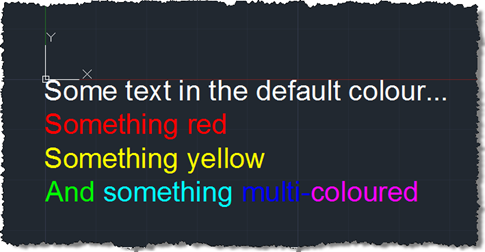
Some weeks ago we received this question via ADN support: My string contains several sentences and I need to make 2 of these sentences Red. I know that I could use a separate Mtext for the red portion; however, I was wondering if there was a way to programatically do this using just one Mtext? A big thanks to Varadarajan Krishnan, from our DevTech team in India, for providing the code that formed the basis for the below solution. I decided to spice things up slightly by adding some additional per-phrase and per-word colouring. Here's the C# code: using Autodesk.AutoCAD.ApplicationServices;…
-

After seeing Shaan list the results of the latest AUGI wishlist, I started thinking about which of the items would be worth covering either on this blog or via a Plugin of the Month. The second item on the list, "Automatically Differentiate Manually Edited Dimensions", has (hopefully) been addressed by Dimension Patrol, this month's Plugin of the Month, so that's a good start, anyway. The first item, "Change Objects in a Block to a new Layer", seemed as good a good place to start as anywhere. Here's some C# code that builds upon a technique for selecting/highlighting nested entities shown…
-
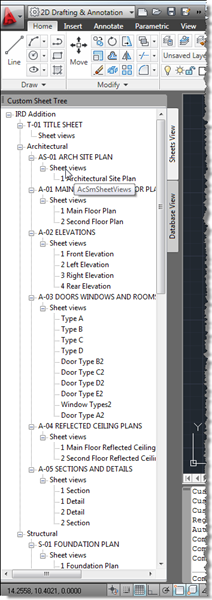
I didn't realise when I created the last post (with code borrowed from Fenton) that this would become a multi-part series – otherwise I'd clearly have called the earlier post "Part 1". 🙂 A comment from Harold Comerro requested information on getting more from the DST than was previously shown. Today's post extends the previous code to create two different slices of the data: a "Sheets View" and a "Database View", both hosted in the same palette set. Here's the updated C# code: using Autodesk.AutoCAD.ApplicationServices; using Autodesk.AutoCAD.EditorInput; using Autodesk.AutoCAD.Runtime; using Autodesk.AutoCAD.Windows; using acApp = Autodesk.AutoCAD.ApplicationServices; using ACSMCOMPONENTS18Lib; using System.Windows.Forms;…
-
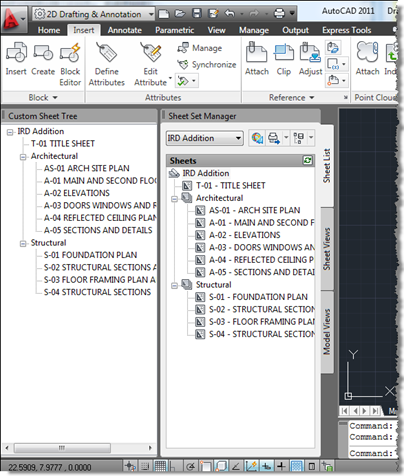
A big thank you to Fenton Webb, from DevTech Americas, for providing the code which was the basis for this post. Thanks, Fents! 🙂 Fenton sent a version of this code recently to an ADN member who was interested in duplicating the information shown in AutoCAD's Sheet Set Manager inside a custom, palette-hosted tree-view dialog. Fenton's version made use of WPF: I've dumbed it down a little to use WinForms, but may do a follow-up post using WPF (although the WPF TreeView doesn't appear to support data-binding, so I may well decide not to bother). I have made some other…
-
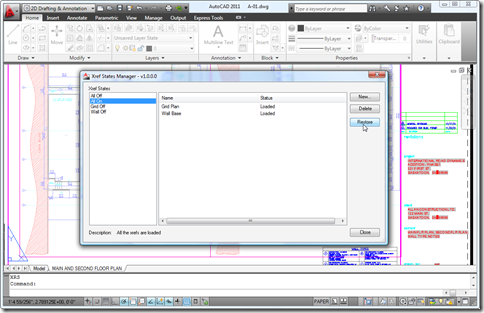
Yes, I know, I know – we're halfway through the month, already. This plugin has been live on Autodesk Labs since the beginning of the month, but I've been a little distracted by April Fools' jokes, fooling around with Photosynth point clouds as well as finishing up some internal activities which always tend to take time away from blogging at this time of year. Anyway, I've been remiss talking about this very cool application, but at least Scott was there to announce it on day one. The application was developed by Glenn Ryan, and there are a number of notable…
-
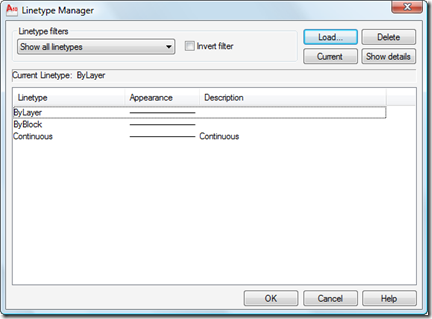
I received this question by email from Chris Witt: I know you can load specific linetypes with vb.net, but is there a way to load *all* line types from a specified lin file with vb.net without having to name each one? This is an easy one, as the Database.LoadLineTypeFile() method supports wildcard characters in the linetype name. Here's some C# code that does this: using Autodesk.AutoCAD.ApplicationServices; using Autodesk.AutoCAD.DatabaseServices; using Autodesk.AutoCAD.EditorInput; using Autodesk.AutoCAD.Runtime; namespace LoadLinetypes { public class Commands { [CommandMethod("LL")] public void LoadLinetypes() { Document doc = Application.DocumentManager.MdiActiveDocument; Database db =…