Drawing structure
-
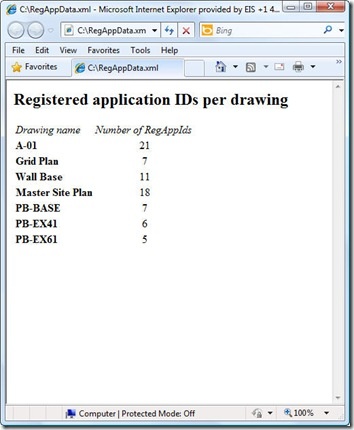
As raised as a possibility at the end of the last post, I did choose to throw together a quick XSLT stylesheet to generate an HTML report of the XML data created by our XRA command. To enable this I did make a few changes to our command implementation, which we'll take a look at first. Here's the updated C# code, with new/modified lines in red (and here's the updated source file): 1 using Autodesk.AutoCAD.ApplicationServices; 2 using Autodesk.AutoCAD.DatabaseServices; 3 using Autodesk.AutoCAD.EditorInput; 4 using Autodesk.AutoCAD.Runtime; 5 using System.Collections.Generic; 6 using System.Text; 7 using System.Xml; 8 using System.Xml.Serialization; 9 using System.IO; …
-
This post takes the code from the last post and extends it to serialize the collected RegAppId data to an XML file, as per Step 3 below: Implement a command to collect RegAppId information for the active document Extend this command to work on a drawing not loaded in the editor Save our RegAppId information to some persistent location (XML) Create a modified version of ScriptPro 2.0 (one of our Plugins of the Month) to call our command without opening the drawing I've chosen once again to leverage the very handy XmlSerializer class to handle serialization to and from XML:…
-
Thanks for Chris, Dan and Dale for pointing out the obvious issue(s) with my last post. Let's just blame it on a few holiday cobwebs needing brushing away during the first week back in the saddle. 🙂 The main issue with my previous implementation was that I'd somehow forgotten that Database.Insert() allows you to insert into a named block definition. This simple function does all my previous, manual approach did and more. The secondary issue – but still very important to those using annotation scaling – is that the previous code does not work for annotative blocks, as Dan very…
-
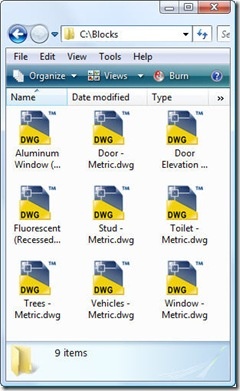
Important note: the code in this post – while potentially interesting, at a certain level – has been superceded by the code in the following post. Please go ahead and use that simpler, more complete implementation instead. This question came in, over the holidays, that seemed like it was worth addressing: How do I get an external DWG into the blocks table as a block definition? I started by quoting this ancient (at least in terms of this blog) post, but it turned out only to be of partial help: the problem is that the external DWG does not contain…
-
As Scott has announced over on his blog, January's Plugin of the Month, DrawOrder By Layer, is now available on Autodesk Labs. I first posted the code for this very useful plugin back in October, and this version includes only a very minor change from that one (for performance reasons it now only works with modelspace layers). A huge thanks to Terry Dotson from DotSoft for generously donating this plugin. After the original post, a few people provided feedback on user interface enhancements they'd like to see in the tool – thanks for taking the time to do so, those…
-

After a break of a week, I thought it was time to take the QR Code application a little further, after our previous versions creating basic QR codes at a fixed location, using user-specified corners and using a jig. The code in this post adds quite a bit of functionality to the application: The ability to encode various types of data Calendar events Contact information Email addresses Geo-locations Phone numbers Plain text URLs The ability to edit QR Codes The data used to create the QR Code is attached to the raster image as XData and gets used for default…
-
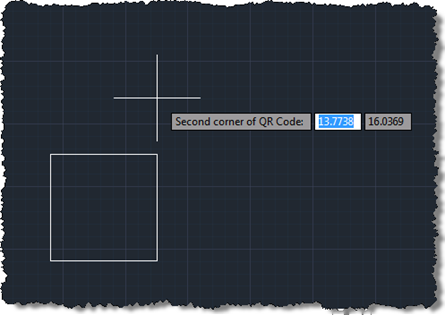
Following on from these two posts, we're now going to implement a jig to create our QR Code raster images inside AutoCAD. Today's approach isn't radically different from the previous one prompting selection of corners, but we do get to see the actual (square) boundary of the raster object as it gets defined. It would have been even better if the raster contents were displayed during the jig, but from what I can tell this has been disabled deliberately, no doubt for performance reasons (you see the same effect – only having the boundary visible – when you move or…
-
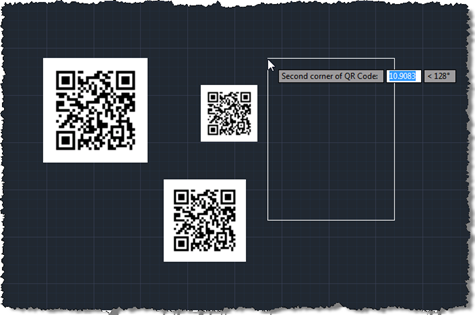
As promised, the code in this post extends that from the last post to add some user selection to the process of defining and placing a QR Code in an AutoCAD drawing. This version of the code also makes sure the raster is positioned in an "upright" orientation, irrespective of the order in which the corners are selected. Many images need to be positioned in such a way (although QR Codes are presumably more tolerant due to the positioning squares in three of the corners), so I expect this technique will be of interest to various people who need to…
-

This week I decided to get started on the QR Code Plugin of the Month I mentioned in this previous post, and show a few interesting techniques along the way. The introductory post mentioned a few different approaches for creating/embedding the codes in a drawing. For now – as it's by far the simplest – I've chosen to insert the code as a raster image. In this post we'll show how to define and insert a raster image of a QR Code into the drawing – for now one with a hardcoded message string, placed at the origin – and…
-
AutoCAD's Product Design team are considering the possibility of automatically removing unnamed groups that are either empty or only contain a single item. The question, though, is whether anyone out there is for some reason relying on the existence of such groups, and consequently whether we would therefore be risking breaking applications or customizations should we choose to auto-purge them. So… do you have an application that uses unnamed groups with 0 or 1 items? I don't have a firm idea of why anyone would do this, but then I'm often surprised by the innovative ways people find to implement…