Drawing structure
-
This post extends the last one which looked at a basic implementation to allow AutoCAD's standard OFFSET command to work on the contents of external references. I haven't flagged the specific changes, but the old code (which is almost identical to that in the last post) starts with the Initialize() function. The previous example created geometry on a temporary layer that exists only as long as the source xref is attached: detaching the xref generally caused dangling layer references. This post evolves the approach and provides a choice to the user (via the XOFFSETLAYER command): to either create the geometry…
-
This post demonstrates a simple check for whether a drawing is two or three dimensional. The code is almost embarrassingly simple, but then the question is significant and in the absence of a "Is3D" property on the Database object this is likely to prove useful for people. So how do we check whether a drawing is 3D? The quick answer is that in most circumstances the EXTMAX system variable will have a non-zero Z value for a 3D drawing. There are potential situations where this might not be true (and EXTMAX doesn't reflect the 3D nature of certain geometry), but…
-
Everything aches after a very enjoyable soccer tournament in Prague (to which I mentioned I was heading off in my last post). But it was well worth the pain; it was really a lot of fun playing with and against (and just catching up with) so many friends and colleagues. I received this question a week or so ago by email: Is there any way to change the handle of an object through the API? Ideally I would like to select two objects and swap the handle. The code in this post does just that: it asks the user to…
-
This question came in recently by email: Is there a way to obtain the object IDs of all the object on a layer? I found the GetAllObjects() method of the Transaction object but it doesn't work. That's right: GetAllObjects() will return the objects accessed via (or added to) the transaction - it has nothing to do with retrieving objects based on any particular property. What you need to do is Editor.SelectAll(), the equivalent of acedSSGet("X") in ObjectARX and (ssget "X") in AutoLISP. You need the version where you pass in a SelectionFilter specifying the layer for which to search. Here's…
-
In the last post we looked at using .NET to define complex linetypes containing text segments. In the post I admitted to not knowing specifics about the properties used to create the text segment in the linetype, and, in the meantime, an old friend took pity on me and came to the rescue. 🙂 Mike Kehoe, who I've known for many years since we worked together in the Guildford office of Autodesk UK, sent me some information that I've reproduced below. Mike now works for Micro Concepts Ltd., an Autodesk reseller, developer and training centre. He originally wrote the below…
-
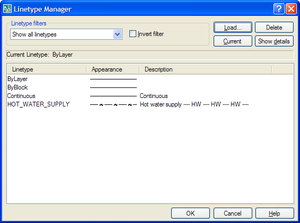
In my last post we saw some code to create a simple linetype using .NET. As a comment on that post, Mark said: Kean, i tried you code and it works great and it also got me thinking... is it possible to programmitically add text in as well? I've tried using ltr.SetTextAt(1, "TEST") but so far i've had no luck, any suggestions??? It turned out to be quite a bit more complicated to make a linetype containing text than merely calling SetTextAt() on one of the segments. In order to understand what properties needed setting, I first loaded the HOT_WATER_SUPPLY…
-
Happy New Year, everyone! I had a very relaxing break over the holiday period: during the better part of two weeks I managed to stay away from my PC and even my BlackBerry, which I admit I'm generally not very good at ignoring. So now I'm easing back into the swing of things, remembering how to type and open modelspaces, among other things. 🙂 To save my brain from unnecessary stress during the first few weeks of 2008, I've decided to take inspiration from the ADN website. Today's post is based on this DevNote, which shows how to create a…
-
This question was asked as comment to a previous post by har!s: Thanks a lot for the code. I have yet to see 2008 and MultiLeader. But I presume that it works on both Model and paper spaces. In that case, what is the best method to make the operation space independent? i.e., it should work on active space irrespective of whether it's model or paper. I think this will be generally applicable to almost all the entity creations. The question is very valid and does indeed apply to a lot of entity creation - and other - activities. Most…
-
In the last post we looked at some code to programmatically purge Registered Application names from the drawing currently active in AutoCAD. In this post we take the "batching" code first used in this previous post and apply it to this problem. What we end up with is an additional command called PF which asks the user to specify a folder and then purges the RegApps from the DWGs in that folder, saving those files that end up being modified with the "_purged" suffix. One point to note is the use of the Database.RetainOriginalThumbnailBitmap property: as we're not making any…
-
Purging can seriously reduce the size of AutoCAD drawings by removing unnecessary symbol table and dictionary entries. The PURGE command in AutoCAD allows you to safely purge these non-graphical objects (layers, linetypes, block definitions, etc.). Since AutoCAD 2005 (if I recall correctly), PURGE also supports the removal of Registered Application names. Applications that make use of Extended Entity Data (XData) must register unique application names in drawings. A few applications have, in the past, created many more names than they required, and as these RegApp names get copied from drawing to drawing (when they get XRefed, for instance), they ended…