Geo-location
-
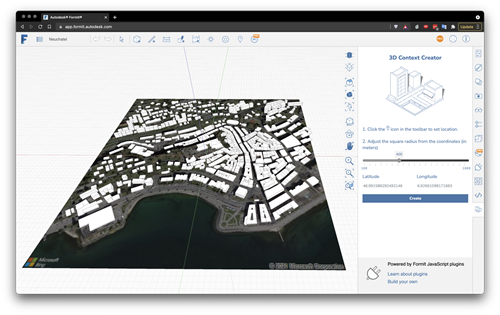
In the last post we looked at using VASA from within Dynamo for FormIt to solve mazes generated by a cool plugin created by Brett from the FormIt team. The Dynamo graph we saw used VASA in "3D mode" – where the voxel height is higher than 1 – but that came with the added need to create a floor for the maze (something that isn't too hard, as we know the exact dimensions and location of the maze). In today's post we're looking at how VASA might be used to perform pathfinding operations at the urban scale, taking geometry…
-
I hadn't planned on writing a third part to this series, but then Mads Paulin – who I mentioned in the last post – got back to me with some information that's really worth sharing. I'd pinged Mads while looking for a way to list the available coordinate systems to the user (another question from Coralie Jacobi, who had originally kicked off the series). I'd found out that the coordinate system definitions are primarily stored in this folder… C:\ProgramData\Autodesk\Geospatial Coordinate Systems 14.01 … but I hadn't worked out to extract any information from the contained CSD files. Mads delivered the…
-
In yesterday's post we saw a simple implementation of two commands to translate between geographical locations (latitude-longitude values) and drawing points inside AutoCAD. In this post we're extending that to access the current coordinate system, as returned by the GeoLocation object attached to the current drawing. Which in some ways should be simple, but then the CoordinateSystem property actually returns XML data, not just the simple coordinate system name you probably passed in when choosing it (see the IGR command, below, to see what I mean): <?xml version="1.0" encoding="utf-16" standalone="no" ?> <Dictionary version="1.0" xmlns="http://www.osgeo.org/mapguide/coordinatesystem"> <ProjectedCoordinateSystem id="SWISS"> …
-
I received a question from Coralie Jacobi, recently, in response to this recent post: Saw your post a while ago on the geolocation in 2015. This functionality is something that we will use a great deal and I will definitely be writing some code to utilize it. What I'd like to see in your blog is something that would show me how to get to the lat\long values of the location I have picked and convert them to the coordinate system that I have selected instead of having the user have to stipulate the location in AutoCAD. In this post…
-
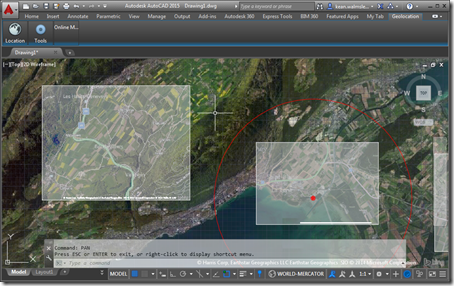
In this recent post we saw how to set our geographic location inside an AutoCAD drawing – essentially geo-referencing the model it contains – programmatically. In today's post we're going to capture a section of the displayed map and embed it inside the drawing, much as the GEOMAPIMAGE command does. In fact, we're going to use the GEOMAPIMAGE command to do most of the heavy lifting: we'll simply call the command and then pick up the created GeomapImage object to manipulate its settings, adjusting some image properties (brightness, contrast and fade settings) and having the map image display hybrid (aerial…
-
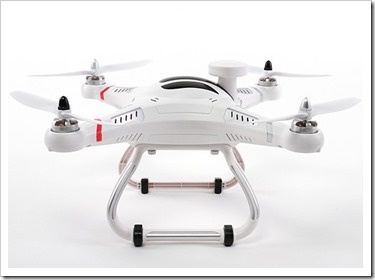
I've been getting very interested in the field of autonomous robot navigation, of late. I own a couple of different robots: while I haven't quite gotten around to buying a robotic vacuum cleaner, I've had an autonomous lawn mower for several years, now, and bought a simple LEGO-carrying programmable robot for my kids for Christmas. One of the reasons I find the field of autonomous robot navigation so interesting is that there's a great deal of overlap with the algorithms and techniques needed for 3D reconstruction: robots need to sense their environment – often using photo or video input –…
-
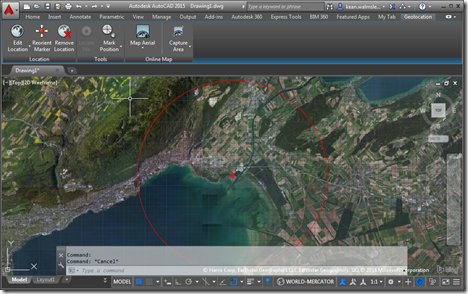
AutoCAD's geo-location API is a topic I've been meaning (and even promising) to cover for some time now. So here we are. 🙂 The below code sample is based on one shown at ADN's DevDays tour at the end of 2013 – for the AutoCAD 2014 release – but the API ended up not being fully usable (at least as far as I recall: someone should jump in and correct me if I have this wrong) until the 2015 release. I've taken the opportunity to use Editor.Command() to call a couple of commands synchronously – to turn on the GEOMAP…