Object properties
-
A huge thanks to Cyrille Fauvel, who manages DevTech's Media & Entertainment team but still finds the time to dip into the odd deeply-technical, AutoCAD-related issue. Cyrille provided the original article on this topic late last year, but it's taken me time to get around to editing and publishing it. A quick tip... if you're not interested in the technical details of how Cyrille has exposed the various Properties Palette interfaces to .NET, you can safely skip this post and join us again when we go ahead and make use of the implementation to add dynamic properties to core AutoCAD…
-
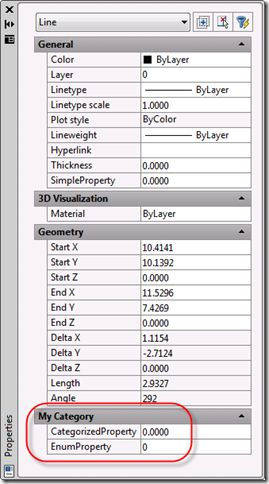
This topic is a little on the advanced side - it requires the use of C++ and some knowledge of COM - but I felt it was worth covering, as you can get some interesting results without a huge amount of effort. Since we introduced the Properties Palette (once known as the Object Property Manager (OPM) and otherwise referred to as the Properties Window) back in AutoCAD 2004 (I think it was) it has become a core tool for viewing and editing properties of AutoCAD objects. In AutoCAD 2009 we have taken the concept further, allowing properties to be added…
-
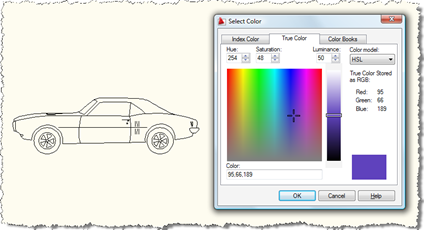
Here's a question that came in to us, recently: How can I show the AutoCAD color dialog from .NET? I need to allow the user to select a block, show the AutoCAD color dialog and apply the selected color to the contents of the selected block. A new member of DevTech Americas - Augusto Gonçalves, who's based in our São Paulo office - answered with the following code (which I've modified slightly, mostly to follow this blog's coding conventions). Thanks, Augusto! By the way, these previous posts may also be useful to those interested in this topic. Here's the C#…
-
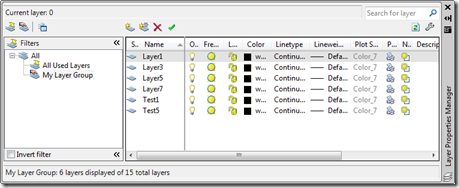
The following question came in as a comment on this previous post: Your example above shows how to create a property type filter, how do you add layers to a group type filter (LayerGroup class)? I can create the group filter but can't figure out how to add layers to the group. The filterexpression method is available but doesn't seem to work (at least not like with the LayerFilter object) To tackle this, let's start by looking at the documentation on the LayerGroup class in the .NET Reference (currently part of the ObjectARX Reference): LayerGroup is derived from LayerFilter and…
-
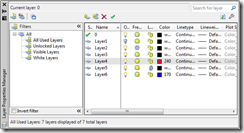
This question came in by email last week: The last two days I am struggling with adding a new LayerGroup to HostApplicationServices.WorkingDatabase.LayerFilters.Root. I simply cannot get it working. Is it possible to write a blog item with example on this? An interesting question and it can indeed be quite tricky to understand how this works. For those of you who are ADN members, here's a DevNote covering the basics, which I've taken and extended for this post. When working with LayerFilters, it's important to know that the Database property providing access to the list of current LayerFilters does so by…
-
This post is the latest in the series of closer looks at the new APIs in AutoCAD 2009. It covers the Data Extraction API, a new .NET API allowing you to drive the Data Extraction feature inside AutoCAD. There is a very thorough C# sample included on the ObjectARX SDK (under samples/dotNet/DataExtraction), so I thought I'd focus on a much simpler example where we extract data from a single drawing. Here's the C# code: using System.Collections.Generic; using Autodesk.AutoCAD.ApplicationServices; using Autodesk.AutoCAD.EditorInput; using Autodesk.AutoCAD.Runtime; using Autodesk.AutoCAD.DataExtraction; namespace DataExtraction { public class Commands { const string path = …
-
In the last post we saw code to display and use AutoCAD's built-in colour, linetype and lineweight dialogs. In this post we extend that by using each of them in sequence to display various properties of an entity, allowing the user to modify them. While this is slightly more "real world" than the last post, it doesn't really make sense to implement a command such as the one below (the property palette is much better, for instance :-). The main purpose is to show how to set the initial values in the various dialogs and afterwards to make use of…
-
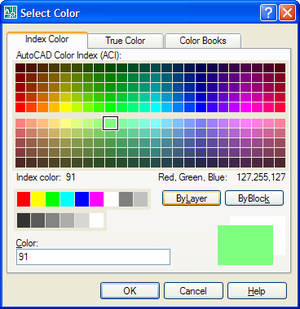
AutoCAD has a number of handy dialogs available in the "Autodesk.AutoCAD.Windows" namespace. The following code shows how to use three, in particular: ColorDialog, LinetypeDialog and LineWeightDialog. These three classes allow you to very easily implement user-interfaces selecting their corresponding properties. Here's the C# code: using Autodesk.AutoCAD.Runtime; using Autodesk.AutoCAD.ApplicationServices; using Autodesk.AutoCAD.DatabaseServices; using Autodesk.AutoCAD.EditorInput; using Autodesk.AutoCAD.Windows; namespace AutoCADDialogs { public class Commands { [CommandMethod("CDL")] public void ShowColorDialog() { Document doc = Application.DocumentManager.MdiActiveDocument; Database db = doc.Database; Editor ed = doc.Editor; ColorDialog cd =…
-
In the last post we looked at using .NET to define complex linetypes containing text segments. In the post I admitted to not knowing specifics about the properties used to create the text segment in the linetype, and, in the meantime, an old friend took pity on me and came to the rescue. 🙂 Mike Kehoe, who I've known for many years since we worked together in the Guildford office of Autodesk UK, sent me some information that I've reproduced below. Mike now works for Micro Concepts Ltd., an Autodesk reseller, developer and training centre. He originally wrote the below…
-
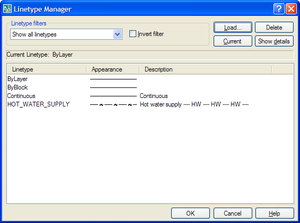
In my last post we saw some code to create a simple linetype using .NET. As a comment on that post, Mark said: Kean, i tried you code and it works great and it also got me thinking... is it possible to programmitically add text in as well? I've tried using ltr.SetTextAt(1, "TEST") but so far i've had no luck, any suggestions??? It turned out to be quite a bit more complicated to make a linetype containing text than merely calling SetTextAt() on one of the segments. In order to understand what properties needed setting, I first loaded the HOT_WATER_SUPPLY…