Object properties
-
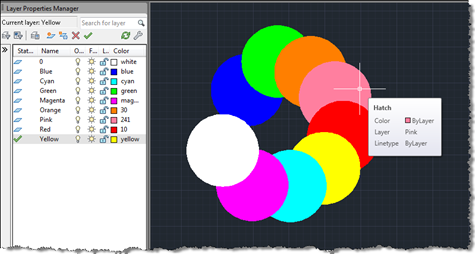
Terry Dotson has – once again – generously offered an application to be an ADN Plugin of the Month. This little tool, called DrawOrderByLayer, allows you to modify the draw-order of objects in an AutoCAD drawing according to the layer they're on. I don't expect this to go live for another month or so (I still have plans for November's plugin), but I did want to post it in order to give people the chance to provide feedback. Here's basically how it works… You have layers containing geometry – in this case I've created circular solid hatches on layers named…
-
A big thanks to Thorsten Meinecke for pointing out the obvious issue with my prior post (the nested entity selection loop which has frustrated me unnecessarily when developing the code for that post and another). Here are the details of the fix: using Editor.GetNestedEntity() along with a PromptNestedEntityOptions object, instead of a direct message string, allows us to specify AllowNone to be true. Which, in turn, causes PromptStatus.None to be returned when the enter or space keys are used to terminate the selection loop. An obvious omission, in hindsight, but anyway – I'm much obliged to you, Thorsten! 🙂 I've…
-

In a recent comment, Adam requested the code from this previous post be modified to work in the same way as another, more recent, post: Is it possible to get a version of this code where the user is prompted to create a selection set of nested objects first, and then being prompted for the new colour of the objects? i.e is it possible to get the code for changing colour working the same way as it does for changing layer, as detailed here? This would allow the user to pick and choose the objects affected, rather than making a…
-

In the last post we saw a very simple, preliminary exploration of some of the new programmatic capabilities of the in-place MText editor in AutoCAD 2011. In that basic case we just used it to strip off all formatting from an MText object. Now we're going to implement a couple of commands to toggle the case of the contents of an MText object between lower- and uppercase. Here's the C# code: using Autodesk.AutoCAD.ApplicationServices; using Autodesk.AutoCAD.EditorInput; using Autodesk.AutoCAD.DatabaseServices; using Autodesk.AutoCAD.Runtime; namespace MTextEditing { public class Commands { [CommandMethod("CTU")] public void ChangeToUppercase() { ChangeCase(true); …
-

Once again, members of the DevTech Americas team have put together an entertaining and informative DevCast session on AutoCAD's APIs. This time, Gopinath Taget joins Stephen Preston and Fenton Webb to present a number of interesting topics: boundary tracing, associative surfaces, 3D laser scanning and point cloud filtering. I'll be covering boundary tracing via this blog in the coming weeks, just as I expect to be doing more with point clouds (coincidentally a laser scanner from FARO – similar to the one Fenton and Gonzalo use in this DevCast – should be arriving for me today, so watch this space…
-
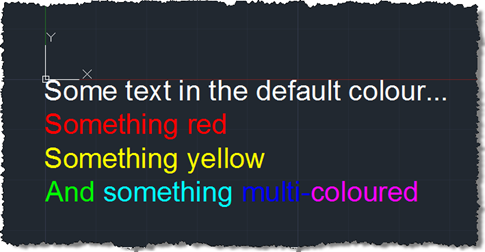
Some weeks ago we received this question via ADN support: My string contains several sentences and I need to make 2 of these sentences Red. I know that I could use a separate Mtext for the red portion; however, I was wondering if there was a way to programatically do this using just one Mtext? A big thanks to Varadarajan Krishnan, from our DevTech team in India, for providing the code that formed the basis for the below solution. I decided to spice things up slightly by adding some additional per-phrase and per-word colouring. Here's the C# code: using Autodesk.AutoCAD.ApplicationServices;…
-
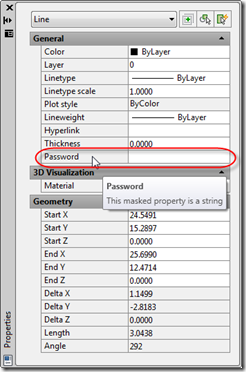
In this recent post we looked at adding custom editing capabilities for dynamic properties we've added via .NET. In the first example we looked at a "distance" property which provided a button allowing the user to select two points. In this post we'll look at implementing a masked string property, such as one you would use for a password. I won't repeat too much of the background information from the last post in this series: you should refer to that to understand the fundamentals (the fact that we're basing this implementation on Cyrille Fauvel's OPM .NET sample, that we're not…
-

Back in these previous posts, we introduced an ObjectARX module that exposed AutoCAD's Property Palette to .NET (thanks again to Cyrille Fauvel for his work on this :-). In this post we're going to build on this work to demonstrate how to integrate properties with more advanced editing controls into the Property Palette. [Note: this sample does not deal with persisting the data with an object. If you want to store your data with a particular object, I suggest taking a look at this previous post which demonstrates how to use Xdata to do so.] This code is being built…
-
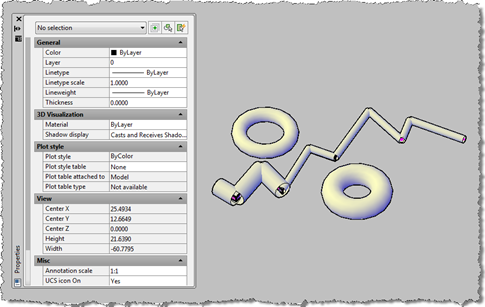
I've been meaning to get to this one for a while. This post takes the OPM .NET implementation and shows how to use it to allow modification of data persisted with an object: in this case we're going to use the XData in which we store the "pipe radius" for the AutoCAD 2010 overrule sample we've recently been developing. To start with, I needed to migrate the OPM .NET module to work with AutoCAD 2010, which meant installing Visual Studio 2008 SP1. Other than that the code migrated very easily, and the project (with the built asdkOPMNetExt.dll assembly) can be…
-
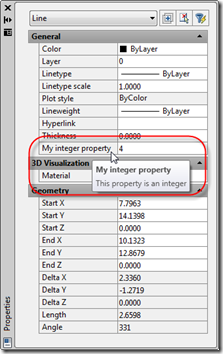
In the last post we looked at the code behind an ObjectARX module exposing AutoCAD's Properties Palette for use from managed .NET languages. Thanks again to Cyrille Fauvel for providing this implementation. In this post we're going to move right onto using this implementation from C#. First things first: if you didn't understand much of what was said in the previous post in this series, Don't Panic! (Yes, that's a quick reference to The Hitchhiker's Guide to the Galaxy.) The actual implementation details aren't particularly important - you only really need to understand them if you want to expose additional…