OK, here goes: my first (public) attempt at integrating the brand new Kinect Fusion functionality – made available this week in v1.7 of Microsoft's Kinect for Windows SDK – into AutoCAD. There are still a few quirks, so I dare say I'll be posting an update in due course.
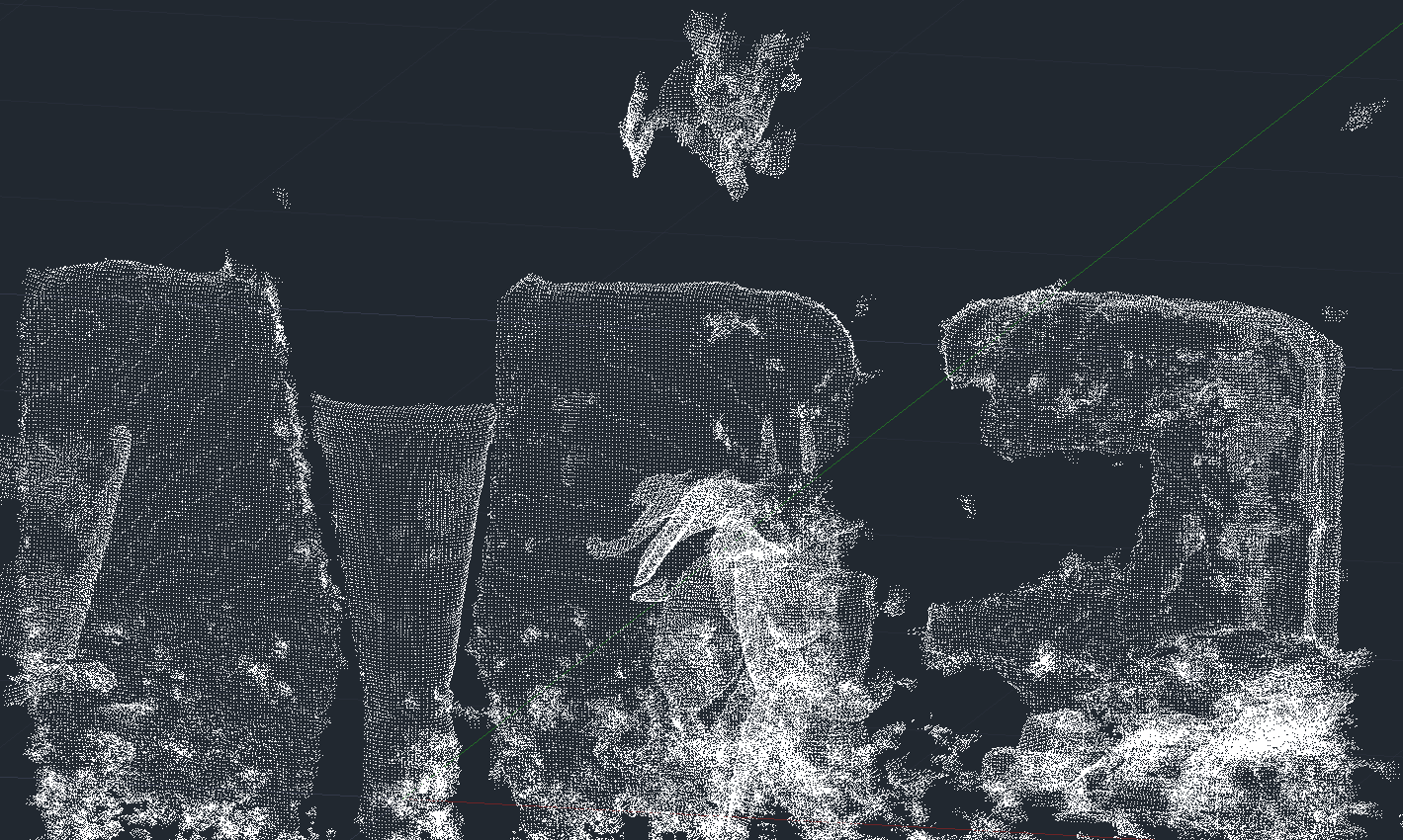
As mentioned in the last post, I've been working on this for some time but can now show it publicly, as the required SDK capabilities have now been published. As part of this effort, I've gone ahead and made sure the other Kinect samples I've written for AutoCAD work with this version of the SDK: all can be found here.
Much of the work was clearly to integrate the appropriate Kinect API calls into an AutoCAD-resident jig, much in the way we've seen before when displaying/importing a single depth frame. Kinect Fusion introduces the idea of a reconstruction volume that gets gradually populated with data streamed in from a Kinect sensor, building up an underlying mesh that represents the 3D model.
AutoCAD is OK with meshes to a certain size, but I wanted to get at the raw point data, instead. The Kinect team has kindly provided the Reconstruction.ExportVolumeBlock() method for just this purpose – it's intended to populate an array with voxel data which you can interpolate trilinearly to extract model/mesh information (erk) – but I haven't yet been able to have it return anything but an array of zeroes. So the code is currently asking the Kinect Fusion runtime to calculate a mesh from the reconstruction volume and we then use the vertices from that mesh as points to display.
The typical Kinect Fusion sample makes use of a quite different technique: it generates a shaded view of the mesh from a particular viewpoint – the underlying API casts rays into the reconstruction volume – which is very quick. Calculating a mesh and extracting its vertices is slower – especially when we get into the millions of points – so we have to accept the responsiveness is going to be different.
And that's mostly OK: we simply drop incoming frames when we're already processing one, as otherwise we build up a queue of unprocessed frames leading to a significant lag between the movement of the sensor and the population of the reconstruction volume. But this also means that there's a much bigger risk of the Kinect Fusion runtime not being able to track the movement – as the time between processed frames is larger and so are the differences – at which point we receive "tracking failures".
Which ultimately means the user has to move the sensor really slowly to keep everything "on track". Here's a video that should give you a sense of the problem, as I attempt to capture a vase and an orchid on my dining table:
[I did edit the video to cut out some waiting as the points are fully imported at the end: the resulting point cloud has around 1.5 million points, so the current process of writing them to an ASCII file, converting this to LAS and then indexing the LAS to PCG is far too slow… this is something I am planning to streamline, incidentally.]
Here's a normal photo of the scene, to give you a sense of what I'm trying to capture: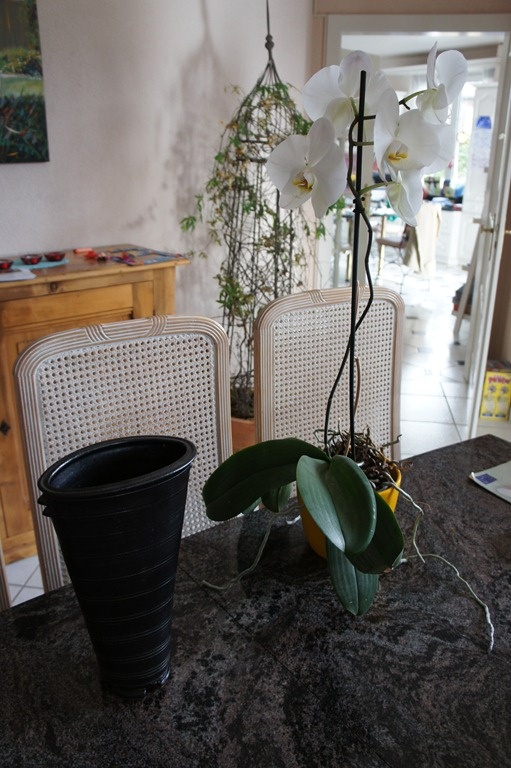
During the video, you'll notice a number of tracking failures. When you get tracking failures you have four main options:
- Return the sensor to the position at which the tracking was last successful (to continue mapping).
- Cancel the capture by hitting escape.
- Complete the capture by clicking the mouse.
- Let the errors accumulate: when the count hits 100 consecutive errors (this is coded in the sample – you could disable this or change the threshold) the reconstruction will get reset.
I hope that at some point I'll be able to tweak the processing to make it sufficiently efficient to eliminate the problem of tracking being lost between frames. I also hope to be able to integrate colour into the point cloud: this isn't something that's directly provided by Kinect Fusion, but I expect there's some way to get there.
Here's the C# code for this implementation (you should download the complete samples – a repeat of the link from earlier in the post, in case you missed it – to see the code it relies upon):
using Autodesk.AutoCAD.EditorInput;
using Autodesk.AutoCAD.Geometry;
using Autodesk.AutoCAD.Runtime;
using Microsoft.Kinect;
using Microsoft.Kinect.Toolkit.Fusion;
using System;
using System.Collections.Generic;
using System.Collections.ObjectModel;
using System.IO;
using System.Threading;
using System.Windows.Threading;
#pragma warning disable 1591
namespace KinectSamples
{
public static class Utils
{
public static Point3dCollection
Point3dFromVertCollection(
ReadOnlyCollection<Vector3> vecs
)
{
var pts = new Point3dCollection();
foreach (var vec in vecs)
{
pts.Add(new Point3d(vec.X, vec.Z, -vec.Y));
}
return pts;
}
public static List<ColoredPoint3d>
ColoredPoint3FromVertCollection(
ReadOnlyCollection<Vector3> vecs
)
{
var pts = new List<ColoredPoint3d>();
foreach (var vec in vecs)
{
pts.Add(
new ColoredPoint3d() { X = vec.X, Y = vec.Z, Z = -vec.Y }
);
}
return pts;
}
}
// A struct containing depth image pixels and frame timestamp
internal struct DepthData
{
public DepthImagePixel[] DepthImagePixels;
public long FrameTimestamp;
}
public class KinectFusionJig : KinectPointCloudJig
{
// Constants
private const int MaxTrackingErrors = 100;
private const int ImageWidth = 640;
private const int ImageHeight = 480;
private const ReconstructionProcessor ProcessorType =
ReconstructionProcessor.Amp;
private const int DeviceToUse = -1;
private const bool AutoResetReconstructionWhenLost = true;
private const int ResetOnTimeStampSkippedMillisecondsGPU = 3000;
private const int ResetOnTimeStampSkippedMillisecondsCPU = 6000;
// Member variables
private Editor _ed;
private SynchronizationContext _ctxt;
private double _roomWidth;
private double _roomLength;
private double _roomHeight;
private int _lowResStep;
private int _voxelsPerMeter;
private FusionFloatImageFrame _depthFloatBuffer;
private Matrix4 _worldToCameraTransform;
private Matrix4 _defaultWorldToVolumeTransform;
private Reconstruction _volume;
private int _processedFrameCount;
private long _lastFrameTimestamp = 0;
private bool _lastTrackingAttemptSucceeded;
private int _trackingErrors;
private int _frameDataLength;
private bool _processing;
private bool _translateResetPoseByMinDepthThreshold = true;
private float _minDepthClip =
FusionDepthProcessor.DefaultMinimumDepth;
private float _maxDepthClip =
FusionDepthProcessor.DefaultMaximumDepth;
// Constructor
public KinectFusionJig(
Editor ed, SynchronizationContext ctxt,
double width, double length, double height, int vpm, int step
)
{
_ed = ed;
_ctxt = ctxt;
_roomWidth = width;
_roomLength = length;
_roomHeight = height;
_voxelsPerMeter = vpm;
_lowResStep = step;
_processing = false;
_lastTrackingAttemptSucceeded = true;
_vecs = new List<ColoredPoint3d>();
}
private void PostToAutoCAD(SendOrPostCallback cb)
{
_ctxt.Post(cb, null);
System.Windows.Forms.Application.DoEvents();
}
public override bool StartSensor()
{
if (_kinect != null)
{
_kinect.DepthStream.Enable(
DepthImageFormat.Resolution640x480Fps30
);
_frameDataLength = _kinect.DepthStream.FramePixelDataLength;
try
{
// Allocate a volume
var volParam =
new ReconstructionParameters(
_voxelsPerMeter,
(int)(_voxelsPerMeter * _roomWidth),
(int)(_voxelsPerMeter * _roomHeight),
(int)(_voxelsPerMeter * _roomLength)
);
_worldToCameraTransform = Matrix4.Identity;
_volume =
Reconstruction.FusionCreateReconstruction(
volParam, ProcessorType, DeviceToUse,
_worldToCameraTransform
);
_defaultWorldToVolumeTransform =
_volume.GetCurrentWorldToVolumeTransform();
ResetReconstruction();
}
catch (InvalidOperationException ex)
{
_ed.WriteMessage("Invalid operation: " + ex.Message);
return false;
}
catch (DllNotFoundException ex)
{
_ed.WriteMessage("DLL not found: " + ex.Message);
return false;
}
catch (ArgumentException ex)
{
_ed.WriteMessage("Invalid argument: " + ex.Message);
return false;
}
catch (OutOfMemoryException ex)
{
_ed.WriteMessage("Out of memory: " + ex.Message);
return false;
}
_depthFloatBuffer =
new FusionFloatImageFrame(ImageWidth, ImageHeight);
_kinect.Start();
_kinect.ElevationAngle = 0;
return true;
}
_ed.WriteMessage(
"\nUnable to start Kinect sensor - " +
"are you sure it's plugged in?"
);
return false;
}
public void OnDepthFrameReady(
object sender, DepthImageFrameReadyEventArgs e
)
{
if (!_processing && !_finished)
{
using (var depthFrame = e.OpenDepthImageFrame())
{
if (depthFrame != null)
{
DepthData depthData = new DepthData();
// Save frame timestamp
depthData.FrameTimestamp = depthFrame.Timestamp;
// Create local depth pixels buffer
depthData.DepthImagePixels =
new DepthImagePixel[depthFrame.PixelDataLength];
// Copy depth pixels to local buffer
depthFrame.CopyDepthImagePixelDataTo(
depthData.DepthImagePixels
);
// Process on a background thread
Dispatcher.CurrentDispatcher.BeginInvoke(
DispatcherPriority.Background,
(Action<DepthData>)((d) => ProcessDepthData(d)),
depthData
);
// Stop other processing from happening until the
// background processing of this frame has completed
_processing = true;
}
}
}
}
// Process the depth input
private void ProcessDepthData(DepthData depthData)
{
try
{
CheckResetTimeStamp(depthData.FrameTimestamp);
// Convert the depth image frame to depth float image frame
FusionDepthProcessor.DepthToDepthFloatFrame(
depthData.DepthImagePixels,
ImageWidth,
ImageHeight,
_depthFloatBuffer,
FusionDepthProcessor.DefaultMinimumDepth,
FusionDepthProcessor.DefaultMaximumDepth,
false
);
bool trackingSucceeded =
_volume.ProcessFrame(
_depthFloatBuffer,
FusionDepthProcessor.DefaultAlignIterationCount,
FusionDepthProcessor.DefaultIntegrationWeight,
_volume.GetCurrentWorldToCameraTransform()
);
if (!trackingSucceeded)
{
_trackingErrors++;
PostToAutoCAD(
a =>
{
_ed.WriteMessage(
"\nTracking failure. Keep calm and carry on."
);
if (AutoResetReconstructionWhenLost)
{
_ed.WriteMessage(
" ({0}/{1})",
_trackingErrors, MaxTrackingErrors
);
}
else
{
_ed.WriteMessage(" {0}", _trackingErrors);
}
}
);
}
else
{
if (!_lastTrackingAttemptSucceeded)
{
PostToAutoCAD(
a => _ed.WriteMessage("\nWe're back on track!")
);
}
// Set the camera pose and reset tracking errors
_worldToCameraTransform =
_volume.GetCurrentWorldToCameraTransform();
_trackingErrors = 0;
}
_lastTrackingAttemptSucceeded = trackingSucceeded;
if (
AutoResetReconstructionWhenLost &&
!trackingSucceeded &&
_trackingErrors >= MaxTrackingErrors
)
{
PostToAutoCAD(
a =>
{
_ed.WriteMessage(
"\nReached error threshold: automatically resetting."
);
_vecs.Clear();
}
);
Console.Beep();
ResetReconstruction();
}
_points = GetPointCloud(true);
++_processedFrameCount;
}
catch (InvalidOperationException ex)
{
PostToAutoCAD(
a =>
{
_ed.WriteMessage(
"\nInvalid operation: {0}", ex.Message
);
}
);
}
// We can now let other processing happen
_processing = false;
}
// Check if the gap between 2 frames has reached reset time
// threshold. If yes, reset the reconstruction
private void CheckResetTimeStamp(long frameTimestamp)
{
if (0 != _lastFrameTimestamp)
{
long timeThreshold =
(ReconstructionProcessor.Amp == ProcessorType) ?
ResetOnTimeStampSkippedMillisecondsGPU :
ResetOnTimeStampSkippedMillisecondsCPU;
// Calculate skipped milliseconds between 2 frames
long skippedMilliseconds =
Math.Abs(frameTimestamp - _lastFrameTimestamp);
if (skippedMilliseconds >= timeThreshold)
{
PostToAutoCAD(
a => _ed.WriteMessage("\nResetting reconstruction.")
);
ResetReconstruction();
}
}
// Set timestamp of last frame
_lastFrameTimestamp = frameTimestamp;
}
// Reset the reconstruction to initial value
private void ResetReconstruction()
{
// Reset tracking error counter
_trackingErrors = 0;
// Set the world-view transform to identity, so the world
// origin is the initial camera location.
_worldToCameraTransform = Matrix4.Identity;
if (_volume != null)
{
// Translate the reconstruction volume location away from
// the world origin by an amount equal to the minimum depth
// threshold. This ensures that some depth signal falls
// inside the volume. If set false, the default world origin
// is set to the center of the front face of the volume,
// which has the effect of locating the volume directly in
// front of the initial camera position with the +Z axis
// into the volume along the initial camera direction of
// view.
if (_translateResetPoseByMinDepthThreshold)
{
Matrix4 worldToVolumeTransform =
_defaultWorldToVolumeTransform;
// Translate the volume in the Z axis by the
// minDepthThreshold distance
float minDist =
(_minDepthClip < _maxDepthClip) ?
_minDepthClip :
_maxDepthClip;
worldToVolumeTransform.M43 -= minDist * _voxelsPerMeter;
_volume.ResetReconstruction(
_worldToCameraTransform, worldToVolumeTransform
);
}
else
{
_volume.ResetReconstruction(_worldToCameraTransform);
}
}
}
protected override SamplerStatus SamplerData()
{
if (_vecs.Count > 0)
{
_points.Clear();
foreach (var vec in _vecs)
{
_points.Add(
new Point3d(vec.X, vec.Y, vec.Z)
);
}
}
ForceMessage();
return SamplerStatus.OK;
}
public override void AttachHandlers()
{
// Attach the event handlers
if (_kinect != null)
{
_kinect.DepthFrameReady +=
new EventHandler<DepthImageFrameReadyEventArgs>(
OnDepthFrameReady
);
}
}
public override void RemoveHandlers()
{
// Detach the event handlers
if (_kinect != null)
{
_kinect.DepthFrameReady -=
new EventHandler<DepthImageFrameReadyEventArgs>(
OnDepthFrameReady
);
}
}
public Mesh GetMesh()
{
return _volume.CalculateMesh(1);
}
// Get a point cloud from the vertices of a mesh
// (would be better to access the volume info directly)
public Point3dCollection GetPointCloud(bool lowRes = false)
{
using (var m = _volume.CalculateMesh(lowRes ? _lowResStep : 1))
{
return Utils.Point3dFromVertCollection(
m.GetVertices()
);
}
}
public List<ColoredPoint3d> GetColoredPointCloud(
bool lowRes = false
)
{
using (var m = _volume.CalculateMesh(lowRes ? _lowResStep : 1))
{
return Utils.ColoredPoint3FromVertCollection(
m.GetVertices()
);
}
}
// Get a point cloud from the volume directly
// (does not currently work)
public Point3dCollection GetPointCloud2(bool lowRes = false)
{
var step = lowRes ? _lowResStep : 1;
var res = _voxelsPerMeter / step;
var destResX = (int)(_roomWidth * res);
var destResY = (int)(_roomHeight * res);
var destResZ = (int)(_roomLength * res);
var destRes = destResX * destResY * destResZ;
var voxels = new short[destRes];
// This should return an array of voxels:
// these are currently all 0
_volume.ExportVolumeBlock(
0, 0, 0, destResX, destResY, destResZ, step, voxels
);
var pitch = destResX;
var slice = destResY * pitch;
var fac = step / 100.0;
var pts = new Point3dCollection();
for (int x=0; x < destResX; x++)
{
for (int y=0; y < destResY; y++)
{
for (int z=0; z < destResZ; z++)
{
var vox = voxels[z * slice + y * pitch + x];
if (vox > 0)//!= 0x80 && vox == 0)
{
pts.Add(new Point3d(x * fac, z * fac, -y * fac));
}
}
}
}
return pts;
}
protected override void ExportPointCloud(
List<ColoredPoint3d> vecs, string filename
)
{
if (vecs.Count > 0)
{
using (StreamWriter sw = new StreamWriter(filename))
{
// For each pixel, write a line to the text file:
// X, Y, Z, R, G, B
foreach (ColoredPoint3d pt in vecs)
{
sw.WriteLine(
"{0}, {1}, {2}, {3}, {4}, {5}",
pt.X, pt.Y, pt.Z, pt.R, pt.G, pt.B
);
}
}
}
}
protected void ExportPointCloud(
Point3dCollection pts, string filename
)
{
if (pts.Count > 0)
{
using (StreamWriter sw = new StreamWriter(filename))
{
// For each pixel, write a line to the text file:
// X, Y, Z, R, G, B
foreach (Point3d pt in pts)
{
sw.WriteLine("{0},{1},{2},0,0,0", pt.X, pt.Y, pt.Z);
}
}
}
}
}
public class KinectFusionCommands
{
private const int RoomWidth = 3;
private const int RoomHeight = 2;
private const int RoomLength = 3;
private const int VoxelsPerMeter = 256;
private const int LowResStep = 4;
private double _roomWidth = RoomWidth;
private double _roomLength = RoomLength;
private double _roomHeight = RoomHeight;
private int _voxelsPerMeter = VoxelsPerMeter;
private int _lowResStep = LowResStep;
[CommandMethod("ADNPLUGINS", "KINFUS", CommandFlags.Modal)]
public void ImportFromKinectFusion()
{
var doc =
Autodesk.AutoCAD.ApplicationServices.
Application.DocumentManager.MdiActiveDocument;
var db = doc.Database;
var ed = doc.Editor;
// Ask the user for double information
var pdo = new PromptDoubleOptions("\nEnter width of volume");
pdo.AllowNegative = false;
pdo.AllowZero = false;
pdo.DefaultValue = _roomWidth;
pdo.UseDefaultValue = true;
var pdr = ed.GetDouble(pdo);
if (pdr.Status != PromptStatus.OK)
return;
_roomWidth = pdr.Value;
pdo.Message = "\nEnter length of volume";
pdo.DefaultValue = _roomLength;
pdr = ed.GetDouble(pdo);
if (pdr.Status != PromptStatus.OK)
return;
_roomLength = pdr.Value;
pdo.Message = "\nEnter height of volume";
pdo.DefaultValue = _roomHeight;
pdr = ed.GetDouble(pdo);
if (pdr.Status != PromptStatus.OK)
return;
_roomHeight = pdr.Value;
// Ask the user for integer information
var pio =
new PromptIntegerOptions("\nEnter voxels per meter");
pio.AllowNegative = false;
pio.AllowZero = false;
pio.DefaultValue = _voxelsPerMeter;
pio.UseDefaultValue = true;
var pir = ed.GetInteger(pio);
if (pir.Status != PromptStatus.OK)
return;
_voxelsPerMeter = pir.Value;
pio.Message = "\nLow resolution sampling";
pio.DefaultValue = _lowResStep;
pir = ed.GetInteger(pio);
if (pir.Status != PromptStatus.OK)
return;
_lowResStep = pir.Value;
// Create a form to set the sync context properly
using (var f1 = new Form1())
{
var ctxt = SynchronizationContext.Current;
if (ctxt == null)
{
throw
new System.Exception(
"Current sync context is null."
);
}
// Create our jig
var kj =
new KinectFusionJig(
ed, ctxt,
_roomWidth, _roomLength, _roomHeight,
_voxelsPerMeter, _lowResStep
);
if (!kj.StartSensor())
{
kj.StopSensor();
return;
}
var pr = ed.Drag(kj);
if (pr.Status != PromptStatus.OK && !kj.Finished)
{
kj.StopSensor();
return;
}
kj.PauseSensor();
try
{
ed.WriteMessage(
"\nCapture complete: examining points...\n"
);
System.Windows.Forms.Application.DoEvents();
var pts = kj.GetColoredPointCloud();
ed.WriteMessage(
"Extracted mesh data: {0} vertices.\n",
pts.Count
);
System.Windows.Forms.Application.DoEvents();
kj.WriteAndImportPointCloud(doc, pts);
}
catch (System.Exception ex)
{
ed.WriteMessage("\nException: {0}", ex.Message);
}
kj.StopSensor();
}
}
}
}
Despite some of the issues – that relate mainly to the fact we're trying to extract 3D data in real-time from the Kinect Fusion runtime – hopefully you can see that this is very interesting technology. If you have a Kinect for Windows sensor, you can also use the Kinect Explorer sample from the KfW SDK to create a mesh (an .OBJ or .STL) that you can then import into the 3D software of your choice. Very cool.


Leave a Reply to Alex Cancel reply