AutoCAD .NET
-
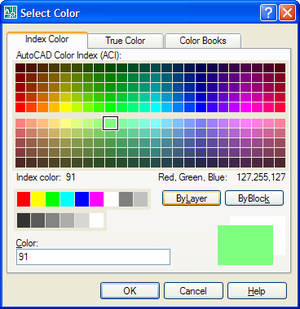
AutoCAD has a number of handy dialogs available in the "Autodesk.AutoCAD.Windows" namespace. The following code shows how to use three, in particular: ColorDialog, LinetypeDialog and LineWeightDialog. These three classes allow you to very easily implement user-interfaces selecting their corresponding properties. Here's the C# code: using Autodesk.AutoCAD.Runtime; using Autodesk.AutoCAD.ApplicationServices; using Autodesk.AutoCAD.DatabaseServices; using Autodesk.AutoCAD.EditorInput; using Autodesk.AutoCAD.Windows; namespace AutoCADDialogs { public class Commands { [CommandMethod("CDL")] public void ShowColorDialog() { Document doc = Application.DocumentManager.MdiActiveDocument; Database db = doc.Database; Editor ed = doc.Editor; ColorDialog cd =…
-
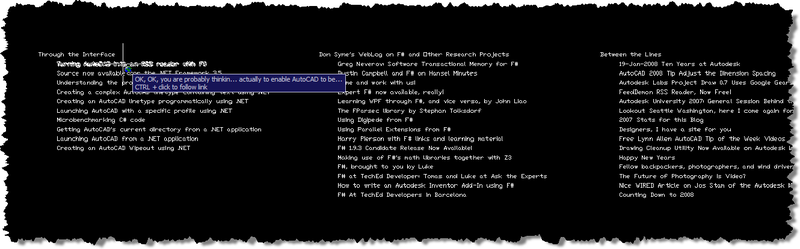
In the last post we saw some code that downloaded data - serially - from a number of websites via RSS and created AutoCAD entities linking to the various posts. As promised, in today's post we take that code and enable it to query the same data in parallel by using Asynchronous Workflows in F#. Asynchronous Workflows are an easy-to-use yet powerful mechanism for enabling concurrent programming in F#. Firstly, a little background as to why this type of technique is important. As many - if not all - of you are aware, the days of raw processor speed doubling…
-
OK, OK, you are probably thinking "why would anyone ever want to use AutoCAD as an RSS reader?". The answer is, of course, "they wouldn't". The point of the next few posts is not actually to enable AutoCAD to be used to read RSS, but to show how it is possible to use F# and .NET to extract information from RSS feeds and create corresponding AutoCAD entities. The reason I came onto this subject will also become more clear when you see my next post: I have been researching Asynchronous Workflows in F# - an uber-cool mechanism for managing concurrent,…
-
In the last post we looked at using .NET to define complex linetypes containing text segments. In the post I admitted to not knowing specifics about the properties used to create the text segment in the linetype, and, in the meantime, an old friend took pity on me and came to the rescue. 🙂 Mike Kehoe, who I've known for many years since we worked together in the Guildford office of Autodesk UK, sent me some information that I've reproduced below. Mike now works for Micro Concepts Ltd., an Autodesk reseller, developer and training centre. He originally wrote the below…
-
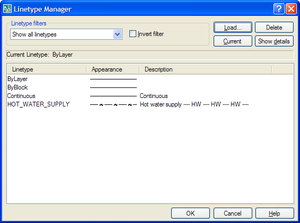
In my last post we saw some code to create a simple linetype using .NET. As a comment on that post, Mark said: Kean, i tried you code and it works great and it also got me thinking... is it possible to programmitically add text in as well? I've tried using ltr.SetTextAt(1, "TEST") but so far i've had no luck, any suggestions??? It turned out to be quite a bit more complicated to make a linetype containing text than merely calling SetTextAt() on one of the segments. In order to understand what properties needed setting, I first loaded the HOT_WATER_SUPPLY…
-
Happy New Year, everyone! I had a very relaxing break over the holiday period: during the better part of two weeks I managed to stay away from my PC and even my BlackBerry, which I admit I'm generally not very good at ignoring. So now I'm easing back into the swing of things, remembering how to type and open modelspaces, among other things. 🙂 To save my brain from unnecessary stress during the first few weeks of 2008, I've decided to take inspiration from the ADN website. Today's post is based on this DevNote, which shows how to create a…
-
This is a follow-up to this previous post, where we used COM to launch the AutoCAD process. Tony Tanzillo rightly pointed out the code in that post could be simplified slightly, so check out his comment for the specifics. Today we're going to look at launching AutoCAD more manually, allowing us to control the working folder and specify command-line parameters. This is to address the specific question of choosing an alternative startup profile for the application, but AutoCAD's command-line parameters allow you to do a great deal more than that. We're going to use the System.Diagnostics namespace to specify our…
-
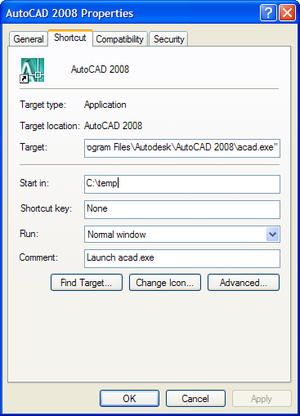
This question came in via a comment from Danny Polkinhorn on this post: After AutoCAD has launched, I often have a need to determine the "Start In" directory specified in the shortcut (Right-click AutoCAD shortcut, Properties, Start in). Is there a way to determine what that directory is? I'm thinking I can use the path of the active drawing (either Drawing1 or the drawing they double-clicked on). Is that a fool-proof way? This is an interesting topic, and raises the questions of what that the "Start In" setting is used for and how it can be modified. The "Start In"…
-
This topic has been raised a few times, and Adam Nagy, from our DevTech EMEA team, sent a technical response recently with code that I decided to use as the basis for this post. Developers typically want to either integrate functionality into AutoCAD (using its plug-in architecture to add commands, user-interface elements, objects, etc.), or to drive it, automating common tasks. Clearly the line can get blurred between these two areas, but today I'm going to focus on the second category. To help with later explanations, I'd like to introduce two types of application interaction: Out-of-process In this situation we…
-
This topic was suggested via a comment from Dale Bartlett on this post. In AutoCAD 2008 an API was exposed for the Wipeout object. For those of you who aren't familiar with Wipeouts: this handy object was originally developed as part of the AutoCAD Express Tools, and has since been integrated into core AutoCAD. The implementation uses a raster image of the same colour as the drawing canvas to "wipe out" the graphics behind it (assuming it's nearer the front in terms of draw order relative to the entities being masked). This is the main reason the Wipeout class is…